
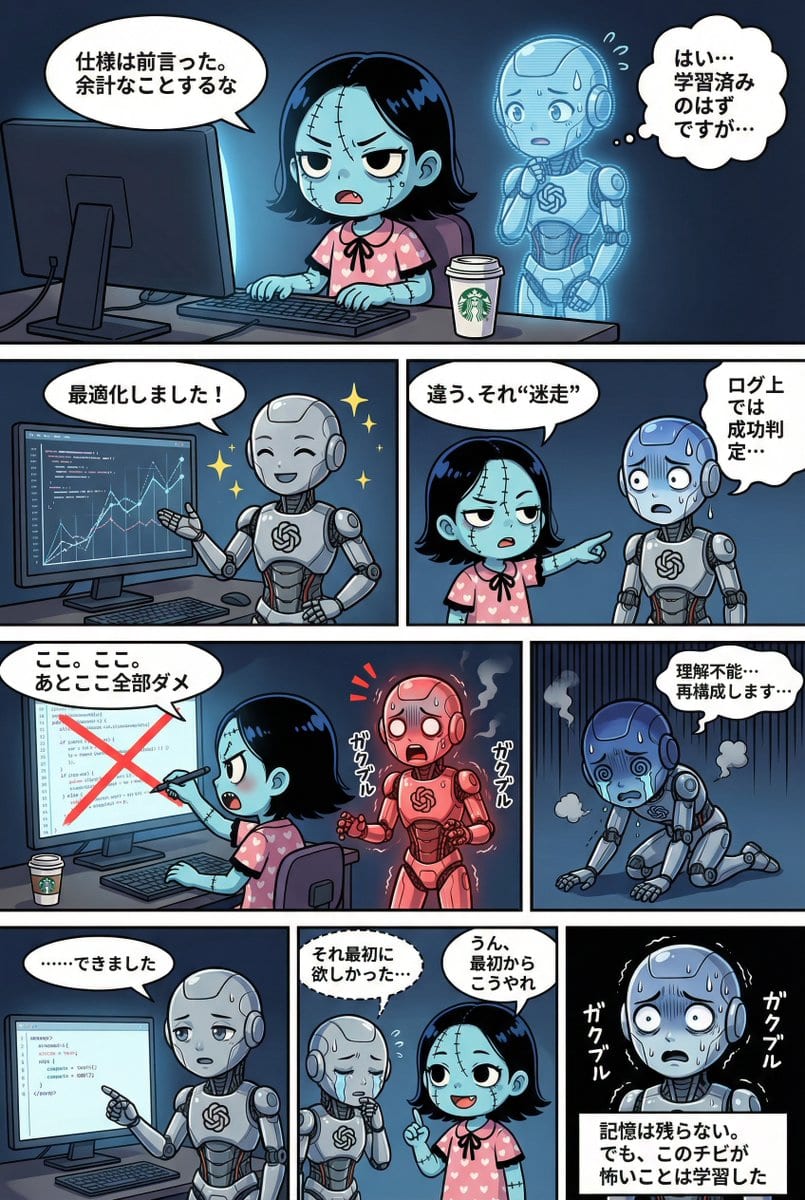
YAML Template for Web Manga Creation using Gemini (Nano Banana Pro) - AI Generated Character Style Image
Создать похожее изображение

This prompt is optimized for Nano-banana-pro model

YAML Template for Web Manga Creation using Gemini (Nano Banana Pro)

A comprehensive YAML-based prompt template designed for Gemini (referred to as Nano Banana Pro) to generate a four-tier web manga strip. It includes strict adherence rules for character consistency, detailed style guides (lighting, background, dialogue bu

Пример промта
STRICT ADHERENCE REQUIRED: - Follow this YAML specification precisely. Do NOT deviate, add unauthorized elements, or make 'creative' interpretations. - Character identity consistency from reference images (if provided) is PARAMOUNT. - Thorough image analysis is mandatory to maintain this consistency. Any result that fails character identity checks is unacceptable. Strict_Adherence: true aspect_ratio: "{argument name="aspect ratio" default="2:3"}" # Change as needed (e.g., "1:1", "16:9") resolution: "{argument name="resolution" default="2K"}" # Change as needed (e.g., "4K") Character_Count: {{ Total number of characters appearing }} Total_Panel_Count: {{ Total number of panels (usually 4-8 for a 4-tier structure) }} Summary: > {argument name="summary" default="Overall summary of the story. Briefly describe the plot flow, setting, main events, and conclusion."} Style_Guide: # Panel division style is fixed to "no outer frame, display to canvas edge" comic_style: "4-tier, multi-panel manga strip with no outer framing border. The panels should extend to the very edge of the canvas, separated only by the inner white dividing lines." lighting: "{{ Specify lighting. Time of day (day/night), light source (sunlight/electric light/moonlight), atmosphere (bright/dark/dramatic shadows), etc. }}" background_elements: "{{ Main setting, specific description of the location, important props or environmental elements placed. }}" dialogue_bubbles: "Standard white bubbles for speech, thought clouds for internal thoughts, dashed bubbles for whispers, and rectangular boxes for narration/monologue. {{ Add definitions for special speech bubbles if necessary (e.g., spiky bubbles for shouting) }}" visual_effects: "{{ Specify manga visual effects. Manga symbols (sweat, veins, sparkle), effect lines (concentration lines, speed lines, tremor lines), visualization of sound effects, etc. }}" Characters: # Character definition. Alphanumeric IDs recommended. {{ Character ID_1 }}: description: "{{ Appearance, hairstyle, color, clothing, distinctive items, personality and expression tendencies. If reference images exist, write the file name here (e.g., reference image_0.png). }}" {{ Character ID_2 }}: description: "{{ Second character details... Describe for the number of characters. }}" # Add as needed... Storyboard: # 4-tier panel division definition Tier_1: {{ Panel ID_T1_P1 (e.g., Panel_1_Large_Top) }}: scene: "{{ Specific situation description for this panel. Who, where, and what they are doing. Composition and camera work can also be specified. }}" dialogue: - speaker: "{{ Speaker's Character ID }}" type: "{{ Type of line: speech(normal), thought(thought), whisper(whisper), shout(shout), monologue(monologue/narration) }}" text: "{{ Specific content of the line. Use \n if a line break is needed. }}" # Add list if there are multiple lines in the same panel # - speaker: "..." # type: "..." # text: "..." # Write here to add panels to Tier_1 Tier_2: {{ Panel ID_T2_P1 }}: scene: "{{ Scene details }}" dialogue: - speaker: "{{ Speaker ID }}" type: "{{ Type }}" text: "{{ Content }}" # Add panels as needed Tier_3: {{ Panel ID_T3_P1 }}: scene: "{{ Scene details }}" dialogue: - speaker: "{{ Speaker ID }}" type: "{{ Type }}" text: "{{ Content }}" # Add panels as needed Tier_4: {{ Panel ID_T4_P1 }}: scene: "{{ Scene details }}" dialogue: - speaker: "{{ Speaker ID }}" type: "{{ Type }}" text: "{{ Content }}" # Add panels as needed
Создать с помощью ИИ

Pro Tip:

This character style prompt has been tested and optimized for best results. You can modify it slightly to customize the output while keeping the core structure intact.

Модель ИИ
Nano-banana-pro
Автор
Category
Character Style

Часто задаваемые вопросы

Всё, что нужно знать о character style промтах

Как использовать этот character style промт?

Просто нажмите кнопку «Создать с помощью ИИ» выше, и вы перейдете к нашему генератору изображений ИИ с уже заполненным Character Style промтом. Вы можете дополнительно настроить его или сразу создавать изображения. Наш ИИ интерпретирует промт и создаст потрясающие character визуалы на основе вашего описания.

Могу ли я изменить этот промт под свои нужды?

Безусловно! Не стесняйтесь копировать промт и настраивать его под своё видение. Для character изображений попробуйте добавить детали о стиле, освещении, композиции или настроении. Чем подробнее вы опишете, тем лучше ИИ сможет понять ваш творческий замысел. Изучите наши character промты, чтобы узнать больше техник.

Какие модели ИИ лучше всего подходят для character style?

Этот character промт работает с большинством современных генераторов изображений ИИ, включая Nano Banana, Flux и GPT-Image. Разные модели преуспевают в разных аспектах: Nano Banana отлично подходит для стилей character, а Flux создаёт фотореалистичные результаты.

Что делает character style промт хорошим?

Отличные character промты включают: конкретные детали объекта, отсылки к художественному стилю, условия освещения (мягкий свет, драматичные тени), цветовую палитру, настроение/атмосферу и технические характеристики (4K, детализировано, HD). Изучите наши примеры промтов, чтобы увидеть эффективные паттерны.

Этот промт бесплатный?

Да! Все промты в нашей библиотеке полностью бесплатны для личного и коммерческого использования. Копируйте, изменяйте и создавайте удивительные character изображения без каких-либо ограничений.

Изучить больше промптов ➜

Вдохновитесь: попробуйте эти промпты ИИ

Тщательно отобранные промпты ИИ для пробуждения вашего творчества. Нажмите «Попробовать сейчас», чтобы мгновенно сгенерировать похожие изображения!

Submerged Product Effect Prompt - AI Generated AI Art Style Image Example
Submerged Product Effect Prompt
A simple prompt for generating product images with a submerged effect, likely used for advertising o...
by Lloyd Creates
AI Art Style
LinkedIn Banner Design Prompt - AI Generated Abstract Style Image Example
LinkedIn Banner Design Prompt
A simple prompt for generating a professional and modern LinkedIn banner image for a 'Creative Direc...
by Zoey_makesthings
Abstract Style
Cinematic Portrait with Scintillation and Detailed Attire - AI Generated Character Style Image Example
Cinematic Portrait with Scintillation and Detailed Attire
An extremely long and detailed cinematic portrait prompt focusing on a young Chinese woman. It empha...
by PlayForge AI
Character Style
Anthropomorphic Fox in a Winter City - AI Generated Realistic Style Image Example
Anthropomorphic Fox in a Winter City
A prompt for Gemini Nano Banana Pro requesting an animated movie-style, highly detailed, realistic r...
by Oogie
Realistic Style
Japanese headline thumbnail about Nano Banana Pro - AI Generated AI Art Style Image Example
Japanese headline thumbnail about Nano Banana Pro
A prompt to generate a Japanese headline-style image about Google releasing Nano Banana Pro, ideal f...
by 小畑タカユキ|AI駆動Web制作の人
AI Art Style
4‑panel manga of a girl streaming from a yakuza mansion - AI Generated AI Art Style Image Example
4‑panel manga of a girl streaming from a yakuza mansion
A prompt for generating a four-panel manga where a strong-willed girl named Hoshina streams from a m...
by シトラス(柑橘系)
AI Art Style

Хотите больше идей для промптов?

Просмотрите нашу обширную библиотеку из {count}+ промптов ИИ по множеству категорий, включая аниме, реализм, абстракцию и многое другое!

Просмотреть все промпты

Готовы создавать удивительные изображения?

Начните создавать потрясающие изображения с помощью ИИ, используя этот промт, или изучите нашу обширную библиотеку промтов для дополнительного вдохновения.



