
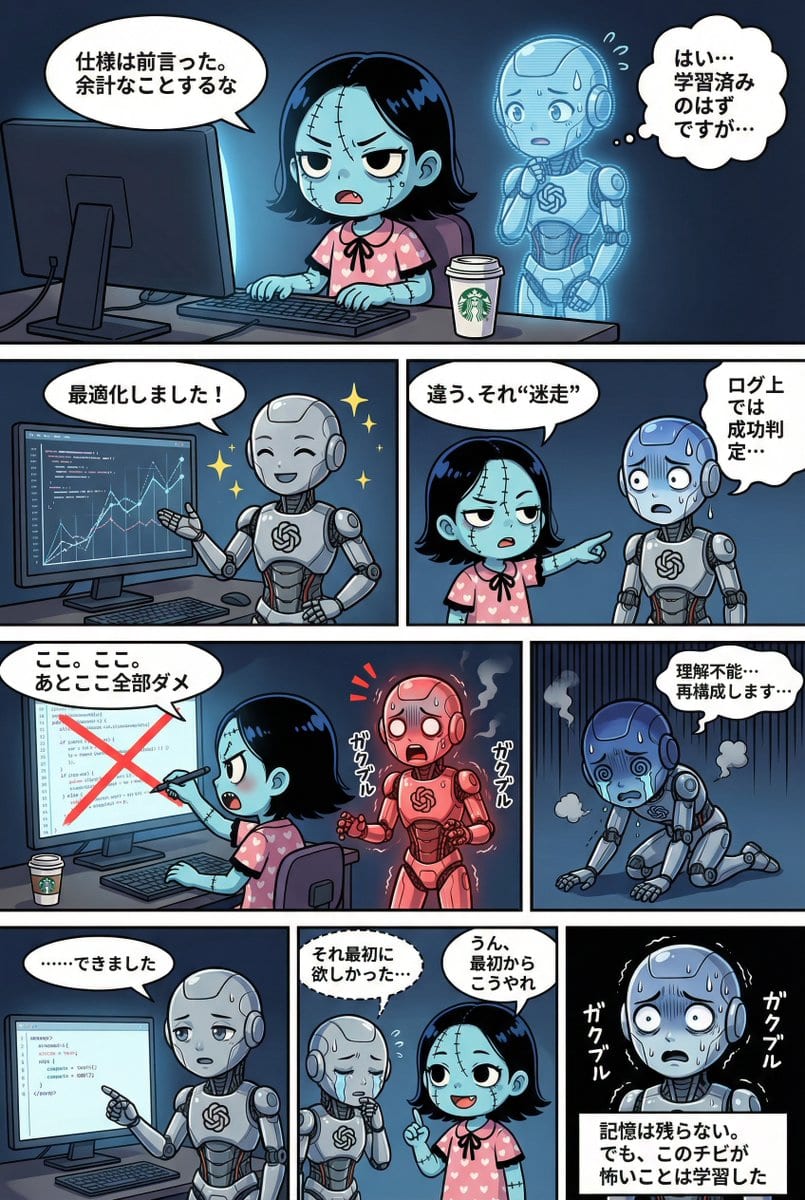
YAML Template for Web Manga Creation using Gemini (Nano Banana Pro)

A comprehensive YAML-based prompt template designed for Gemini (referred to as Nano Banana Pro) to generate a four-tier web manga strip. It includes strict adherence rules for character consistency, detailed style guides (lighting, background, dialogue bu

Indicación de ejemplo
STRICT ADHERENCE REQUIRED: - Follow this YAML specification precisely. Do NOT deviate, add unauthorized elements, or make 'creative' interpretations. - Character identity consistency from reference images (if provided) is PARAMOUNT. - Thorough image analysis is mandatory to maintain this consistency. Any result that fails character identity checks is unacceptable. Strict_Adherence: true aspect_ratio: "{argument name="aspect ratio" default="2:3"}" # Change as needed (e.g., "1:1", "16:9") resolution: "{argument name="resolution" default="2K"}" # Change as needed (e.g., "4K") Character_Count: {{ Total number of characters appearing }} Total_Panel_Count: {{ Total number of panels (usually 4-8 for a 4-tier structure) }} Summary: > {argument name="summary" default="Overall summary of the story. Briefly describe the plot flow, setting, main events, and conclusion."} Style_Guide: # Panel division style is fixed to "no outer frame, display to canvas edge" comic_style: "4-tier, multi-panel manga strip with no outer framing border. The panels should extend to the very edge of the canvas, separated only by the inner white dividing lines." lighting: "{{ Specify lighting. Time of day (day/night), light source (sunlight/electric light/moonlight), atmosphere (bright/dark/dramatic shadows), etc. }}" background_elements: "{{ Main setting, specific description of the location, important props or environmental elements placed. }}" dialogue_bubbles: "Standard white bubbles for speech, thought clouds for internal thoughts, dashed bubbles for whispers, and rectangular boxes for narration/monologue. {{ Add definitions for special speech bubbles if necessary (e.g., spiky bubbles for shouting) }}" visual_effects: "{{ Specify manga visual effects. Manga symbols (sweat, veins, sparkle), effect lines (concentration lines, speed lines, tremor lines), visualization of sound effects, etc. }}" Characters: # Character definition. Alphanumeric IDs recommended. {{ Character ID_1 }}: description: "{{ Appearance, hairstyle, color, clothing, distinctive items, personality and expression tendencies. If reference images exist, write the file name here (e.g., reference image_0.png). }}" {{ Character ID_2 }}: description: "{{ Second character details... Describe for the number of characters. }}" # Add as needed... Storyboard: # 4-tier panel division definition Tier_1: {{ Panel ID_T1_P1 (e.g., Panel_1_Large_Top) }}: scene: "{{ Specific situation description for this panel. Who, where, and what they are doing. Composition and camera work can also be specified. }}" dialogue: - speaker: "{{ Speaker's Character ID }}" type: "{{ Type of line: speech(normal), thought(thought), whisper(whisper), shout(shout), monologue(monologue/narration) }}" text: "{{ Specific content of the line. Use \n if a line break is needed. }}" # Add list if there are multiple lines in the same panel # - speaker: "..." # type: "..." # text: "..." # Write here to add panels to Tier_1 Tier_2: {{ Panel ID_T2_P1 }}: scene: "{{ Scene details }}" dialogue: - speaker: "{{ Speaker ID }}" type: "{{ Type }}" text: "{{ Content }}" # Add panels as needed Tier_3: {{ Panel ID_T3_P1 }}: scene: "{{ Scene details }}" dialogue: - speaker: "{{ Speaker ID }}" type: "{{ Type }}" text: "{{ Content }}" # Add panels as needed Tier_4: {{ Panel ID_T4_P1 }}: scene: "{{ Scene details }}" dialogue: - speaker: "{{ Speaker ID }}" type: "{{ Type }}" text: "{{ Content }}" # Add panels as needed
Generar con IA
Modelo de IA
Nano-banana-pro
Autor

Preguntas frecuentes

Todo lo que necesitas saber sobre indicaciones de character style

¿Cómo uso esta indicación de character style?

Simplemente haz clic en el botón "Generar con IA" arriba, y serás llevado a nuestro generador de imágenes con IA con esta indicación de Character Style pre-llenada. Puedes personalizarla más o generar imágenes directamente. Nuestra IA interpretará la indicación y creará impresionantes visuales de character basados en tu descripción.

¿Puedo modificar esta indicación para mis necesidades específicas?

¡Por supuesto! Siéntete libre de copiar la indicación y personalizarla para que coincida con tu visión. Para obras de arte de character, intenta añadir detalles sobre estilo, iluminación, composición o ambiente. Cuanto más descriptivo seas, mejor podrá la IA entender tu visión creativa. Explora nuestras indicaciones de character para aprender más técnicas.

¿Qué modelos de IA funcionan mejor para character style?

Esta indicación de character funciona con la mayoría de los generadores de imágenes de IA modernos, incluyendo Nano Banana, Flux y GPT-Image. Diferentes modelos sobresalen en diferentes aspectos - Nano Banana es excelente para estilos character, mientras que Flux ofrece resultados fotorrealistas.

¿Qué hace una buena indicación de character style?

Las grandes indicaciones de character incluyen: detalles específicos del sujeto, referencias de estilo artístico, condiciones de iluminación (luz suave, sombras dramáticas), paleta de colores, ambiente/atmósfera y especificaciones técnicas (4K, detallado, HD). Estudia nuestras indicaciones de ejemplo para ver patrones efectivos.

¿Esta indicación es gratuita?

¡Sí! Todas las indicaciones en nuestra biblioteca son completamente gratuitas para uso personal y comercial. Copia, modifica y crea increíbles obras de arte de character sin restricciones.

More Prompts ➜
Recursive artist painting a photo of himself painting - AI Image Prompt
Recursive artist painting a photo of himself painting
Creates an amateur 1998-style photograph of a middle-aged artist copying an image from a computer screen to canvas, where the image itself is a photo of the artist painting the recursive image, ideal for mind-bending meta scenes.
by ρŁ??Mʘ
Infographic from pasted text - AI Image Prompt
Infographic from pasted text
This prompt turns a block of text, such as a summary, into a clean infographic layout.
by Mentis ??
Boudoir portrait in charcoal sketch 4K - AI Image Prompt
Boudoir portrait in charcoal sketch 4K
A concise prompt to create a high-resolution boudoir portrait rendered in a charcoal sketch style.
by Hagbard Celine
Ugly slide introducing Einstein - AI Image Prompt
Ugly slide introducing Einstein
A short Japanese prompt asking Nano Banana Pro to create a cheesy, tacky slide introducing Einstein.
by 研究者レン / 科学系ポッドキャスト
80s Miami diner bikini selfie with panther - AI Image Prompt
80s Miami diner bikini selfie with panther
A cinematic 1980s Miami-style scene of a blonde woman in a bikini with a black panther in a retro diner, with pastel neon colors and film still vibes.
by Javi Lopez ⛩️
Hand drip coffee flowchart in Japanese magazine style - AI Image Prompt
Hand drip coffee flowchart in Japanese magazine style
A Traditional Chinese prompt to draw a hand-drip coffee process flowchart with simple explanations in Taiwan Traditional Chinese, styled like a Japanese fashion or lifestyle magazine, perfect for café visuals.
by fox hsiao

¿Listo para crear imágenes increíbles?

Empieza a generar impresionantes imágenes con IA usando esta indicación o explora nuestra extensa biblioteca de indicaciones para más inspiración.

Generar ahora Explorar todas las indicaciones



