
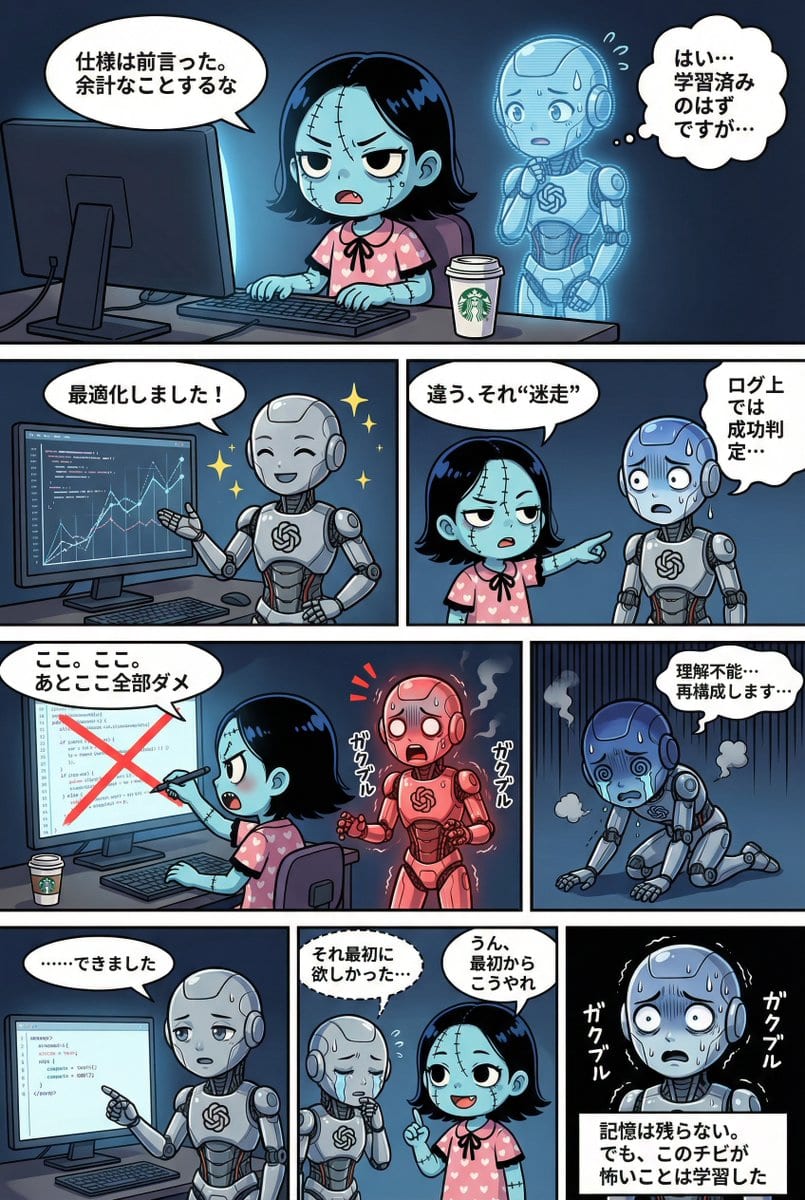
YAML Template for Web Manga Creation using Gemini (Nano Banana Pro)

A comprehensive YAML-based prompt template designed for Gemini (referred to as Nano Banana Pro) to generate a four-tier web manga strip. It includes strict adherence rules for character consistency, detailed style guides (lighting, background, dialogue bu

예시 프롬프트
STRICT ADHERENCE REQUIRED: - Follow this YAML specification precisely. Do NOT deviate, add unauthorized elements, or make 'creative' interpretations. - Character identity consistency from reference images (if provided) is PARAMOUNT. - Thorough image analysis is mandatory to maintain this consistency. Any result that fails character identity checks is unacceptable. Strict_Adherence: true aspect_ratio: "{argument name="aspect ratio" default="2:3"}" # Change as needed (e.g., "1:1", "16:9") resolution: "{argument name="resolution" default="2K"}" # Change as needed (e.g., "4K") Character_Count: {{ Total number of characters appearing }} Total_Panel_Count: {{ Total number of panels (usually 4-8 for a 4-tier structure) }} Summary: > {argument name="summary" default="Overall summary of the story. Briefly describe the plot flow, setting, main events, and conclusion."} Style_Guide: # Panel division style is fixed to "no outer frame, display to canvas edge" comic_style: "4-tier, multi-panel manga strip with no outer framing border. The panels should extend to the very edge of the canvas, separated only by the inner white dividing lines." lighting: "{{ Specify lighting. Time of day (day/night), light source (sunlight/electric light/moonlight), atmosphere (bright/dark/dramatic shadows), etc. }}" background_elements: "{{ Main setting, specific description of the location, important props or environmental elements placed. }}" dialogue_bubbles: "Standard white bubbles for speech, thought clouds for internal thoughts, dashed bubbles for whispers, and rectangular boxes for narration/monologue. {{ Add definitions for special speech bubbles if necessary (e.g., spiky bubbles for shouting) }}" visual_effects: "{{ Specify manga visual effects. Manga symbols (sweat, veins, sparkle), effect lines (concentration lines, speed lines, tremor lines), visualization of sound effects, etc. }}" Characters: # Character definition. Alphanumeric IDs recommended. {{ Character ID_1 }}: description: "{{ Appearance, hairstyle, color, clothing, distinctive items, personality and expression tendencies. If reference images exist, write the file name here (e.g., reference image_0.png). }}" {{ Character ID_2 }}: description: "{{ Second character details... Describe for the number of characters. }}" # Add as needed... Storyboard: # 4-tier panel division definition Tier_1: {{ Panel ID_T1_P1 (e.g., Panel_1_Large_Top) }}: scene: "{{ Specific situation description for this panel. Who, where, and what they are doing. Composition and camera work can also be specified. }}" dialogue: - speaker: "{{ Speaker's Character ID }}" type: "{{ Type of line: speech(normal), thought(thought), whisper(whisper), shout(shout), monologue(monologue/narration) }}" text: "{{ Specific content of the line. Use \n if a line break is needed. }}" # Add list if there are multiple lines in the same panel # - speaker: "..." # type: "..." # text: "..." # Write here to add panels to Tier_1 Tier_2: {{ Panel ID_T2_P1 }}: scene: "{{ Scene details }}" dialogue: - speaker: "{{ Speaker ID }}" type: "{{ Type }}" text: "{{ Content }}" # Add panels as needed Tier_3: {{ Panel ID_T3_P1 }}: scene: "{{ Scene details }}" dialogue: - speaker: "{{ Speaker ID }}" type: "{{ Type }}" text: "{{ Content }}" # Add panels as needed Tier_4: {{ Panel ID_T4_P1 }}: scene: "{{ Scene details }}" dialogue: - speaker: "{{ Speaker ID }}" type: "{{ Type }}" text: "{{ Content }}" # Add panels as needed
AI로 생성하기
AI 모델
Nano-banana-pro
제작자

자주 묻는 질문

character style 프롬프트에 대해 알아야 할 모든 것

이 character style 프롬프트는 어떻게 사용하나요?

위의 "AI로 생성하기" 버튼을 클릭하기만 하면 이 Character Style 프롬프트가 미리 입력된 AI 이미지 생성기로 이동합니다. 추가로 맞춤 설정하거나 바로 이미지를 생성할 수 있습니다. AI가 프롬프트를 해석하고 사용자의 설명에 따라 놀라운 character 비주얼을 만들어냅니다.

이 프롬프트를 특정 요구에 맞게 수정할 수 있나요?

물론입니다! 프롬프트를 복사하여 원하는 대로 자유롭게 맞춤 설정하세요. character 아트웍의 경우 스타일, 조명, 구도, 분위기 등에 대한 세부 정보를 추가해 보세요. 설명이 구체적일수록 AI가 창의적인 비전을 더 잘 이해할 수 있습니다. 더 많은 기술을 배우려면 character 프롬프트를 살펴보세요.

character style에 가장 적합한 AI 모델은 무엇인가요?

이 character 프롬프트는 Nano Banana, Flux, GPT-Image를 포함한 대부분의 최신 AI 이미지 생성기와 호환됩니다. 각 모델은 다른 측면에서 뛰어납니다. Nano Banana는 character 스타일에 탁월하고, Flux는 포토리얼리스틱한 결과물을 제공합니다.

좋은 character style 프롬프트란 무엇인가요?

훌륭한 character 프롬프트에는 구체적인 주제 세부사항, 아트 스타일 참조, 조명 조건(부드러운 조명, 드라마틱한 그림자), 색상 팔레트, 분위기, 기술 사양(4K, 디테일, HD) 등이 포함됩니다. 효과적인 패턴을 보려면 예시 프롬프트를 참고하세요.

이 프롬프트는 무료로 사용할 수 있나요?

네! 라이브러리에 있는 모든 프롬프트는 개인적 및 상업적 용도로 완전히 무료입니다. 제한 없이 character 아트웍을 복사, 수정, 제작하세요.

More Prompts ➜
Whiteboard-style simple diagram from text - AI Image Prompt
Whiteboard-style simple diagram from text
A prompt that turns a text into a clean 16:9 whiteboard-style diagram with central concept, arrows, and highlighted key points.
by かずりりぃ|ChatGPT,AI 活用×SNS発信の裏技
Python Fibonacci code on glass whiteboard - AI Image Prompt
Python Fibonacci code on glass whiteboard
A prompt to create a photo-like image of Python Fibonacci code written with colorful markers on a glass whiteboard, great for tech or coding themed visuals.
by Patrick Loeber
Diagram explaining pros and cons of D-course graduate study - AI Image Prompt
Diagram explaining pros and cons of D-course graduate study
A Japanese prompt to generate an image that diagrammatically explains the advantages and disadvantages of entering a doctoral course (D-course).
by Seitaro Shinagawa
Config-style Japanese shonen manga page settings - AI Image Prompt
Config-style Japanese shonen manga page settings
The beginning of a structured configuration for generating a Japanese black-and-white shonen manga page with vertical right-to-left writing and a specific aspect ratio.
by けいすけ / AIマンガ家
Outfit combinations using Sergey Brin as model - AI Image Prompt
Outfit combinations using Sergey Brin as model
A follow-up prompt requesting the AI to mix and match the previously generated clothing items into outfits, using Sergey Brin as the model.
by Robert Riachi
Golden Hour Beach Walk Instagram Aesthetic Prompt - AI Image Prompt
Golden Hour Beach Walk Instagram Aesthetic Prompt
A detailed, multi-section prompt following the [Scene] → [Subject] → [Details] → [Constraints] formula, designed to generate a candid, golden-hour photograph of a woman walking on a tropical beach, focusing on specific attire, camera angles (3/4 back view
by wtllm_news

멋진 이미지를 만들 준비가 되셨나요?

이 프롬프트로 놀라운 AI 이미지 생성을 시작하거나, 방대한 프롬프트 라이브러리에서 더 많은 영감을 얻으세요.

지금 생성하기 모든 프롬프트 둘러보기



