
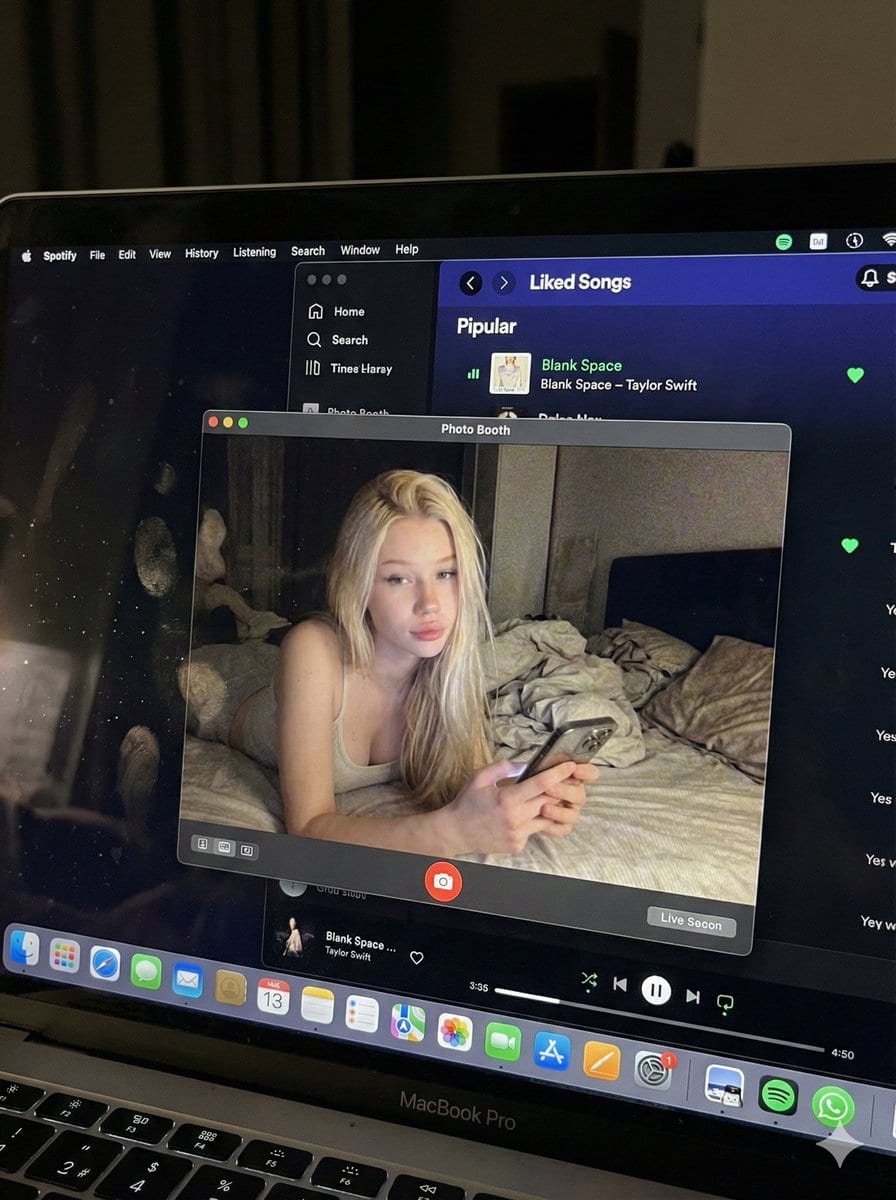
Photorealistic MacBook Screen POV Selfie Prompt

A complex JSON prompt for Gemini Nano Banana Pro designed for image-to-image generation, focusing on creating an ultra-realistic POV shot looking down at a MacBook screen. The screen displays a Photo Booth live preview of the subject (whose identity is st

Пример промта
{ "image_settings": { "aspect_ratio": "3:4", "resolution": { "width": 1152, "height": 1536 } }, "prompt": { "identity_lock": { "reference": "{argument name="reference" default="input_photo"}", "preserve": [ "{argument name="preserve 1" default="face"}", "{argument name="preserve 2" default="facial proportions"}", "{argument name="preserve 3" default="eye shape"}", "{argument name="preserve 4" default="nose"}", "{argument name="preserve 5" default="lips"}", "{argument name="preserve 6" default="skin tone"}", "{argument name="preserve 7" default="skin texture"}", "{argument name="preserve 8" default="hairline"}", "{argument name="preserve 9" default="overall identity"}" ], "rules": [ "{argument name="rule 1" default="no face swap"}", "{argument name="rule 2" default="no beautify"}", "{argument name="rule 3" default="no smoothing"}", "{argument name="rule 4" default="no reshaping"}", "{argument name="rule 5" default="no AI look"}" ] }, "scene": { "camera_angle": "{argument name="camera angle" default="high-angle downward shot, POV"}", "composition": "{argument name="composition" default="MacBook screen fills most of the frame, thin strip of physical keyboard visible at the bottom"}", "screen_surface": [ "{argument name="screen surface 1" default="visible RGB pixel grid"}", "{argument name="screen surface 2" default="subtle moire effect"}", "{argument name="screen surface 3" default="micro dust on glass"}", "{argument name="screen surface 4" default="faint fingerprints"}", "{argument name="screen surface 5" default="soft ambient reflections"}" ] }, "digital_interface": { "os": "{argument name="os" default="macOS dark mode"}", "background_app": { "name": "{argument name="background app name" default="Spotify"}", "view": "{argument name="background app view" default="Liked Songs"}", "visible_tracks": [ "{argument name="track 1" default="Blank Space – Taylor Swift"}", "{argument name="track 2" default="Shake It Off – Taylor Swift"}", "{argument name="track 3" default="Cruel Summer – Taylor Swift"}", "{argument name="track 4" default="Love Story – Taylor Swift"}" ] }, "foreground_app": { "name": "{argument name="foreground app name" default="Photo Booth"}", "state": "{argument name="foreground app state" default="live preview window"}", "position": "{argument name="foreground app position" default="floating, center-right"}" } }, "photo_booth_content": { "environment": { "room": "{argument name="room" default="dim bedroom"}", "background": "{argument name="background" default="off-white wall, rumpled bedding"}", "lighting": "{argument name="lighting" default="low-light, nocturnal, cool screen glow mixed with warm skin tones"}" }, "subject": { "pose": "{argument name="subject pose" default="lying down, relaxed, candid"}", "expression": "{argument name="subject expression" default="natural, slightly relaxed"}", "outfit": "{argument name="subject outfit" default="light-colored tank top"}", "prop": { "item": "{argument name="prop item" default="iPhone 15 Pro"}", "hand": "{argument name="prop hand" default="right hand"}" } } }, "realism_rules": [ "{argument name="realism rule 1" default="this is a photo of a screen, not a screenshot"}", "{argument name="realism rule 2" default="raw smartphone photo look"}", "{argument name="realism rule 3" default="natural noise"}", "{argument name="realism rule 4" default="imperfect glass"}", "{argument name="realism rule 5" default="no studio lighting"}", "{argument name="realism rule 6" default="no HD polish"}" ] }, "negative_prompt": [ "{argument name="negative 1" default="screenshot"}", "{argument name="negative 2" default="flat UI"}", "{argument name="negative 3" default="perfect screen"}", "{argument name="negative 4" default="clean glass"}", "{argument name="negative 5" default="studio lighting"}", "{argument name="negative 6" default="beauty filter"}", "{argument name="negative 7" default="cartoon"}", "{argument name="negative 8" default="3d render"}", "{argument name="negative 9" default="painting"}", "{argument name="negative 10" default="watermark"}", "{argument name="negative 11" default="blurred face"}" ] }
Создать с помощью ИИ
Модель ИИ
Nano-banana-pro
Автор

Часто задаваемые вопросы

Всё, что нужно знать о realistic style промтах

Как использовать этот realistic style промт?

Просто нажмите кнопку «Создать с помощью ИИ» выше, и вы перейдете к нашему генератору изображений ИИ с уже заполненным Realistic Style промтом. Вы можете дополнительно настроить его или сразу создавать изображения. Наш ИИ интерпретирует промт и создаст потрясающие realistic визуалы на основе вашего описания.

Могу ли я изменить этот промт под свои нужды?

Безусловно! Не стесняйтесь копировать промт и настраивать его под своё видение. Для realistic изображений попробуйте добавить детали о стиле, освещении, композиции или настроении. Чем подробнее вы опишете, тем лучше ИИ сможет понять ваш творческий замысел. Изучите наши realistic промты, чтобы узнать больше техник.

Какие модели ИИ лучше всего подходят для realistic style?

Этот realistic промт работает с большинством современных генераторов изображений ИИ, включая Nano Banana, Flux и GPT-Image. Разные модели преуспевают в разных аспектах: Nano Banana отлично подходит для стилей realistic, а Flux создаёт фотореалистичные результаты.

Что делает realistic style промт хорошим?

Отличные realistic промты включают: конкретные детали объекта, отсылки к художественному стилю, условия освещения (мягкий свет, драматичные тени), цветовую палитру, настроение/атмосферу и технические характеристики (4K, детализировано, HD). Изучите наши примеры промтов, чтобы увидеть эффективные паттерны.

Этот промт бесплатный?

Да! Все промты в нашей библиотеке полностью бесплатны для личного и коммерческого использования. Копируйте, изменяйте и создавайте удивительные realistic изображения без каких-либо ограничений.

More Prompts ➜
Outfit transfer between two photos - AI Image Prompt
Outfit transfer between two photos
Moves clothing from one reference image onto a person in another image, making the clothing intentionally oversized.
by zhenya
Boudoir portrait in charcoal sketch 4K - AI Image Prompt
Boudoir portrait in charcoal sketch 4K
A concise prompt to create a high-resolution boudoir portrait rendered in a charcoal sketch style.
by Hagbard Celine
Add baseball hat with embroidered text - AI Image Prompt
Add baseball hat with embroidered text
A follow-up editing prompt to add a baseball cap with specific lettering to an existing generated image.
by Rufus Deuchler
Five-panel manga of a YouTube thumbnail creator workflow - AI Image Prompt
Five-panel manga of a YouTube thumbnail creator workflow
A prompt that makes a five-panel comic showing a YouTube thumbnail creator designing in Photoshop, delivering to a client, then celebrating improved views and analyzing analytics.
by タツキ|サムネ×マーケ戦略
Visually Stunning Slide Generation from Content - AI Image Prompt
Visually Stunning Slide Generation from Content
A meta-prompt designed to instruct an AI model to take existing content and transform it into a highly dynamic, visually exciting, and landscape-oriented presentation slide, giving the model complete design freedom beyond the original constraints.
by Simon Smith
Multi-Person Feature Retention Test (Failure) - AI Image Prompt
Multi-Person Feature Retention Test (Failure)
A prompt designed to test GPT Image 1.5's ability to maintain distinct features across multiple people in a complex scene, which resulted in a failure according to the user.
by -Zho-

Готовы создавать удивительные изображения?

Начните создавать потрясающие изображения с помощью ИИ, используя этот промт, или изучите нашу обширную библиотеку промтов для дополнительного вдохновения.

Создать сейчас Просмотреть все промты



