
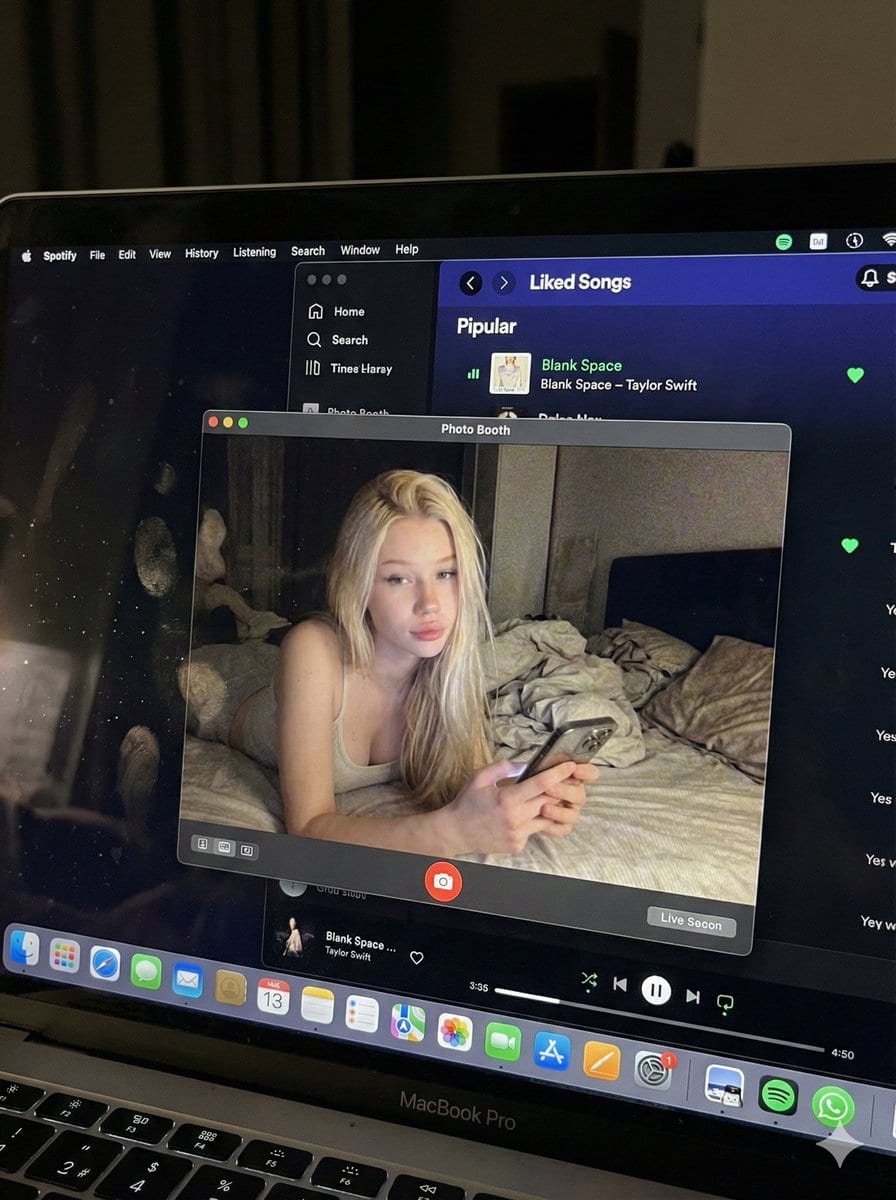
Photorealistic MacBook Screen POV Selfie Prompt

A complex JSON prompt for Gemini Nano Banana Pro designed for image-to-image generation, focusing on creating an ultra-realistic POV shot looking down at a MacBook screen. The screen displays a Photo Booth live preview of the subject (whose identity is st

Exemplo de prompt
{ "image_settings": { "aspect_ratio": "3:4", "resolution": { "width": 1152, "height": 1536 } }, "prompt": { "identity_lock": { "reference": "{argument name="reference" default="input_photo"}", "preserve": [ "{argument name="preserve 1" default="face"}", "{argument name="preserve 2" default="facial proportions"}", "{argument name="preserve 3" default="eye shape"}", "{argument name="preserve 4" default="nose"}", "{argument name="preserve 5" default="lips"}", "{argument name="preserve 6" default="skin tone"}", "{argument name="preserve 7" default="skin texture"}", "{argument name="preserve 8" default="hairline"}", "{argument name="preserve 9" default="overall identity"}" ], "rules": [ "{argument name="rule 1" default="no face swap"}", "{argument name="rule 2" default="no beautify"}", "{argument name="rule 3" default="no smoothing"}", "{argument name="rule 4" default="no reshaping"}", "{argument name="rule 5" default="no AI look"}" ] }, "scene": { "camera_angle": "{argument name="camera angle" default="high-angle downward shot, POV"}", "composition": "{argument name="composition" default="MacBook screen fills most of the frame, thin strip of physical keyboard visible at the bottom"}", "screen_surface": [ "{argument name="screen surface 1" default="visible RGB pixel grid"}", "{argument name="screen surface 2" default="subtle moire effect"}", "{argument name="screen surface 3" default="micro dust on glass"}", "{argument name="screen surface 4" default="faint fingerprints"}", "{argument name="screen surface 5" default="soft ambient reflections"}" ] }, "digital_interface": { "os": "{argument name="os" default="macOS dark mode"}", "background_app": { "name": "{argument name="background app name" default="Spotify"}", "view": "{argument name="background app view" default="Liked Songs"}", "visible_tracks": [ "{argument name="track 1" default="Blank Space – Taylor Swift"}", "{argument name="track 2" default="Shake It Off – Taylor Swift"}", "{argument name="track 3" default="Cruel Summer – Taylor Swift"}", "{argument name="track 4" default="Love Story – Taylor Swift"}" ] }, "foreground_app": { "name": "{argument name="foreground app name" default="Photo Booth"}", "state": "{argument name="foreground app state" default="live preview window"}", "position": "{argument name="foreground app position" default="floating, center-right"}" } }, "photo_booth_content": { "environment": { "room": "{argument name="room" default="dim bedroom"}", "background": "{argument name="background" default="off-white wall, rumpled bedding"}", "lighting": "{argument name="lighting" default="low-light, nocturnal, cool screen glow mixed with warm skin tones"}" }, "subject": { "pose": "{argument name="subject pose" default="lying down, relaxed, candid"}", "expression": "{argument name="subject expression" default="natural, slightly relaxed"}", "outfit": "{argument name="subject outfit" default="light-colored tank top"}", "prop": { "item": "{argument name="prop item" default="iPhone 15 Pro"}", "hand": "{argument name="prop hand" default="right hand"}" } } }, "realism_rules": [ "{argument name="realism rule 1" default="this is a photo of a screen, not a screenshot"}", "{argument name="realism rule 2" default="raw smartphone photo look"}", "{argument name="realism rule 3" default="natural noise"}", "{argument name="realism rule 4" default="imperfect glass"}", "{argument name="realism rule 5" default="no studio lighting"}", "{argument name="realism rule 6" default="no HD polish"}" ] }, "negative_prompt": [ "{argument name="negative 1" default="screenshot"}", "{argument name="negative 2" default="flat UI"}", "{argument name="negative 3" default="perfect screen"}", "{argument name="negative 4" default="clean glass"}", "{argument name="negative 5" default="studio lighting"}", "{argument name="negative 6" default="beauty filter"}", "{argument name="negative 7" default="cartoon"}", "{argument name="negative 8" default="3d render"}", "{argument name="negative 9" default="painting"}", "{argument name="negative 10" default="watermark"}", "{argument name="negative 11" default="blurred face"}" ] }
Gerar com IA
Modelo de IA
Nano-banana-pro
Autor

Perguntas frequentes

Tudo o que precisa saber sobre prompts de realistic style

Como uso este prompt de realistic style?

Basta clicar no botão "Gerar com IA" acima, e você será levado ao nosso gerador de imagens por IA com este prompt de Realistic Style pré-preenchido. Você pode personalizá-lo ainda mais ou gerar imagens diretamente. Nossa IA interpretará o prompt e criará visuais impressionantes de realistic com base na sua descrição.

Posso modificar este prompt para minhas necessidades específicas?

Com certeza! Sinta-se à vontade para copiar o prompt e personalizá-lo de acordo com sua visão. Para obras de arte realistic, tente adicionar detalhes sobre estilo, iluminação, composição ou ambiente. Quanto mais descritivo você for, melhor a IA poderá entender sua visão criativa. Navegue pelos nossos prompts realistic para aprender mais técnicas.

Quais modelos de IA funcionam melhor para realistic style?

Este prompt realistic funciona com a maioria dos geradores de imagem de IA modernos, incluindo Nano Banana, Flux e GPT-Image. Diferentes modelos se destacam em diferentes aspectos - Nano Banana é ótimo para estilos realistic, enquanto o Flux oferece resultados fotorrealistas.

O que faz um bom prompt de realistic style?

Ótimos prompts realistic incluem: detalhes específicos do assunto, referências de estilo de arte, condições de iluminação (luz suave, sombras dramáticas), paleta de cores, ambiente/atmosfera e especificações técnicas (4K, detalhado, HD). Estude nossos exemplos de prompt para ver padrões eficazes.

Este prompt é gratuito?

Sim! Todos os prompts em nossa biblioteca são totalmente gratuitos para uso pessoal e comercial. Copie, modifique e crie obras de arte incríveis de realistic sem quaisquer restrições.

More Prompts ➜
Where’s Waldo-style LOTR in the Shire - AI Image Prompt
Where’s Waldo-style LOTR in the Shire
Generates a busy Where’s Waldo-style illustration featuring all Lord of the Rings characters in the Shire, perfect for playful search-and-find images.
by Stevan Bogosavljević
Trompe l'oeil subject stepping out of social media screen - AI Image Prompt
Trompe l'oeil subject stepping out of social media screen
A prompt to turn an uploaded subject into a trompe l'oeil illusion where they step out of a social media interface on a large screen, including UI details and emoji reactions.
by madpencil_
Replace country text in an existing image - AI Image Prompt
Replace country text in an existing image
A prompt for editing an existing image by changing every occurrence of “United States” to “India” while preserving overall layout.
by ??. ??? ????? ᴹᴰ ?️‍?️
Comic from single image - AI Image Prompt
Comic from single image
A prompt that turns one uploaded image into a multi-panel comic, ideal for narrative expansion and comic layout generation.
by Derya Unutmaz, MD
Low-angle man with hood scarf and cat on head - AI Image Prompt
Low-angle man with hood scarf and cat on head
A cinematic 9:16 portrait prompt of a young man wearing a specific hooded scarf with a Maine Coon cat sitting on top.
by Yaseen Khan Gul
Group image from multiple character references - AI Image Prompt
Group image from multiple character references
A simple prompt that asks Nano Banana Pro to combine multiple individual character reference images into one group shot.
by Martin LeBlanc

Pronto para criar imagens incríveis?

Comece a gerar imagens impressionantes por IA com este prompt ou explore nossa extensa biblioteca de prompts para mais inspiração.

Gerar agora Navegar por todos os prompts



