
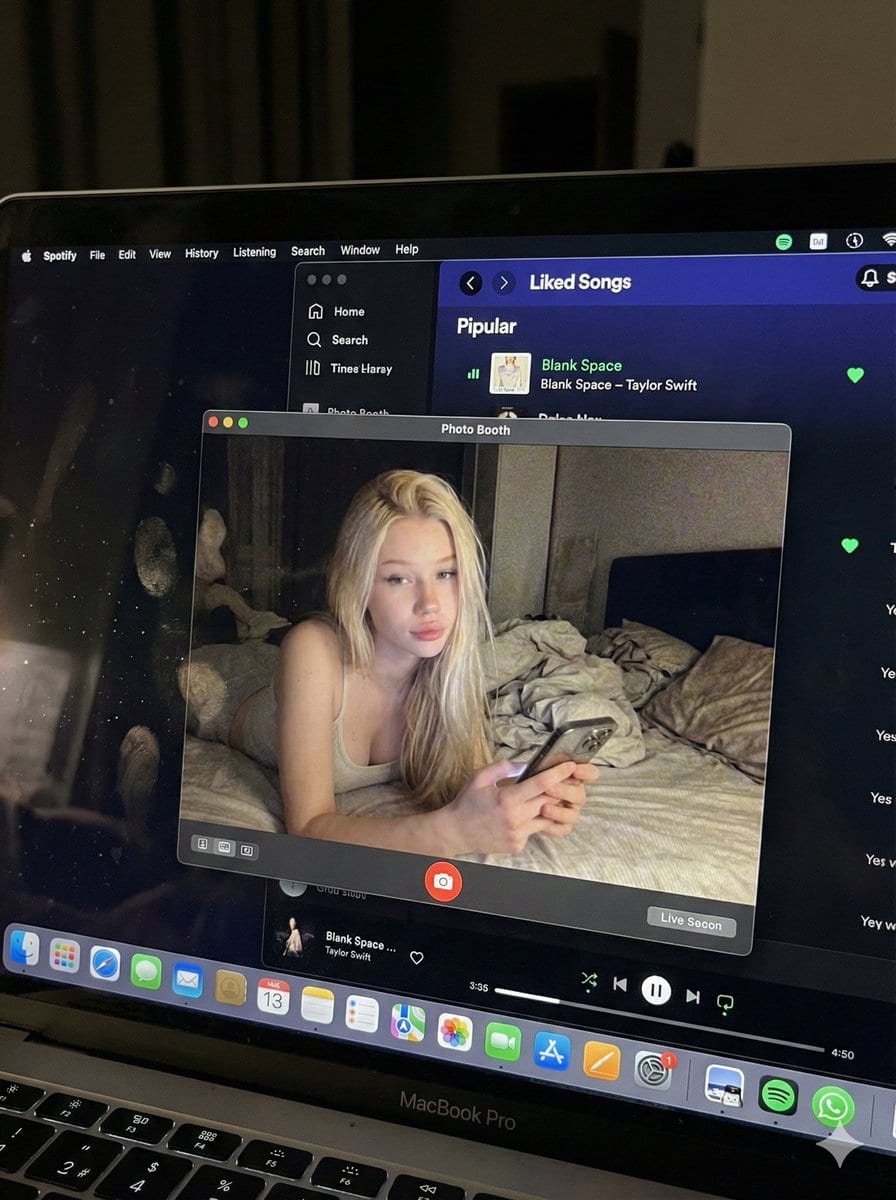
Photorealistic MacBook Screen POV Selfie Prompt

A complex JSON prompt for Gemini Nano Banana Pro designed for image-to-image generation, focusing on creating an ultra-realistic POV shot looking down at a MacBook screen. The screen displays a Photo Booth live preview of the subject (whose identity is st

Exemple de prompt
{ "image_settings": { "aspect_ratio": "3:4", "resolution": { "width": 1152, "height": 1536 } }, "prompt": { "identity_lock": { "reference": "{argument name="reference" default="input_photo"}", "preserve": [ "{argument name="preserve 1" default="face"}", "{argument name="preserve 2" default="facial proportions"}", "{argument name="preserve 3" default="eye shape"}", "{argument name="preserve 4" default="nose"}", "{argument name="preserve 5" default="lips"}", "{argument name="preserve 6" default="skin tone"}", "{argument name="preserve 7" default="skin texture"}", "{argument name="preserve 8" default="hairline"}", "{argument name="preserve 9" default="overall identity"}" ], "rules": [ "{argument name="rule 1" default="no face swap"}", "{argument name="rule 2" default="no beautify"}", "{argument name="rule 3" default="no smoothing"}", "{argument name="rule 4" default="no reshaping"}", "{argument name="rule 5" default="no AI look"}" ] }, "scene": { "camera_angle": "{argument name="camera angle" default="high-angle downward shot, POV"}", "composition": "{argument name="composition" default="MacBook screen fills most of the frame, thin strip of physical keyboard visible at the bottom"}", "screen_surface": [ "{argument name="screen surface 1" default="visible RGB pixel grid"}", "{argument name="screen surface 2" default="subtle moire effect"}", "{argument name="screen surface 3" default="micro dust on glass"}", "{argument name="screen surface 4" default="faint fingerprints"}", "{argument name="screen surface 5" default="soft ambient reflections"}" ] }, "digital_interface": { "os": "{argument name="os" default="macOS dark mode"}", "background_app": { "name": "{argument name="background app name" default="Spotify"}", "view": "{argument name="background app view" default="Liked Songs"}", "visible_tracks": [ "{argument name="track 1" default="Blank Space – Taylor Swift"}", "{argument name="track 2" default="Shake It Off – Taylor Swift"}", "{argument name="track 3" default="Cruel Summer – Taylor Swift"}", "{argument name="track 4" default="Love Story – Taylor Swift"}" ] }, "foreground_app": { "name": "{argument name="foreground app name" default="Photo Booth"}", "state": "{argument name="foreground app state" default="live preview window"}", "position": "{argument name="foreground app position" default="floating, center-right"}" } }, "photo_booth_content": { "environment": { "room": "{argument name="room" default="dim bedroom"}", "background": "{argument name="background" default="off-white wall, rumpled bedding"}", "lighting": "{argument name="lighting" default="low-light, nocturnal, cool screen glow mixed with warm skin tones"}" }, "subject": { "pose": "{argument name="subject pose" default="lying down, relaxed, candid"}", "expression": "{argument name="subject expression" default="natural, slightly relaxed"}", "outfit": "{argument name="subject outfit" default="light-colored tank top"}", "prop": { "item": "{argument name="prop item" default="iPhone 15 Pro"}", "hand": "{argument name="prop hand" default="right hand"}" } } }, "realism_rules": [ "{argument name="realism rule 1" default="this is a photo of a screen, not a screenshot"}", "{argument name="realism rule 2" default="raw smartphone photo look"}", "{argument name="realism rule 3" default="natural noise"}", "{argument name="realism rule 4" default="imperfect glass"}", "{argument name="realism rule 5" default="no studio lighting"}", "{argument name="realism rule 6" default="no HD polish"}" ] }, "negative_prompt": [ "{argument name="negative 1" default="screenshot"}", "{argument name="negative 2" default="flat UI"}", "{argument name="negative 3" default="perfect screen"}", "{argument name="negative 4" default="clean glass"}", "{argument name="negative 5" default="studio lighting"}", "{argument name="negative 6" default="beauty filter"}", "{argument name="negative 7" default="cartoon"}", "{argument name="negative 8" default="3d render"}", "{argument name="negative 9" default="painting"}", "{argument name="negative 10" default="watermark"}", "{argument name="negative 11" default="blurred face"}" ] }
Générer avec l'IA
Modèle d'IA
Nano-banana-pro
Auteur

Questions fréquentes

Tout ce que vous devez savoir sur les prompts realistic style

Comment utiliser ce prompt realistic style ?

Cliquez simplement sur le bouton "Générer avec l'IA" ci-dessus, et vous serez redirigé vers notre générateur d'images IA avec ce prompt Realistic Style pré-rempli. Vous pouvez le personnaliser davantage ou générer des images directement. Notre IA interprétera le prompt et créera de superbes visuels realistic basés sur votre description.

Puis-je modifier ce prompt pour mes besoins spécifiques ?

Absolument ! N'hésitez pas à copier le prompt et à le personnaliser selon votre vision. Pour les œuvres d'art realistic, essayez d'ajouter des détails sur le style, l'éclairage, la composition ou l'ambiance. Plus vous êtes descriptif, mieux l'IA pourra comprendre votre vision créative. Parcourez nos prompts realistic pour apprendre plus de techniques.

Quels modèles d'IA fonctionnent le mieux pour realistic style ?

Ce prompt realistic fonctionne avec la plupart des générateurs d'images IA modernes, y compris Nano Banana, Flux et GPT-Image. Différents modèles excellent dans différents aspects - Nano Banana est excellent pour les styles realistic, tandis que Flux offre des résultats photoréalistes.

Qu'est-ce qui fait un bon prompt realistic style ?

Les excellents prompts realistic incluent : des détails spécifiques sur le sujet, des références de style artistique, des conditions d'éclairage (lumière douce, ombres dramatiques), une palette de couleurs, une ambiance/atmosphère et des spécifications techniques (4K, détaillé, HD). Étudiez nos exemples de prompts pour voir des modèles efficaces.

Ce prompt est-il gratuit ?

Oui ! Tous les prompts de notre bibliothèque sont entièrement gratuits pour un usage personnel et commercial. Copiez, modifiez et créez d'étonnantes œuvres d'art realistic sans aucune restriction.

More Prompts ➜
Water Margin top 30 characters grid in gongbi style - AI Image Prompt
Water Margin top 30 characters grid in gongbi style
A Chinese prompt that generates a grid of the top 30 Water Margin characters in Chinese gongbi painting style, with names labeled on each cell.
by leon
Weekend photo dump grid for Instagram - AI Image Prompt
Weekend photo dump grid for Instagram
An English prompt that generates a 9-image ‘photo dump’ grid showing a person’s weekend in various lifestyle shots, perfect for social media content automation.
by 阿西_出海(2.0版)
Where’s Waldo Star Wars scene - AI Image Prompt
Where’s Waldo Star Wars scene
Generates a dense “Where’s Waldo” style illustration featuring all Star Wars characters on Tatooine, including Waldo.
by CREACAS
1915 Bengali newspaper page reconstruction - AI Image Prompt
1915 Bengali newspaper page reconstruction
A rich, historically detailed prompt to recreate an authentic 1915 Bengali newspaper page with accurate typography, illustrations, and paper texture.
by neural nets.
Watercolor US map with state abbreviations - AI Image Prompt
Watercolor US map with state abbreviations
A prompt for a full watercolor-style map of the United States, labeling each state with its abbreviation and adding creative illustrations.
by Kaushik Shivakumar
Epic LEGO Spider-Man movie poster scene - AI Image Prompt
Epic LEGO Spider-Man movie poster scene
A detailed Chinese prompt for an epic LEGO-style Spider-Man action scene with stormy skies, lightning, scattered bricks and cinematic poster-style composition.
by 松果先森

Prêt à créer des images incroyables ?

Commencez à générer de superbes images IA avec ce prompt ou explorez notre vaste bibliothèque de prompts pour plus d'inspiration.

Générer maintenant Parcourir tous les prompts



