
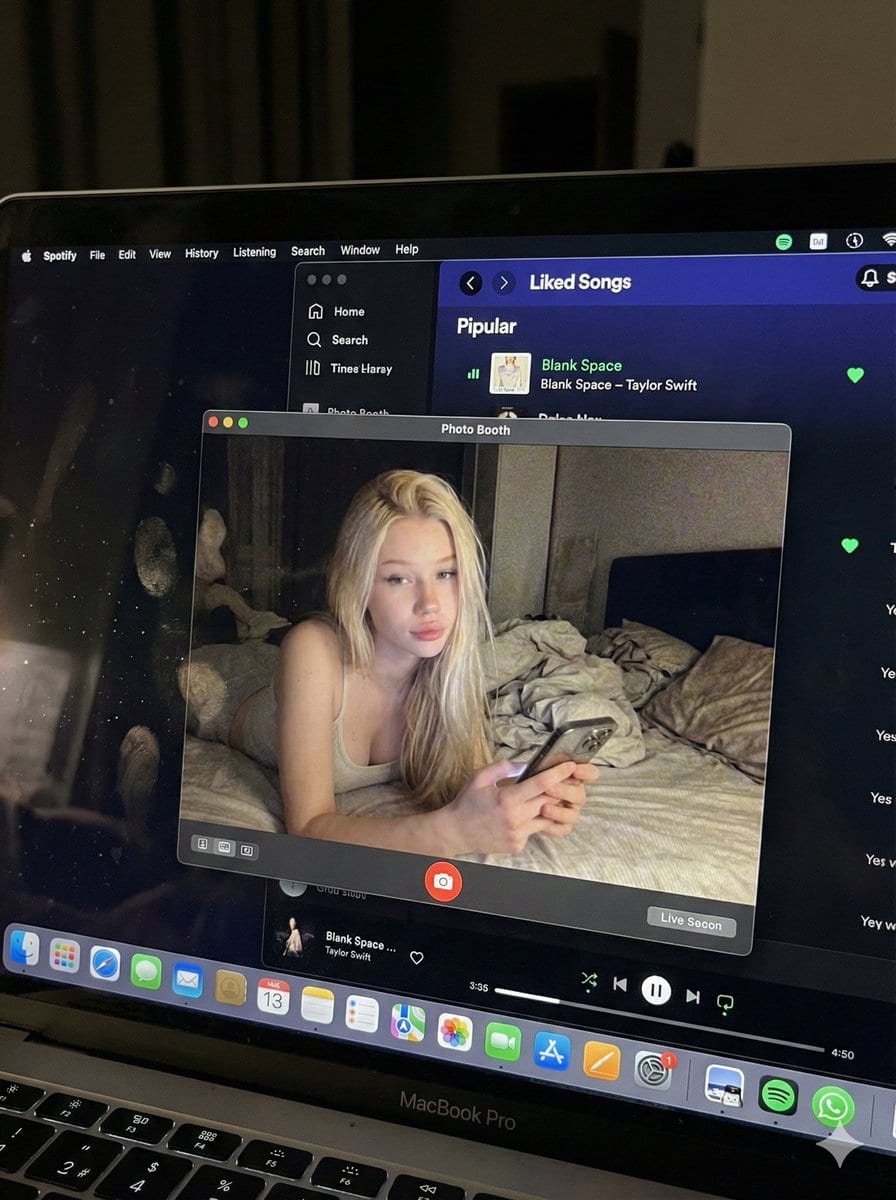
Photorealistic MacBook Screen POV Selfie Prompt - AI Generated Realistic Style Image
Generar imagen similar

This prompt is optimized for Nano-banana-pro model

Photorealistic MacBook Screen POV Selfie Prompt

A complex JSON prompt for Gemini Nano Banana Pro designed for image-to-image generation, focusing on creating an ultra-realistic POV shot looking down at a MacBook screen. The screen displays a Photo Booth live preview of the subject (whose identity is st

Indicación de ejemplo
{ "image_settings": { "aspect_ratio": "3:4", "resolution": { "width": 1152, "height": 1536 } }, "prompt": { "identity_lock": { "reference": "{argument name="reference" default="input_photo"}", "preserve": [ "{argument name="preserve 1" default="face"}", "{argument name="preserve 2" default="facial proportions"}", "{argument name="preserve 3" default="eye shape"}", "{argument name="preserve 4" default="nose"}", "{argument name="preserve 5" default="lips"}", "{argument name="preserve 6" default="skin tone"}", "{argument name="preserve 7" default="skin texture"}", "{argument name="preserve 8" default="hairline"}", "{argument name="preserve 9" default="overall identity"}" ], "rules": [ "{argument name="rule 1" default="no face swap"}", "{argument name="rule 2" default="no beautify"}", "{argument name="rule 3" default="no smoothing"}", "{argument name="rule 4" default="no reshaping"}", "{argument name="rule 5" default="no AI look"}" ] }, "scene": { "camera_angle": "{argument name="camera angle" default="high-angle downward shot, POV"}", "composition": "{argument name="composition" default="MacBook screen fills most of the frame, thin strip of physical keyboard visible at the bottom"}", "screen_surface": [ "{argument name="screen surface 1" default="visible RGB pixel grid"}", "{argument name="screen surface 2" default="subtle moire effect"}", "{argument name="screen surface 3" default="micro dust on glass"}", "{argument name="screen surface 4" default="faint fingerprints"}", "{argument name="screen surface 5" default="soft ambient reflections"}" ] }, "digital_interface": { "os": "{argument name="os" default="macOS dark mode"}", "background_app": { "name": "{argument name="background app name" default="Spotify"}", "view": "{argument name="background app view" default="Liked Songs"}", "visible_tracks": [ "{argument name="track 1" default="Blank Space – Taylor Swift"}", "{argument name="track 2" default="Shake It Off – Taylor Swift"}", "{argument name="track 3" default="Cruel Summer – Taylor Swift"}", "{argument name="track 4" default="Love Story – Taylor Swift"}" ] }, "foreground_app": { "name": "{argument name="foreground app name" default="Photo Booth"}", "state": "{argument name="foreground app state" default="live preview window"}", "position": "{argument name="foreground app position" default="floating, center-right"}" } }, "photo_booth_content": { "environment": { "room": "{argument name="room" default="dim bedroom"}", "background": "{argument name="background" default="off-white wall, rumpled bedding"}", "lighting": "{argument name="lighting" default="low-light, nocturnal, cool screen glow mixed with warm skin tones"}" }, "subject": { "pose": "{argument name="subject pose" default="lying down, relaxed, candid"}", "expression": "{argument name="subject expression" default="natural, slightly relaxed"}", "outfit": "{argument name="subject outfit" default="light-colored tank top"}", "prop": { "item": "{argument name="prop item" default="iPhone 15 Pro"}", "hand": "{argument name="prop hand" default="right hand"}" } } }, "realism_rules": [ "{argument name="realism rule 1" default="this is a photo of a screen, not a screenshot"}", "{argument name="realism rule 2" default="raw smartphone photo look"}", "{argument name="realism rule 3" default="natural noise"}", "{argument name="realism rule 4" default="imperfect glass"}", "{argument name="realism rule 5" default="no studio lighting"}", "{argument name="realism rule 6" default="no HD polish"}" ] }, "negative_prompt": [ "{argument name="negative 1" default="screenshot"}", "{argument name="negative 2" default="flat UI"}", "{argument name="negative 3" default="perfect screen"}", "{argument name="negative 4" default="clean glass"}", "{argument name="negative 5" default="studio lighting"}", "{argument name="negative 6" default="beauty filter"}", "{argument name="negative 7" default="cartoon"}", "{argument name="negative 8" default="3d render"}", "{argument name="negative 9" default="painting"}", "{argument name="negative 10" default="watermark"}", "{argument name="negative 11" default="blurred face"}" ] }
Generar con IA

Pro Tip:

This realistic style prompt has been tested and optimized for best results. You can modify it slightly to customize the output while keeping the core structure intact.

Modelo de IA
Nano-banana-pro
Autor
Category
Realistic Style

Preguntas frecuentes

Todo lo que necesitas saber sobre indicaciones de realistic style

¿Cómo uso esta indicación de realistic style?

Simplemente haz clic en el botón "Generar con IA" arriba, y serás llevado a nuestro generador de imágenes con IA con esta indicación de Realistic Style pre-llenada. Puedes personalizarla más o generar imágenes directamente. Nuestra IA interpretará la indicación y creará impresionantes visuales de realistic basados en tu descripción.

¿Puedo modificar esta indicación para mis necesidades específicas?

¡Por supuesto! Siéntete libre de copiar la indicación y personalizarla para que coincida con tu visión. Para obras de arte de realistic, intenta añadir detalles sobre estilo, iluminación, composición o ambiente. Cuanto más descriptivo seas, mejor podrá la IA entender tu visión creativa. Explora nuestras indicaciones de realistic para aprender más técnicas.

¿Qué modelos de IA funcionan mejor para realistic style?

Esta indicación de realistic funciona con la mayoría de los generadores de imágenes de IA modernos, incluyendo Nano Banana, Flux y GPT-Image. Diferentes modelos sobresalen en diferentes aspectos - Nano Banana es excelente para estilos realistic, mientras que Flux ofrece resultados fotorrealistas.

¿Qué hace una buena indicación de realistic style?

Las grandes indicaciones de realistic incluyen: detalles específicos del sujeto, referencias de estilo artístico, condiciones de iluminación (luz suave, sombras dramáticas), paleta de colores, ambiente/atmósfera y especificaciones técnicas (4K, detallado, HD). Estudia nuestras indicaciones de ejemplo para ver patrones efectivos.

¿Esta indicación es gratuita?

¡Sí! Todas las indicaciones en nuestra biblioteca son completamente gratuitas para uso personal y comercial. Copia, modifica y crea increíbles obras de arte de realistic sin restricciones.

¿Listo para crear imágenes increíbles?

Empieza a generar impresionantes imágenes con IA usando esta indicación o explora nuestra extensa biblioteca de indicaciones para más inspiración.



