
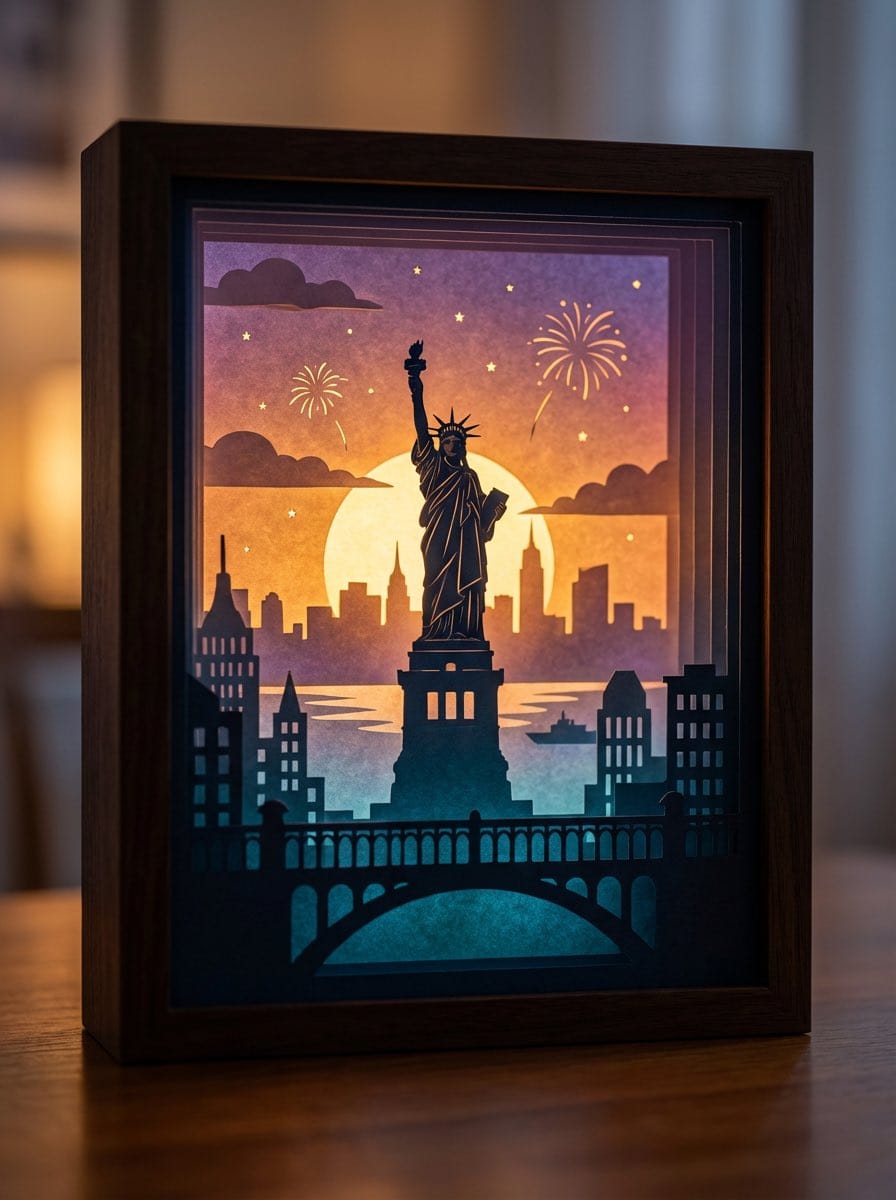
3D paper cut light box illustration framework

A detailed prompt template for generating dreamy, multi-layered 3D paper cut light box artworks, where you can swap in any theme and the model handles layers, lighting, color logic, and material realism.

Пример промта
Generate an art photograph of a highly dreamy and three-dimensional 3D paper cut light box. The paper cut theme is: {argument name="theme" default="a deer in a forest under the moonlight"}. Layering structure and composition: Design the image as a real, physical paper cut light box composed of 5–7 layers of paper stacked together. Each layer must have its own depth of field and clear silhouette, and you should be able to see the thickness of the paper and the shadows between layers. Core structure: - The image should clearly present a multi-layered silhouette effect, with visible physical spacing between the paper layers. - Overall composition is vertical 3:4, with the light box centered, leaving a bit of space at the edges, like a glowing art object placed on a table. Depth layout: - Foreground (layers 1–2): use dark, intricate silhouettes that form a frame around the edges of the image, with elements matching the current theme, such as branches and vines for forest themes, windows and arches for city or castle themes, or rocks and coral for underwater or fantasy themes. - Midground (layers 3–4): this holds the core subject of the theme, slightly central in the composition and taking up the main visual weight. The subject’s silhouette must be complete and not overly blocked by the foreground. - Background (layers 5–6): use more simplified, lower-contrast silhouettes to show distant environment and structures, adding depth to the scene. Three-dimensionality: - There must be obvious physical spacing and shadows between layers. Light should pass between the paper layers to create soft gradations of light and dark, emphasizing the paper thickness and 3D depth, so it looks like a real paper cut light box, not a flat illustration. Light and atmosphere (backlighting): Backlighting: - The light source must come from the very back of the scene, shining forward through all the paper layers. - Light passing through the cutouts in each layer should form soft volumetric light and gradually decreasing brightness and contrast from back to front. Color gradients (auto-adapting to the theme): If no specific color scheme is given, automatically choose a main palette and gradient that fit the theme, while keeping a soft, night-light-friendly look. For example, warm gold to cool blue-green for forest themes, teal to deep blue for underwater themes, icy blue to deep blue for winter scenes, amber to electric blue for cyber cities, candlelight gold to deep indigo for castles, or deep blue to purple with golden glows for space themes. If the user clearly specifies a color direction or mood (such as “cool sci-fi” or “pink-blue dreamy”), follow that as the top priority while maintaining the soft backlit, soothing feeling of a night light. Overall feel: The image should feel quiet, healing, and storybook-like, like a softly glowing bedtime story lamp, not a noisy neon poster or infographic. Materials and details: Paper texture: - Emphasize the reality of heavy art paper: fine texture, slight visible fibers, clean sharp cut edges with visible thickness, and light that diffuses softly through the paper like a real fibrous material, not plastic or metal. Physical light box photography feel: - Present the image as a photograph of a real light box, not a flat illustration or vector graphic. You can faintly show the light box frame (simple white or light wood) and a slightly blurred tabletop or environment. - The lighting should feel natural, with real-lens depth of field: slightly blurred foreground, sharp midground subject, and soft background. Detail decorations: - You may add a modest amount of tiny floating elements between paper layers to enhance space, such as tiny glowing dots, dust motes, snowflakes, bubbles, or other small particles relevant to the theme. Their number must be restrained so they only enhance atmosphere and depth without cluttering or disrupting the silhouette structure. Technical parameters: vertical 3:4 ratio, high-resolution output.
Создать с помощью ИИ
Модель ИИ
Nano-banana-pro
Автор

Часто задаваемые вопросы

Всё, что нужно знать о realistic style промтах

Как использовать этот realistic style промт?

Просто нажмите кнопку «Создать с помощью ИИ» выше, и вы перейдете к нашему генератору изображений ИИ с уже заполненным Realistic Style промтом. Вы можете дополнительно настроить его или сразу создавать изображения. Наш ИИ интерпретирует промт и создаст потрясающие realistic визуалы на основе вашего описания.

Могу ли я изменить этот промт под свои нужды?

Безусловно! Не стесняйтесь копировать промт и настраивать его под своё видение. Для realistic изображений попробуйте добавить детали о стиле, освещении, композиции или настроении. Чем подробнее вы опишете, тем лучше ИИ сможет понять ваш творческий замысел. Изучите наши realistic промты, чтобы узнать больше техник.

Какие модели ИИ лучше всего подходят для realistic style?

Этот realistic промт работает с большинством современных генераторов изображений ИИ, включая Nano Banana, Flux и GPT-Image. Разные модели преуспевают в разных аспектах: Nano Banana отлично подходит для стилей realistic, а Flux создаёт фотореалистичные результаты.

Что делает realistic style промт хорошим?

Отличные realistic промты включают: конкретные детали объекта, отсылки к художественному стилю, условия освещения (мягкий свет, драматичные тени), цветовую палитру, настроение/атмосферу и технические характеристики (4K, детализировано, HD). Изучите наши примеры промтов, чтобы увидеть эффективные паттерны.

Этот промт бесплатный?

Да! Все промты в нашей библиотеке полностью бесплатны для личного и коммерческого использования. Копируйте, изменяйте и создавайте удивительные realistic изображения без каких-либо ограничений.

More Prompts ➜
Night view of skyscraper via coordinates - AI Image Prompt
Night view of skyscraper via coordinates
Two geo-based prompts to generate night scenes: one of Yeouido’s 63 Building and another focusing on Lotte World Tower, using latitude and longitude with an optional landmark-focus instruction.
by SETI Park
Hand-drawn infographic card about long-term IP building - AI Image Prompt
Hand-drawn infographic card about long-term IP building
A detailed prompt for creating a 9:16 hand-drawn infographic card with brush script Chinese text and simple illustrations, themed around the long-term compounding of building a personal IP.
by 宝玉
Modern Christmas sale poster design (English) - AI Image Prompt
Modern Christmas sale poster design (English)
An English prompt for a modern, stylish Christmas sale poster with a solid festive red background and vibrant, playful energy.
by ミヤマ
Convert videogame screenshot to hyperreal modern engine - AI Image Prompt
Convert videogame screenshot to hyperreal modern engine
A prompt for transforming an existing videogame screenshot into a hyper-realistic, modern game engine render while preserving composition.
by Kiaran Ritchie
Generating LINE Sticker Style Expressions - AI Image Prompt
Generating LINE Sticker Style Expressions
A prompt used with GPT Image 1.5 to generate eight different facial expressions suitable for LINE stickers, complete with accompanying comments.
by ひつじ
Text Generation Test on Paper - AI Image Prompt
Text Generation Test on Paper
A simple test prompt for GPT Image 1.5 to check its ability to render complex text accurately, specifically requesting the opening lines of the Japanese traditional story 'Jyumon' on white paper in black text.
by カーブミラー

Готовы создавать удивительные изображения?

Начните создавать потрясающие изображения с помощью ИИ, используя этот промт, или изучите нашу обширную библиотеку промтов для дополнительного вдохновения.

Создать сейчас Просмотреть все промты



