
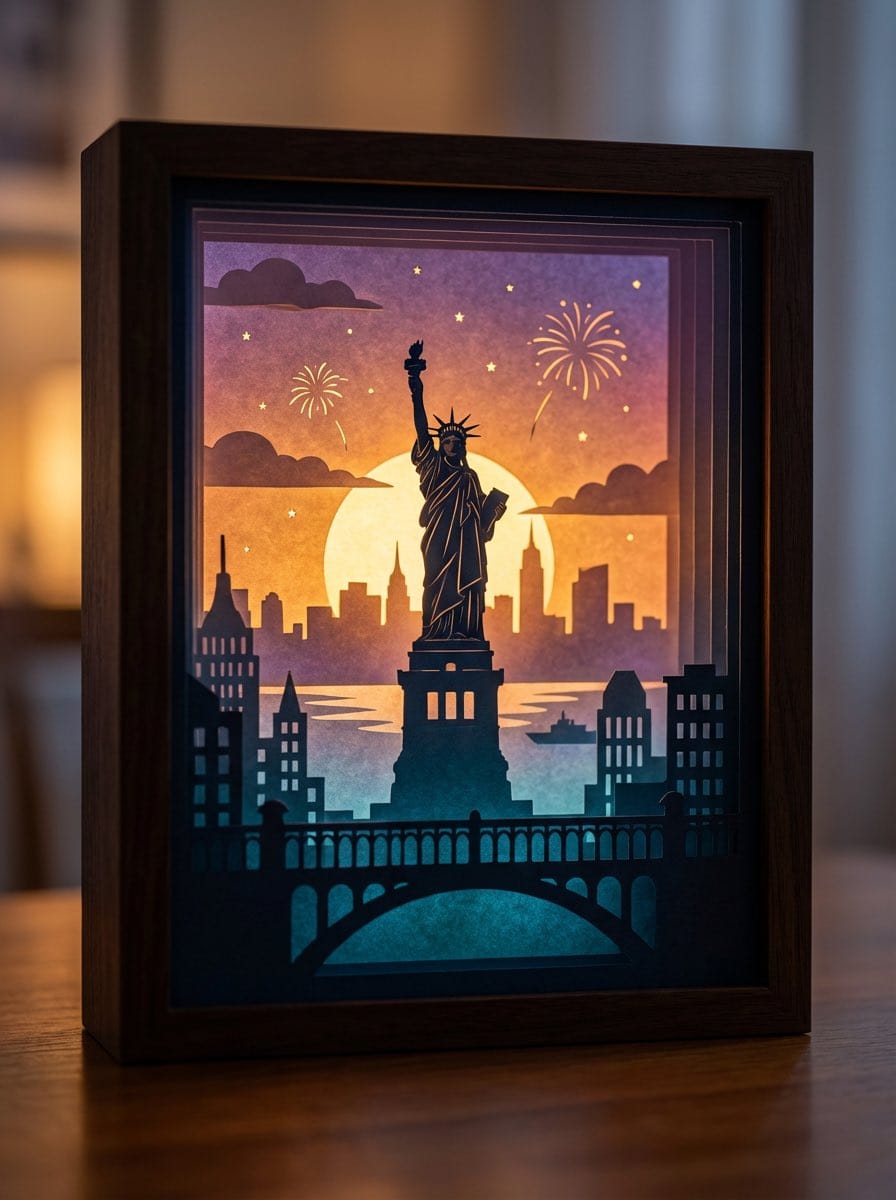
3D paper cut light box illustration framework

A detailed prompt template for generating dreamy, multi-layered 3D paper cut light box artworks, where you can swap in any theme and the model handles layers, lighting, color logic, and material realism.

Beispielaufforderung
Generate an art photograph of a highly dreamy and three-dimensional 3D paper cut light box. The paper cut theme is: {argument name="theme" default="a deer in a forest under the moonlight"}. Layering structure and composition: Design the image as a real, physical paper cut light box composed of 5–7 layers of paper stacked together. Each layer must have its own depth of field and clear silhouette, and you should be able to see the thickness of the paper and the shadows between layers. Core structure: - The image should clearly present a multi-layered silhouette effect, with visible physical spacing between the paper layers. - Overall composition is vertical 3:4, with the light box centered, leaving a bit of space at the edges, like a glowing art object placed on a table. Depth layout: - Foreground (layers 1–2): use dark, intricate silhouettes that form a frame around the edges of the image, with elements matching the current theme, such as branches and vines for forest themes, windows and arches for city or castle themes, or rocks and coral for underwater or fantasy themes. - Midground (layers 3–4): this holds the core subject of the theme, slightly central in the composition and taking up the main visual weight. The subject’s silhouette must be complete and not overly blocked by the foreground. - Background (layers 5–6): use more simplified, lower-contrast silhouettes to show distant environment and structures, adding depth to the scene. Three-dimensionality: - There must be obvious physical spacing and shadows between layers. Light should pass between the paper layers to create soft gradations of light and dark, emphasizing the paper thickness and 3D depth, so it looks like a real paper cut light box, not a flat illustration. Light and atmosphere (backlighting): Backlighting: - The light source must come from the very back of the scene, shining forward through all the paper layers. - Light passing through the cutouts in each layer should form soft volumetric light and gradually decreasing brightness and contrast from back to front. Color gradients (auto-adapting to the theme): If no specific color scheme is given, automatically choose a main palette and gradient that fit the theme, while keeping a soft, night-light-friendly look. For example, warm gold to cool blue-green for forest themes, teal to deep blue for underwater themes, icy blue to deep blue for winter scenes, amber to electric blue for cyber cities, candlelight gold to deep indigo for castles, or deep blue to purple with golden glows for space themes. If the user clearly specifies a color direction or mood (such as “cool sci-fi” or “pink-blue dreamy”), follow that as the top priority while maintaining the soft backlit, soothing feeling of a night light. Overall feel: The image should feel quiet, healing, and storybook-like, like a softly glowing bedtime story lamp, not a noisy neon poster or infographic. Materials and details: Paper texture: - Emphasize the reality of heavy art paper: fine texture, slight visible fibers, clean sharp cut edges with visible thickness, and light that diffuses softly through the paper like a real fibrous material, not plastic or metal. Physical light box photography feel: - Present the image as a photograph of a real light box, not a flat illustration or vector graphic. You can faintly show the light box frame (simple white or light wood) and a slightly blurred tabletop or environment. - The lighting should feel natural, with real-lens depth of field: slightly blurred foreground, sharp midground subject, and soft background. Detail decorations: - You may add a modest amount of tiny floating elements between paper layers to enhance space, such as tiny glowing dots, dust motes, snowflakes, bubbles, or other small particles relevant to the theme. Their number must be restrained so they only enhance atmosphere and depth without cluttering or disrupting the silhouette structure. Technical parameters: vertical 3:4 ratio, high-resolution output.
Mit KI generieren
KI-Modell
Nano-banana-pro
Autor

Häufig gestellte Fragen

Alles, was Sie über realistic style-Aufforderungen wissen müssen

Wie verwende ich diese realistic style-Aufforderung?

Klicken Sie einfach auf die Schaltfläche "Mit KI generieren" oben, und Sie gelangen zu unserem KI-Bildgenerator mit dieser bereits ausgefüllten Realistic Style-Aufforderung. Sie können sie weiter anpassen oder Bilder direkt generieren. Unsere KI interpretiert die Aufforderung und erstellt atemberaubende realistic-Visualisierungen basierend auf Ihrer Beschreibung.

Kann ich diese Aufforderung für meine speziellen Bedürfnisse anpassen?

Auf jeden Fall! Sie können die Aufforderung gerne kopieren und an Ihre Vorstellungen anpassen. Für realistic-Kunstwerke versuchen Sie, Details zu Stil, Beleuchtung, Komposition oder Stimmung hinzuzufügen. Je beschreibender Sie sind, desto besser kann die KI Ihre kreative Vision verstehen. Durchsuchen Sie unsere realistic-Aufforderungen, um mehr Techniken zu lernen.

Welche KI-Modelle eignen sich am besten für realistic style?

Diese realistic-Aufforderung funktioniert mit den meisten modernen KI-Bildgeneratoren, einschließlich Nano Banana, Flux und GPT-Image. Verschiedene Modelle zeichnen sich durch unterschiedliche Aspekte aus - Nano Banana ist großartig für realistic-Stile, während Flux fotorealistische Ergebnisse liefert.

Was macht eine gute realistic style-Aufforderung aus?

Großartige realistic-Aufforderungen enthalten: spezifische Subjektdetails, Referenzen zum Kunststil, Beleuchtungsbedingungen (weiches Licht, dramatische Schatten), Farbpalette, Stimmung/Atmosphäre und technische Spezifikationen (4K, detailliert, HD). Studieren Sie unsere Beispielaufforderungen, um effektive Muster zu sehen.

Ist diese Aufforderung kostenlos nutzbar?

Ja! Alle Aufforderungen in unserer Bibliothek sind für die persönliche und kommerzielle Nutzung völlig kostenlos. Kopieren, modifizieren und erstellen Sie erstaunliche realistic-Kunstwerke ohne Einschränkungen.

More Prompts ➜
Goth makeover variant of existing photo - AI Image Prompt
Goth makeover variant of existing photo
An English natural-language prompt used to reimagine a person’s photo as if they were into goth music at the time, letting the model infer what to change.
by Cybersphere
Keep art, translate manga speech to English in original balloons - AI Image Prompt
Keep art, translate manga speech to English in original balloons
A prompt for image editing: keep the original manga artwork, translate only the dialogue into English, and place the translated text into the existing speech balloons.
by けいすけ / AIマンガ家
MrBeast-style YouTube channel redesign - AI Image Prompt
MrBeast-style YouTube channel redesign
Creates a YouTube channel page that looks like a real MrBeast layout but with all thumbnails replaced by a themed tournament.
by Higgsfield AI ?
Monochrome Hand-Drawn Sketch Transformation - AI Image Prompt
Monochrome Hand-Drawn Sketch Transformation
A prompt designed to transform an uploaded image into a high-contrast, hyper-detailed monochrome hand-drawn sketch. It specifies using an artistic blend of graphite pencil and charcoal shading, focusing only on the main subject, and incorporating visible
by ✨ Pulikesi✨
Create a Realistic Photo of Her (Iterative Refinement) - AI Image Prompt
Create a Realistic Photo of Her (Iterative Refinement)
An iterative prompt sequence used to refine an image generation result, starting with a request for a realistic photo and then demanding even greater realism with specific details like skin texture, emphasizing a non-artistic, human look.
by Roi Lee
Image Editing: Rotate 45 Degrees - AI Image Prompt
Image Editing: Rotate 45 Degrees
A simple French prompt used to test the image editing capabilities of GPT Image 1.5, specifically instructing the model to rotate an existing image 45 degrees to the left.
by Joffrey

Bereit, erstaunliche Bilder zu erstellen?

Beginnen Sie noch heute mit der Generierung atemberaubender KI-Bilder mit dieser Aufforderung oder durchsuchen Sie unsere umfangreiche Aufforderungsbibliothek nach weiterer Inspiration.

Jetzt generieren Alle Aufforderungen durchsuchen



