
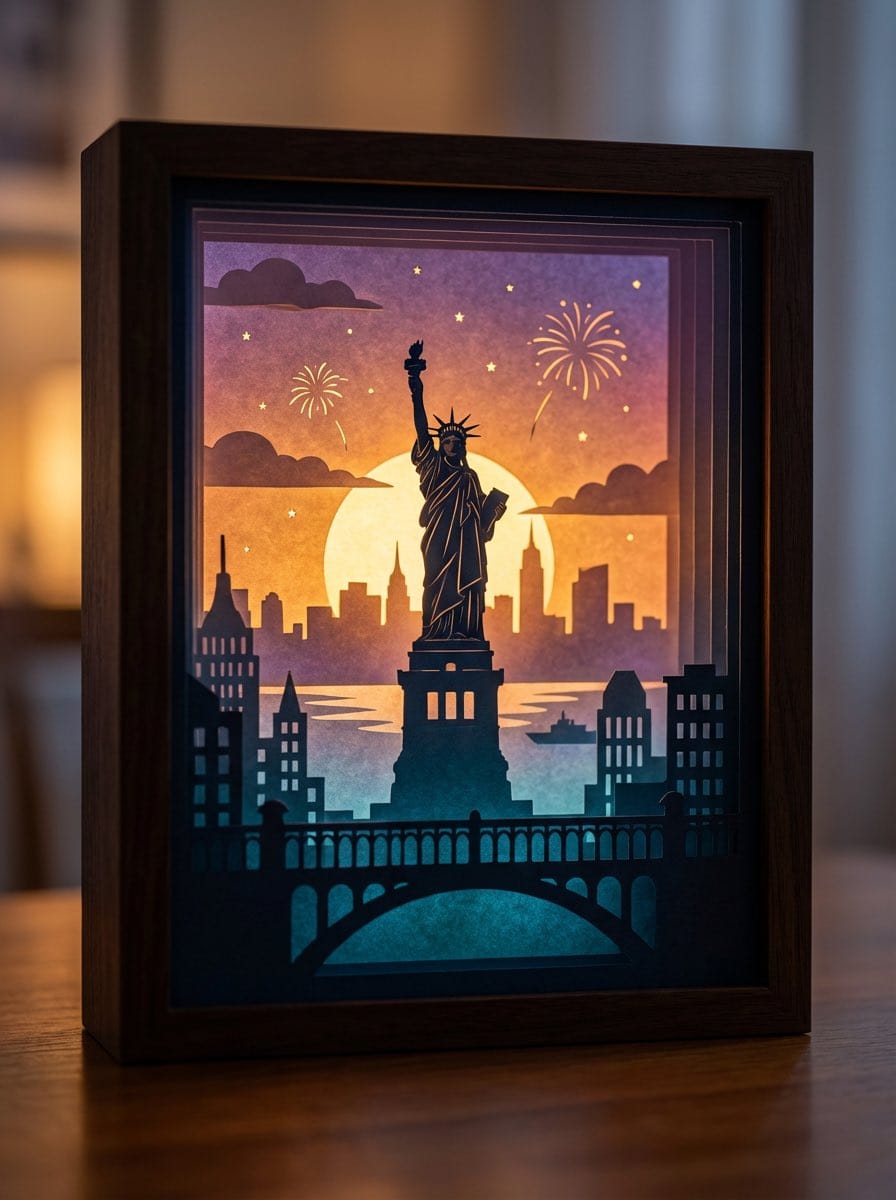
3D paper cut light box illustration framework

A detailed prompt template for generating dreamy, multi-layered 3D paper cut light box artworks, where you can swap in any theme and the model handles layers, lighting, color logic, and material realism.

Exemplo de prompt
Generate an art photograph of a highly dreamy and three-dimensional 3D paper cut light box. The paper cut theme is: {argument name="theme" default="a deer in a forest under the moonlight"}. Layering structure and composition: Design the image as a real, physical paper cut light box composed of 5–7 layers of paper stacked together. Each layer must have its own depth of field and clear silhouette, and you should be able to see the thickness of the paper and the shadows between layers. Core structure: - The image should clearly present a multi-layered silhouette effect, with visible physical spacing between the paper layers. - Overall composition is vertical 3:4, with the light box centered, leaving a bit of space at the edges, like a glowing art object placed on a table. Depth layout: - Foreground (layers 1–2): use dark, intricate silhouettes that form a frame around the edges of the image, with elements matching the current theme, such as branches and vines for forest themes, windows and arches for city or castle themes, or rocks and coral for underwater or fantasy themes. - Midground (layers 3–4): this holds the core subject of the theme, slightly central in the composition and taking up the main visual weight. The subject’s silhouette must be complete and not overly blocked by the foreground. - Background (layers 5–6): use more simplified, lower-contrast silhouettes to show distant environment and structures, adding depth to the scene. Three-dimensionality: - There must be obvious physical spacing and shadows between layers. Light should pass between the paper layers to create soft gradations of light and dark, emphasizing the paper thickness and 3D depth, so it looks like a real paper cut light box, not a flat illustration. Light and atmosphere (backlighting): Backlighting: - The light source must come from the very back of the scene, shining forward through all the paper layers. - Light passing through the cutouts in each layer should form soft volumetric light and gradually decreasing brightness and contrast from back to front. Color gradients (auto-adapting to the theme): If no specific color scheme is given, automatically choose a main palette and gradient that fit the theme, while keeping a soft, night-light-friendly look. For example, warm gold to cool blue-green for forest themes, teal to deep blue for underwater themes, icy blue to deep blue for winter scenes, amber to electric blue for cyber cities, candlelight gold to deep indigo for castles, or deep blue to purple with golden glows for space themes. If the user clearly specifies a color direction or mood (such as “cool sci-fi” or “pink-blue dreamy”), follow that as the top priority while maintaining the soft backlit, soothing feeling of a night light. Overall feel: The image should feel quiet, healing, and storybook-like, like a softly glowing bedtime story lamp, not a noisy neon poster or infographic. Materials and details: Paper texture: - Emphasize the reality of heavy art paper: fine texture, slight visible fibers, clean sharp cut edges with visible thickness, and light that diffuses softly through the paper like a real fibrous material, not plastic or metal. Physical light box photography feel: - Present the image as a photograph of a real light box, not a flat illustration or vector graphic. You can faintly show the light box frame (simple white or light wood) and a slightly blurred tabletop or environment. - The lighting should feel natural, with real-lens depth of field: slightly blurred foreground, sharp midground subject, and soft background. Detail decorations: - You may add a modest amount of tiny floating elements between paper layers to enhance space, such as tiny glowing dots, dust motes, snowflakes, bubbles, or other small particles relevant to the theme. Their number must be restrained so they only enhance atmosphere and depth without cluttering or disrupting the silhouette structure. Technical parameters: vertical 3:4 ratio, high-resolution output.
Gerar com IA
Modelo de IA
Nano-banana-pro
Autor

Perguntas frequentes

Tudo o que precisa saber sobre prompts de realistic style

Como uso este prompt de realistic style?

Basta clicar no botão "Gerar com IA" acima, e você será levado ao nosso gerador de imagens por IA com este prompt de Realistic Style pré-preenchido. Você pode personalizá-lo ainda mais ou gerar imagens diretamente. Nossa IA interpretará o prompt e criará visuais impressionantes de realistic com base na sua descrição.

Posso modificar este prompt para minhas necessidades específicas?

Com certeza! Sinta-se à vontade para copiar o prompt e personalizá-lo de acordo com sua visão. Para obras de arte realistic, tente adicionar detalhes sobre estilo, iluminação, composição ou ambiente. Quanto mais descritivo você for, melhor a IA poderá entender sua visão criativa. Navegue pelos nossos prompts realistic para aprender mais técnicas.

Quais modelos de IA funcionam melhor para realistic style?

Este prompt realistic funciona com a maioria dos geradores de imagem de IA modernos, incluindo Nano Banana, Flux e GPT-Image. Diferentes modelos se destacam em diferentes aspectos - Nano Banana é ótimo para estilos realistic, enquanto o Flux oferece resultados fotorrealistas.

O que faz um bom prompt de realistic style?

Ótimos prompts realistic incluem: detalhes específicos do assunto, referências de estilo de arte, condições de iluminação (luz suave, sombras dramáticas), paleta de cores, ambiente/atmosfera e especificações técnicas (4K, detalhado, HD). Estude nossos exemplos de prompt para ver padrões eficazes.

Este prompt é gratuito?

Sim! Todos os prompts em nossa biblioteca são totalmente gratuitos para uso pessoal e comercial. Copie, modifique e crie obras de arte incríveis de realistic sem quaisquer restrições.

More Prompts ➜
Chalkboard king rabbit illustration at sunset - AI Image Prompt
Chalkboard king rabbit illustration at sunset
Creates a classroom chalkboard artwork of a rabbit king with Japanese text, in a real classroom scene with sunset light coming through the window from an oblique angle.
by さつき@AIお絵描き(うさぎ好き)
Figure-style product page design for a heartbreak girl figure - AI Image Prompt
Figure-style product page design for a heartbreak girl figure
A detailed prompt for turning an image into an ultra-detailed figure-style product page, including logos, zoomed-in details, and layout like a professional figure product listing.
by てんねん
High-angle fashion portrait on marble staircase - AI Image Prompt
High-angle fashion portrait on marble staircase
A detailed fashion portrait prompt for an Asian male model leaning on a marble staircase, preserving the reference subject’s facial features and specifying hairstyle, clothing, and pose, great for editorial-style shots or profile images.
by ?arᎧon
Comic from single image - AI Image Prompt
Comic from single image
A prompt that turns one uploaded image into a multi-panel comic, ideal for narrative expansion and comic layout generation.
by Derya Unutmaz, MD
New Pokémon pixel art battle scene - AI Image Prompt
New Pokémon pixel art battle scene
Uses an existing pixel-art battle scene as reference and generates a new battle with different Pokémon and environment.
by proper
Blackboard solving Pythagoras theorem - AI Image Prompt
Blackboard solving Pythagoras theorem
Generates an image of a classroom blackboard where the Pythagorean theorem is being solved step by step, great for educational visuals.
by Heisenberg

Pronto para criar imagens incríveis?

Comece a gerar imagens impressionantes por IA com este prompt ou explore nossa extensa biblioteca de prompts para mais inspiração.

Gerar agora Navegar por todos os prompts



