
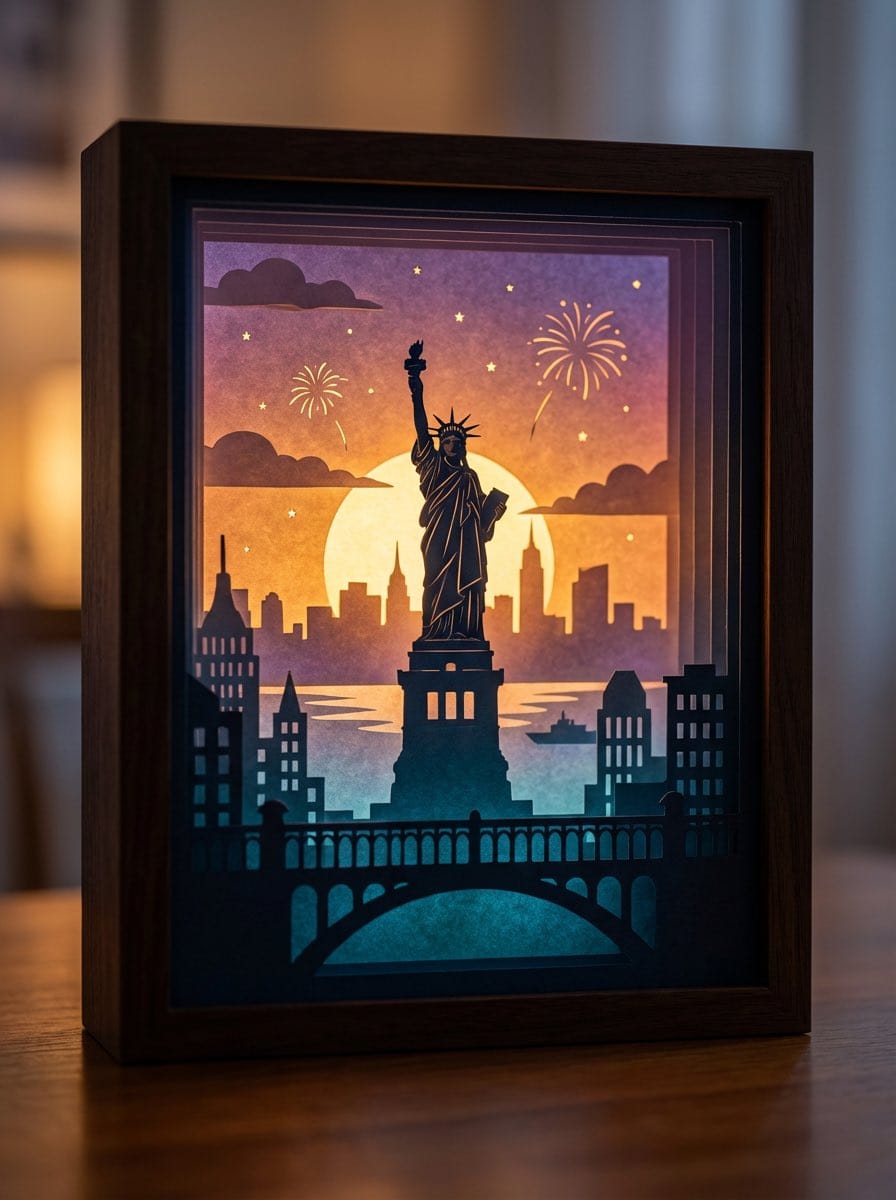
3D paper cut light box illustration framework

A detailed prompt template for generating dreamy, multi-layered 3D paper cut light box artworks, where you can swap in any theme and the model handles layers, lighting, color logic, and material realism.

Indicación de ejemplo
Generate an art photograph of a highly dreamy and three-dimensional 3D paper cut light box. The paper cut theme is: {argument name="theme" default="a deer in a forest under the moonlight"}. Layering structure and composition: Design the image as a real, physical paper cut light box composed of 5–7 layers of paper stacked together. Each layer must have its own depth of field and clear silhouette, and you should be able to see the thickness of the paper and the shadows between layers. Core structure: - The image should clearly present a multi-layered silhouette effect, with visible physical spacing between the paper layers. - Overall composition is vertical 3:4, with the light box centered, leaving a bit of space at the edges, like a glowing art object placed on a table. Depth layout: - Foreground (layers 1–2): use dark, intricate silhouettes that form a frame around the edges of the image, with elements matching the current theme, such as branches and vines for forest themes, windows and arches for city or castle themes, or rocks and coral for underwater or fantasy themes. - Midground (layers 3–4): this holds the core subject of the theme, slightly central in the composition and taking up the main visual weight. The subject’s silhouette must be complete and not overly blocked by the foreground. - Background (layers 5–6): use more simplified, lower-contrast silhouettes to show distant environment and structures, adding depth to the scene. Three-dimensionality: - There must be obvious physical spacing and shadows between layers. Light should pass between the paper layers to create soft gradations of light and dark, emphasizing the paper thickness and 3D depth, so it looks like a real paper cut light box, not a flat illustration. Light and atmosphere (backlighting): Backlighting: - The light source must come from the very back of the scene, shining forward through all the paper layers. - Light passing through the cutouts in each layer should form soft volumetric light and gradually decreasing brightness and contrast from back to front. Color gradients (auto-adapting to the theme): If no specific color scheme is given, automatically choose a main palette and gradient that fit the theme, while keeping a soft, night-light-friendly look. For example, warm gold to cool blue-green for forest themes, teal to deep blue for underwater themes, icy blue to deep blue for winter scenes, amber to electric blue for cyber cities, candlelight gold to deep indigo for castles, or deep blue to purple with golden glows for space themes. If the user clearly specifies a color direction or mood (such as “cool sci-fi” or “pink-blue dreamy”), follow that as the top priority while maintaining the soft backlit, soothing feeling of a night light. Overall feel: The image should feel quiet, healing, and storybook-like, like a softly glowing bedtime story lamp, not a noisy neon poster or infographic. Materials and details: Paper texture: - Emphasize the reality of heavy art paper: fine texture, slight visible fibers, clean sharp cut edges with visible thickness, and light that diffuses softly through the paper like a real fibrous material, not plastic or metal. Physical light box photography feel: - Present the image as a photograph of a real light box, not a flat illustration or vector graphic. You can faintly show the light box frame (simple white or light wood) and a slightly blurred tabletop or environment. - The lighting should feel natural, with real-lens depth of field: slightly blurred foreground, sharp midground subject, and soft background. Detail decorations: - You may add a modest amount of tiny floating elements between paper layers to enhance space, such as tiny glowing dots, dust motes, snowflakes, bubbles, or other small particles relevant to the theme. Their number must be restrained so they only enhance atmosphere and depth without cluttering or disrupting the silhouette structure. Technical parameters: vertical 3:4 ratio, high-resolution output.
Generar con IA
Modelo de IA
Nano-banana-pro
Autor

Preguntas frecuentes

Todo lo que necesitas saber sobre indicaciones de realistic style

¿Cómo uso esta indicación de realistic style?

Simplemente haz clic en el botón "Generar con IA" arriba, y serás llevado a nuestro generador de imágenes con IA con esta indicación de Realistic Style pre-llenada. Puedes personalizarla más o generar imágenes directamente. Nuestra IA interpretará la indicación y creará impresionantes visuales de realistic basados en tu descripción.

¿Puedo modificar esta indicación para mis necesidades específicas?

¡Por supuesto! Siéntete libre de copiar la indicación y personalizarla para que coincida con tu visión. Para obras de arte de realistic, intenta añadir detalles sobre estilo, iluminación, composición o ambiente. Cuanto más descriptivo seas, mejor podrá la IA entender tu visión creativa. Explora nuestras indicaciones de realistic para aprender más técnicas.

¿Qué modelos de IA funcionan mejor para realistic style?

Esta indicación de realistic funciona con la mayoría de los generadores de imágenes de IA modernos, incluyendo Nano Banana, Flux y GPT-Image. Diferentes modelos sobresalen en diferentes aspectos - Nano Banana es excelente para estilos realistic, mientras que Flux ofrece resultados fotorrealistas.

¿Qué hace una buena indicación de realistic style?

Las grandes indicaciones de realistic incluyen: detalles específicos del sujeto, referencias de estilo artístico, condiciones de iluminación (luz suave, sombras dramáticas), paleta de colores, ambiente/atmósfera y especificaciones técnicas (4K, detallado, HD). Estudia nuestras indicaciones de ejemplo para ver patrones efectivos.

¿Esta indicación es gratuita?

¡Sí! Todas las indicaciones en nuestra biblioteca son completamente gratuitas para uso personal y comercial. Copia, modifica y crea increíbles obras de arte de realistic sin restricciones.

More Prompts ➜
Color comic of a character getting energized by barbecue - AI Image Prompt
Color comic of a character getting energized by barbecue
A Japanese prompt to create a numbered-panel color comic where a given character eats grilled meat and becomes more energetic, with the story left up to the model.
by はらぺこきんぐ@サラリーマン副業研究室・室長
Batch study card generation prompts (physics, English, poetry) - AI Image Prompt
Batch study card generation prompts (physics, English, poetry)
Three Nano Banana Pro prompts for generating physics law infographics, English conversation scene cards, and Tang poetry learning cards, suitable for educational materials and bulk creation.
by 小互
Manga-style Japanese onomatopoeia overlay - AI Image Prompt
Manga-style Japanese onomatopoeia overlay
An English prompt to overlay large, bold Japanese onomatopoeia text in classic manga style onto a photo without altering the subject or background.
by Zeto
Bench press muscle diagram - AI Image Prompt
Bench press muscle diagram
A straightforward anatomy prompt that generates a body diagram highlighting the muscles activated during the bench press exercise.
by Martin LeBlanc
Live-action video game BTS scene - AI Image Prompt
Live-action video game BTS scene
A flexible prompt template that generates behind-the-scenes shots of filming a live action adaptation of a chosen video game.
by CHRIS FIRST
Infographic of OpenAI's History - AI Image Prompt
Infographic of OpenAI's History
A straightforward prompt requesting the generation of an infographic detailing the history of OpenAI, specifically including its progress up to the year 2025.
by PSS

¿Listo para crear imágenes increíbles?

Empieza a generar impresionantes imágenes con IA usando esta indicación o explora nuestra extensa biblioteca de indicaciones para más inspiración.

Generar ahora Explorar todas las indicaciones



