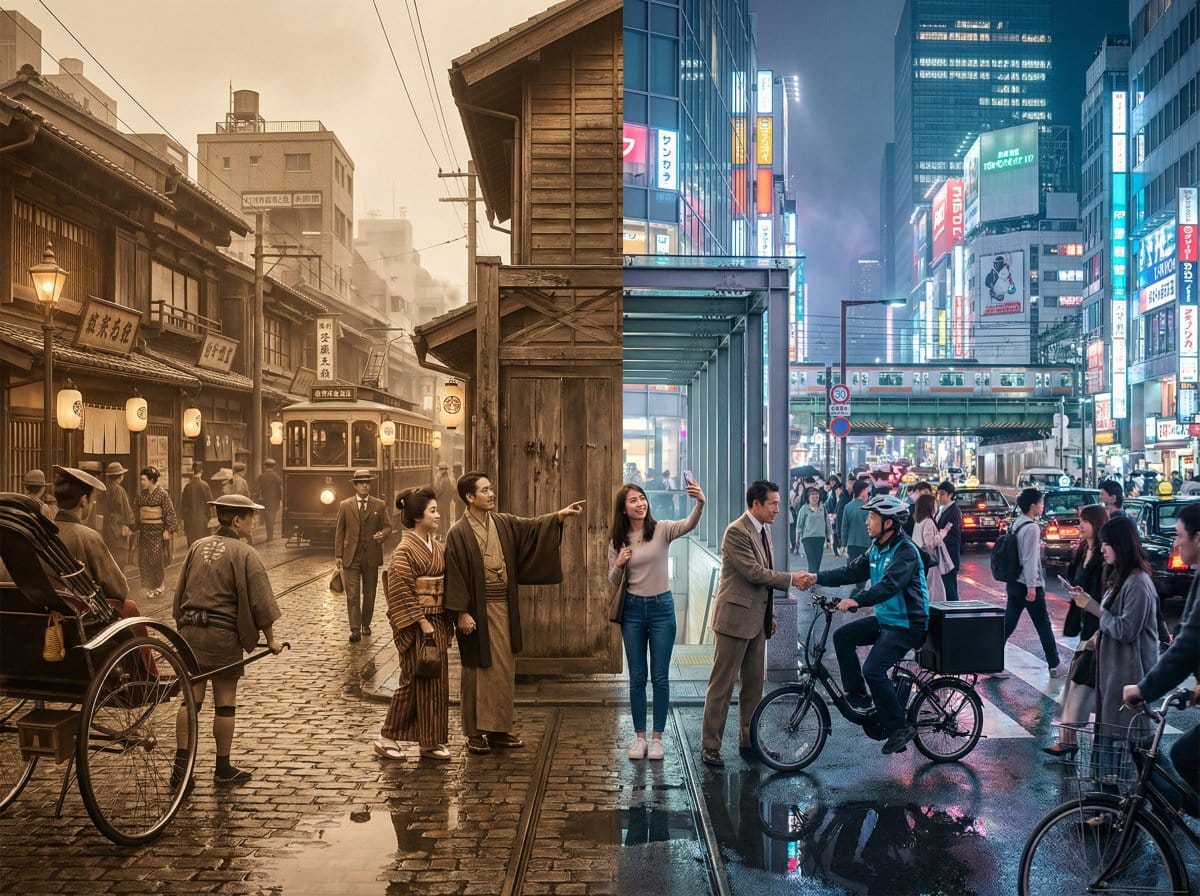
Tokyo Time-Blend Split-Screen - AI Generated AI Art Style Image
유사 이미지 생성

This prompt is optimized for Nano-banana-pro model

Tokyo Time-Blend Split-Screen

A complex, structured prompt for generating a cinematic wide shot of Tokyo, seamlessly blending the 1920s and the present day in a split-screen composition, detailing environmental elements, lighting, and the dynamic interaction between the two eras.

예시 프롬프트
Horizontal split-screen cinematic wide shot of {argument name="city" default="Tokyo city"} seamlessly blending two eras: {argument name="era 1" default="1920s"} on the left and {argument name="era 2" default="present day"} on the right, merging organically in the center with transitional materials and interactions between people from both times., "subject": "Tokyo city split between 1920s and present day with people interacting across eras", "environment": "Urban Tokyo streetscape transitioning from wooden machiya shops, tiled roofs, narrow alleys, rickshaws, vintage trams and paper lanterns on the left to glass-and-steel skyscrapers, neon-lit storefronts, elevated train lines, LED billboards, sleek cafes, bicycles, taxis and compact cars on the right; wet reflective pavement and blended center where gates, tracks and lighting morph into modern equivalents", "style": "photorealistic, cinematic, ultra-detailed, historically accurate period detail on left and crisp contemporary detail on right", "lighting": "mixed cinematic lighting: soft warm sepia fill on the 1920s left with subtle film-grain texture, cool neon backlight and high-contrast illumination on the present-day right, volumetric city fog and atmospheric particles across the scene, balanced color grading to preserve both eras", "camera": { "angle": "eye-level wide-angle", "distance": "wide shot (cinematic 4:3 composition)", "depth_of_field": "dynamic depth of field (selective focus across planes)", "focus": "primary focus on the midground center where era interactions occur, with layered focus into foreground and background details" }, "composition": { "framing": "horizontal split-screen blended composition, cinematic wide 4:3 framing", "subject_placement": "left half dominated by 1920s elements, right half by modern elements, central seam blended organically with key human interactions placed near center rule-of-thirds points", "foreground": "wet pavement reflections, close pedestrians from both eras, rickshaw wheel and modern bicycle tire, scattered period props newspapers and modern items smartphones", "background": "left: narrow alleys, vintage trams, tiled roofs and paper signs; right: elevated train lines, skyscrapers, LED billboards and neon storefronts; distant atmospheric fog and city lights unifying the skyline", "negative_space": "subtle open sky and upper building massing to avoid clutter while maintaining cinematic breadth" }, "mood": "cinematic, nostalgic on the left, vivid and energetic on the right, overall sense of curiosity and surprise from human interactions, narrative and time-travel intrigue", "color_palette": [ "sepia brown", "warm amber", "cool cyan", "neon magenta", "neutral concrete grays" ], "technical": { "render_type": "photorealistic photo", "post_processing": [] }
AI로 생성하기

Pro Tip:

This ai art style prompt has been tested and optimized for best results. You can modify it slightly to customize the output while keeping the core structure intact.

AI 모델
Nano-banana-pro
Category
AI Art Style

자주 묻는 질문

ai art style 프롬프트에 대해 알아야 할 모든 것

이 ai art style 프롬프트는 어떻게 사용하나요?

위의 "AI로 생성하기" 버튼을 클릭하기만 하면 이 AI Art Style 프롬프트가 미리 입력된 AI 이미지 생성기로 이동합니다. 추가로 맞춤 설정하거나 바로 이미지를 생성할 수 있습니다. AI가 프롬프트를 해석하고 사용자의 설명에 따라 놀라운 ai art 비주얼을 만들어냅니다.

이 프롬프트를 특정 요구에 맞게 수정할 수 있나요?

물론입니다! 프롬프트를 복사하여 원하는 대로 자유롭게 맞춤 설정하세요. ai art 아트웍의 경우 스타일, 조명, 구도, 분위기 등에 대한 세부 정보를 추가해 보세요. 설명이 구체적일수록 AI가 창의적인 비전을 더 잘 이해할 수 있습니다. 더 많은 기술을 배우려면 ai art 프롬프트를 살펴보세요.

ai art style에 가장 적합한 AI 모델은 무엇인가요?

이 ai art 프롬프트는 Nano Banana, Flux, GPT-Image를 포함한 대부분의 최신 AI 이미지 생성기와 호환됩니다. 각 모델은 다른 측면에서 뛰어납니다. Nano Banana는 ai art 스타일에 탁월하고, Flux는 포토리얼리스틱한 결과물을 제공합니다.

좋은 ai art style 프롬프트란 무엇인가요?

훌륭한 ai art 프롬프트에는 구체적인 주제 세부사항, 아트 스타일 참조, 조명 조건(부드러운 조명, 드라마틱한 그림자), 색상 팔레트, 분위기, 기술 사양(4K, 디테일, HD) 등이 포함됩니다. 효과적인 패턴을 보려면 예시 프롬프트를 참고하세요.

이 프롬프트는 무료로 사용할 수 있나요?

네! 라이브러리에 있는 모든 프롬프트는 개인적 및 상업적 용도로 완전히 무료입니다. 제한 없이 ai art 아트웍을 복사, 수정, 제작하세요.

멋진 이미지를 만들 준비가 되셨나요?

이 프롬프트로 놀라운 AI 이미지 생성을 시작하거나, 방대한 프롬프트 라이브러리에서 더 많은 영감을 얻으세요.