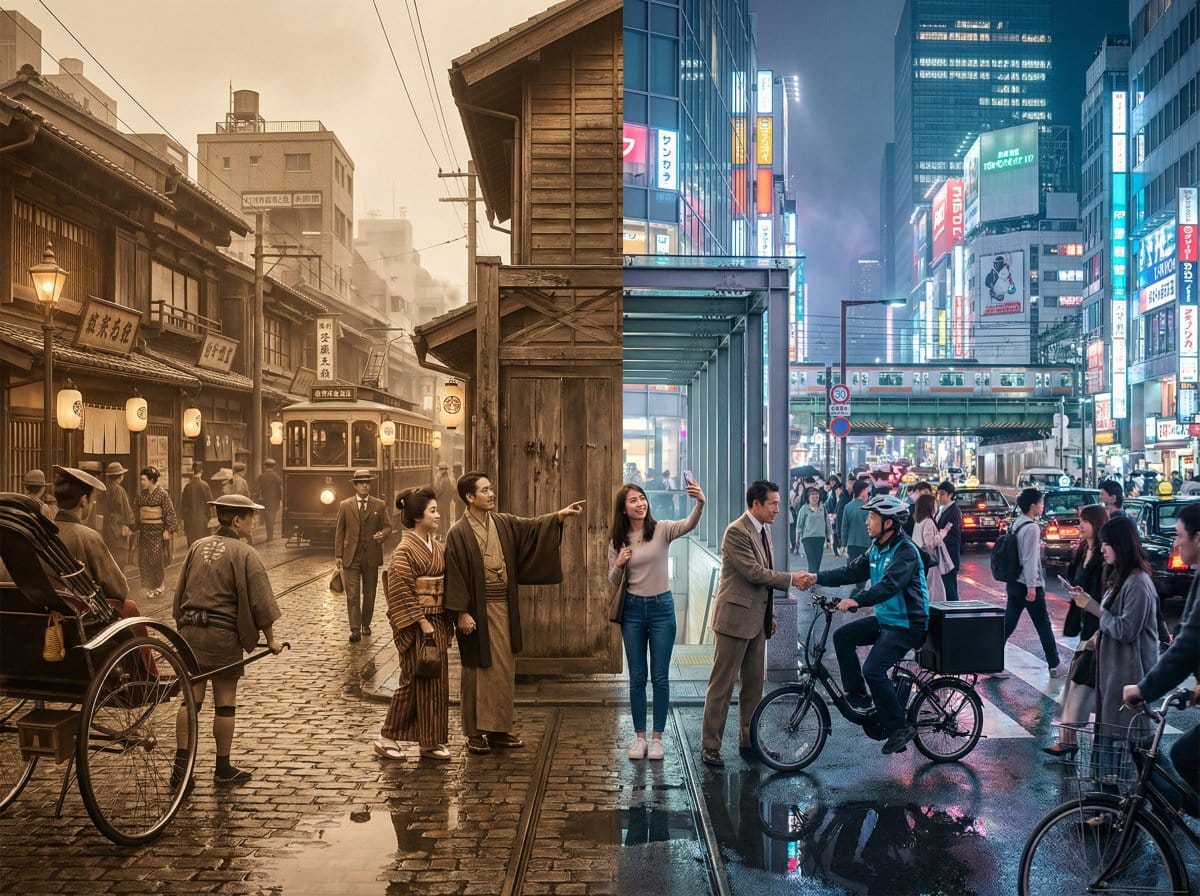
Tokyo Time-Blend Split-Screen - AI Generated AI Art Style Image
類似画像を生成

This prompt is optimized for Nano-banana-pro model

Tokyo Time-Blend Split-Screen

A complex, structured prompt for generating a cinematic wide shot of Tokyo, seamlessly blending the 1920s and the present day in a split-screen composition, detailing environmental elements, lighting, and the dynamic interaction between the two eras.

プロンプト例
Horizontal split-screen cinematic wide shot of {argument name="city" default="Tokyo city"} seamlessly blending two eras: {argument name="era 1" default="1920s"} on the left and {argument name="era 2" default="present day"} on the right, merging organically in the center with transitional materials and interactions between people from both times., "subject": "Tokyo city split between 1920s and present day with people interacting across eras", "environment": "Urban Tokyo streetscape transitioning from wooden machiya shops, tiled roofs, narrow alleys, rickshaws, vintage trams and paper lanterns on the left to glass-and-steel skyscrapers, neon-lit storefronts, elevated train lines, LED billboards, sleek cafes, bicycles, taxis and compact cars on the right; wet reflective pavement and blended center where gates, tracks and lighting morph into modern equivalents", "style": "photorealistic, cinematic, ultra-detailed, historically accurate period detail on left and crisp contemporary detail on right", "lighting": "mixed cinematic lighting: soft warm sepia fill on the 1920s left with subtle film-grain texture, cool neon backlight and high-contrast illumination on the present-day right, volumetric city fog and atmospheric particles across the scene, balanced color grading to preserve both eras", "camera": { "angle": "eye-level wide-angle", "distance": "wide shot (cinematic 4:3 composition)", "depth_of_field": "dynamic depth of field (selective focus across planes)", "focus": "primary focus on the midground center where era interactions occur, with layered focus into foreground and background details" }, "composition": { "framing": "horizontal split-screen blended composition, cinematic wide 4:3 framing", "subject_placement": "left half dominated by 1920s elements, right half by modern elements, central seam blended organically with key human interactions placed near center rule-of-thirds points", "foreground": "wet pavement reflections, close pedestrians from both eras, rickshaw wheel and modern bicycle tire, scattered period props newspapers and modern items smartphones", "background": "left: narrow alleys, vintage trams, tiled roofs and paper signs; right: elevated train lines, skyscrapers, LED billboards and neon storefronts; distant atmospheric fog and city lights unifying the skyline", "negative_space": "subtle open sky and upper building massing to avoid clutter while maintaining cinematic breadth" }, "mood": "cinematic, nostalgic on the left, vivid and energetic on the right, overall sense of curiosity and surprise from human interactions, narrative and time-travel intrigue", "color_palette": [ "sepia brown", "warm amber", "cool cyan", "neon magenta", "neutral concrete grays" ], "technical": { "render_type": "photorealistic photo", "post_processing": [] }
AIで生成

Pro Tip:

This ai art style prompt has been tested and optimized for best results. You can modify it slightly to customize the output while keeping the core structure intact.

AIモデル
Nano-banana-pro
Category
AI Art Style

よくある質問

ai art styleプロンプトについて知っておくべきことすべて

このai art styleプロンプトはどうやって使うのですか?

上の「AIで生成」ボタンをクリックするだけで、このAI Art Styleプロンプトが入力済みのAI画像生成ツールに移動します。さらにカスタマイズしたり、直接画像を生成したりできます。私たちのAIがプロンプトを解釈し、あなたの説明に基づいて素晴らしいai artビジュアルを作成します。

このプロンプトを自分の特定のニーズに合わせて変更できますか?

もちろんです!プロンプトをコピーして、あなたのビジョンに合わせて自由にカスタマイズしてください。ai artアート作品の場合は、スタイル、照明、構図、雰囲気などの詳細を追加してみてください。より具体的に説明するほど、AIがあなたの創造的なビジョンを理解しやすくなります。私たちのai artプロンプトを閲覧して、さらなるテクニックを学びましょう。

ai art styleにはどのAIモデルが最適ですか?

このai artプロンプトは、Nano Banana、Flux、GPT-Imageなど、最新のAI画像生成ツールのほとんどで動作します。モデルによって得意分野が異なり、Nano Bananaはai artスタイルに優れ、Fluxはフォトリアルな結果を提供します。

良いai art styleプロンプトとはどのようなものですか?

優れたai artプロンプトには、具体的な被写体の詳細、アートスタイルの参考、照明条件(柔らかな光、劇的な影)、カラーパレット、雰囲気、技術仕様(4K、詳細、HD)などが含まれます。効果的なパターンを確認するには、サンプルプロンプトを研究してください。

このプロンプトは無料で使えますか?

はい!ライブラリ内のすべてのプロンプトは、個人用・商用ともに完全に無料です。制限なく、ai artアート作品をコピー、変更、作成していただけます。

素晴らしい画像を作成する準備はできましたか?

このプロンプトを使って素晴らしいAI画像の生成を始めるか、豊富なプロンプトライブラリを探索してさらなるインスピレーションを得てください。