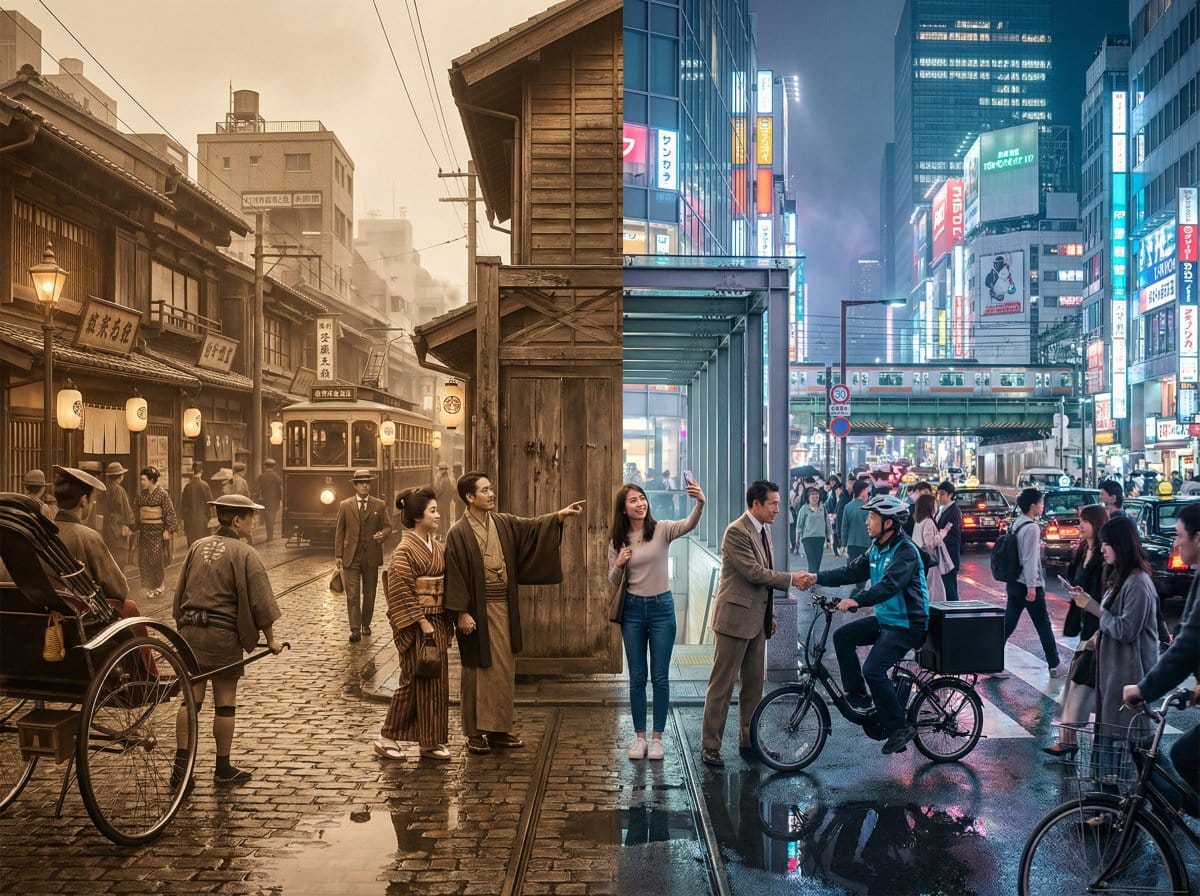
Tokyo Time-Blend Split-Screen - AI Generated AI Art Style Image
Générer une image similaire

This prompt is optimized for Nano-banana-pro model

Tokyo Time-Blend Split-Screen

A complex, structured prompt for generating a cinematic wide shot of Tokyo, seamlessly blending the 1920s and the present day in a split-screen composition, detailing environmental elements, lighting, and the dynamic interaction between the two eras.

Exemple de prompt
Horizontal split-screen cinematic wide shot of {argument name="city" default="Tokyo city"} seamlessly blending two eras: {argument name="era 1" default="1920s"} on the left and {argument name="era 2" default="present day"} on the right, merging organically in the center with transitional materials and interactions between people from both times., "subject": "Tokyo city split between 1920s and present day with people interacting across eras", "environment": "Urban Tokyo streetscape transitioning from wooden machiya shops, tiled roofs, narrow alleys, rickshaws, vintage trams and paper lanterns on the left to glass-and-steel skyscrapers, neon-lit storefronts, elevated train lines, LED billboards, sleek cafes, bicycles, taxis and compact cars on the right; wet reflective pavement and blended center where gates, tracks and lighting morph into modern equivalents", "style": "photorealistic, cinematic, ultra-detailed, historically accurate period detail on left and crisp contemporary detail on right", "lighting": "mixed cinematic lighting: soft warm sepia fill on the 1920s left with subtle film-grain texture, cool neon backlight and high-contrast illumination on the present-day right, volumetric city fog and atmospheric particles across the scene, balanced color grading to preserve both eras", "camera": { "angle": "eye-level wide-angle", "distance": "wide shot (cinematic 4:3 composition)", "depth_of_field": "dynamic depth of field (selective focus across planes)", "focus": "primary focus on the midground center where era interactions occur, with layered focus into foreground and background details" }, "composition": { "framing": "horizontal split-screen blended composition, cinematic wide 4:3 framing", "subject_placement": "left half dominated by 1920s elements, right half by modern elements, central seam blended organically with key human interactions placed near center rule-of-thirds points", "foreground": "wet pavement reflections, close pedestrians from both eras, rickshaw wheel and modern bicycle tire, scattered period props newspapers and modern items smartphones", "background": "left: narrow alleys, vintage trams, tiled roofs and paper signs; right: elevated train lines, skyscrapers, LED billboards and neon storefronts; distant atmospheric fog and city lights unifying the skyline", "negative_space": "subtle open sky and upper building massing to avoid clutter while maintaining cinematic breadth" }, "mood": "cinematic, nostalgic on the left, vivid and energetic on the right, overall sense of curiosity and surprise from human interactions, narrative and time-travel intrigue", "color_palette": [ "sepia brown", "warm amber", "cool cyan", "neon magenta", "neutral concrete grays" ], "technical": { "render_type": "photorealistic photo", "post_processing": [] }
Générer avec l'IA

Pro Tip:

This ai art style prompt has been tested and optimized for best results. You can modify it slightly to customize the output while keeping the core structure intact.

Modèle d'IA
Nano-banana-pro
Category
AI Art Style

Questions fréquentes

Tout ce que vous devez savoir sur les prompts ai art style

Comment utiliser ce prompt ai art style ?

Cliquez simplement sur le bouton "Générer avec l'IA" ci-dessus, et vous serez redirigé vers notre générateur d'images IA avec ce prompt AI Art Style pré-rempli. Vous pouvez le personnaliser davantage ou générer des images directement. Notre IA interprétera le prompt et créera de superbes visuels ai art basés sur votre description.

Puis-je modifier ce prompt pour mes besoins spécifiques ?

Absolument ! N'hésitez pas à copier le prompt et à le personnaliser selon votre vision. Pour les œuvres d'art ai art, essayez d'ajouter des détails sur le style, l'éclairage, la composition ou l'ambiance. Plus vous êtes descriptif, mieux l'IA pourra comprendre votre vision créative. Parcourez nos prompts ai art pour apprendre plus de techniques.

Quels modèles d'IA fonctionnent le mieux pour ai art style ?

Ce prompt ai art fonctionne avec la plupart des générateurs d'images IA modernes, y compris Nano Banana, Flux et GPT-Image. Différents modèles excellent dans différents aspects - Nano Banana est excellent pour les styles ai art, tandis que Flux offre des résultats photoréalistes.

Qu'est-ce qui fait un bon prompt ai art style ?

Les excellents prompts ai art incluent : des détails spécifiques sur le sujet, des références de style artistique, des conditions d'éclairage (lumière douce, ombres dramatiques), une palette de couleurs, une ambiance/atmosphère et des spécifications techniques (4K, détaillé, HD). Étudiez nos exemples de prompts pour voir des modèles efficaces.

Ce prompt est-il gratuit ?

Oui ! Tous les prompts de notre bibliothèque sont entièrement gratuits pour un usage personnel et commercial. Copiez, modifiez et créez d'étonnantes œuvres d'art ai art sans aucune restriction.

Prêt à créer des images incroyables ?

Commencez à générer de superbes images IA avec ce prompt ou explorez notre vaste bibliothèque de prompts pour plus d'inspiration.