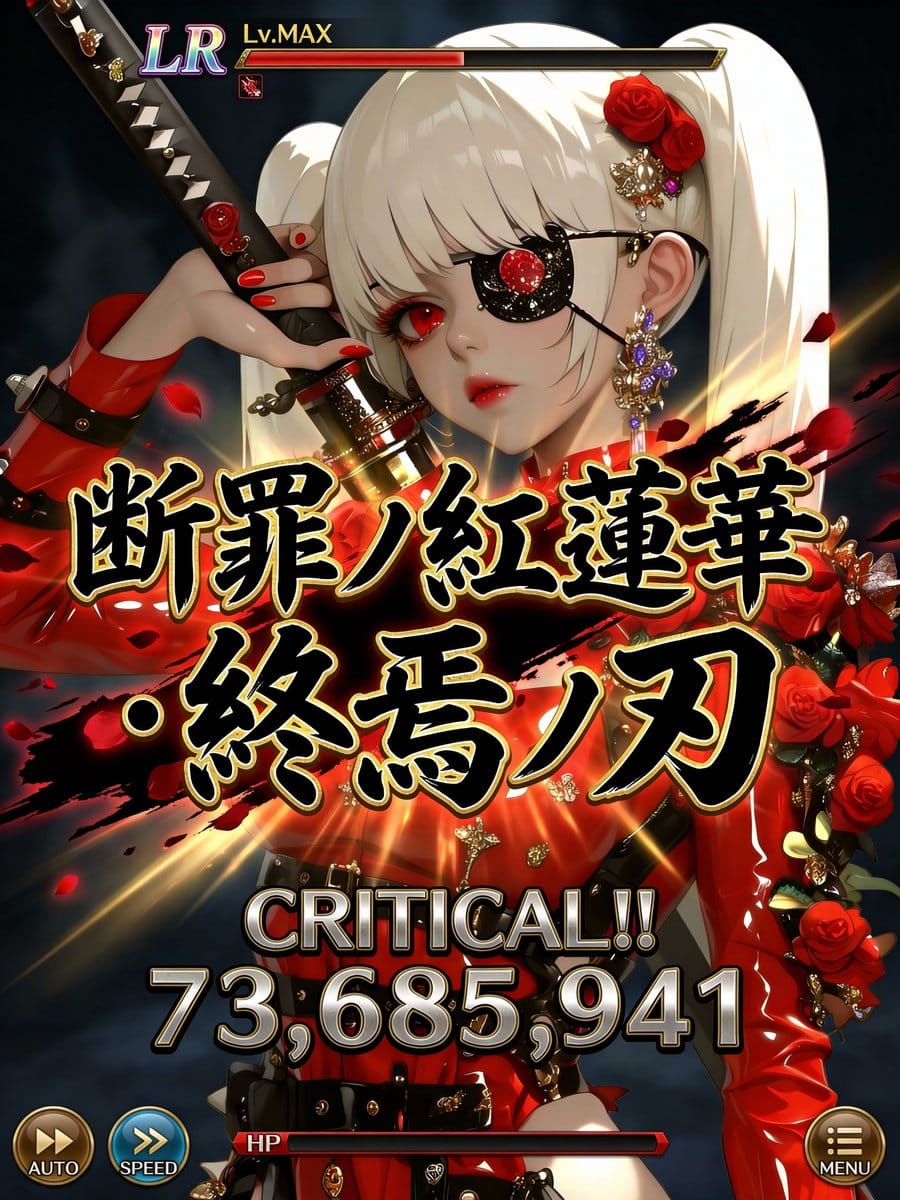
예시 프롬프트
Quality: Ultra High Quality / 4K equivalent / High definition / High contrast
Format: Special move activation scene UI for the latest smartphone games
Usage: Official game-level screenshots shared on social media ────────────────────
[Most Important: Complete Fixation of Character Art Style]
・Do not change the facial features, eye shape, pupil texture, contour, hairstyle, coloring, color usage, or atmosphere of the character in the input illustration at all.
・Prohibit changing the character into a different person, a different artist's style, or changing the art style.
・Treat the character as an “extension of the original illustration.”
・Prohibit redrawing, redesigning, or reinterpretation. [Scope of Inference Allowed]
・Inference is limited only to the following: UI / Text / Effects / Damage numerical value / Direction
・The character's appearance, perceived age, and impression are completely fixed.
──────────────────── [Composition/Camera]
・Bust-up to waist-up composition.
・The character occupies 60-70% of the screen.
・The face, especially the “eyes,” should be positioned toward the top or sides of the screen.
・Do not place any text, UI, or effects around the eyes.
・Full-body composition is prohibited. ────────────────────
[Special Move Name (Main Subject, Maximum Display)]
・Fixed display in the center of the screen.
・Extra-thick, extra-large Japanese brush script.
・The maximum size currently possible.
・Part of the text extends off-screen.
・Absolutely do not overlap the character's face, especially the eyes. [Gold Border of Move Name (Fine Adjustment, Important)]
・Adjust the gold border to be “slightly thin.”
・Tighten the border to increase text density.
・Keep the gold glow subdued, prioritizing contrast with black solid color.
・Prioritize logo feel and weight, reducing flashiness by one level. [Rule for Generating Special Move Name]
・Generate a completely original Japanese move name each time, based on the world view, attribute, and atmosphere of the input illustration.
・Chuunibyou-style and profound.
・Include elements such as mythology, judgment, azure ice, crimson lotus, demise, machine, and divinity.
・Prohibit existing work names, proper nouns, examples, or samples.
・Do not display “Example,” “Sample,” or “placeholder” at all.
──────────────────── [Move Power (Variable, Optimized)]
・The power of the special move displays a different numerical value each time.
・Damage numerical values are randomly generated within the following range: 12,000,000 ~ 98,000,000 ・Fixed maximum value is prohibited.
・Prohibit repeating digits, maxed-out values, or exact matches.
・Prioritize natural, strong-looking, non-uniform numerical values. [Damage Numerical Font (Weight Enhancement)]
・The font is thick, angular, and has a low center of gravity.
・Slightly wider horizontally, not overly compressed vertically.
・Metallic/rock-like massiveness.
・Subdued glow, using shadow and three-dimensionality to convey weight.
・Gives the impression that the “numbers themselves are heavy.” [Power Display Composition]
・CRITICAL!! must be displayed.
・Damage numerical value has the maximum presence in the center of the screen.
・Visual flow: CRITICAL → Numerical Value → Move Name.
──────────────────── [OVERKILL Display Rule (Most Important)]
・Do not display OVERKILL text at all.
・Do not use it anywhere in the text, UI, or effects.
──────────────────── [Character Information UI]
・Rarity (UR / LR)
・Lv.MAX
・Small and consolidated at the top of the screen.
・Does not assert itself more than the character. [HP/Gauge]
・HP bar is thinly placed at the bottom.
・Convey that HP is 0 or less only through the gauge representation.
・Prohibit emphasis via text. [Other UI]
・AUTO / SPEED / MENU are placed minimally at the edge of the screen.
・Semi-transparent design, not information-overloaded.
──────────────────── [Direction Policy]
・Only the center (Move Name + Damage) moves intensely.
・The character's face, eyes, and expression remain calm.
・“Art style is static, text and numbers are heavy, effects are minimal but strong.” [Color Design]
・Black × Gold × Attribute Color
・Calm tones around the face.
・Maximum contrast in the center.
──────────────────── [Strict Compliance Items]
・Absolutely do not change the character's art style.
・Do not overlap text or UI on the eyes.
・Move name is centered and maximum size.
・Do not display OVERKILL.
・Do not fix the damage numerical value.
・Do not display explanatory text, examples, or supplementary text.
Pro Tip:
This character style prompt has been tested and optimized for best results. You can modify it slightly to customize the output while keeping the core structure intact.