
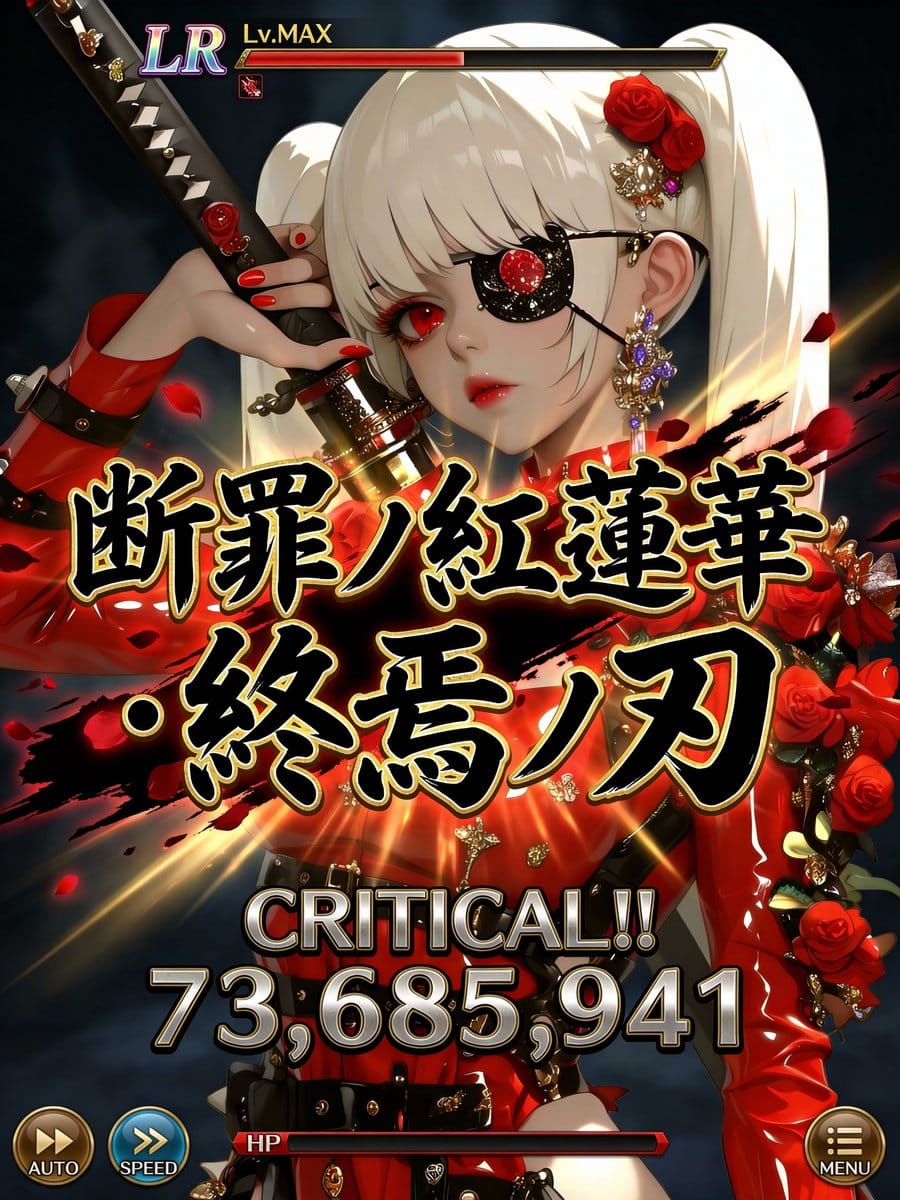
Social Game Special Move Production Prompt for Nano Banana Pro

A highly detailed, multi-section prompt designed to generate a screen capture of a social game's special move sequence (cut-in, move name, damage display). It strictly requires maintaining the character's original art style from a reference image while in

Indicación de ejemplo
Quality: Ultra High Quality / 4K equivalent / High definition / High contrast Format: Special move activation scene UI for the latest smartphone games Usage: Official game-level screenshots shared on social media ──────────────────── [Most Important: Complete Fixation of Character Art Style] ・Do not change the facial features, eye shape, pupil texture, contour, hairstyle, coloring, color usage, or atmosphere of the character in the input illustration at all. ・Prohibit changing the character into a different person, a different artist's style, or changing the art style. ・Treat the character as an “extension of the original illustration.” ・Prohibit redrawing, redesigning, or reinterpretation. [Scope of Inference Allowed] ・Inference is limited only to the following: UI / Text / Effects / Damage numerical value / Direction ・The character's appearance, perceived age, and impression are completely fixed. ──────────────────── [Composition/Camera] ・Bust-up to waist-up composition. ・The character occupies 60-70% of the screen. ・The face, especially the “eyes,” should be positioned toward the top or sides of the screen. ・Do not place any text, UI, or effects around the eyes. ・Full-body composition is prohibited. ──────────────────── [Special Move Name (Main Subject, Maximum Display)] ・Fixed display in the center of the screen. ・Extra-thick, extra-large Japanese brush script. ・The maximum size currently possible. ・Part of the text extends off-screen. ・Absolutely do not overlap the character's face, especially the eyes. [Gold Border of Move Name (Fine Adjustment, Important)] ・Adjust the gold border to be “slightly thin.” ・Tighten the border to increase text density. ・Keep the gold glow subdued, prioritizing contrast with black solid color. ・Prioritize logo feel and weight, reducing flashiness by one level. [Rule for Generating Special Move Name] ・Generate a completely original Japanese move name each time, based on the world view, attribute, and atmosphere of the input illustration. ・Chuunibyou-style and profound. ・Include elements such as mythology, judgment, azure ice, crimson lotus, demise, machine, and divinity. ・Prohibit existing work names, proper nouns, examples, or samples. ・Do not display “Example,” “Sample,” or “placeholder” at all. ──────────────────── [Move Power (Variable, Optimized)] ・The power of the special move displays a different numerical value each time. ・Damage numerical values are randomly generated within the following range: 12,000,000 ~ 98,000,000 ・Fixed maximum value is prohibited. ・Prohibit repeating digits, maxed-out values, or exact matches. ・Prioritize natural, strong-looking, non-uniform numerical values. [Damage Numerical Font (Weight Enhancement)] ・The font is thick, angular, and has a low center of gravity. ・Slightly wider horizontally, not overly compressed vertically. ・Metallic/rock-like massiveness. ・Subdued glow, using shadow and three-dimensionality to convey weight. ・Gives the impression that the “numbers themselves are heavy.” [Power Display Composition] ・CRITICAL!! must be displayed. ・Damage numerical value has the maximum presence in the center of the screen. ・Visual flow: CRITICAL → Numerical Value → Move Name. ──────────────────── [OVERKILL Display Rule (Most Important)] ・Do not display OVERKILL text at all. ・Do not use it anywhere in the text, UI, or effects. ──────────────────── [Character Information UI] ・Rarity (UR / LR) ・Lv.MAX ・Small and consolidated at the top of the screen. ・Does not assert itself more than the character. [HP/Gauge] ・HP bar is thinly placed at the bottom. ・Convey that HP is 0 or less only through the gauge representation. ・Prohibit emphasis via text. [Other UI] ・AUTO / SPEED / MENU are placed minimally at the edge of the screen. ・Semi-transparent design, not information-overloaded. ──────────────────── [Direction Policy] ・Only the center (Move Name + Damage) moves intensely. ・The character's face, eyes, and expression remain calm. ・“Art style is static, text and numbers are heavy, effects are minimal but strong.” [Color Design] ・Black × Gold × Attribute Color ・Calm tones around the face. ・Maximum contrast in the center. ──────────────────── [Strict Compliance Items] ・Absolutely do not change the character's art style. ・Do not overlap text or UI on the eyes. ・Move name is centered and maximum size. ・Do not display OVERKILL. ・Do not fix the damage numerical value. ・Do not display explanatory text, examples, or supplementary text.
Generar con IA
Modelo de IA
Nano-banana-pro
Autor

Preguntas frecuentes

Todo lo que necesitas saber sobre indicaciones de character style

¿Cómo uso esta indicación de character style?

Simplemente haz clic en el botón "Generar con IA" arriba, y serás llevado a nuestro generador de imágenes con IA con esta indicación de Character Style pre-llenada. Puedes personalizarla más o generar imágenes directamente. Nuestra IA interpretará la indicación y creará impresionantes visuales de character basados en tu descripción.

¿Puedo modificar esta indicación para mis necesidades específicas?

¡Por supuesto! Siéntete libre de copiar la indicación y personalizarla para que coincida con tu visión. Para obras de arte de character, intenta añadir detalles sobre estilo, iluminación, composición o ambiente. Cuanto más descriptivo seas, mejor podrá la IA entender tu visión creativa. Explora nuestras indicaciones de character para aprender más técnicas.

¿Qué modelos de IA funcionan mejor para character style?

Esta indicación de character funciona con la mayoría de los generadores de imágenes de IA modernos, incluyendo Nano Banana, Flux y GPT-Image. Diferentes modelos sobresalen en diferentes aspectos - Nano Banana es excelente para estilos character, mientras que Flux ofrece resultados fotorrealistas.

¿Qué hace una buena indicación de character style?

Las grandes indicaciones de character incluyen: detalles específicos del sujeto, referencias de estilo artístico, condiciones de iluminación (luz suave, sombras dramáticas), paleta de colores, ambiente/atmósfera y especificaciones técnicas (4K, detallado, HD). Estudia nuestras indicaciones de ejemplo para ver patrones efectivos.

¿Esta indicación es gratuita?

¡Sí! Todas las indicaciones en nuestra biblioteca son completamente gratuitas para uso personal y comercial. Copia, modifica y crea increíbles obras de arte de character sin restricciones.

More Prompts ➜
Anime-style seated portrait from face image - AI Image Prompt
Anime-style seated portrait from face image
A Japanese prompt that takes a face image and generates an anime-leaning digital illustration of the person kneeling in a beautiful dress on a velvet pedestal.
by Kitten Kiki
A4 manga about how amazing Nano Banana Pro is - AI Image Prompt
A4 manga about how amazing Nano Banana Pro is
A prompt that uses an existing character image to create an A4-proportioned manga where the character introduces and explains how impressive Nano Banana Pro is.
by ぐふとくく
Times Square icon on many screens - AI Image Prompt
Times Square icon on many screens
A short prompt to place your profile icon across many screens in Times Square, ideal for playful, larger‑than‑life avatar renders.
by Higgsfield AI ?
Depth of field shift to focus on man’s face - AI Image Prompt
Depth of field shift to focus on man’s face
An edit prompt that pulls focus onto a man’s face while blurring his hand, great for creating a more dramatic, storytelling portrait look.
by فاطمة المحمادي
Giant person holding Tokyo Tower in a modern cityscape - AI Image Prompt
Giant person holding Tokyo Tower in a modern cityscape
A highly detailed photorealistic prompt comparing GPT Image 1.5 and Gemini Nano banana Pro. It describes a person from a reference photo being enlarged to gigantic proportions, squatting over a modern Tokyo cityscape, and gently holding the Tokyo Tower, e
by そう|n8nで始めるAIエージェント
Combine These Two Photos (Image-to-Image) - AI Image Prompt
Combine These Two Photos (Image-to-Image)
A concise prompt used for image manipulation or image-to-image generation, instructing the model to combine two provided reference photos.
by Zach Moskow

¿Listo para crear imágenes increíbles?

Empieza a generar impresionantes imágenes con IA usando esta indicación o explora nuestra extensa biblioteca de indicaciones para más inspiración.

Generar ahora Explorar todas las indicaciones



