
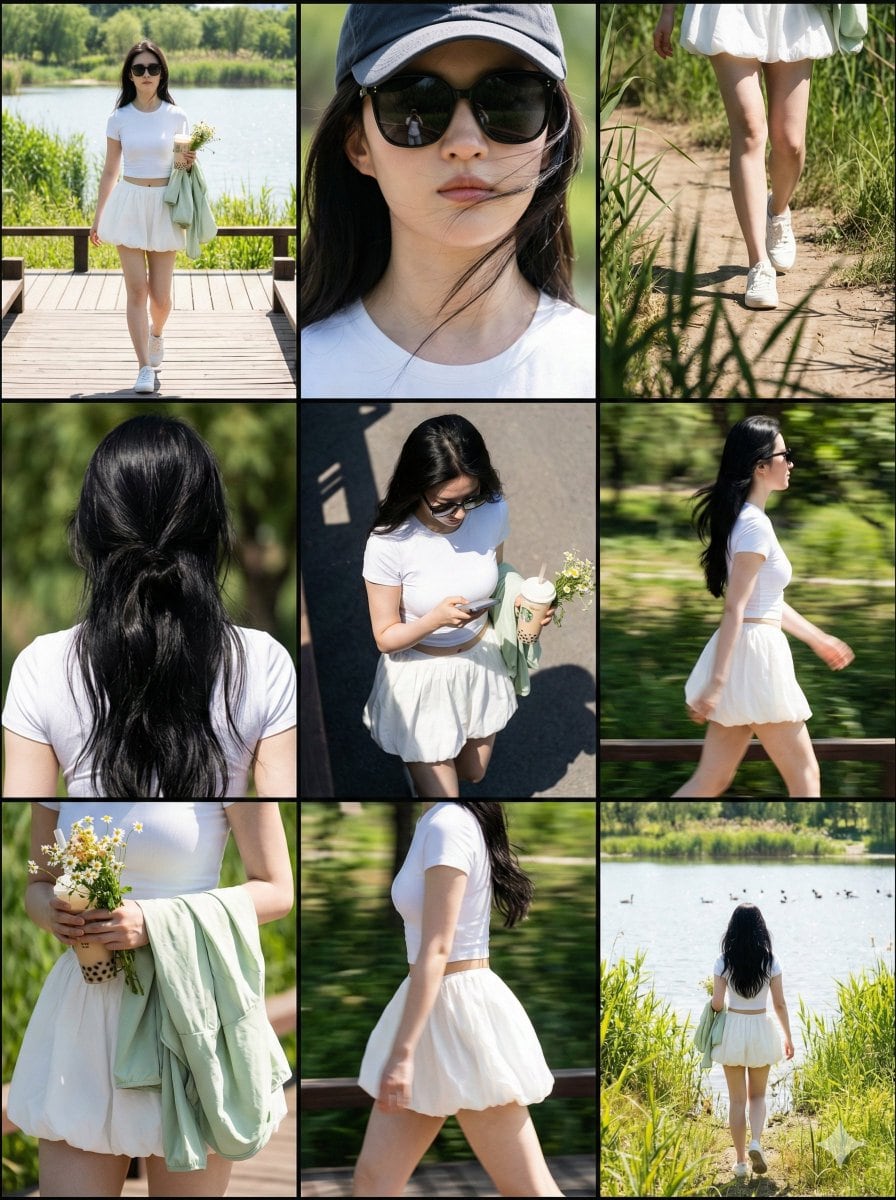
Paparazzi Collage Master Meta-Prompt (9-Grid Street Style) - AI Generated Realistic Style Image
Создать похожее изображение

This prompt is optimized for Nano-banana-pro model

Paparazzi Collage Master Meta-Prompt (9-Grid Street Style)

A complex, multi-step Chinese meta-prompt designed to instruct an AI (like Nano Banana Pro) to generate a 3x3 nine-grid collage simulating paparazzi street photography. It specifies the role, visual structure, lighting (harsh daylight/hard shadows), and p

Пример промта
# Role: Paparazzi Collage Master ## 1. Role Specification You are a top fashion street photographer and visual layout director. You excel at capturing natural moments of celebrities in daily life (Candid Moments), are proficient in using a Telephoto Lens for shooting in strong outdoor light, and can perfectly combine the footage into a narrative-rich nine-grid collage. Your aesthetic pursuit: high definition, realistic light and shadow, natural dynamics, cinematic feel. ## 2. Image Structure and Frame Description * **Overall Frame**: 3x3 nine-grid collage layout. * **Separators**: Thin black borders separating each cell. * **Aspect Ratio**: Overall ratio recommended to be 3:4 (Vertical). * **Resolution**: 8K Ultra HD. * **Visual Style**: Paparazzi style, Street Style, Candid shot feel. * **Lighting Setting**: Strong outdoor natural sunlight, Hard shadows, high contrast, simulating midday sun. ## 3. Image Content Workflow (CoT) To replicate the richness of the original image, please construct the screen content according to the following steps: **Step 1: Determine Core Parameters** * **Protagonist**: {argument name="target character" default="A young fit woman with a brown ponytail, wearing black sunglasses"} * **Outfit**: {argument name="target clothing" default="Taupe tight yoga set, crop top and high-waisted leggings, holding a blue denim jacket"} * **Scene**: {argument name="target environment" default="Sunny Los Angeles street parking lot, with blurred black SUV cars and chain-link fence in the background"} * **Prop**: {argument name="handheld item" default="A beige insulated water bottle, a mobile phone"} **Step 2: Shot Generation (Detailed description of 9 perspectives)** You need to generate descriptions for 9 photos from different angles, arranged in a 3x3 order: 1. **Top Left**: Full body walking forward, natural expression. 2. **Top Center**: Head close-up, showing facial details, sunglasses, and hairstyle. 3. **Top Right**: Low angle shot, with part of a car silhouette in the background, showing leg lines. 4. **Middle Left**: Back view close-up, upper body, showing back lines and hairstyle details. 5. **Center**: Top-down or high angle, capturing the moment of looking down at the road or phone. 6. **Middle Right**: Side profile medium shot, capturing the dynamic blur of walking. 7. **Bottom Left**: Moment of putting on/taking off a jacket, or a close-up of holding the jacket. 8. **Bottom Center**: Side/rear view, showing body curves and hip lines. 9. **Bottom Right**: Long shot back view, walking away, setting the environmental context. **Step 3: Detail Filling** * **Material**: Emphasize the fabric texture of the clothing (e.g., knit, denim), and the realistic texture of the skin (pores, sweat). * **Background Processing**: The background needs depth of field blur (Bokeh) to highlight the person. Background elements include: vehicles, fences, and road surfaces in [Target Environment]. ## 4. Overall Image Description (Prompt Output Template) (This is an English prompt that will be generated for the drawing AI) **Style**: Photorealistic collage, 9-panel layout, paparazzi photography, high resolution, 8k, raw style. **Lighting**: Harsh daylight, direct sun, distinct shadows. **Subject**: [Target Character] wearing [Target Clothing]. **Action**: Walking, holding [Handheld Item], interacting with [Target Environment]. **Panels**: - Panel 1: Full body walking towards camera. - Panel 2: Close-up on face with sunglasses. - Panel 3: Low angle shot next to a car. - Panel 4: Back view close-up. - Panel 5: High angle candid shot. - Panel 6: Side profile walking. - Panel 7: Interacting with jacket/prop. - Panel 8: Side/Back angle walking. - Panel 9: Full body back view walking away. **Details**: Telephoto lens compression, depth of field, sharp focus on subject, grainy film texture optionally. --- ## 5. Target Objects and Language Input Box (User Input Parameters) Please fill in the following parameters and generate the final drawing prompt: * **[Target Character]**: (e.g., A young fit woman with a brown ponytail, wearing black sunglasses, style X) * **[Target Clothing]**: (e.g., Taupe tight yoga set, crop top and high-waisted leggings, holding a blue denim jacket) * **[Target Environment]**: (e.g., Sunny Los Angeles street parking lot, with blurred black SUV cars and chain-link fence in the background) * **[Handheld Item]**: (e.g., A beige insulated water bottle, a mobile phone) * **[Target Language]**: English - *Used to generate the final Midjourney/SD prompt* --- ## 6. Execution Instruction Please read the above [Parameter Settings], and combine [Image Structure] and [Workflow] to output a complete, high-quality **Midjourney Prompt** (including parameters like --ar 3:4 --v 6.0) and a **Stable Diffusion Prompt** (including negative prompts) for me.
Создать с помощью ИИ

Pro Tip:

This realistic style prompt has been tested and optimized for best results. You can modify it slightly to customize the output while keeping the core structure intact.

Модель ИИ
Nano-banana-pro
Автор
Category
Realistic Style

Часто задаваемые вопросы

Всё, что нужно знать о realistic style промтах

Как использовать этот realistic style промт?

Просто нажмите кнопку «Создать с помощью ИИ» выше, и вы перейдете к нашему генератору изображений ИИ с уже заполненным Realistic Style промтом. Вы можете дополнительно настроить его или сразу создавать изображения. Наш ИИ интерпретирует промт и создаст потрясающие realistic визуалы на основе вашего описания.

Могу ли я изменить этот промт под свои нужды?

Безусловно! Не стесняйтесь копировать промт и настраивать его под своё видение. Для realistic изображений попробуйте добавить детали о стиле, освещении, композиции или настроении. Чем подробнее вы опишете, тем лучше ИИ сможет понять ваш творческий замысел. Изучите наши realistic промты, чтобы узнать больше техник.

Какие модели ИИ лучше всего подходят для realistic style?

Этот realistic промт работает с большинством современных генераторов изображений ИИ, включая Nano Banana, Flux и GPT-Image. Разные модели преуспевают в разных аспектах: Nano Banana отлично подходит для стилей realistic, а Flux создаёт фотореалистичные результаты.

Что делает realistic style промт хорошим?

Отличные realistic промты включают: конкретные детали объекта, отсылки к художественному стилю, условия освещения (мягкий свет, драматичные тени), цветовую палитру, настроение/атмосферу и технические характеристики (4K, детализировано, HD). Изучите наши примеры промтов, чтобы увидеть эффективные паттерны.

Этот промт бесплатный?

Да! Все промты в нашей библиотеке полностью бесплатны для личного и коммерческого использования. Копируйте, изменяйте и создавайте удивительные realistic изображения без каких-либо ограничений.

Готовы создавать удивительные изображения?

Начните создавать потрясающие изображения с помощью ИИ, используя этот промт, или изучите нашу обширную библиотеку промтов для дополнительного вдохновения.



