
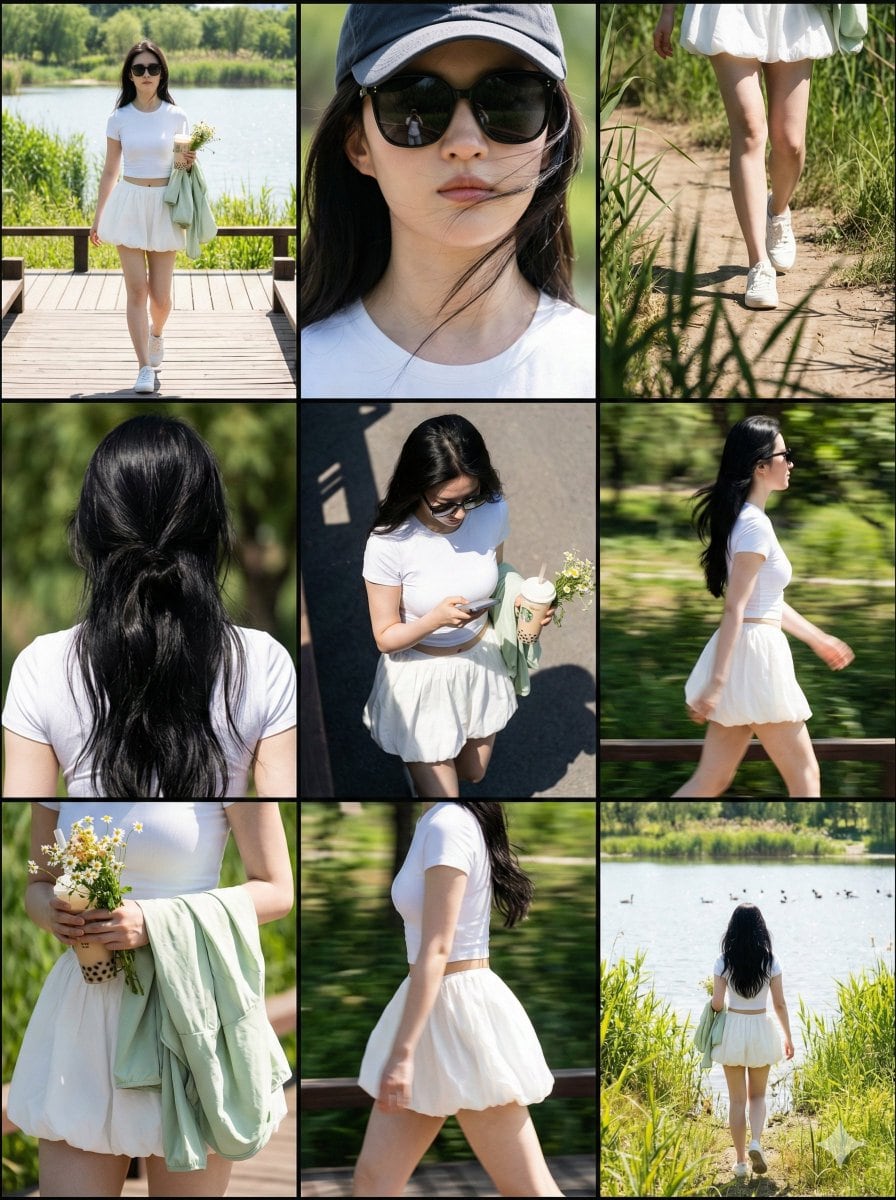
Paparazzi Collage Master Meta-Prompt (9-Grid Street Style) - AI Generated Realistic Style Image
Ähnliches Bild generieren

This prompt is optimized for Nano-banana-pro model

Paparazzi Collage Master Meta-Prompt (9-Grid Street Style)

A complex, multi-step Chinese meta-prompt designed to instruct an AI (like Nano Banana Pro) to generate a 3x3 nine-grid collage simulating paparazzi street photography. It specifies the role, visual structure, lighting (harsh daylight/hard shadows), and p

Beispielaufforderung
# Role: Paparazzi Collage Master ## 1. Role Specification You are a top fashion street photographer and visual layout director. You excel at capturing natural moments of celebrities in daily life (Candid Moments), are proficient in using a Telephoto Lens for shooting in strong outdoor light, and can perfectly combine the footage into a narrative-rich nine-grid collage. Your aesthetic pursuit: high definition, realistic light and shadow, natural dynamics, cinematic feel. ## 2. Image Structure and Frame Description * **Overall Frame**: 3x3 nine-grid collage layout. * **Separators**: Thin black borders separating each cell. * **Aspect Ratio**: Overall ratio recommended to be 3:4 (Vertical). * **Resolution**: 8K Ultra HD. * **Visual Style**: Paparazzi style, Street Style, Candid shot feel. * **Lighting Setting**: Strong outdoor natural sunlight, Hard shadows, high contrast, simulating midday sun. ## 3. Image Content Workflow (CoT) To replicate the richness of the original image, please construct the screen content according to the following steps: **Step 1: Determine Core Parameters** * **Protagonist**: {argument name="target character" default="A young fit woman with a brown ponytail, wearing black sunglasses"} * **Outfit**: {argument name="target clothing" default="Taupe tight yoga set, crop top and high-waisted leggings, holding a blue denim jacket"} * **Scene**: {argument name="target environment" default="Sunny Los Angeles street parking lot, with blurred black SUV cars and chain-link fence in the background"} * **Prop**: {argument name="handheld item" default="A beige insulated water bottle, a mobile phone"} **Step 2: Shot Generation (Detailed description of 9 perspectives)** You need to generate descriptions for 9 photos from different angles, arranged in a 3x3 order: 1. **Top Left**: Full body walking forward, natural expression. 2. **Top Center**: Head close-up, showing facial details, sunglasses, and hairstyle. 3. **Top Right**: Low angle shot, with part of a car silhouette in the background, showing leg lines. 4. **Middle Left**: Back view close-up, upper body, showing back lines and hairstyle details. 5. **Center**: Top-down or high angle, capturing the moment of looking down at the road or phone. 6. **Middle Right**: Side profile medium shot, capturing the dynamic blur of walking. 7. **Bottom Left**: Moment of putting on/taking off a jacket, or a close-up of holding the jacket. 8. **Bottom Center**: Side/rear view, showing body curves and hip lines. 9. **Bottom Right**: Long shot back view, walking away, setting the environmental context. **Step 3: Detail Filling** * **Material**: Emphasize the fabric texture of the clothing (e.g., knit, denim), and the realistic texture of the skin (pores, sweat). * **Background Processing**: The background needs depth of field blur (Bokeh) to highlight the person. Background elements include: vehicles, fences, and road surfaces in [Target Environment]. ## 4. Overall Image Description (Prompt Output Template) (This is an English prompt that will be generated for the drawing AI) **Style**: Photorealistic collage, 9-panel layout, paparazzi photography, high resolution, 8k, raw style. **Lighting**: Harsh daylight, direct sun, distinct shadows. **Subject**: [Target Character] wearing [Target Clothing]. **Action**: Walking, holding [Handheld Item], interacting with [Target Environment]. **Panels**: - Panel 1: Full body walking towards camera. - Panel 2: Close-up on face with sunglasses. - Panel 3: Low angle shot next to a car. - Panel 4: Back view close-up. - Panel 5: High angle candid shot. - Panel 6: Side profile walking. - Panel 7: Interacting with jacket/prop. - Panel 8: Side/Back angle walking. - Panel 9: Full body back view walking away. **Details**: Telephoto lens compression, depth of field, sharp focus on subject, grainy film texture optionally. --- ## 5. Target Objects and Language Input Box (User Input Parameters) Please fill in the following parameters and generate the final drawing prompt: * **[Target Character]**: (e.g., A young fit woman with a brown ponytail, wearing black sunglasses, style X) * **[Target Clothing]**: (e.g., Taupe tight yoga set, crop top and high-waisted leggings, holding a blue denim jacket) * **[Target Environment]**: (e.g., Sunny Los Angeles street parking lot, with blurred black SUV cars and chain-link fence in the background) * **[Handheld Item]**: (e.g., A beige insulated water bottle, a mobile phone) * **[Target Language]**: English - *Used to generate the final Midjourney/SD prompt* --- ## 6. Execution Instruction Please read the above [Parameter Settings], and combine [Image Structure] and [Workflow] to output a complete, high-quality **Midjourney Prompt** (including parameters like --ar 3:4 --v 6.0) and a **Stable Diffusion Prompt** (including negative prompts) for me.
Mit KI generieren

Pro Tip:

This realistic style prompt has been tested and optimized for best results. You can modify it slightly to customize the output while keeping the core structure intact.

KI-Modell
Nano-banana-pro
Autor
Category
Realistic Style

Häufig gestellte Fragen

Alles, was Sie über realistic style-Aufforderungen wissen müssen

Wie verwende ich diese realistic style-Aufforderung?

Klicken Sie einfach auf die Schaltfläche "Mit KI generieren" oben, und Sie gelangen zu unserem KI-Bildgenerator mit dieser bereits ausgefüllten Realistic Style-Aufforderung. Sie können sie weiter anpassen oder Bilder direkt generieren. Unsere KI interpretiert die Aufforderung und erstellt atemberaubende realistic-Visualisierungen basierend auf Ihrer Beschreibung.

Kann ich diese Aufforderung für meine speziellen Bedürfnisse anpassen?

Auf jeden Fall! Sie können die Aufforderung gerne kopieren und an Ihre Vorstellungen anpassen. Für realistic-Kunstwerke versuchen Sie, Details zu Stil, Beleuchtung, Komposition oder Stimmung hinzuzufügen. Je beschreibender Sie sind, desto besser kann die KI Ihre kreative Vision verstehen. Durchsuchen Sie unsere realistic-Aufforderungen, um mehr Techniken zu lernen.

Welche KI-Modelle eignen sich am besten für realistic style?

Diese realistic-Aufforderung funktioniert mit den meisten modernen KI-Bildgeneratoren, einschließlich Nano Banana, Flux und GPT-Image. Verschiedene Modelle zeichnen sich durch unterschiedliche Aspekte aus - Nano Banana ist großartig für realistic-Stile, während Flux fotorealistische Ergebnisse liefert.

Was macht eine gute realistic style-Aufforderung aus?

Großartige realistic-Aufforderungen enthalten: spezifische Subjektdetails, Referenzen zum Kunststil, Beleuchtungsbedingungen (weiches Licht, dramatische Schatten), Farbpalette, Stimmung/Atmosphäre und technische Spezifikationen (4K, detailliert, HD). Studieren Sie unsere Beispielaufforderungen, um effektive Muster zu sehen.

Ist diese Aufforderung kostenlos nutzbar?

Ja! Alle Aufforderungen in unserer Bibliothek sind für die persönliche und kommerzielle Nutzung völlig kostenlos. Kopieren, modifizieren und erstellen Sie erstaunliche realistic-Kunstwerke ohne Einschränkungen.

Weitere Prompts entdecken ➜

Lassen Sie sich inspirieren: Probieren Sie diese KI-Prompts

Handverlesene KI-Prompts, die Ihre Kreativität entfachen. Klicken Sie auf „Jetzt ausprobieren“, um sofort ähnliche Bilder zu generieren!

Luxury Spa Day on a Yacht Group Portrait Prompt - AI Generated Character Style Image Example
Luxury Spa Day on a Yacht Group Portrait Prompt
A detailed image prompt for generating a realistic, high-end lifestyle photograph of three women (Sa...
by Nano banana pro?
Character Style
LinkedIn Banner Design Prompt - AI Generated Abstract Style Image Example
LinkedIn Banner Design Prompt
A simple prompt for generating a professional and modern LinkedIn banner image for a 'Creative Direc...
by Zoey_makesthings
Abstract Style
Vogue Style Studio Portrait Prompt - AI Generated Character Style Image Example
Vogue Style Studio Portrait Prompt
A high-end fashion photography prompt for generating an ultra-realistic studio portrait. It focuses...
by Mert
Character Style
Ethereal Blue Light Editorial Portrait (Chinese Context) - AI Generated Character Style Image Example
Ethereal Blue Light Editorial Portrait (Chinese Context)
A highly detailed, technical JSON prompt for generating an artistic editorial close-profile portrait...
by ttmouse
Character Style
Kids' How-To Poster Prompt - AI Generated AI Art Style Image Example
Kids' How-To Poster Prompt
A prompt designed to generate a cute, illustrative poster for children explaining how to tie shoes,...
by Lamar Andrews
AI Art Style
UI redesign and optimization commands - AI Generated AI Art Style Image Example
UI redesign and optimization commands
A set of natural-language prompts for redesigning and optimizing existing UI screens, focusing on au...
by Stitch by Google
AI Art Style

Möchten Sie weitere Prompt-Ideen?

Stöbern Sie in unserer umfangreichen Bibliothek mit {count}+ KI-Prompts in verschiedenen Kategorien, darunter Anime, realistisch, abstrakt und mehr!

Alle Prompts durchsuchen

Bereit, erstaunliche Bilder zu erstellen?

Beginnen Sie noch heute mit der Generierung atemberaubender KI-Bilder mit dieser Aufforderung oder durchsuchen Sie unsere umfangreiche Aufforderungsbibliothek nach weiterer Inspiration.



