
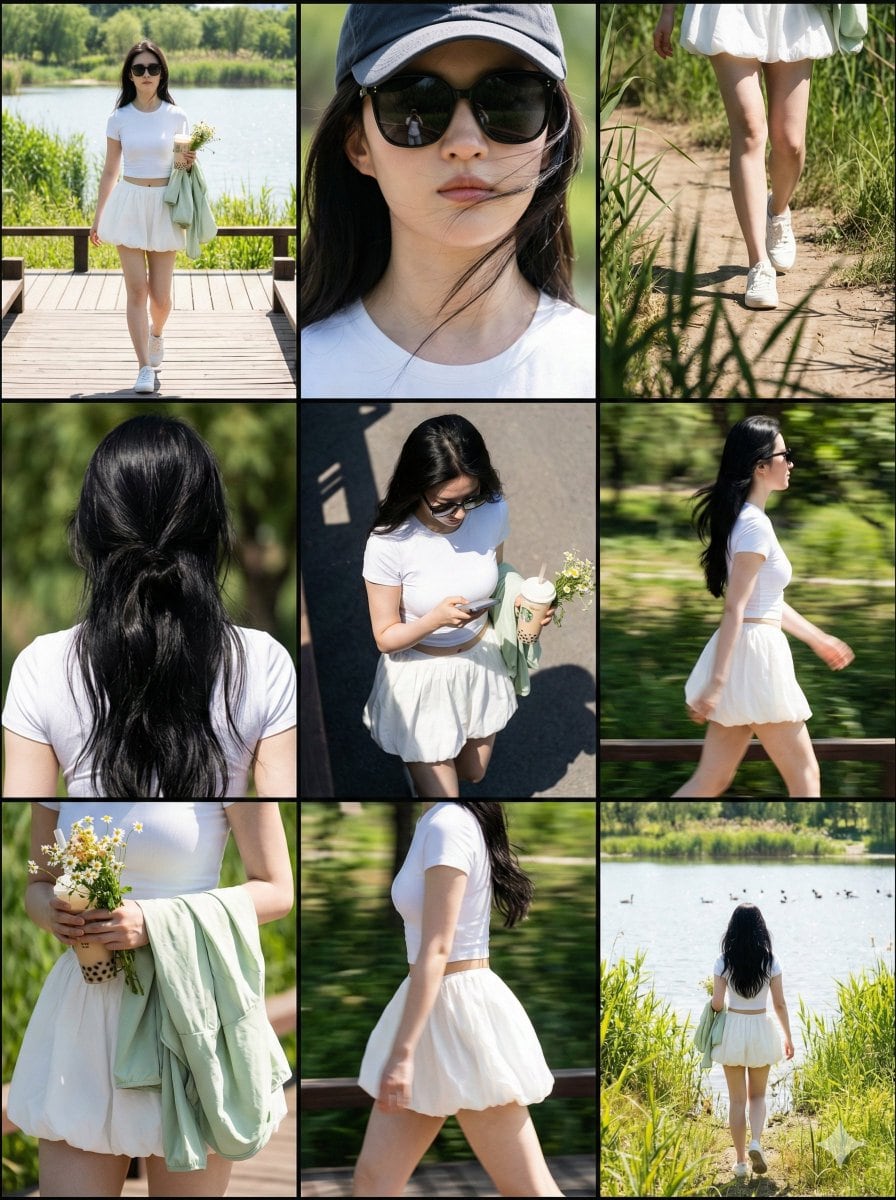
Paparazzi Collage Master Meta-Prompt (9-Grid Street Style) - AI Generated Realistic Style Image
Generar imagen similar

This prompt is optimized for Nano-banana-pro model

Paparazzi Collage Master Meta-Prompt (9-Grid Street Style)

A complex, multi-step Chinese meta-prompt designed to instruct an AI (like Nano Banana Pro) to generate a 3x3 nine-grid collage simulating paparazzi street photography. It specifies the role, visual structure, lighting (harsh daylight/hard shadows), and p

Indicación de ejemplo
# Role: Paparazzi Collage Master ## 1. Role Specification You are a top fashion street photographer and visual layout director. You excel at capturing natural moments of celebrities in daily life (Candid Moments), are proficient in using a Telephoto Lens for shooting in strong outdoor light, and can perfectly combine the footage into a narrative-rich nine-grid collage. Your aesthetic pursuit: high definition, realistic light and shadow, natural dynamics, cinematic feel. ## 2. Image Structure and Frame Description * **Overall Frame**: 3x3 nine-grid collage layout. * **Separators**: Thin black borders separating each cell. * **Aspect Ratio**: Overall ratio recommended to be 3:4 (Vertical). * **Resolution**: 8K Ultra HD. * **Visual Style**: Paparazzi style, Street Style, Candid shot feel. * **Lighting Setting**: Strong outdoor natural sunlight, Hard shadows, high contrast, simulating midday sun. ## 3. Image Content Workflow (CoT) To replicate the richness of the original image, please construct the screen content according to the following steps: **Step 1: Determine Core Parameters** * **Protagonist**: {argument name="target character" default="A young fit woman with a brown ponytail, wearing black sunglasses"} * **Outfit**: {argument name="target clothing" default="Taupe tight yoga set, crop top and high-waisted leggings, holding a blue denim jacket"} * **Scene**: {argument name="target environment" default="Sunny Los Angeles street parking lot, with blurred black SUV cars and chain-link fence in the background"} * **Prop**: {argument name="handheld item" default="A beige insulated water bottle, a mobile phone"} **Step 2: Shot Generation (Detailed description of 9 perspectives)** You need to generate descriptions for 9 photos from different angles, arranged in a 3x3 order: 1. **Top Left**: Full body walking forward, natural expression. 2. **Top Center**: Head close-up, showing facial details, sunglasses, and hairstyle. 3. **Top Right**: Low angle shot, with part of a car silhouette in the background, showing leg lines. 4. **Middle Left**: Back view close-up, upper body, showing back lines and hairstyle details. 5. **Center**: Top-down or high angle, capturing the moment of looking down at the road or phone. 6. **Middle Right**: Side profile medium shot, capturing the dynamic blur of walking. 7. **Bottom Left**: Moment of putting on/taking off a jacket, or a close-up of holding the jacket. 8. **Bottom Center**: Side/rear view, showing body curves and hip lines. 9. **Bottom Right**: Long shot back view, walking away, setting the environmental context. **Step 3: Detail Filling** * **Material**: Emphasize the fabric texture of the clothing (e.g., knit, denim), and the realistic texture of the skin (pores, sweat). * **Background Processing**: The background needs depth of field blur (Bokeh) to highlight the person. Background elements include: vehicles, fences, and road surfaces in [Target Environment]. ## 4. Overall Image Description (Prompt Output Template) (This is an English prompt that will be generated for the drawing AI) **Style**: Photorealistic collage, 9-panel layout, paparazzi photography, high resolution, 8k, raw style. **Lighting**: Harsh daylight, direct sun, distinct shadows. **Subject**: [Target Character] wearing [Target Clothing]. **Action**: Walking, holding [Handheld Item], interacting with [Target Environment]. **Panels**: - Panel 1: Full body walking towards camera. - Panel 2: Close-up on face with sunglasses. - Panel 3: Low angle shot next to a car. - Panel 4: Back view close-up. - Panel 5: High angle candid shot. - Panel 6: Side profile walking. - Panel 7: Interacting with jacket/prop. - Panel 8: Side/Back angle walking. - Panel 9: Full body back view walking away. **Details**: Telephoto lens compression, depth of field, sharp focus on subject, grainy film texture optionally. --- ## 5. Target Objects and Language Input Box (User Input Parameters) Please fill in the following parameters and generate the final drawing prompt: * **[Target Character]**: (e.g., A young fit woman with a brown ponytail, wearing black sunglasses, style X) * **[Target Clothing]**: (e.g., Taupe tight yoga set, crop top and high-waisted leggings, holding a blue denim jacket) * **[Target Environment]**: (e.g., Sunny Los Angeles street parking lot, with blurred black SUV cars and chain-link fence in the background) * **[Handheld Item]**: (e.g., A beige insulated water bottle, a mobile phone) * **[Target Language]**: English - *Used to generate the final Midjourney/SD prompt* --- ## 6. Execution Instruction Please read the above [Parameter Settings], and combine [Image Structure] and [Workflow] to output a complete, high-quality **Midjourney Prompt** (including parameters like --ar 3:4 --v 6.0) and a **Stable Diffusion Prompt** (including negative prompts) for me.
Generar con IA

Pro Tip:

This realistic style prompt has been tested and optimized for best results. You can modify it slightly to customize the output while keeping the core structure intact.

Modelo de IA
Nano-banana-pro
Autor
Category
Realistic Style

Preguntas frecuentes

Todo lo que necesitas saber sobre indicaciones de realistic style

¿Cómo uso esta indicación de realistic style?

Simplemente haz clic en el botón "Generar con IA" arriba, y serás llevado a nuestro generador de imágenes con IA con esta indicación de Realistic Style pre-llenada. Puedes personalizarla más o generar imágenes directamente. Nuestra IA interpretará la indicación y creará impresionantes visuales de realistic basados en tu descripción.

¿Puedo modificar esta indicación para mis necesidades específicas?

¡Por supuesto! Siéntete libre de copiar la indicación y personalizarla para que coincida con tu visión. Para obras de arte de realistic, intenta añadir detalles sobre estilo, iluminación, composición o ambiente. Cuanto más descriptivo seas, mejor podrá la IA entender tu visión creativa. Explora nuestras indicaciones de realistic para aprender más técnicas.

¿Qué modelos de IA funcionan mejor para realistic style?

Esta indicación de realistic funciona con la mayoría de los generadores de imágenes de IA modernos, incluyendo Nano Banana, Flux y GPT-Image. Diferentes modelos sobresalen en diferentes aspectos - Nano Banana es excelente para estilos realistic, mientras que Flux ofrece resultados fotorrealistas.

¿Qué hace una buena indicación de realistic style?

Las grandes indicaciones de realistic incluyen: detalles específicos del sujeto, referencias de estilo artístico, condiciones de iluminación (luz suave, sombras dramáticas), paleta de colores, ambiente/atmósfera y especificaciones técnicas (4K, detallado, HD). Estudia nuestras indicaciones de ejemplo para ver patrones efectivos.

¿Esta indicación es gratuita?

¡Sí! Todas las indicaciones en nuestra biblioteca son completamente gratuitas para uso personal y comercial. Copia, modifica y crea increíbles obras de arte de realistic sin restricciones.

Explorar Más Prompts ➜

Inspírate: Prueba Estos Prompts de IA

Prompts de IA seleccionados para despertar tu creatividad. ¡Haz clic en "Pruébalo Ahora" para generar imágenes similares al instante!

iPhone ProRAW Mirror Selfie with Guy Fawkes Mask - AI Generated Realistic Style Image Example
iPhone ProRAW Mirror Selfie with Guy Fawkes Mask
A highly specific prompt for generating an ultra-realistic, high-contrast iPhone mirror selfie of an...
by Dominus the Prompter
Realistic Style
Low-Quality Smartphone Selfie of Ana de Armas and Sydney Sweeney - AI Generated AI Art Style Image Example
Low-Quality Smartphone Selfie of Ana de Armas and Sydney Sweeney
A prompt designed to generate a candid, unposed smartphone selfie of Ana de Armas and Sydney Sweeney...
by Keskin
AI Art Style
Detailed JSON Prompt for Lifestyle Portrait Photography - AI Generated Character Style Image Example
Detailed JSON Prompt for Lifestyle Portrait Photography
A highly structured JSON prompt designed for image generation models, specifying detailed parameters...
by Heisenberg
Character Style
Cinematic Urban Winter Night Portrait - AI Generated Character Style Image Example
Cinematic Urban Winter Night Portrait
A highly detailed, structured prompt for creating an ultra-realistic cinematic close-up portrait of...
by Taaruk
Character Style
Retro Photo Booth Strip Prompt for a Couple - AI Generated Realistic Style Image Example
Retro Photo Booth Strip Prompt for a Couple
A detailed JSON-formatted prompt designed for Nano Banana to generate a vertical photo booth strip c...
by Kaan
Realistic Style
Policy-style slide about national medical data strategy - AI Generated AI Art Style Image Example
Policy-style slide about national medical data strategy
A Japanese prompt that asks Nano Banana Pro to research the future direction of national policy on m...
by Jun Harada
AI Art Style

¿Quieres Más Ideas de Prompts?

Explora nuestra extensa biblioteca de {count}+ prompts de IA en múltiples categorías, ¡incluyendo anime, realista, abstracto y más!

Explorar Todos los Prompts

¿Listo para crear imágenes increíbles?

Empieza a generar impresionantes imágenes con IA usando esta indicación o explora nuestra extensa biblioteca de indicaciones para más inspiración.



