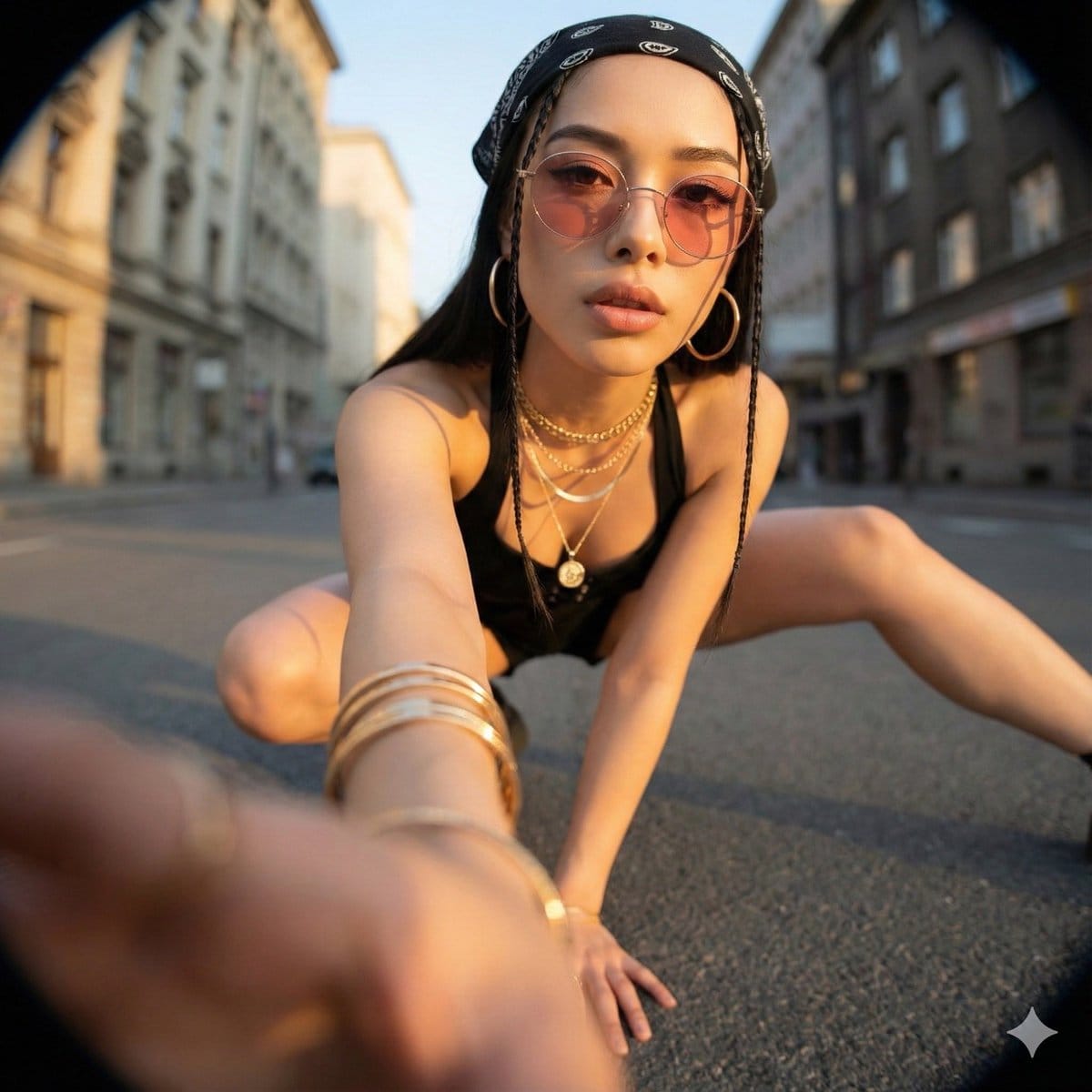
예시 프롬프트
Ultra-Wide Angle Perspective and Dynamic Pose Remake Edit
This is an edit of the original image, not the generation of a new character.
Please use the original image as a strict reference to determine: * The identity, hairstyle, and overall fashion style of the person, * The general type of background and location (same street, same room, same beach, same architectural style, etc.).
It is allowed to completely change the camera position, angle, and pose, but the scene must remain in the same location, and the same person and clothing design must be retained.
Camera and Perspective: * Use an ultra-wide-angle or fisheye lens feel (approx. 12–18mm full-frame look). * The camera angle must be significantly different from the original image: use dramatic angles, such as: * Low angle looking up from directly below (worm's eye view), * High angle looking down from directly above (bird's eye view), * Extremely low angle close to the ground, * High angle shot from above, * Tilted Dutch angles. * Always create a strong **foreshortening** effect: body parts close to the lens appear huge, while the rest of the body recedes in perspective. * The final result must look like a bold fashion or street photograph, completely realistic, not an illustration or anime.
Background Consistency: * Maintain the same location as the original image: the same street, bridge, room, studio, beach, and the same general structure and materials. * Do not replace the background with a completely different place. * Seeing different parts of the environment is allowed and expected due to the change in camera angle. * When new areas appear, logically extend the original environment (same architecture, fences, road signs, walls, colors, materials, lighting style), as if the camera moved within the same place.
Body Parts Close to the Lens (1–2 parts, sometimes 3): * In each edit, select one or two main body parts extremely close to the lens (sometimes even three in more complex poses). * Vary between different images; do not always use the same body parts. * Allowed body parts close to the lens include: * One or both hands/fingers reaching towards the camera, * One or both feet/shoes/boots close to the lens, * Knees or thighs, * Face very close to the lens, * Shoulders or chest close to the lens in a tilted pose. * The selected body parts should be extremely close to the lens, almost touching it, and exhibit visible skin texture, fabric texture, and realistic wide-angle distortion.
Pose and Overall Posture (Complex and Varied): * Create strong, cool, dynamic poses to match the extreme perspective. * Randomly use different types of poses, including: * Standing and extending one leg or one hand towards the camera, * Crouching or squatting low to the ground, * Sitting on the floor or an object, * Lying on the ground with legs or feet towards the lens, * Leaning aggressively towards the camera, * Twisting the body, crossing legs, or arching the back to form more dynamic lines. * Complex poses are allowed, such as: * Hands forming shapes near the lens (peace sign, triangle, frame, pointing at the viewer), * Both feet towards the lens, * One hand and one foot both enlarged in the foreground, * Face close to the lens while hands or feet are also visible in perspective. * Maintain credible anatomy even with extreme foreshortening.
Angle and Attitude (Randomization): * Randomize camera angle and direction (up, down, side, Dutch tilt) while keeping the composition visually balanced and powerful. * Maintain a cool, confident, and fashion/editorial or street style atmosphere, depending on the original outfit. * Facial expressions can vary (serious, playful, confident, mysterious) but must still look like the same person.
Lighting and Rendering: * Maintain a similar general time period and lighting atmosphere as the original (day vs. night, indoor vs. outdoor, soft light vs. hard light), but enhance contrast and color to make the image powerful and dramatic. * Maintain realistic shadows and contact points with the ground or floor. * High resolution, sharp details, with clear skin texture, fabric weave, and material highlights.
Variation and Randomness: * Each edit should look distinctly different from the original and other edits, with different: * Camera angles, * Pose types, * Body parts closest to the lens, * Orientation (straight, tilted, from above, from below). * Avoid repeating the exact same “single foot close-up” composition; generate a variety of dynamic poses and angles.
Strict Rules: * Do not turn the person into someone else. * Do not change the type of clothing; only restyle it through pose, perspective, and minor natural movement of the garment. * Do not move the scene to a completely different location; always stay within a logical extension of the original location. * Do not add text, logos, watermarks, or graphic design elements. * Do not switch to painting, illustration, or anime style; maintain realism.
Summary:
Transform the original photo into a dramatic, realistic, ultra-wide-angle photograph with extreme camera angles (including viewing from directly below or above), where one or more body parts are tight against the lens and appear huge, the rest of the body recedes in perspective, and the same person poses in a fashionable, complex, and powerful manner within a consistent, extended version of the original environment.
Pro Tip:
This realistic style prompt has been tested and optimized for best results. You can modify it slightly to customize the output while keeping the core structure intact.