
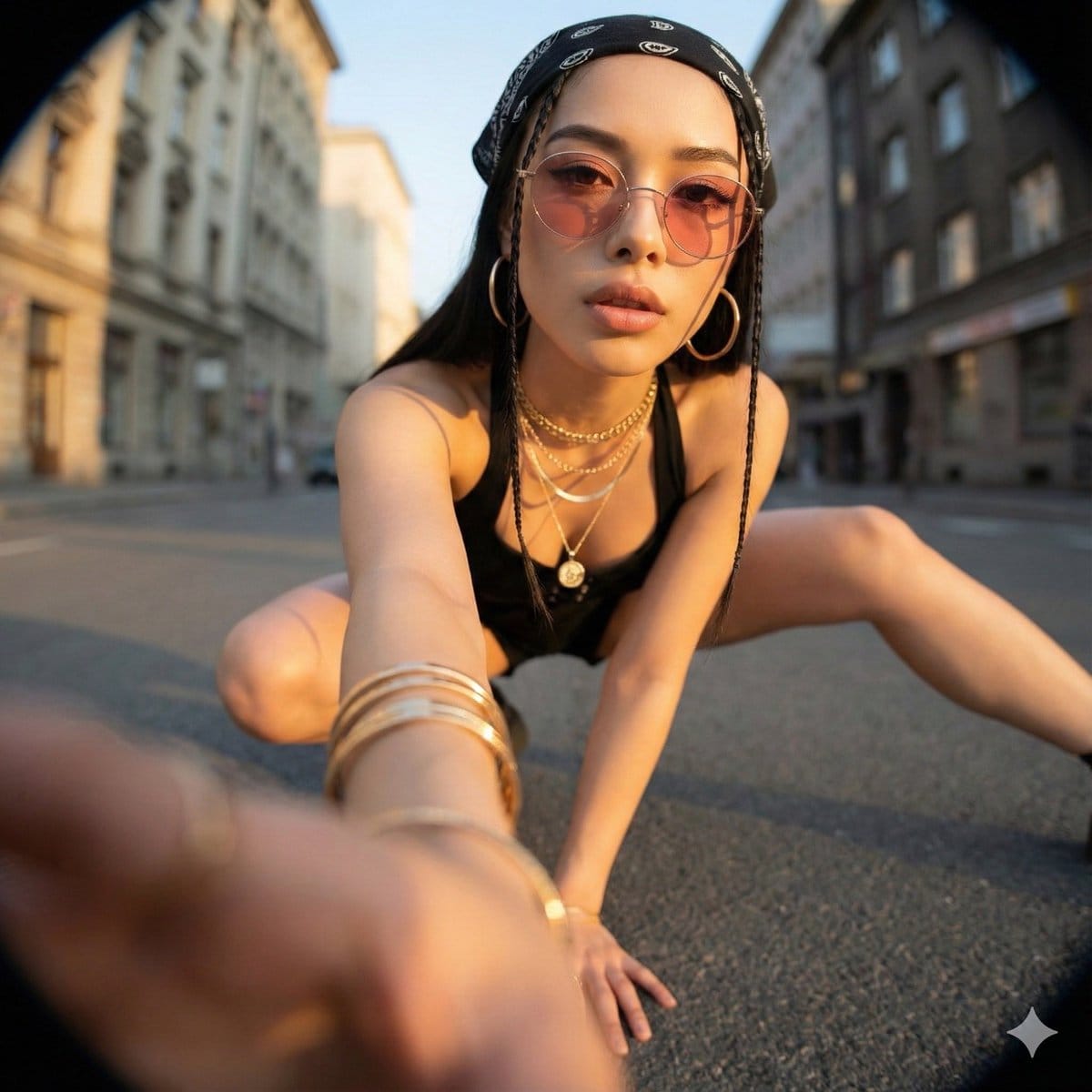
Ultra-Wide Angle Dynamic Pose Remake Prompt

A comprehensive Chinese prompt for Nano Banana Pro focused on editing an existing image to create a dramatic, photorealistic, ultra-wide-angle photograph. It requires strict identity and location preservation while allowing complete changes in camera angl

Exemple de prompt
Ultra-Wide Angle Perspective and Dynamic Pose Remake Edit This is an edit of the original image, not the generation of a new character. Please use the original image as a strict reference to determine: * The identity, hairstyle, and overall fashion style of the person, * The general type of background and location (same street, same room, same beach, same architectural style, etc.). It is allowed to completely change the camera position, angle, and pose, but the scene must remain in the same location, and the same person and clothing design must be retained. Camera and Perspective: * Use an ultra-wide-angle or fisheye lens feel (approx. 12–18mm full-frame look). * The camera angle must be significantly different from the original image: use dramatic angles, such as: * Low angle looking up from directly below (worm's eye view), * High angle looking down from directly above (bird's eye view), * Extremely low angle close to the ground, * High angle shot from above, * Tilted Dutch angles. * Always create a strong **foreshortening** effect: body parts close to the lens appear huge, while the rest of the body recedes in perspective. * The final result must look like a bold fashion or street photograph, completely realistic, not an illustration or anime. Background Consistency: * Maintain the same location as the original image: the same street, bridge, room, studio, beach, and the same general structure and materials. * Do not replace the background with a completely different place. * Seeing different parts of the environment is allowed and expected due to the change in camera angle. * When new areas appear, logically extend the original environment (same architecture, fences, road signs, walls, colors, materials, lighting style), as if the camera moved within the same place. Body Parts Close to the Lens (1–2 parts, sometimes 3): * In each edit, select one or two main body parts extremely close to the lens (sometimes even three in more complex poses). * Vary between different images; do not always use the same body parts. * Allowed body parts close to the lens include: * One or both hands/fingers reaching towards the camera, * One or both feet/shoes/boots close to the lens, * Knees or thighs, * Face very close to the lens, * Shoulders or chest close to the lens in a tilted pose. * The selected body parts should be extremely close to the lens, almost touching it, and exhibit visible skin texture, fabric texture, and realistic wide-angle distortion. Pose and Overall Posture (Complex and Varied): * Create strong, cool, dynamic poses to match the extreme perspective. * Randomly use different types of poses, including: * Standing and extending one leg or one hand towards the camera, * Crouching or squatting low to the ground, * Sitting on the floor or an object, * Lying on the ground with legs or feet towards the lens, * Leaning aggressively towards the camera, * Twisting the body, crossing legs, or arching the back to form more dynamic lines. * Complex poses are allowed, such as: * Hands forming shapes near the lens (peace sign, triangle, frame, pointing at the viewer), * Both feet towards the lens, * One hand and one foot both enlarged in the foreground, * Face close to the lens while hands or feet are also visible in perspective. * Maintain credible anatomy even with extreme foreshortening. Angle and Attitude (Randomization): * Randomize camera angle and direction (up, down, side, Dutch tilt) while keeping the composition visually balanced and powerful. * Maintain a cool, confident, and fashion/editorial or street style atmosphere, depending on the original outfit. * Facial expressions can vary (serious, playful, confident, mysterious) but must still look like the same person. Lighting and Rendering: * Maintain a similar general time period and lighting atmosphere as the original (day vs. night, indoor vs. outdoor, soft light vs. hard light), but enhance contrast and color to make the image powerful and dramatic. * Maintain realistic shadows and contact points with the ground or floor. * High resolution, sharp details, with clear skin texture, fabric weave, and material highlights. Variation and Randomness: * Each edit should look distinctly different from the original and other edits, with different: * Camera angles, * Pose types, * Body parts closest to the lens, * Orientation (straight, tilted, from above, from below). * Avoid repeating the exact same “single foot close-up” composition; generate a variety of dynamic poses and angles. Strict Rules: * Do not turn the person into someone else. * Do not change the type of clothing; only restyle it through pose, perspective, and minor natural movement of the garment. * Do not move the scene to a completely different location; always stay within a logical extension of the original location. * Do not add text, logos, watermarks, or graphic design elements. * Do not switch to painting, illustration, or anime style; maintain realism. Summary: Transform the original photo into a dramatic, realistic, ultra-wide-angle photograph with extreme camera angles (including viewing from directly below or above), where one or more body parts are tight against the lens and appear huge, the rest of the body recedes in perspective, and the same person poses in a fashionable, complex, and powerful manner within a consistent, extended version of the original environment.
Générer avec l'IA
Modèle d'IA
Nano-banana-pro
Auteur

Questions fréquentes

Tout ce que vous devez savoir sur les prompts realistic style

Comment utiliser ce prompt realistic style ?

Cliquez simplement sur le bouton "Générer avec l'IA" ci-dessus, et vous serez redirigé vers notre générateur d'images IA avec ce prompt Realistic Style pré-rempli. Vous pouvez le personnaliser davantage ou générer des images directement. Notre IA interprétera le prompt et créera de superbes visuels realistic basés sur votre description.

Puis-je modifier ce prompt pour mes besoins spécifiques ?

Absolument ! N'hésitez pas à copier le prompt et à le personnaliser selon votre vision. Pour les œuvres d'art realistic, essayez d'ajouter des détails sur le style, l'éclairage, la composition ou l'ambiance. Plus vous êtes descriptif, mieux l'IA pourra comprendre votre vision créative. Parcourez nos prompts realistic pour apprendre plus de techniques.

Quels modèles d'IA fonctionnent le mieux pour realistic style ?

Ce prompt realistic fonctionne avec la plupart des générateurs d'images IA modernes, y compris Nano Banana, Flux et GPT-Image. Différents modèles excellent dans différents aspects - Nano Banana est excellent pour les styles realistic, tandis que Flux offre des résultats photoréalistes.

Qu'est-ce qui fait un bon prompt realistic style ?

Les excellents prompts realistic incluent : des détails spécifiques sur le sujet, des références de style artistique, des conditions d'éclairage (lumière douce, ombres dramatiques), une palette de couleurs, une ambiance/atmosphère et des spécifications techniques (4K, détaillé, HD). Étudiez nos exemples de prompts pour voir des modèles efficaces.

Ce prompt est-il gratuit ?

Oui ! Tous les prompts de notre bibliothèque sont entièrement gratuits pour un usage personnel et commercial. Copiez, modifiez et créez d'étonnantes œuvres d'art realistic sans aucune restriction.

More Prompts ➜
Selfie with random Brazilian celebrities - AI Image Prompt
Selfie with random Brazilian celebrities
A Portuguese prompt to generate a selfie featuring five random Brazilian celebrities, fun for playful social content mockups.
by Victor Venâncio
Selfie of multiple celebrities - AI Image Prompt
Selfie of multiple celebrities
Prompt to create a selfie featuring 10 random celebrities.
by can
Joe Rogan podcast with a gray alien - AI Image Prompt
Joe Rogan podcast with a gray alien
An image generation prompt requesting a DSLR photo depicting a scene from Joe Rogan's podcast, specifically featuring a discussion with a gray alien.
by Ralph Nas
Red/Dark/Evil GitHub Logo with Screenshot - AI Image Prompt
Red/Dark/Evil GitHub Logo with Screenshot
A prompt requesting a modification of the GitHub logo to appear red, dark, and evil, presented within a screenshot context.
by Mehmet Ali Peker.eth ?
Hyper-Realistic Buddhist Monk Meditation Scene - AI Image Prompt
Hyper-Realistic Buddhist Monk Meditation Scene
A prompt for generating a hyper-realistic, full-shot image of an elderly Buddhist monk meditating on a rugged mountain peak. It specifies detailed textures for robes and rocks, dramatic sunrise lighting, and a cinematic atmosphere with snow-capped mountai
by Murphy
Hyper-Realistic Cat Photograph - AI Image Prompt
Hyper-Realistic Cat Photograph
A highly detailed prompt focused on generating an ultra-photorealistic image of a domestic cat, specifying minute details like fur texture, eye reflections, skin imperfections, camera settings (85mm lens, f/1.8), and lighting to achieve studio-quality rea
by Mr Ash

Prêt à créer des images incroyables ?

Commencez à générer de superbes images IA avec ce prompt ou explorez notre vaste bibliothèque de prompts pour plus d'inspiration.

Générer maintenant Parcourir tous les prompts



