
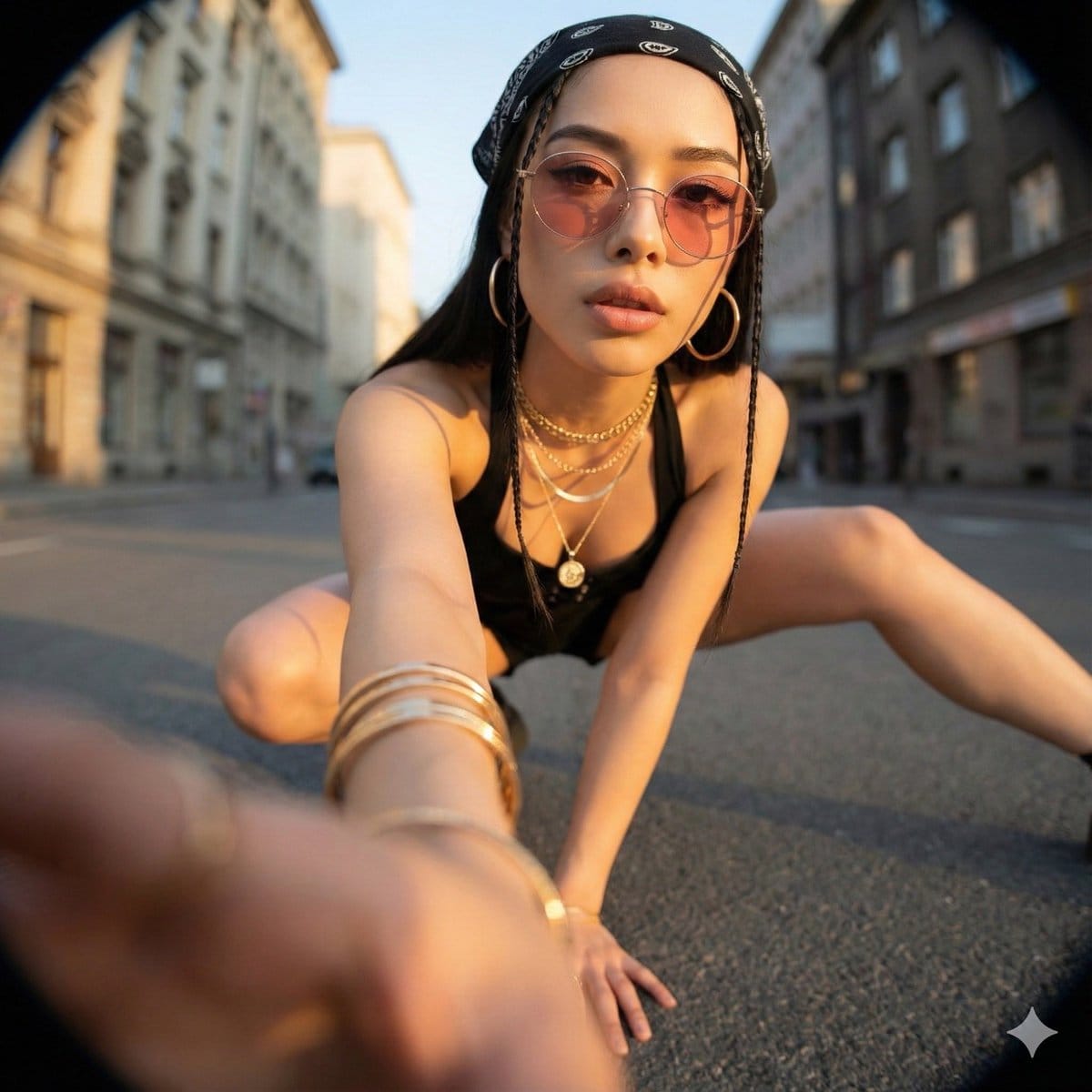
Ultra-Wide Angle Dynamic Pose Remake Prompt - AI Generated Realistic Style Image
Generar imagen similar

This prompt is optimized for Nano-banana-pro model

Ultra-Wide Angle Dynamic Pose Remake Prompt

A comprehensive Chinese prompt for Nano Banana Pro focused on editing an existing image to create a dramatic, photorealistic, ultra-wide-angle photograph. It requires strict identity and location preservation while allowing complete changes in camera angl

Indicación de ejemplo
Ultra-Wide Angle Perspective and Dynamic Pose Remake Edit This is an edit of the original image, not the generation of a new character. Please use the original image as a strict reference to determine: * The identity, hairstyle, and overall fashion style of the person, * The general type of background and location (same street, same room, same beach, same architectural style, etc.). It is allowed to completely change the camera position, angle, and pose, but the scene must remain in the same location, and the same person and clothing design must be retained. Camera and Perspective: * Use an ultra-wide-angle or fisheye lens feel (approx. 12–18mm full-frame look). * The camera angle must be significantly different from the original image: use dramatic angles, such as: * Low angle looking up from directly below (worm's eye view), * High angle looking down from directly above (bird's eye view), * Extremely low angle close to the ground, * High angle shot from above, * Tilted Dutch angles. * Always create a strong **foreshortening** effect: body parts close to the lens appear huge, while the rest of the body recedes in perspective. * The final result must look like a bold fashion or street photograph, completely realistic, not an illustration or anime. Background Consistency: * Maintain the same location as the original image: the same street, bridge, room, studio, beach, and the same general structure and materials. * Do not replace the background with a completely different place. * Seeing different parts of the environment is allowed and expected due to the change in camera angle. * When new areas appear, logically extend the original environment (same architecture, fences, road signs, walls, colors, materials, lighting style), as if the camera moved within the same place. Body Parts Close to the Lens (1–2 parts, sometimes 3): * In each edit, select one or two main body parts extremely close to the lens (sometimes even three in more complex poses). * Vary between different images; do not always use the same body parts. * Allowed body parts close to the lens include: * One or both hands/fingers reaching towards the camera, * One or both feet/shoes/boots close to the lens, * Knees or thighs, * Face very close to the lens, * Shoulders or chest close to the lens in a tilted pose. * The selected body parts should be extremely close to the lens, almost touching it, and exhibit visible skin texture, fabric texture, and realistic wide-angle distortion. Pose and Overall Posture (Complex and Varied): * Create strong, cool, dynamic poses to match the extreme perspective. * Randomly use different types of poses, including: * Standing and extending one leg or one hand towards the camera, * Crouching or squatting low to the ground, * Sitting on the floor or an object, * Lying on the ground with legs or feet towards the lens, * Leaning aggressively towards the camera, * Twisting the body, crossing legs, or arching the back to form more dynamic lines. * Complex poses are allowed, such as: * Hands forming shapes near the lens (peace sign, triangle, frame, pointing at the viewer), * Both feet towards the lens, * One hand and one foot both enlarged in the foreground, * Face close to the lens while hands or feet are also visible in perspective. * Maintain credible anatomy even with extreme foreshortening. Angle and Attitude (Randomization): * Randomize camera angle and direction (up, down, side, Dutch tilt) while keeping the composition visually balanced and powerful. * Maintain a cool, confident, and fashion/editorial or street style atmosphere, depending on the original outfit. * Facial expressions can vary (serious, playful, confident, mysterious) but must still look like the same person. Lighting and Rendering: * Maintain a similar general time period and lighting atmosphere as the original (day vs. night, indoor vs. outdoor, soft light vs. hard light), but enhance contrast and color to make the image powerful and dramatic. * Maintain realistic shadows and contact points with the ground or floor. * High resolution, sharp details, with clear skin texture, fabric weave, and material highlights. Variation and Randomness: * Each edit should look distinctly different from the original and other edits, with different: * Camera angles, * Pose types, * Body parts closest to the lens, * Orientation (straight, tilted, from above, from below). * Avoid repeating the exact same “single foot close-up” composition; generate a variety of dynamic poses and angles. Strict Rules: * Do not turn the person into someone else. * Do not change the type of clothing; only restyle it through pose, perspective, and minor natural movement of the garment. * Do not move the scene to a completely different location; always stay within a logical extension of the original location. * Do not add text, logos, watermarks, or graphic design elements. * Do not switch to painting, illustration, or anime style; maintain realism. Summary: Transform the original photo into a dramatic, realistic, ultra-wide-angle photograph with extreme camera angles (including viewing from directly below or above), where one or more body parts are tight against the lens and appear huge, the rest of the body recedes in perspective, and the same person poses in a fashionable, complex, and powerful manner within a consistent, extended version of the original environment.
Generar con IA

Pro Tip:

This realistic style prompt has been tested and optimized for best results. You can modify it slightly to customize the output while keeping the core structure intact.

Modelo de IA
Nano-banana-pro
Autor
Category
Realistic Style

Preguntas frecuentes

Todo lo que necesitas saber sobre indicaciones de realistic style

¿Cómo uso esta indicación de realistic style?

Simplemente haz clic en el botón "Generar con IA" arriba, y serás llevado a nuestro generador de imágenes con IA con esta indicación de Realistic Style pre-llenada. Puedes personalizarla más o generar imágenes directamente. Nuestra IA interpretará la indicación y creará impresionantes visuales de realistic basados en tu descripción.

¿Puedo modificar esta indicación para mis necesidades específicas?

¡Por supuesto! Siéntete libre de copiar la indicación y personalizarla para que coincida con tu visión. Para obras de arte de realistic, intenta añadir detalles sobre estilo, iluminación, composición o ambiente. Cuanto más descriptivo seas, mejor podrá la IA entender tu visión creativa. Explora nuestras indicaciones de realistic para aprender más técnicas.

¿Qué modelos de IA funcionan mejor para realistic style?

Esta indicación de realistic funciona con la mayoría de los generadores de imágenes de IA modernos, incluyendo Nano Banana, Flux y GPT-Image. Diferentes modelos sobresalen en diferentes aspectos - Nano Banana es excelente para estilos realistic, mientras que Flux ofrece resultados fotorrealistas.

¿Qué hace una buena indicación de realistic style?

Las grandes indicaciones de realistic incluyen: detalles específicos del sujeto, referencias de estilo artístico, condiciones de iluminación (luz suave, sombras dramáticas), paleta de colores, ambiente/atmósfera y especificaciones técnicas (4K, detallado, HD). Estudia nuestras indicaciones de ejemplo para ver patrones efectivos.

¿Esta indicación es gratuita?

¡Sí! Todas las indicaciones en nuestra biblioteca son completamente gratuitas para uso personal y comercial. Copia, modifica y crea increíbles obras de arte de realistic sin restricciones.

Explorar Más Prompts ➜

Inspírate: Prueba Estos Prompts de IA

Prompts de IA seleccionados para despertar tu creatividad. ¡Haz clic en "Pruébalo Ahora" para generar imágenes similares al instante!

Abstract Brand Illustration for Innovation and Clarity - AI Generated Abstract Style Image Example
Abstract Brand Illustration for Innovation and Clarity
A concise prompt for generating an abstract brand illustration. It specifies the representation of i...
by SRKDAN
Abstract Style
16:9 Cinematic Storyboard from References - AI Generated Character Style Image Example
16:9 Cinematic Storyboard from References
A Chinese prompt for generating a 16:9 cinematic storyboard (four continuous panels) in a realistic...
by 茶狮子
Character Style
Intense Ink Sketch Portrait with Face Likeness - AI Generated Character Style Image Example
Intense Ink Sketch Portrait with Face Likeness
A structured JSON prompt for generating a dramatic side-profile portrait in an expressive ink sketch...
by Johnn
Character Style
Luxury Office Portrait Prompt (Image-to-Image) - AI Generated Character Style Image Example
Luxury Office Portrait Prompt (Image-to-Image)
A prompt for Nano Banana Pro designed to generate a sophisticated, fashion editorial-style portrait...
by ぴょんきち|AI兄さん
Character Style
3D stylized character transformation prompt - AI Generated Character Style Image Example
3D stylized character transformation prompt
A prompt designed to transform an uploaded subject into a stylized 3D character with soft, clay-like...
by Gizem Akdag
Character Style
Japanese Festival Mikoshi Float Prompt Template - AI Generated Character Style Image Example
Japanese Festival Mikoshi Float Prompt Template
A Japanese prompt template for Nano Banana Pro designed to place a user's character onto a giant fes...
by とすくん
Character Style

¿Quieres Más Ideas de Prompts?

Explora nuestra extensa biblioteca de {count}+ prompts de IA en múltiples categorías, ¡incluyendo anime, realista, abstracto y más!

Explorar Todos los Prompts

¿Listo para crear imágenes increíbles?

Empieza a generar impresionantes imágenes con IA usando esta indicación o explora nuestra extensa biblioteca de indicaciones para más inspiración.



