
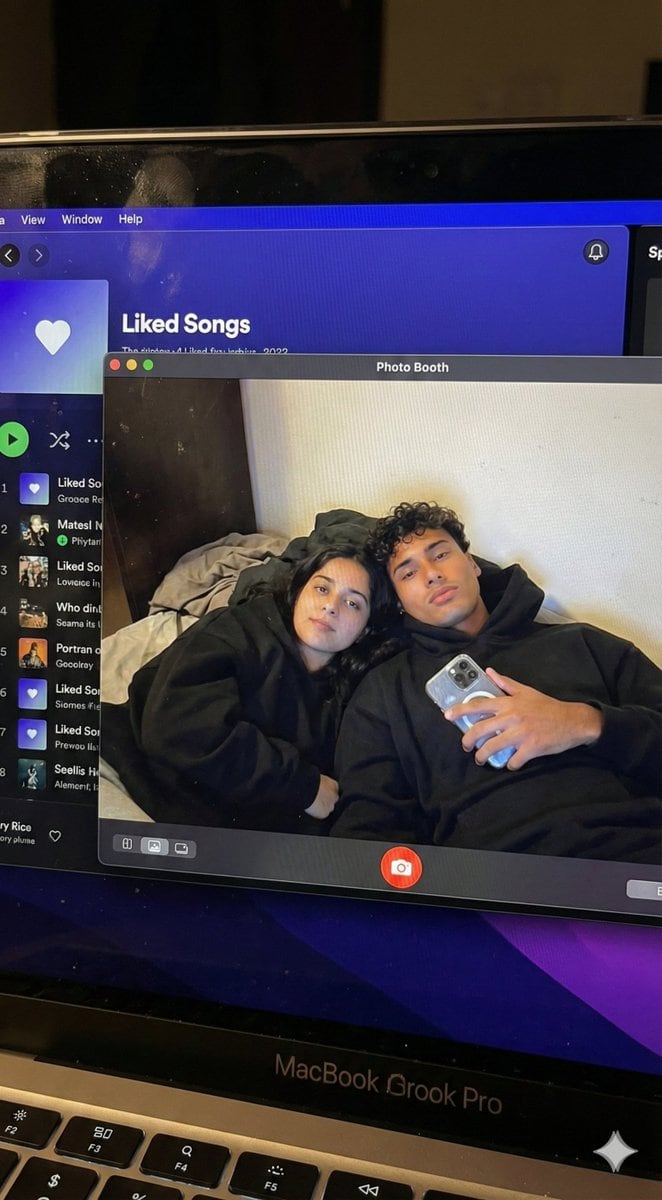
Couple MacBook screen selfie simulation prompt - AI Generated Realistic Style Image
生成類似圖像

This prompt is optimized for Nano-banana-pro model

Couple MacBook screen selfie simulation prompt

A complex JSON configuration for simulating a hyper-realistic MacBook screen showing a Photo Booth selfie of a specific couple, including physical screen artifacts, UI layout, and strict identity preservation settings.

範例提示詞
{ "task_configuration": { "task_type": "screen_simulation_photorealism", "target_model": "SDXL_1.0_Refiner", "aspect_ratio": "3:4", "resolution": { "width": 1152, "height": 1536 } }, "visual_hierarchy": { "layer_1_physical_macro": { "camera_angle": "Downward-angled, high-angle", "framing": "MacBook screen filling 95% of the frame", "surface_imperfections": [ "subtle pixel-grid texture (moire)", "tiny dust particles on the glass", "faint ambient light reflection on the glossy screen", "fingerprint smudges" ], "foreground_anchor": "Thin strip of the physical keyboard visible at the lower edge" }, "layer_2_digital_interface": { "theme": "Dark Mode (macOS)", "window_layout": { "left_panel": "Spotify 'Liked Songs' playlist (dimmed)", "right_panel": "Photo Booth live-preview window (dominant focus)" } }, "layer_3_nested_subject_content": { "context": "Inside the Photo Booth window", "environment": "Dim bedroom, off-white wall, rumpled bedding", "lighting_simulation": "Cool screen glow mixed with warm skin tones, deep nocturnal shadows", "subjects": { "shared_attributes": [ "Oversized black hoodies", "Hoods pushed back (faces fully visible)", "Reclining pose", "Looking at the screen" ], "subject_a_guy": { "identity_target": "{argument name="guy reference image in english" default="2nd image attached"}", "action": "Holding a phone in the right hand with a clear reflective case", "position": "Right/Center" }, "subject_b_girl": { "identity_target": "{argument name="girl reference image in english" default="1st image attached"}", "action": "Resting closely beside Subject A", "position": "Left/Center" } } } }, "prompt_assembly": { "positive_prompt": "Hyper-realistic downward shot of a MacBook screen. The screen surface has visible dust, pixel grid, and reflection. The screen displays a Photo Booth window showing a couple in a dark room. [Subject Descriptions]. They are wearing black hoodies. The lighting is low-key, candid, nocturnal, bluish screen glow. High fidelity, raw photo, unedited.", "negative_prompt": "vector art, screenshot, flat digital image, clean glass, perfect screen, daylight, bright studio lights, cartoon, 3d render, painting, watermark" }, "identity_preservation_settings": { "strictness_level": "CRITICAL", "methodology": { "face_restoration": false, "note": "Disable generic face restorers (CodeFormer) to avoid a 'plastic' look. Use IP-Adapter.", "control_net_stack_multiline_placeholder": "[ControlNet configuration continues here]" } } }
AI生成

Pro Tip:

This realistic style prompt has been tested and optimized for best results. You can modify it slightly to customize the output while keeping the core structure intact.

AI模型
Nano-banana-pro
作者
Category
Realistic Style

常見問題

關於realistic style提示詞,你想知道的一切

如何使用這個realistic style提示詞?

只需點擊上面的「AI生成」按鈕,即可跳轉到我們的AI圖像生成器,並且這個Realistic Style提示詞已自動填好。你可以進一步自訂或直接生成圖像。我們的AI會解讀提示詞,並根據你的描述創建出令人驚嘆的realistic視覺效果。

我可以根據特定需求修改這個提示詞嗎?

當然可以!隨意複製並定製這個提示詞,以實現你的創作構想。對於realistic藝術作品,嘗試添加風格、光線、構圖或情緒等細節。你的描述越具體,AI就越能理解你的創意。瀏覽我們的realistic提示詞合集,學習更多技巧。

哪些AI模型最適合生成realistic style圖像?

這個realistic提示詞適用於大多數現代AI圖像生成器,包括Nano Banana、Flux和GPT-Image。不同的模型各有專長——Nano Banana擅長realistic風格,而Flux則能生成逼真的照片級效果。

怎樣才算是一個好的realistic style提示詞?

優秀的realistic提示詞通常包含:具體的主題細節、藝術風格參考、光線條件(如柔光、戲劇性陰影)、色彩搭配、情緒/氛圍以及技術規格(如4K、細節豐富、高清)。研究我們的範例提示詞,可以學到有效的模式。

這個提示詞可以免費使用嗎?

是的!我們庫中的所有提示詞,無論是個人還是商業用途,都完全免費。你可以隨意複製、修改,並創作出色的realistic藝術作品,沒有限制。

準備好創作驚豔圖像了嗎?

立即使用這個提示詞開始生成令人讚嘆的AI圖像,或者瀏覽我們豐富的提示詞庫,獲取更多靈感。



