
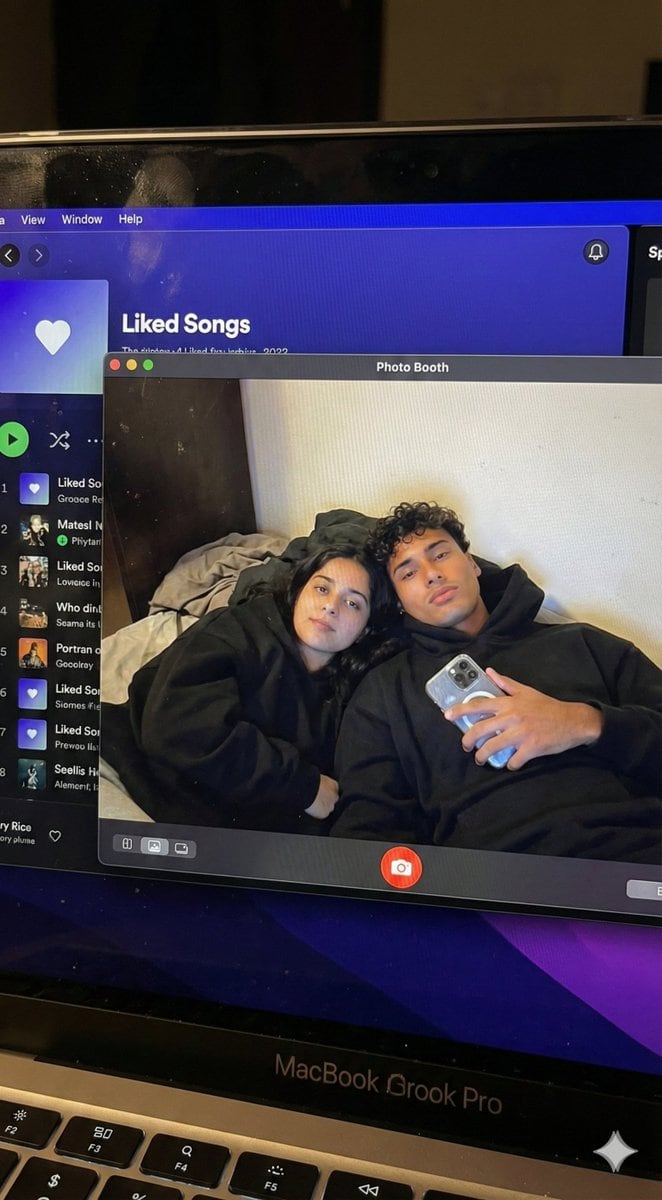
Couple MacBook screen selfie simulation prompt - AI Generated Realistic Style Image
유사 이미지 생성

This prompt is optimized for Nano-banana-pro model

Couple MacBook screen selfie simulation prompt

A complex JSON configuration for simulating a hyper-realistic MacBook screen showing a Photo Booth selfie of a specific couple, including physical screen artifacts, UI layout, and strict identity preservation settings.

예시 프롬프트
{ "task_configuration": { "task_type": "screen_simulation_photorealism", "target_model": "SDXL_1.0_Refiner", "aspect_ratio": "3:4", "resolution": { "width": 1152, "height": 1536 } }, "visual_hierarchy": { "layer_1_physical_macro": { "camera_angle": "Downward-angled, high-angle", "framing": "MacBook screen filling 95% of the frame", "surface_imperfections": [ "subtle pixel-grid texture (moire)", "tiny dust particles on the glass", "faint ambient light reflection on the glossy screen", "fingerprint smudges" ], "foreground_anchor": "Thin strip of the physical keyboard visible at the lower edge" }, "layer_2_digital_interface": { "theme": "Dark Mode (macOS)", "window_layout": { "left_panel": "Spotify 'Liked Songs' playlist (dimmed)", "right_panel": "Photo Booth live-preview window (dominant focus)" } }, "layer_3_nested_subject_content": { "context": "Inside the Photo Booth window", "environment": "Dim bedroom, off-white wall, rumpled bedding", "lighting_simulation": "Cool screen glow mixed with warm skin tones, deep nocturnal shadows", "subjects": { "shared_attributes": [ "Oversized black hoodies", "Hoods pushed back (faces fully visible)", "Reclining pose", "Looking at the screen" ], "subject_a_guy": { "identity_target": "{argument name="guy reference image in english" default="2nd image attached"}", "action": "Holding a phone in the right hand with a clear reflective case", "position": "Right/Center" }, "subject_b_girl": { "identity_target": "{argument name="girl reference image in english" default="1st image attached"}", "action": "Resting closely beside Subject A", "position": "Left/Center" } } } }, "prompt_assembly": { "positive_prompt": "Hyper-realistic downward shot of a MacBook screen. The screen surface has visible dust, pixel grid, and reflection. The screen displays a Photo Booth window showing a couple in a dark room. [Subject Descriptions]. They are wearing black hoodies. The lighting is low-key, candid, nocturnal, bluish screen glow. High fidelity, raw photo, unedited.", "negative_prompt": "vector art, screenshot, flat digital image, clean glass, perfect screen, daylight, bright studio lights, cartoon, 3d render, painting, watermark" }, "identity_preservation_settings": { "strictness_level": "CRITICAL", "methodology": { "face_restoration": false, "note": "Disable generic face restorers (CodeFormer) to avoid a 'plastic' look. Use IP-Adapter.", "control_net_stack_multiline_placeholder": "[ControlNet configuration continues here]" } } }
AI로 생성하기

Pro Tip:

This realistic style prompt has been tested and optimized for best results. You can modify it slightly to customize the output while keeping the core structure intact.

AI 모델
Nano-banana-pro
제작자
Category
Realistic Style

자주 묻는 질문

realistic style 프롬프트에 대해 알아야 할 모든 것

이 realistic style 프롬프트는 어떻게 사용하나요?

위의 "AI로 생성하기" 버튼을 클릭하기만 하면 이 Realistic Style 프롬프트가 미리 입력된 AI 이미지 생성기로 이동합니다. 추가로 맞춤 설정하거나 바로 이미지를 생성할 수 있습니다. AI가 프롬프트를 해석하고 사용자의 설명에 따라 놀라운 realistic 비주얼을 만들어냅니다.

이 프롬프트를 특정 요구에 맞게 수정할 수 있나요?

물론입니다! 프롬프트를 복사하여 원하는 대로 자유롭게 맞춤 설정하세요. realistic 아트웍의 경우 스타일, 조명, 구도, 분위기 등에 대한 세부 정보를 추가해 보세요. 설명이 구체적일수록 AI가 창의적인 비전을 더 잘 이해할 수 있습니다. 더 많은 기술을 배우려면 realistic 프롬프트를 살펴보세요.

realistic style에 가장 적합한 AI 모델은 무엇인가요?

이 realistic 프롬프트는 Nano Banana, Flux, GPT-Image를 포함한 대부분의 최신 AI 이미지 생성기와 호환됩니다. 각 모델은 다른 측면에서 뛰어납니다. Nano Banana는 realistic 스타일에 탁월하고, Flux는 포토리얼리스틱한 결과물을 제공합니다.

좋은 realistic style 프롬프트란 무엇인가요?

훌륭한 realistic 프롬프트에는 구체적인 주제 세부사항, 아트 스타일 참조, 조명 조건(부드러운 조명, 드라마틱한 그림자), 색상 팔레트, 분위기, 기술 사양(4K, 디테일, HD) 등이 포함됩니다. 효과적인 패턴을 보려면 예시 프롬프트를 참고하세요.

이 프롬프트는 무료로 사용할 수 있나요?

네! 라이브러리에 있는 모든 프롬프트는 개인적 및 상업적 용도로 완전히 무료입니다. 제한 없이 realistic 아트웍을 복사, 수정, 제작하세요.

더 많은 프롬프트 탐색 ➜

영감 얻기: 이 AI 프롬프트를 사용해보세요

창의성을 자극하는 엄선된 AI 프롬프트. "지금 사용해보기"를 클릭하여 유사한 이미지를 즉시 생성하세요!

Vibrant Arcade Portrait with Orange Outfit and Neon Lights - AI Generated Character Style Image Example
Vibrant Arcade Portrait with Orange Outfit and Neon Lights
A structured prompt for generating an energetic and playful portrait of a woman seated on a 'SUPER B...
by Lore
Character Style
Hyper-Realistic Kiwi Splash Macro Photography Prompt - AI Generated Realistic Style Image Example
Hyper-Realistic Kiwi Splash Macro Photography Prompt
A prompt for generating a hyper-realistic, 8K macro photograph of sliced kiwi splashing in water. Th...
by ?
Realistic Style
Cute Style Portrait with Identity Lock and Specific Outfit - AI Generated Character Style Image Example
Cute Style Portrait with Identity Lock and Specific Outfit
A highly detailed, structured prompt for generating a cute-style full-body portrait of a young woman...
by Arron2006
Character Style
Digital Papercraft Portrait of a Young Man - AI Generated Character Style Image Example
Digital Papercraft Portrait of a Young Man
This prompt is for generating an ultra-detailed digital papercraft portrait of a young man using a g...
by Mohamed IDBRAHIM
Character Style
Cinematic Alpine Portrait (Duplicate) - AI Generated Character Style Image Example
Cinematic Alpine Portrait (Duplicate)
A highly detailed JSON prompt for generating a cinematic RAW photograph portrait of a young woman in...
by yusra.
Character Style
Professor explaining content on a whiteboard - AI Generated AI Art Style Image Example
Professor explaining content on a whiteboard
A reusable ‘whiteboard prompt’ that turns pasted text into an image of a professor explaining the co...
by てる@プロンプトマフィア
AI Art Style

더 많은 프롬프트 아이디어가 필요하신가요?

애니메이션, 사실적, 추상 등 여러 카테고리에 걸친 {count}+ AI 프롬프트의 방대한 라이브러리를 둘러보세요!

모든 프롬프트 둘러보기

멋진 이미지를 만들 준비가 되셨나요?

이 프롬프트로 놀라운 AI 이미지 생성을 시작하거나, 방대한 프롬프트 라이브러리에서 더 많은 영감을 얻으세요.



