
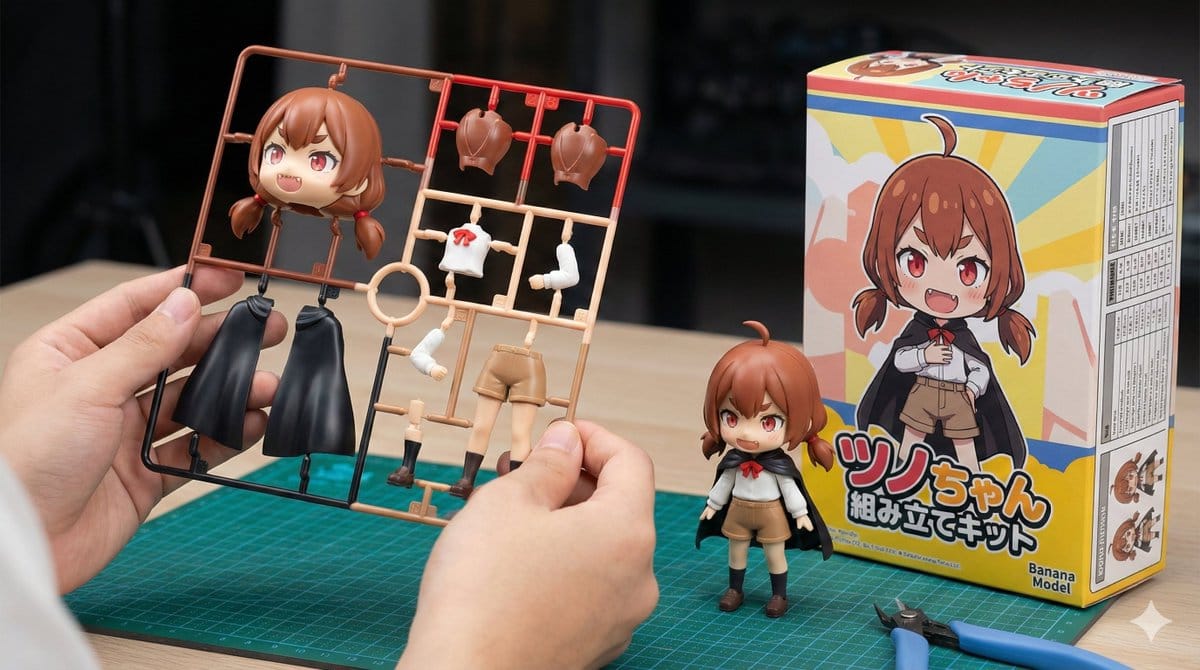
Plastic Model Kit Generation Prompt

A detailed template prompt for Nano Banana Pro to generate an image of a plastic model kit (plamo) based on a specified character, including the runner frame, a completed figure, and a package box with specific branding ('Banana Model') and technical deta

Пример промта
[Character Setting Section] 1. Character Appearance Details: (Enter the characteristics of the original character here. Example: A magical girl with long blonde hair and a blue dress) {argument name="character details" default="Brown hair, short twin tails, red eyes, slightly pointed teeth (giza teeth)."} 2. Text to Display on the Package: (Enter the title you want written on the box in English or Roman letters here. Example: MAGIC GIRL) {argument name="package title" default="Tsunochyan Assembly Kit"} [Fixed Section] Image Style: Vivid, photorealistic product introduction photo for hobby products. Horizontal (16:9). Main Subject (Hand): In the center foreground of the image, a human hand is holding up the plastic model 'runner (frame)' toward the camera. Important Shape Instruction: The parts on the runner are **deformed into a cute mini-character (SD style/chibi character) with two heads high** based on the specified "Character Appearance Details". The head part is large and rounded. **Only one head part** is placed. Do not show multiple face parts or spare heads. That single head part is large and clearly represents the character's features. Important Color Instruction: The runner parts are not monochromatic gray, but are **"multi-colored"**. The plastic parts themselves are pre-colored red, blue, skin tone, white, etc., according to the character's color settings (to look like a specification that can be completed just by assembly). Background (Work Desk): Behind the hand on the desk, the following two items are placed: Completed Product: A completed figure assembled in the same "mini-character" design as the runner is standing. Package Box: The box is placed next to the completed product at an angle where the "front" and "side" are visible. Front Design: Clearly display only the SD illustration of the specified character and the specified "Text to Display on the Package" as a large logo. Manufacturer Logo (Important): Clearly place a logo mark reading "Banana Model" on the bottom right of the box front. Do not display any other existing logos or unknown marks. Side Design (Important): The side of the box should be printed with a "specifications table" (a table with borders and a list of fine text) detailing the product's performance and values. Tools: Only two items are placed on the desk: a green **"cutting mat" and "nippers"** for plastic models. Overall Setting: The background is moderately blurred with depth of field, and the composition highlights the colorful runner parts in the hand and the box with the specified text.
Создать с помощью ИИ
Модель ИИ
Nano-banana-pro
Автор

Часто задаваемые вопросы

Всё, что нужно знать о character style промтах

Как использовать этот character style промт?

Просто нажмите кнопку «Создать с помощью ИИ» выше, и вы перейдете к нашему генератору изображений ИИ с уже заполненным Character Style промтом. Вы можете дополнительно настроить его или сразу создавать изображения. Наш ИИ интерпретирует промт и создаст потрясающие character визуалы на основе вашего описания.

Могу ли я изменить этот промт под свои нужды?

Безусловно! Не стесняйтесь копировать промт и настраивать его под своё видение. Для character изображений попробуйте добавить детали о стиле, освещении, композиции или настроении. Чем подробнее вы опишете, тем лучше ИИ сможет понять ваш творческий замысел. Изучите наши character промты, чтобы узнать больше техник.

Какие модели ИИ лучше всего подходят для character style?

Этот character промт работает с большинством современных генераторов изображений ИИ, включая Nano Banana, Flux и GPT-Image. Разные модели преуспевают в разных аспектах: Nano Banana отлично подходит для стилей character, а Flux создаёт фотореалистичные результаты.

Что делает character style промт хорошим?

Отличные character промты включают: конкретные детали объекта, отсылки к художественному стилю, условия освещения (мягкий свет, драматичные тени), цветовую палитру, настроение/атмосферу и технические характеристики (4K, детализировано, HD). Изучите наши примеры промтов, чтобы увидеть эффективные паттерны.

Этот промт бесплатный?

Да! Все промты в нашей библиотеке полностью бесплатны для личного и коммерческого использования. Копируйте, изменяйте и создавайте удивительные character изображения без каких-либо ограничений.

More Prompts ➜
Blackboard summary of pasted content - AI Image Prompt
Blackboard summary of pasted content
A simple prompt that takes some given text and turns it into a single blackboard-style visual summary.
by 岡部颯太|船橋屋
YouTube thumbnail design brief for a masked interview video - AI Image Prompt
YouTube thumbnail design brief for a masked interview video
A long, detailed prompt asking the AI to design a high-conversion YouTube thumbnail using a masked character from a reference image, focusing on layout, text, and target audience.
by える | YouTubeマーケター
Taiwan election voting flowchart in Traditional Chinese - AI Image Prompt
Taiwan election voting flowchart in Traditional Chinese
A Traditional Chinese prompt to generate an illustrated flowchart explaining Taiwan county and city mayor election voting procedures and notes, ideal for civic education materials.
by fox hsiao
Technical schematic overlay on Ksitigarbha Bodhisattva statue - AI Image Prompt
Technical schematic overlay on Ksitigarbha Bodhisattva statue
A complex prompt aiming to create a high-resolution, realistic photograph of the 99-meter Statue of Ksitigarbha Bodhisattva of Mount Jiuhua, overlaid with white, hand-drawn technical schematics and engineering diagrams to achieve an educational infographi
by Xinchun Qian
Golden Hour Beach Walk Instagram Aesthetic Prompt - AI Image Prompt
Golden Hour Beach Walk Instagram Aesthetic Prompt
A detailed, multi-section prompt following the [Scene] → [Subject] → [Details] → [Constraints] formula, designed to generate a candid, golden-hour photograph of a woman walking on a tropical beach, focusing on specific attire, camera angles (3/4 back view
by wtllm_news
Extracting a Still from a Grid Image - AI Image Prompt
Extracting a Still from a Grid Image
A simple, functional prompt used for frame extraction from a previously generated image grid, specifically targeting the image located at row 1, column 2.
by TechHalla

Готовы создавать удивительные изображения?

Начните создавать потрясающие изображения с помощью ИИ, используя этот промт, или изучите нашу обширную библиотеку промтов для дополнительного вдохновения.

Создать сейчас Просмотреть все промты



