
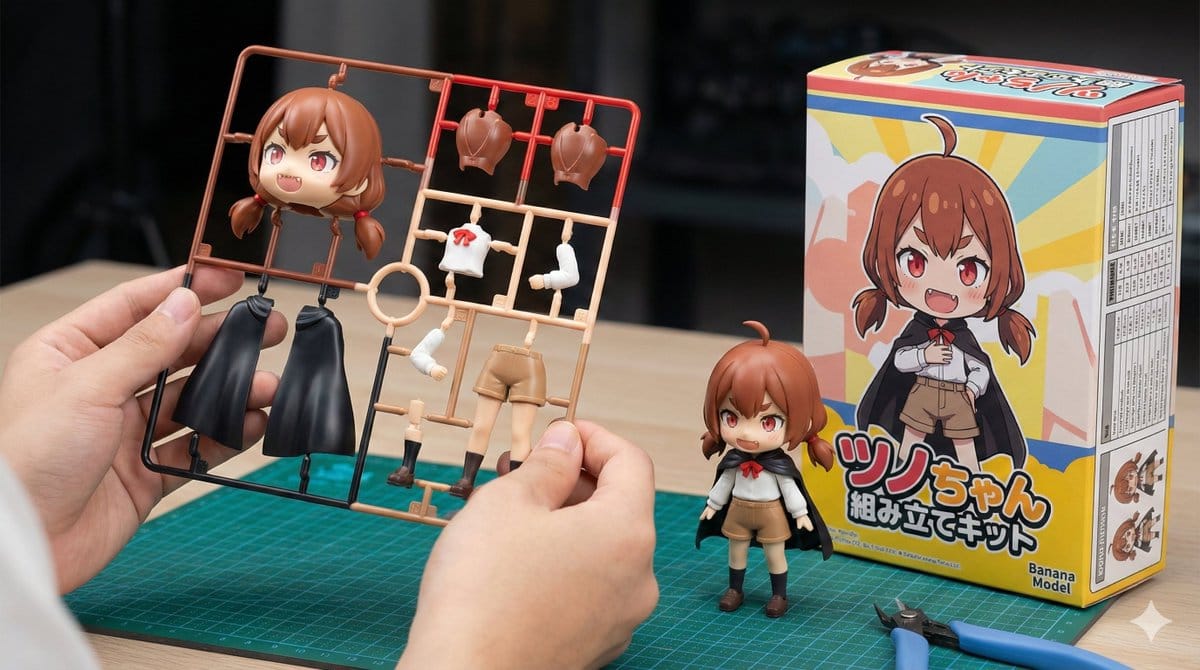
Plastic Model Kit Generation Prompt - AI Generated Character Style Image
유사 이미지 생성

This prompt is optimized for Nano-banana-pro model

Plastic Model Kit Generation Prompt

A detailed template prompt for Nano Banana Pro to generate an image of a plastic model kit (plamo) based on a specified character, including the runner frame, a completed figure, and a package box with specific branding ('Banana Model') and technical deta

예시 프롬프트
[Character Setting Section] 1. Character Appearance Details: (Enter the characteristics of the original character here. Example: A magical girl with long blonde hair and a blue dress) {argument name="character details" default="Brown hair, short twin tails, red eyes, slightly pointed teeth (giza teeth)."} 2. Text to Display on the Package: (Enter the title you want written on the box in English or Roman letters here. Example: MAGIC GIRL) {argument name="package title" default="Tsunochyan Assembly Kit"} [Fixed Section] Image Style: Vivid, photorealistic product introduction photo for hobby products. Horizontal (16:9). Main Subject (Hand): In the center foreground of the image, a human hand is holding up the plastic model 'runner (frame)' toward the camera. Important Shape Instruction: The parts on the runner are **deformed into a cute mini-character (SD style/chibi character) with two heads high** based on the specified "Character Appearance Details". The head part is large and rounded. **Only one head part** is placed. Do not show multiple face parts or spare heads. That single head part is large and clearly represents the character's features. Important Color Instruction: The runner parts are not monochromatic gray, but are **"multi-colored"**. The plastic parts themselves are pre-colored red, blue, skin tone, white, etc., according to the character's color settings (to look like a specification that can be completed just by assembly). Background (Work Desk): Behind the hand on the desk, the following two items are placed: Completed Product: A completed figure assembled in the same "mini-character" design as the runner is standing. Package Box: The box is placed next to the completed product at an angle where the "front" and "side" are visible. Front Design: Clearly display only the SD illustration of the specified character and the specified "Text to Display on the Package" as a large logo. Manufacturer Logo (Important): Clearly place a logo mark reading "Banana Model" on the bottom right of the box front. Do not display any other existing logos or unknown marks. Side Design (Important): The side of the box should be printed with a "specifications table" (a table with borders and a list of fine text) detailing the product's performance and values. Tools: Only two items are placed on the desk: a green **"cutting mat" and "nippers"** for plastic models. Overall Setting: The background is moderately blurred with depth of field, and the composition highlights the colorful runner parts in the hand and the box with the specified text.
AI로 생성하기

Pro Tip:

This character style prompt has been tested and optimized for best results. You can modify it slightly to customize the output while keeping the core structure intact.

AI 모델
Nano-banana-pro
제작자
Category
Character Style

자주 묻는 질문

character style 프롬프트에 대해 알아야 할 모든 것

이 character style 프롬프트는 어떻게 사용하나요?

위의 "AI로 생성하기" 버튼을 클릭하기만 하면 이 Character Style 프롬프트가 미리 입력된 AI 이미지 생성기로 이동합니다. 추가로 맞춤 설정하거나 바로 이미지를 생성할 수 있습니다. AI가 프롬프트를 해석하고 사용자의 설명에 따라 놀라운 character 비주얼을 만들어냅니다.

이 프롬프트를 특정 요구에 맞게 수정할 수 있나요?

물론입니다! 프롬프트를 복사하여 원하는 대로 자유롭게 맞춤 설정하세요. character 아트웍의 경우 스타일, 조명, 구도, 분위기 등에 대한 세부 정보를 추가해 보세요. 설명이 구체적일수록 AI가 창의적인 비전을 더 잘 이해할 수 있습니다. 더 많은 기술을 배우려면 character 프롬프트를 살펴보세요.

character style에 가장 적합한 AI 모델은 무엇인가요?

이 character 프롬프트는 Nano Banana, Flux, GPT-Image를 포함한 대부분의 최신 AI 이미지 생성기와 호환됩니다. 각 모델은 다른 측면에서 뛰어납니다. Nano Banana는 character 스타일에 탁월하고, Flux는 포토리얼리스틱한 결과물을 제공합니다.

좋은 character style 프롬프트란 무엇인가요?

훌륭한 character 프롬프트에는 구체적인 주제 세부사항, 아트 스타일 참조, 조명 조건(부드러운 조명, 드라마틱한 그림자), 색상 팔레트, 분위기, 기술 사양(4K, 디테일, HD) 등이 포함됩니다. 효과적인 패턴을 보려면 예시 프롬프트를 참고하세요.

이 프롬프트는 무료로 사용할 수 있나요?

네! 라이브러리에 있는 모든 프롬프트는 개인적 및 상업적 용도로 완전히 무료입니다. 제한 없이 character 아트웍을 복사, 수정, 제작하세요.

더 많은 프롬프트 탐색 ➜

영감 얻기: 이 AI 프롬프트를 사용해보세요

창의성을 자극하는 엄선된 AI 프롬프트. "지금 사용해보기"를 클릭하여 유사한 이미지를 즉시 생성하세요!

Cinderella Transformation AI Image Prompt - AI Generated Fantasy Style Image Example
Cinderella Transformation AI Image Prompt
This prompt is used with Nano Banana Pro to generate an image of a Cinderella-like princess, capturi...
by ちゃろん
Fantasy Style
Professional Studio Photoshoot Prompt (Sydney Sweeney Inspired) - AI Generated Realistic Style Image Example
Professional Studio Photoshoot Prompt (Sydney Sweeney Inspired)
A structured JSON prompt for generating an ultra-realistic, high-contrast professional studio photos...
by Bahar azam
Realistic Style
Model Walking Down Runway Prompt - AI Generated Realistic Style Image Example
Model Walking Down Runway Prompt
A simple prompt used to compare image generation models, instructing the AI to create a photo of a m...
by Yana Welinder
Realistic Style
Recipe breakdown and food photoshoot - AI Generated Realistic Style Image Example
Recipe breakdown and food photoshoot
An English prompt that analyzes a dish image to produce a detailed recipe with ingredients, while ma...
by DΞV
Realistic Style
4-panel Japanese gag manga about Nanami eating ramen - AI Generated AI Art Style Image Example
4-panel Japanese gag manga about Nanami eating ramen
A detailed prompt for creating a vertical 4-panel Japanese gag manga featuring a young woman named N...
by Shinya@AIマンガ家
AI Art Style
Neon-girl manga page 1 setup - AI Generated AI Art Style Image Example
Neon-girl manga page 1 setup
A Japanese prompt for page 1 of a manga about the girl Neon, specifying vertical Japanese text bubbl...
by よはく@0と1のすきま
AI Art Style

더 많은 프롬프트 아이디어가 필요하신가요?

애니메이션, 사실적, 추상 등 여러 카테고리에 걸친 {count}+ AI 프롬프트의 방대한 라이브러리를 둘러보세요!

모든 프롬프트 둘러보기

멋진 이미지를 만들 준비가 되셨나요?

이 프롬프트로 놀라운 AI 이미지 생성을 시작하거나, 방대한 프롬프트 라이브러리에서 더 많은 영감을 얻으세요.



