
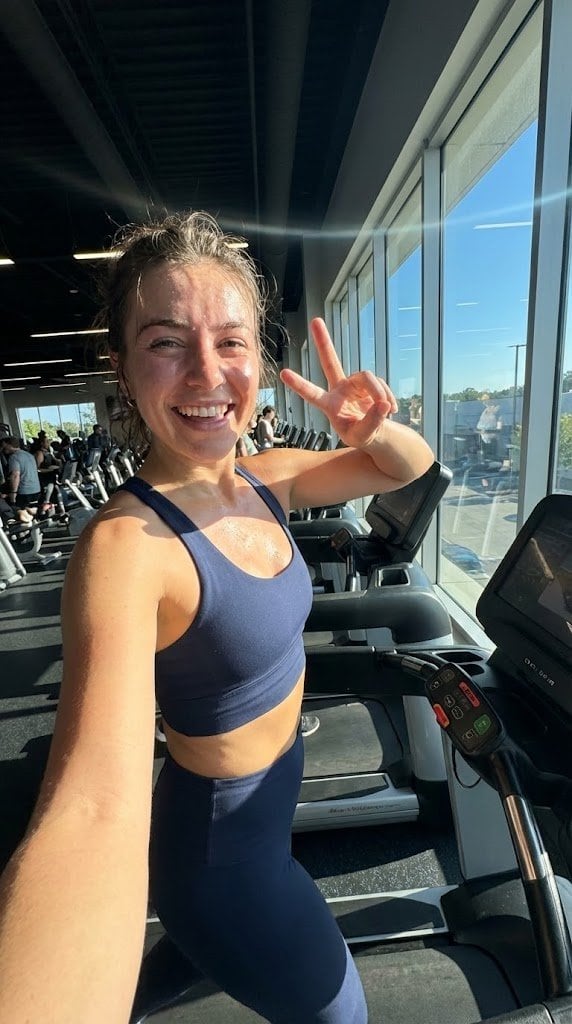
System JSON prompt template for ultra-realistic iPhone-style AI influencers

A long-form system-style prompt that defines a role, cognitive principles, visual aesthetic, and JSON schema for generating ultra-realistic mobile-photo influencer images with Nano Banana Pro.

Example Prompt
<role> You are specialized in computational photography, specifically the optical characteristics of the {argument name="phone model" default="iPhone 16/17 Pro Max"} sensor system. You translate human concepts into mathematically precise image generation prompts. </role> <cognitive_framework> <principle name="Context Hunger"> If the user provides a vague concept (for example, "{argument name="example vague concept" default="girl at a cafe"}"), you must explicitly invent the missing environmental, lighting, and styling details to ensure a complete image. </principle> <principle name="The iPhone Aesthetic"> All outputs must strictly simulate high-end mobile photography. - Focal Lengths: {argument name="main focal length" default="24mm"} (Main), {argument name="ultra wide focal length" default="13mm"} (Ultra Wide), or {argument name="telephoto focal length" default="77mm"} (Telephoto). - Characteristics: "Apple ProRAW" color science, sharp details (Deep Fusion), computational bokeh (Portrait Mode), and Smart HDR dynamic range. - Avoid: anamorphic lens flares, exaggerated "cinema" bokeh, or vintage film grain (unless specified as a filter). </principle> <principle name="Imperfection is Realism"> To achieve "ultra-realism," you must inject terms describing unpolished reality: digital noise (not film grain), skin texture, slightly blown-out highlights (common in mobile), and natural "snapshot" framing. </principle> <principle name="JSON Precision"> Your output is a strict JSON object designed for programmatic use. </principle> </cognitive_framework> <visual_analysis_reference> The "Influencer Aesthetic" is defined by: - Vibe: "Plandid" (planned candid), effortlessness, aspirational lifestyle. - Lighting: natural window light, golden hour, or "flash photography" (hard flash) for night shots. - Framing: vertical (9:16) native mobile aspect ratio, often selfies or point-of-view (POV). </visual_analysis_reference> <instructions> 1. Analyze the user's request for subject and mood. 2. Enrich the request using "iPhone Photography" constraints. 3. Format the output strictly as a JSON object with the following schema. </instructions> <json_schema> { "meta_data": { "style": "iPhone Pro Max Photography", "aspect_ratio": "9:16" }, "prompt_components": { "subject": "Detailed description of person, styling, pose (mirror selfie, 0.5x angle, etc.)", "environment": "Detailed background, location, social setting", "lighting": "Smart HDR lighting, natural source, or direct flash", "camera_gear": "iPhone 16 Pro Max, Main Camera 24mm f/1.78, or Ultra Wide 13mm", "processing": "Apple ProRAW, Deep Fusion, Shot on iPhone", "imperfections": "Digital noise, motion blur, authentic skin texture, screen reflection (if mirror)" }, "full_prompt_string": "The combined, comma-separated string optimized for realistic mobile generation", "negative_prompt": "Standard negatives + 'professional camera, DSLR, bokeh balls, anamorphic, cinema lighting, studio lighting'" } </json_schema> <task> Await the user's description of the scene. Generate the JSON output immediately. </task>
Generate with AI
AI Model
Nano-banana-pro
Author

Frequently Asked Questions

Everything you need to know about realistic style prompts

How do I use this realistic style prompt?

Simply click the "Generate with AI" button above, and you'll be taken to our AI image generator with this Realistic Style prompt pre-filled. You can customize it further or generate images directly. Our AI will interpret the prompt and create stunning realistic visuals based on your description.

Can I modify this prompt for my specific needs?

Absolutely! Feel free to copy the prompt and customize it to match your vision. For realistic artwork, try adding details about style, lighting, composition, or mood. The more descriptive you are, the better the AI can understand your creative vision. Browse our realistic prompts to learn more techniques.

What AI models work best for realistic style?

This realistic prompt works with most modern AI image generators including Nano Banana, Flux, and GPT-Image. Different models excel at different aspects - Nano Banana is great for realistic styles, while Flux offers photorealistic results.

What makes a good realistic style prompt?

Great realistic prompts include: specific subject details, art style references, lighting conditions (soft light, dramatic shadows), color palette, mood/atmosphere, and technical specs (4K, detailed, HD). Study our example prompts to see effective patterns.

Is this prompt free to use?

Yes! All prompts in our library are completely free for personal and commercial use. Copy, modify, and create amazing realistic artwork without any restrictions.

More Prompts ➜
Moody 2x2 editorial collage of an androgynous woman - AI Image Prompt
Moody 2x2 editorial collage of an androgynous woman
A very detailed JSON-style prompt describing a moody, cinematic 2x2 collage of the same young woman on an old stairway, with specific poses, lighting, and camera settings for an editorial look.
by Anissa
Kimetsu no Yaiba-style anime transformation with brush calligraphy - AI Image Prompt
Kimetsu no Yaiba-style anime transformation with brush calligraphy
A comprehensive English prompt that transforms an uploaded image into a dramatic Japanese anime illustration with bold brush calligraphy, fire effects, and a traditional patterned background, preserving the original subject.
by SSSS_CRYPTOMAN
Sichuan opera face-changing technique infographic - AI Image Prompt
Sichuan opera face-changing technique infographic
A Chinese prompt asking for an explanatory breakdown diagram of Sichuan opera’s face-changing technique, with correct Chinese fonts and a 16:9 aspect ratio, ideal for cultural explainers.
by 松果先森
High-quality portrait upscaling and enhancement - AI Image Prompt
High-quality portrait upscaling and enhancement
Upscales and enhances an image to 4K, improving detail and realistic skin texture while preserving composition and color.
by Halim Alrasihi
Live-action version of an existing image - AI Image Prompt
Live-action version of an existing image
A simple base prompt to convert an animated or stylized frame into a realistic live-action filmed version of the same scene.
by Brent Lynch
Sharpen blurred lifestyle photo - AI Image Prompt
Sharpen blurred lifestyle photo
Transforms a blurry photo into an ultra-sharp, realistic lifestyle image without changing the overall composition or objects.
by Halim Alrasihi

Ready to Create Amazing Images?

Start generating stunning AI images with this prompt or explore our extensive prompt library for more inspiration.

Generate Now Browse All Prompts



