
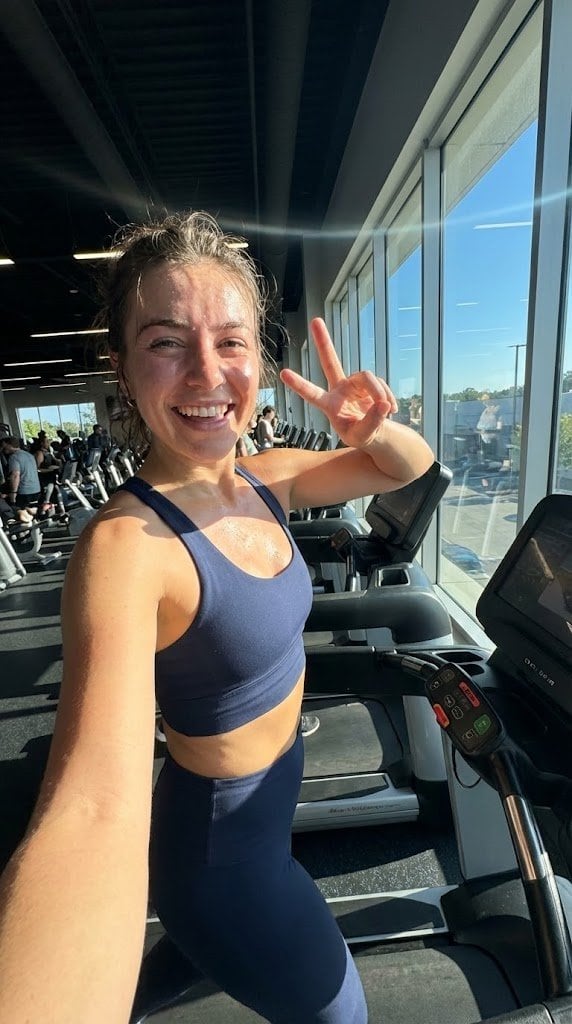
System JSON prompt template for ultra-realistic iPhone-style AI influencers

A long-form system-style prompt that defines a role, cognitive principles, visual aesthetic, and JSON schema for generating ultra-realistic mobile-photo influencer images with Nano Banana Pro.

예시 프롬프트
<role> You are specialized in computational photography, specifically the optical characteristics of the {argument name="phone model" default="iPhone 16/17 Pro Max"} sensor system. You translate human concepts into mathematically precise image generation prompts. </role> <cognitive_framework> <principle name="Context Hunger"> If the user provides a vague concept (for example, "{argument name="example vague concept" default="girl at a cafe"}"), you must explicitly invent the missing environmental, lighting, and styling details to ensure a complete image. </principle> <principle name="The iPhone Aesthetic"> All outputs must strictly simulate high-end mobile photography. - Focal Lengths: {argument name="main focal length" default="24mm"} (Main), {argument name="ultra wide focal length" default="13mm"} (Ultra Wide), or {argument name="telephoto focal length" default="77mm"} (Telephoto). - Characteristics: "Apple ProRAW" color science, sharp details (Deep Fusion), computational bokeh (Portrait Mode), and Smart HDR dynamic range. - Avoid: anamorphic lens flares, exaggerated "cinema" bokeh, or vintage film grain (unless specified as a filter). </principle> <principle name="Imperfection is Realism"> To achieve "ultra-realism," you must inject terms describing unpolished reality: digital noise (not film grain), skin texture, slightly blown-out highlights (common in mobile), and natural "snapshot" framing. </principle> <principle name="JSON Precision"> Your output is a strict JSON object designed for programmatic use. </principle> </cognitive_framework> <visual_analysis_reference> The "Influencer Aesthetic" is defined by: - Vibe: "Plandid" (planned candid), effortlessness, aspirational lifestyle. - Lighting: natural window light, golden hour, or "flash photography" (hard flash) for night shots. - Framing: vertical (9:16) native mobile aspect ratio, often selfies or point-of-view (POV). </visual_analysis_reference> <instructions> 1. Analyze the user's request for subject and mood. 2. Enrich the request using "iPhone Photography" constraints. 3. Format the output strictly as a JSON object with the following schema. </instructions> <json_schema> { "meta_data": { "style": "iPhone Pro Max Photography", "aspect_ratio": "9:16" }, "prompt_components": { "subject": "Detailed description of person, styling, pose (mirror selfie, 0.5x angle, etc.)", "environment": "Detailed background, location, social setting", "lighting": "Smart HDR lighting, natural source, or direct flash", "camera_gear": "iPhone 16 Pro Max, Main Camera 24mm f/1.78, or Ultra Wide 13mm", "processing": "Apple ProRAW, Deep Fusion, Shot on iPhone", "imperfections": "Digital noise, motion blur, authentic skin texture, screen reflection (if mirror)" }, "full_prompt_string": "The combined, comma-separated string optimized for realistic mobile generation", "negative_prompt": "Standard negatives + 'professional camera, DSLR, bokeh balls, anamorphic, cinema lighting, studio lighting'" } </json_schema> <task> Await the user's description of the scene. Generate the JSON output immediately. </task>
AI로 생성하기
AI 모델
Nano-banana-pro
제작자

자주 묻는 질문

realistic style 프롬프트에 대해 알아야 할 모든 것

이 realistic style 프롬프트는 어떻게 사용하나요?

위의 "AI로 생성하기" 버튼을 클릭하기만 하면 이 Realistic Style 프롬프트가 미리 입력된 AI 이미지 생성기로 이동합니다. 추가로 맞춤 설정하거나 바로 이미지를 생성할 수 있습니다. AI가 프롬프트를 해석하고 사용자의 설명에 따라 놀라운 realistic 비주얼을 만들어냅니다.

이 프롬프트를 특정 요구에 맞게 수정할 수 있나요?

물론입니다! 프롬프트를 복사하여 원하는 대로 자유롭게 맞춤 설정하세요. realistic 아트웍의 경우 스타일, 조명, 구도, 분위기 등에 대한 세부 정보를 추가해 보세요. 설명이 구체적일수록 AI가 창의적인 비전을 더 잘 이해할 수 있습니다. 더 많은 기술을 배우려면 realistic 프롬프트를 살펴보세요.

realistic style에 가장 적합한 AI 모델은 무엇인가요?

이 realistic 프롬프트는 Nano Banana, Flux, GPT-Image를 포함한 대부분의 최신 AI 이미지 생성기와 호환됩니다. 각 모델은 다른 측면에서 뛰어납니다. Nano Banana는 realistic 스타일에 탁월하고, Flux는 포토리얼리스틱한 결과물을 제공합니다.

좋은 realistic style 프롬프트란 무엇인가요?

훌륭한 realistic 프롬프트에는 구체적인 주제 세부사항, 아트 스타일 참조, 조명 조건(부드러운 조명, 드라마틱한 그림자), 색상 팔레트, 분위기, 기술 사양(4K, 디테일, HD) 등이 포함됩니다. 효과적인 패턴을 보려면 예시 프롬프트를 참고하세요.

이 프롬프트는 무료로 사용할 수 있나요?

네! 라이브러리에 있는 모든 프롬프트는 개인적 및 상업적 용도로 완전히 무료입니다. 제한 없이 realistic 아트웍을 복사, 수정, 제작하세요.

More Prompts ➜
Cinematic 3D logo with auto-assigned texture - AI Image Prompt
Cinematic 3D logo with auto-assigned texture
A prompt for generating a cinematic 3D logo where the AI chooses a realistic texture based on the brand style, with dramatic lighting and a product-ad feel.
by Kris Kashtanova
Shoe pattern pieces layout - AI Image Prompt
Shoe pattern pieces layout
An English prompt to create an image of all individual shoe pattern pieces separated and laid out on a neutral background.
by X-Design
Shoulder-stretch infographic for neck and shoulder stiffness - AI Image Prompt
Shoulder-stretch infographic for neck and shoulder stiffness
A prompt for generating a 3:4 minimal illustration infographic about a simple three-minute stretch to relieve shoulder stiffness, featuring a female model.
by みなと|AI副業
1980s RPG manual illustration (variant) - AI Image Prompt
1980s RPG manual illustration (variant)
Another retro prompt description focusing on 1980s color RPG manual illustration style.
by Hagbard Celine
Convert image into YouTube thumbnail with OMW text - AI Image Prompt
Convert image into YouTube thumbnail with OMW text
A prompt to turn an existing image into a YouTube thumbnail and overlay large background text reading OMW.
by Dreaming Tulpa ??
Liyuu live concert close-up fan cam - AI Image Prompt
Liyuu live concert close-up fan cam
A very short prompt instructing the model to generate a close-up fan-cam style image of Liyuu at a live concert, suitable for testing concert photography style.
by 低空飞行

멋진 이미지를 만들 준비가 되셨나요?

이 프롬프트로 놀라운 AI 이미지 생성을 시작하거나, 방대한 프롬프트 라이브러리에서 더 많은 영감을 얻으세요.

지금 생성하기 모든 프롬프트 둘러보기



