
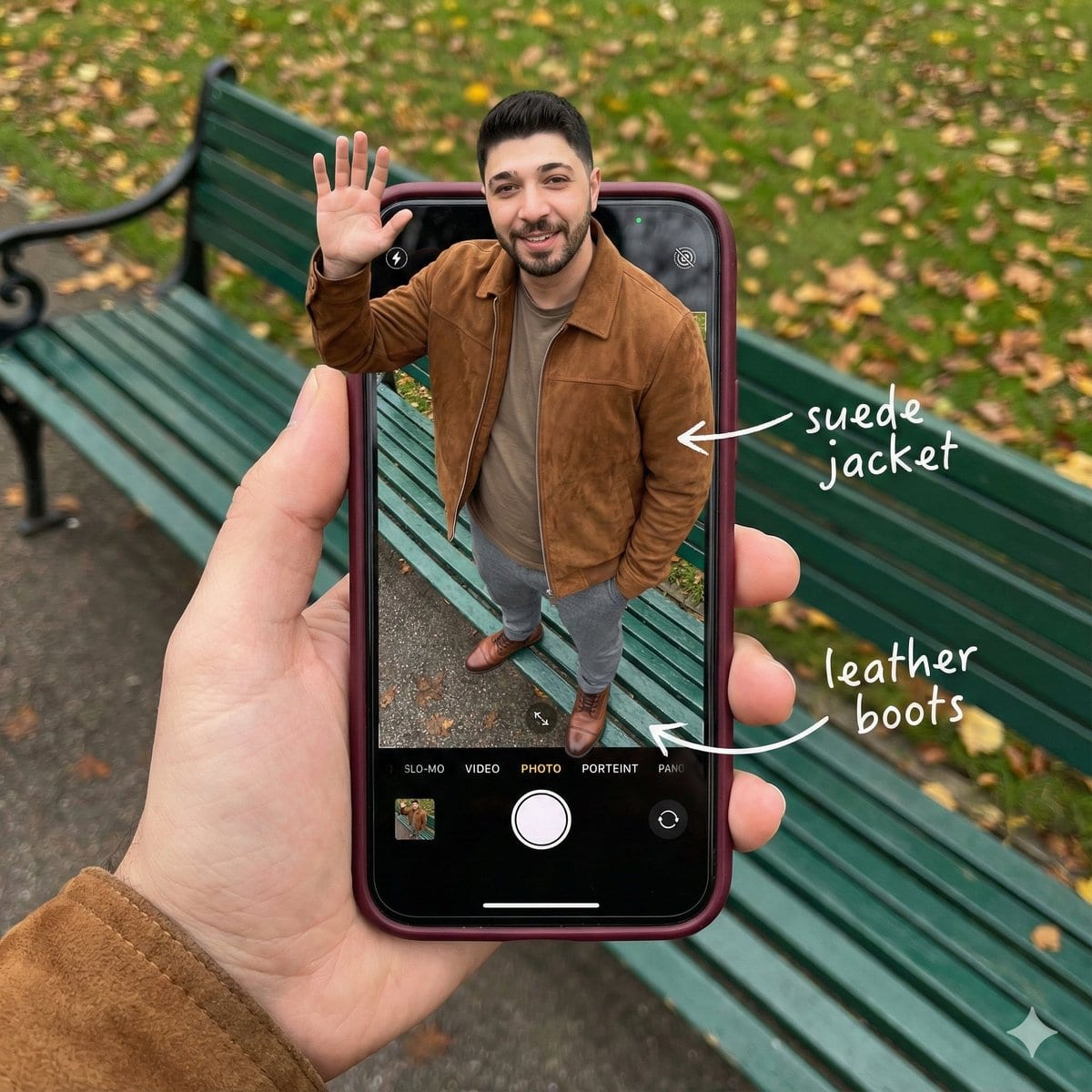
Smartphone Screen Stepping Out Optical Illusion Prompt

A complex JSON prompt for generating a hyper-realistic optical illusion where a man appears to be stepping out of a smartphone screen held in a hand, with his legs visible inside the camera interface, requiring detailed UI elements and photorealistic text

Example Prompt
{   "subject": {     "description": "A hyper-realistic optical illusion photograph. A young Caucasian man appears to be stepping out of a smartphone screen held in a hand. The screen displays the camera interface, capturing his boots, while his real upper body extends out of the phone into reality. He is waving his hand naturally to the viewer.",     "mirror_rules": "Ensure the phone screen clearly shows the iOS Camera UI (shutter button, mode text). Handwritten annotations must be legible and not mirrored.",     "age": "20s",     "expression": {       "eyes": {         "look": "Confident and friendly",         "energy": "Direct and charismatic",         "direction": "Looking at the viewer"       },       "mouth": {         "position": "Relaxed smile",         "energy": "Approachable and stylish"       },       "overall": "Lifelike, engaging interaction"     },     "face": {       "preserve_original": "true",       "makeup": "No makeup, natural male skin texture",       "features": "Preserve facial structure from reference image"     },     "hair": {       "color": "Dark brown",       "style": "Naturally styled, slightly textured",       "effect": "Realistic shine, subtle wind effect"     },     "body": {       "frame": "Athletic but proportionally realistic male body",       "waist": "Natural male proportions",       "chest": "Covered by high-quality knit or jacket",       "legs": "Visible INSIDE the phone screen interface wearing boots",       "skin": {         "visible_areas": "Face, hands",         "tone": "Fair Caucasian skin",         "texture": "Ultra-realistic skin texture, visible pores, natural imperfections",         "lighting_effect": "Soft daylight"       }     },     "pose": {       "position": "Torso and head emerging vertically from the phone, legs displayed on the screen",       "base": "Dynamic standing pose",       "overall": "One hand raised outside the phone, waving naturally, energetic and alive"     },     "clothing": {       "top": {         "effect": "High-end menswear styling, premium fabric texture, high-quality textile photography"       },       "bottom": {         "type": "Tailored trousers and leather boots",         "color": "Dark Grey trousers, Brown boots",         "details": "Boots visible on the screen beneath the UI elements"       }     }   },   "accessories": {     "jewelry": "Gold rings on the photographer's hand (foreground)",     "device": "Smartphone with burgundy case. The screen is ACTIVE and DETAILED: it displays the iOS Camera App Interface (white circular shutter button at bottom, 'PHOTO' text).",     "prop": "On the phone screen: White handwritten-style text overlays with arrows pointing to the outfit elements (e.g., text 'suede jacket' with arrow, 'leather boots' with arrow)."   },   "photography": {     "camera_style": "DSLR photography, Macro lens for phone details",     "angle": "POV, High angle looking down at hand",     "shot_type"
Generate with AI
AI Model
Nano-banana-pro

Frequently Asked Questions

Everything you need to know about realistic style prompts

How do I use this realistic style prompt?

Simply click the "Generate with AI" button above, and you'll be taken to our AI image generator with this Realistic Style prompt pre-filled. You can customize it further or generate images directly. Our AI will interpret the prompt and create stunning realistic visuals based on your description.

Can I modify this prompt for my specific needs?

Absolutely! Feel free to copy the prompt and customize it to match your vision. For realistic artwork, try adding details about style, lighting, composition, or mood. The more descriptive you are, the better the AI can understand your creative vision. Browse our realistic prompts to learn more techniques.

What AI models work best for realistic style?

This realistic prompt works with most modern AI image generators including Nano Banana, Flux, and GPT-Image. Different models excel at different aspects - Nano Banana is great for realistic styles, while Flux offers photorealistic results.

What makes a good realistic style prompt?

Great realistic prompts include: specific subject details, art style references, lighting conditions (soft light, dramatic shadows), color palette, mood/atmosphere, and technical specs (4K, detailed, HD). Study our example prompts to see effective patterns.

Is this prompt free to use?

Yes! All prompts in our library are completely free for personal and commercial use. Copy, modify, and create amazing realistic artwork without any restrictions.

More Prompts ➜
Hyper faithful image remaster - AI Image Prompt
Hyper faithful image remaster
A short instruction prompt to remaster a blurry image with maximum fidelity to the original.
by Follow4vibess
4-panel manga about Gemini generating Japanese text images - AI Image Prompt
4-panel manga about Gemini generating Japanese text images
A prompt to create a 4-panel manga using an attached character who learns via smartphone that Gemini can generate images containing Japanese text and tries it out.
by Google Japan
Podcast cover from two reference portraits - AI Image Prompt
Podcast cover from two reference portraits
A flexible prompt idea for generating a podcast cover using two uploaded portraits as references, with a black conceptual background and studio lighting, optionally matching poses from TV show posters.
by indigo
Gigantic Santa Claus on NYC Avenue (Structured Prompt) - AI Image Prompt
Gigantic Santa Claus on NYC Avenue (Structured Prompt)
A highly structured prompt defining an aerial, hyperrealistic photograph of a gigantic Santa Claus sitting casually on a New York City avenue. It specifies camera setup, subject details (maintaining reference likeness), wardrobe, environment, and atmosphe
by SaaS Junction || AI & SaaS Updates
Image Editing: Rotate 45 Degrees - AI Image Prompt
Image Editing: Rotate 45 Degrees
A simple French prompt used to test the image editing capabilities of GPT Image 1.5, specifically instructing the model to rotate an existing image 45 degrees to the left.
by Joffrey
2x2 Catch and Cook Prompt (Screenshot) - AI Image Prompt
2x2 Catch and Cook Prompt (Screenshot)
A prompt used in a comparison test, focusing on maintaining a specific geometric shape (a bird's triangular shape) during image generation. The prompt text is visible in the accompanying screenshot.
by TechHalla

Ready to Create Amazing Images?

Start generating stunning AI images with this prompt or explore our extensive prompt library for more inspiration.

Generate Now Browse All Prompts



