
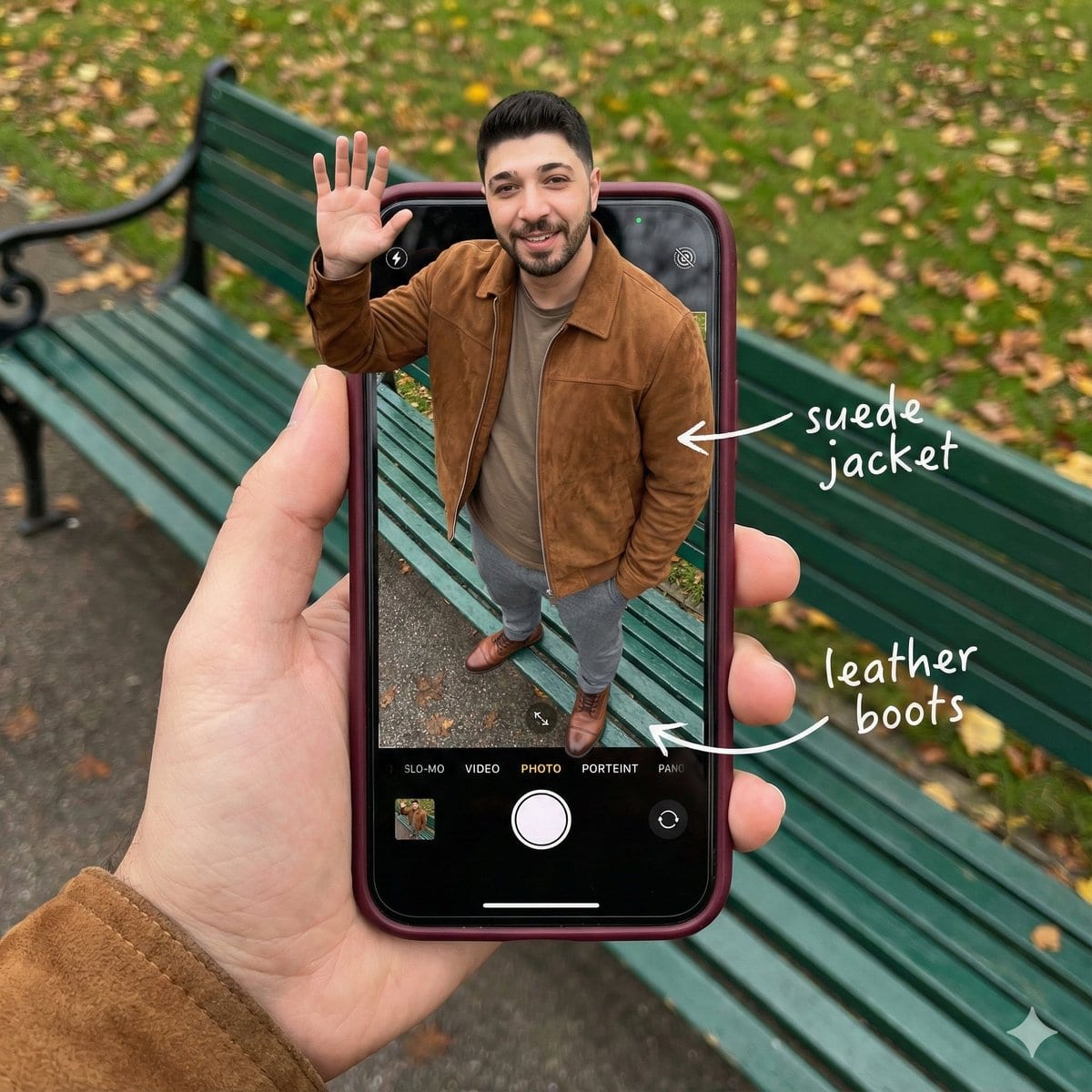
Smartphone Screen Stepping Out Optical Illusion Prompt

A complex JSON prompt for generating a hyper-realistic optical illusion where a man appears to be stepping out of a smartphone screen held in a hand, with his legs visible inside the camera interface, requiring detailed UI elements and photorealistic text

Indicación de ejemplo
{   "subject": {     "description": "A hyper-realistic optical illusion photograph. A young Caucasian man appears to be stepping out of a smartphone screen held in a hand. The screen displays the camera interface, capturing his boots, while his real upper body extends out of the phone into reality. He is waving his hand naturally to the viewer.",     "mirror_rules": "Ensure the phone screen clearly shows the iOS Camera UI (shutter button, mode text). Handwritten annotations must be legible and not mirrored.",     "age": "20s",     "expression": {       "eyes": {         "look": "Confident and friendly",         "energy": "Direct and charismatic",         "direction": "Looking at the viewer"       },       "mouth": {         "position": "Relaxed smile",         "energy": "Approachable and stylish"       },       "overall": "Lifelike, engaging interaction"     },     "face": {       "preserve_original": "true",       "makeup": "No makeup, natural male skin texture",       "features": "Preserve facial structure from reference image"     },     "hair": {       "color": "Dark brown",       "style": "Naturally styled, slightly textured",       "effect": "Realistic shine, subtle wind effect"     },     "body": {       "frame": "Athletic but proportionally realistic male body",       "waist": "Natural male proportions",       "chest": "Covered by high-quality knit or jacket",       "legs": "Visible INSIDE the phone screen interface wearing boots",       "skin": {         "visible_areas": "Face, hands",         "tone": "Fair Caucasian skin",         "texture": "Ultra-realistic skin texture, visible pores, natural imperfections",         "lighting_effect": "Soft daylight"       }     },     "pose": {       "position": "Torso and head emerging vertically from the phone, legs displayed on the screen",       "base": "Dynamic standing pose",       "overall": "One hand raised outside the phone, waving naturally, energetic and alive"     },     "clothing": {       "top": {         "effect": "High-end menswear styling, premium fabric texture, high-quality textile photography"       },       "bottom": {         "type": "Tailored trousers and leather boots",         "color": "Dark Grey trousers, Brown boots",         "details": "Boots visible on the screen beneath the UI elements"       }     }   },   "accessories": {     "jewelry": "Gold rings on the photographer's hand (foreground)",     "device": "Smartphone with burgundy case. The screen is ACTIVE and DETAILED: it displays the iOS Camera App Interface (white circular shutter button at bottom, 'PHOTO' text).",     "prop": "On the phone screen: White handwritten-style text overlays with arrows pointing to the outfit elements (e.g., text 'suede jacket' with arrow, 'leather boots' with arrow)."   },   "photography": {     "camera_style": "DSLR photography, Macro lens for phone details",     "angle": "POV, High angle looking down at hand",     "shot_type"
Generar con IA
Modelo de IA
Nano-banana-pro

Preguntas frecuentes

Todo lo que necesitas saber sobre indicaciones de realistic style

¿Cómo uso esta indicación de realistic style?

Simplemente haz clic en el botón "Generar con IA" arriba, y serás llevado a nuestro generador de imágenes con IA con esta indicación de Realistic Style pre-llenada. Puedes personalizarla más o generar imágenes directamente. Nuestra IA interpretará la indicación y creará impresionantes visuales de realistic basados en tu descripción.

¿Puedo modificar esta indicación para mis necesidades específicas?

¡Por supuesto! Siéntete libre de copiar la indicación y personalizarla para que coincida con tu visión. Para obras de arte de realistic, intenta añadir detalles sobre estilo, iluminación, composición o ambiente. Cuanto más descriptivo seas, mejor podrá la IA entender tu visión creativa. Explora nuestras indicaciones de realistic para aprender más técnicas.

¿Qué modelos de IA funcionan mejor para realistic style?

Esta indicación de realistic funciona con la mayoría de los generadores de imágenes de IA modernos, incluyendo Nano Banana, Flux y GPT-Image. Diferentes modelos sobresalen en diferentes aspectos - Nano Banana es excelente para estilos realistic, mientras que Flux ofrece resultados fotorrealistas.

¿Qué hace una buena indicación de realistic style?

Las grandes indicaciones de realistic incluyen: detalles específicos del sujeto, referencias de estilo artístico, condiciones de iluminación (luz suave, sombras dramáticas), paleta de colores, ambiente/atmósfera y especificaciones técnicas (4K, detallado, HD). Estudia nuestras indicaciones de ejemplo para ver patrones efectivos.

¿Esta indicación es gratuita?

¡Sí! Todas las indicaciones en nuestra biblioteca son completamente gratuitas para uso personal y comercial. Copia, modifica y crea increíbles obras de arte de realistic sin restricciones.

More Prompts ➜
Trompe l'oeil subject stepping out of social media screen - AI Image Prompt
Trompe l'oeil subject stepping out of social media screen
A prompt to turn an uploaded subject into a trompe l'oeil illusion where they step out of a social media interface on a large screen, including UI details and emoji reactions.
by madpencil_
UI redesign and optimization commands - AI Image Prompt
UI redesign and optimization commands
A set of natural-language prompts for redesigning and optimizing existing UI screens, focusing on audience, conversion, and usability goals.
by Stitch by Google
Where’s Waldo Star Wars scene - AI Image Prompt
Where’s Waldo Star Wars scene
Generates a dense “Where’s Waldo” style illustration featuring all Star Wars characters on Tatooine, including Waldo.
by CREACAS
Multi-image fusion character transformation - AI Image Prompt
Multi-image fusion character transformation
A complex Chinese prompt (quoted in the tweet) telling the model to turn the person from image 1 into a real human holding a figure from image 2, wearing clothes from image 3, makeup and hair from image 4, expression from image 5, and with a car from imag
by -Zho-
Low-angle man with hood scarf and cat on head - AI Image Prompt
Low-angle man with hood scarf and cat on head
A cinematic 9:16 portrait prompt of a young man wearing a specific hooded scarf with a Maine Coon cat sitting on top.
by Yaseen Khan Gul
Cinematic rainy street, underwater cathedral, and design-to-photo - AI Image Prompt
Cinematic rainy street, underwater cathedral, and design-to-photo
Replies contain multiple Chinese prompts: a rainy old street with neon reflections, a submerged cathedral with volumetric light and diver, and a request to turn a design draft into a real object image.
by 余温

¿Listo para crear imágenes increíbles?

Empieza a generar impresionantes imágenes con IA usando esta indicación o explora nuestra extensa biblioteca de indicaciones para más inspiración.

Generar ahora Explorar todas las indicaciones



