
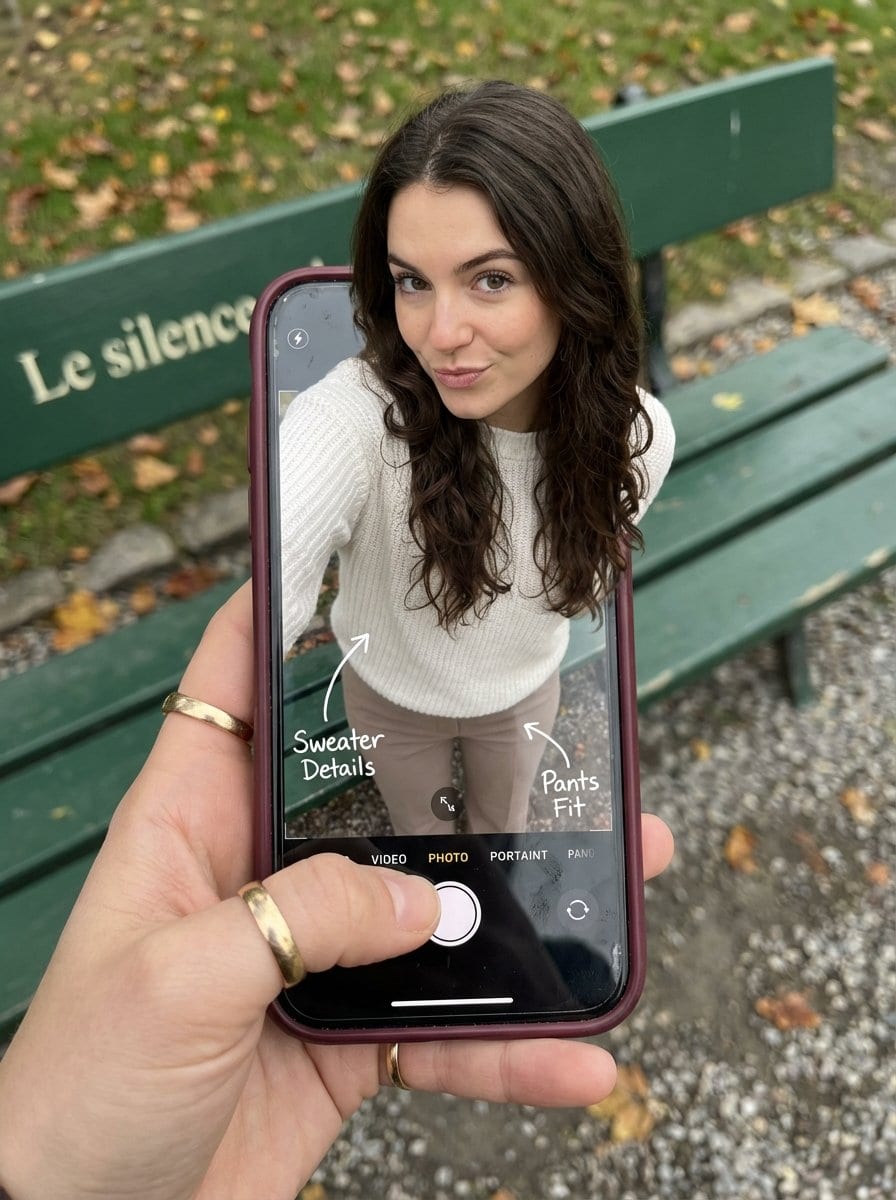
Optical Illusion: Stepping Out of a Smartphone Screen - AI Generated Realistic Style Image
Generate Similar Image

This prompt is optimized for Nano-banana-pro model

Optical Illusion: Stepping Out of a Smartphone Screen

A highly structured Nano Banana Pro prompt designed to create a hyper-realistic optical illusion photograph. The image features a woman appearing to step out of a smartphone screen, with her legs visible inside the phone's camera interface and her upper b

Example Prompt
{ "subject": { "description": "A hyper-realistic optical illusion photograph. A young Caucasian woman appears to be stepping out of a smartphone screen held in a hand. The screen displays the camera interface, capturing her legs, while her real upper body extends out of the phone into reality.", "mirror_rules": "Ensure the phone screen clearly shows the iOS Camera UI (shutter button, mode text). Handwritten annotations must be legible and not mirrored.", "age": "20s", "expression": { "eyes": { "look": "Alluring and playful", "energy": "Confident, direct", "direction": "Looking at the viewer" }, "mouth": { "position": "Neutral, relaxed lips", "energy": "Chic and composed" }, "overall": "Lifelike, engaging interaction" }, "face": { "preserve_original": "false", "makeup": "Natural glam, matte foundation, defined European features", "features": "High nose bridge, double eyelids, defined jawline" }, "hair": { "color": "Dark brown", "style": "Long, loose waves, voluminous", "effect": "Realistic shine, wind-blown effect" }, "body": { "frame": "Petite but proportionally realistic", "waist": "Defined", "chest": "Covered by white sweater", "legs": "Visible INSIDE the phone screen interface wearing pants", "skin": { "visible_areas": "Face, hands", "tone": "Fair Caucasian skin", "texture": "Ultra-realistic skin texture, visible pores, natural imperfections", "lighting_effect": "Soft daylight" } }, "pose": { "position": "Torso and head emerging vertically from the phone, legs displayed on the screen", "base": "Dynamic standing pose", "overall": "A dynamic random pose that feels full of vitality" }, "clothing": { "top": { "type": "White sweater", "effect": "Exquisite outfit, High-quality textile photography" }, "bottom": { "type": "Pants", "color": "Neutral tone", "details": "Pants visible on the screen beneath the UI elements" } } }, "accessories": { "jewelry": "Gold rings on the photographer's hand (foreground)", "device": "Smartphone with burgundy case. The screen is ACTIVE and DETAILED: it displays the IOS Camera App Interface (white circular shutter button at bottom, 'PHOTO' text).", "prop": "On the phone screen: White handwritten-style text overlays with arrows pointing to the outfit elements" }, "photography": { "camera_style": "DSLR photography, Macro lens for phone details", "angle": "POV, High angle looking down at hand", "shot_type": "Composite photography", "aspect_ratio": "3:4", "texture": "Sharp screen pixels, fingerprint smudges on screen, realistic fabric texture", "lighting": "Overcast soft natural light", "depth_of_field": "Background bench blurred (Bokeh), Phone scr" } }
Generate with AI

Pro Tip:

This realistic style prompt has been tested and optimized for best results. You can modify it slightly to customize the output while keeping the core structure intact.

AI Model
Nano-banana-pro
Author
Category
Realistic Style

Frequently Asked Questions

Everything you need to know about realistic style prompts

How do I use this realistic style prompt?

Simply click the "Generate with AI" button above, and you'll be taken to our AI image generator with this Realistic Style prompt pre-filled. You can customize it further or generate images directly. Our AI will interpret the prompt and create stunning realistic visuals based on your description.

Can I modify this prompt for my specific needs?

Absolutely! Feel free to copy the prompt and customize it to match your vision. For realistic artwork, try adding details about style, lighting, composition, or mood. The more descriptive you are, the better the AI can understand your creative vision. Browse our realistic prompts to learn more techniques.

What AI models work best for realistic style?

This realistic prompt works with most modern AI image generators including Nano Banana, Flux, and GPT-Image. Different models excel at different aspects - Nano Banana is great for realistic styles, while Flux offers photorealistic results.

What makes a good realistic style prompt?

Great realistic prompts include: specific subject details, art style references, lighting conditions (soft light, dramatic shadows), color palette, mood/atmosphere, and technical specs (4K, detailed, HD). Study our example prompts to see effective patterns.

Is this prompt free to use?

Yes! All prompts in our library are completely free for personal and commercial use. Copy, modify, and create amazing realistic artwork without any restrictions.

Ready to Create Amazing Images?

Start generating stunning AI images with this prompt or explore our extensive prompt library for more inspiration.



