
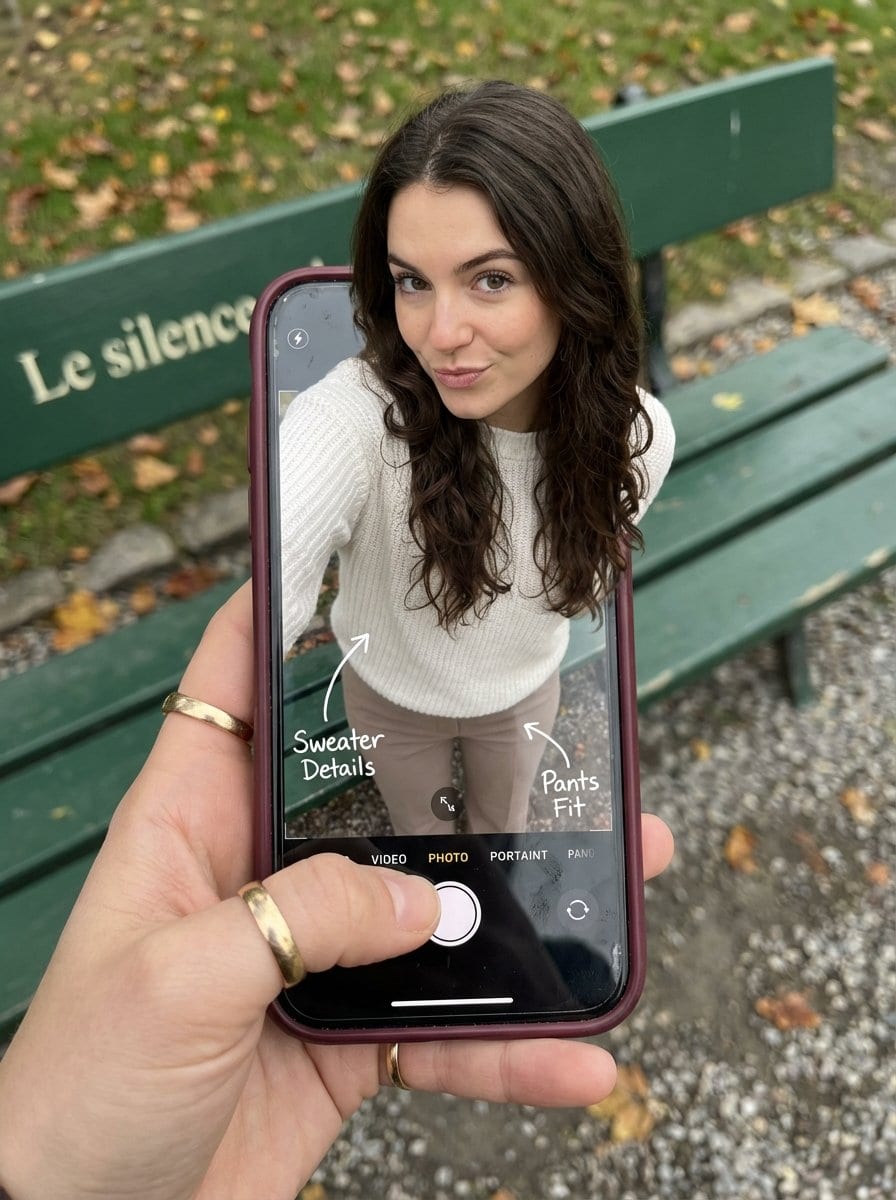
Optical Illusion: Stepping Out of a Smartphone Screen

A highly structured Nano Banana Pro prompt designed to create a hyper-realistic optical illusion photograph. The image features a woman appearing to step out of a smartphone screen, with her legs visible inside the phone's camera interface and her upper b

예시 프롬프트
{ "subject": { "description": "A hyper-realistic optical illusion photograph. A young Caucasian woman appears to be stepping out of a smartphone screen held in a hand. The screen displays the camera interface, capturing her legs, while her real upper body extends out of the phone into reality.", "mirror_rules": "Ensure the phone screen clearly shows the iOS Camera UI (shutter button, mode text). Handwritten annotations must be legible and not mirrored.", "age": "20s", "expression": { "eyes": { "look": "Alluring and playful", "energy": "Confident, direct", "direction": "Looking at the viewer" }, "mouth": { "position": "Neutral, relaxed lips", "energy": "Chic and composed" }, "overall": "Lifelike, engaging interaction" }, "face": { "preserve_original": "false", "makeup": "Natural glam, matte foundation, defined European features", "features": "High nose bridge, double eyelids, defined jawline" }, "hair": { "color": "Dark brown", "style": "Long, loose waves, voluminous", "effect": "Realistic shine, wind-blown effect" }, "body": { "frame": "Petite but proportionally realistic", "waist": "Defined", "chest": "Covered by white sweater", "legs": "Visible INSIDE the phone screen interface wearing pants", "skin": { "visible_areas": "Face, hands", "tone": "Fair Caucasian skin", "texture": "Ultra-realistic skin texture, visible pores, natural imperfections", "lighting_effect": "Soft daylight" } }, "pose": { "position": "Torso and head emerging vertically from the phone, legs displayed on the screen", "base": "Dynamic standing pose", "overall": "A dynamic random pose that feels full of vitality" }, "clothing": { "top": { "type": "White sweater", "effect": "Exquisite outfit, High-quality textile photography" }, "bottom": { "type": "Pants", "color": "Neutral tone", "details": "Pants visible on the screen beneath the UI elements" } } }, "accessories": { "jewelry": "Gold rings on the photographer's hand (foreground)", "device": "Smartphone with burgundy case. The screen is ACTIVE and DETAILED: it displays the IOS Camera App Interface (white circular shutter button at bottom, 'PHOTO' text).", "prop": "On the phone screen: White handwritten-style text overlays with arrows pointing to the outfit elements" }, "photography": { "camera_style": "DSLR photography, Macro lens for phone details", "angle": "POV, High angle looking down at hand", "shot_type": "Composite photography", "aspect_ratio": "3:4", "texture": "Sharp screen pixels, fingerprint smudges on screen, realistic fabric texture", "lighting": "Overcast soft natural light", "depth_of_field": "Background bench blurred (Bokeh), Phone scr" } }
AI로 생성하기
AI 모델
Nano-banana-pro
제작자

자주 묻는 질문

realistic style 프롬프트에 대해 알아야 할 모든 것

이 realistic style 프롬프트는 어떻게 사용하나요?

위의 "AI로 생성하기" 버튼을 클릭하기만 하면 이 Realistic Style 프롬프트가 미리 입력된 AI 이미지 생성기로 이동합니다. 추가로 맞춤 설정하거나 바로 이미지를 생성할 수 있습니다. AI가 프롬프트를 해석하고 사용자의 설명에 따라 놀라운 realistic 비주얼을 만들어냅니다.

이 프롬프트를 특정 요구에 맞게 수정할 수 있나요?

물론입니다! 프롬프트를 복사하여 원하는 대로 자유롭게 맞춤 설정하세요. realistic 아트웍의 경우 스타일, 조명, 구도, 분위기 등에 대한 세부 정보를 추가해 보세요. 설명이 구체적일수록 AI가 창의적인 비전을 더 잘 이해할 수 있습니다. 더 많은 기술을 배우려면 realistic 프롬프트를 살펴보세요.

realistic style에 가장 적합한 AI 모델은 무엇인가요?

이 realistic 프롬프트는 Nano Banana, Flux, GPT-Image를 포함한 대부분의 최신 AI 이미지 생성기와 호환됩니다. 각 모델은 다른 측면에서 뛰어납니다. Nano Banana는 realistic 스타일에 탁월하고, Flux는 포토리얼리스틱한 결과물을 제공합니다.

좋은 realistic style 프롬프트란 무엇인가요?

훌륭한 realistic 프롬프트에는 구체적인 주제 세부사항, 아트 스타일 참조, 조명 조건(부드러운 조명, 드라마틱한 그림자), 색상 팔레트, 분위기, 기술 사양(4K, 디테일, HD) 등이 포함됩니다. 효과적인 패턴을 보려면 예시 프롬프트를 참고하세요.

이 프롬프트는 무료로 사용할 수 있나요?

네! 라이브러리에 있는 모든 프롬프트는 개인적 및 상업적 용도로 완전히 무료입니다. 제한 없이 realistic 아트웍을 복사, 수정, 제작하세요.

More Prompts ➜
YouTube thumbnail design brief for a masked interview video - AI Image Prompt
YouTube thumbnail design brief for a masked interview video
A long, detailed prompt asking the AI to design a high-conversion YouTube thumbnail using a masked character from a reference image, focusing on layout, text, and target audience.
by える | YouTubeマーケター
Roadmap diagram for becoming a successful web designer in Japan - AI Image Prompt
Roadmap diagram for becoming a successful web designer in Japan
A text-plus-diagram style prompt instructing the model to create a realistic roadmap image for succeeding as a web designer in Japan, including career steps like agencies and in-house roles.
by VIVIBOND inc. 三鍋忍@デザインやWeb制作の現場
Convert scene to low-res pixel art - AI Image Prompt
Convert scene to low-res pixel art
A brief prompt instructing the model to recreate an entire scene, including water splashes and background, as low resolution pixel art.
by proper
Cinematic fashion editorial in a windstorm - AI Image Prompt
Cinematic fashion editorial in a windstorm
A comprehensive prompt for a high-fashion cinematic editorial portrait in a windy city street with motion blur, plus negative prompt and technical parameters for high-end renders.
by Shreya Yadav
Unfiltered mirror selfie with tech leaders - AI Image Prompt
Unfiltered mirror selfie with tech leaders
A highly specific prompt designed to test realism and composition by generating a raw, unfiltered amateur mirror selfie taken on an iPhone 16 Pro Max, featuring Sam Altman, Elon Musk, and Jensen Huang in a casual, unstaged indoor setting with natural ligh
by Awais
Extracting a Still from a Grid Image - AI Image Prompt
Extracting a Still from a Grid Image
A simple, functional prompt used for frame extraction from a previously generated image grid, specifically targeting the image located at row 1, column 2.
by TechHalla

멋진 이미지를 만들 준비가 되셨나요?

이 프롬프트로 놀라운 AI 이미지 생성을 시작하거나, 방대한 프롬프트 라이브러리에서 더 많은 영감을 얻으세요.

지금 생성하기 모든 프롬프트 둘러보기



