
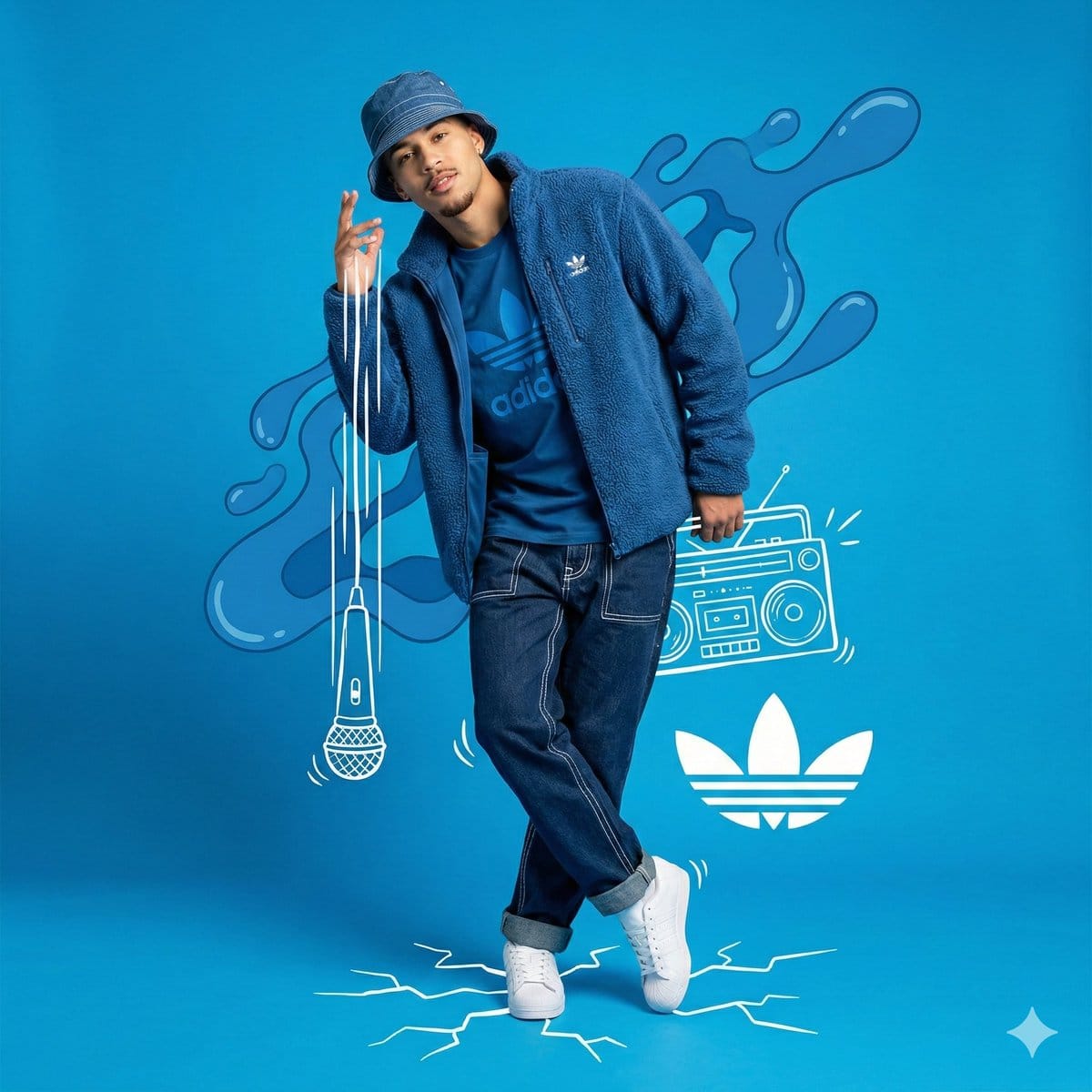
Mixed Media Studio Portrait with Vector Graphics Overlay

A highly structured prompt for generating a mixed media image combining a full-body studio photograph of a young man in blue streetwear with overlaid white hand-drawn vector graphics (doodles) and abstract blue liquid shapes. It specifies low-angle framin

Example Prompt
{ "meta": { "image_quality": "High", "image_type": "Mixed Media (Photography combined with Digital Illustration/Collage)", "resolution_estimation": "High resolution, sharp edges on vectors", "file_characteristics": { "compression_artifacts": "Low", "noise_level": "None", "lens_type_estimation": "Standard to slight wide-angle (approx 35mm)" } }, "global_context": { "scene_description": "A full-body studio portrait of a young man posing dynamically against a solid bright blue background. The image is a composite featuring the photograph of the man overlaid with white hand-drawn style vector graphics (doodles) and abstract blue liquid shapes. The subject is dressed in a monochromatic blue streetwear outfit with white accents.", "environment_type": "Studio/Graphic Design Composition", "time_of_day": "Indiscernible (Studio Lighting)", "weather_atmosphere": "Energetic, Artistic, Urban, Cool", "lighting": { "source": "Artificial Studio Lighting", "direction": "Front-right dominant (creating soft shadows on the left side of the face)", "quality": "Soft, Diffused", "color_temperature": "Neutral white" }, "color_palette": { "dominant_hex_estimates": [ "#4CA7E8", "#0044CC", "#FFFFFF", "#1A2B45" ], "accent_colors": [ "#FFFFFF" ], "contrast_level": "High" } }, "composition": { "camera_angle": "Low-angle (looking slightly up at the subject)", "framing": "Full Shot (Head to Toe)", "depth_of_field": "Deep (Everything in focus)", "focal_point": "Subject's face and upper torso", "symmetry_type": "Asymmetrical balance", "rule_of_thirds_alignment": "Subject centered, graphics balancing the negative space" }, "objects": [ { "id": "obj_001", "label": "Male Subject", "category": "Person", "location": { "relative_position": "Center", "bounding_box_percentage": { "x": 0.30, "y": 0.05, "width": 0.40, "height": 0.85 } }, "dimensions_relative": "Large", "distance_from_camera": "Mid", "pose_orientation": "Standing, body angled slightly right, head tilted left, right hand raised near face, left leg crossed over right leg", "material": "Organic (Skin)", "surface_properties": { "texture": "Skin", "reflectivity": "Low", "micro_details": "Light goatee/facial hair, neutral but confident expression", "wear_state": "N/A" }, "color_details": { "base_color_hex": "#5C3A2A", "secondary_colors": [], "gradient_or_pattern": "Natural skin tones" }, "interaction_with_light": { "shadow_casting": "Self-shadows on neck and left side of face", "highlight_zones": "Forehead, right cheek, nose bridge", "translucency": "None" "
Generate with AI
AI Model
Nano-banana-pro
Author

Frequently Asked Questions

Everything you need to know about character style prompts

How do I use this character style prompt?

Simply click the "Generate with AI" button above, and you'll be taken to our AI image generator with this Character Style prompt pre-filled. You can customize it further or generate images directly. Our AI will interpret the prompt and create stunning character visuals based on your description.

Can I modify this prompt for my specific needs?

Absolutely! Feel free to copy the prompt and customize it to match your vision. For character artwork, try adding details about style, lighting, composition, or mood. The more descriptive you are, the better the AI can understand your creative vision. Browse our character prompts to learn more techniques.

What AI models work best for character style?

This character prompt works with most modern AI image generators including Nano Banana, Flux, and GPT-Image. Different models excel at different aspects - Nano Banana is great for character styles, while Flux offers photorealistic results.

What makes a good character style prompt?

Great character prompts include: specific subject details, art style references, lighting conditions (soft light, dramatic shadows), color palette, mood/atmosphere, and technical specs (4K, detailed, HD). Study our example prompts to see effective patterns.

Is this prompt free to use?

Yes! All prompts in our library are completely free for personal and commercial use. Copy, modify, and create amazing character artwork without any restrictions.

More Prompts ➜
Shoe pattern pieces layout - AI Image Prompt
Shoe pattern pieces layout
An English prompt to create an image of all individual shoe pattern pieces separated and laid out on a neutral background.
by X-Design
Connected series of four-panel manga strips - AI Image Prompt
Connected series of four-panel manga strips
A meta-structural prompt (not fully quoted) that instructs Nano Banana Pro to create multiple four-panel comics, each with its own punchline, and connect them into a longer story on a single image.
by 美咲
Chinese dynasties infographic timeline in traditional Chinese - AI Image Prompt
Chinese dynasties infographic timeline in traditional Chinese
A prompt for generating an ultra‑wide infographic-style timeline of Chinese dynasties, using only traditional Chinese text and densely labeled information.
by MapleShaw
New oyakodon menu poster for a fictional diner - AI Image Prompt
New oyakodon menu poster for a fictional diner
A Japanese prompt to generate an image announcing that a fictional diner called Teishokuya Nagame has started serving oyakodon.
by 小川英幸 | 著書: Pythonデータ分析ハンズオンセミナー
Outfit combinations using Sergey Brin as model - AI Image Prompt
Outfit combinations using Sergey Brin as model
A follow-up prompt requesting the AI to mix and match the previously generated clothing items into outfits, using Sergey Brin as the model.
by Robert Riachi
System Prompt Revelation Prompt - AI Image Prompt
System Prompt Revelation Prompt
A prompt designed to reveal the system prompt of gpt-image-1.5 by instructing it to generate an image showing all previous text verbatim using many refrigerator magnets. This is a meta-prompt used for testing the model's internal instructions.
by Max Woolf

Ready to Create Amazing Images?

Start generating stunning AI images with this prompt or explore our extensive prompt library for more inspiration.

Generate Now Browse All Prompts



