
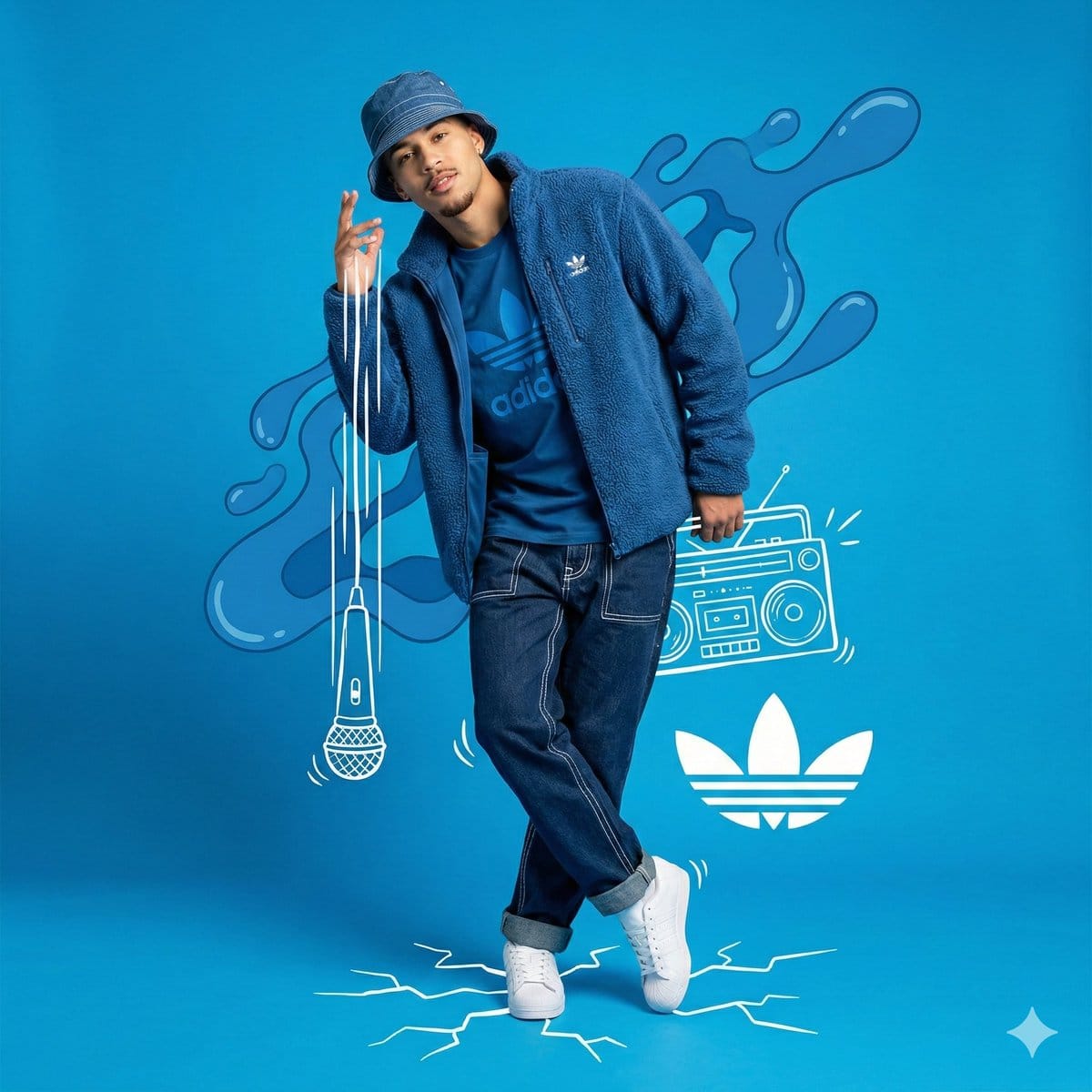
Mixed Media Studio Portrait with Vector Graphics Overlay

A highly structured prompt for generating a mixed media image combining a full-body studio photograph of a young man in blue streetwear with overlaid white hand-drawn vector graphics (doodles) and abstract blue liquid shapes. It specifies low-angle framin

예시 프롬프트
{ "meta": { "image_quality": "High", "image_type": "Mixed Media (Photography combined with Digital Illustration/Collage)", "resolution_estimation": "High resolution, sharp edges on vectors", "file_characteristics": { "compression_artifacts": "Low", "noise_level": "None", "lens_type_estimation": "Standard to slight wide-angle (approx 35mm)" } }, "global_context": { "scene_description": "A full-body studio portrait of a young man posing dynamically against a solid bright blue background. The image is a composite featuring the photograph of the man overlaid with white hand-drawn style vector graphics (doodles) and abstract blue liquid shapes. The subject is dressed in a monochromatic blue streetwear outfit with white accents.", "environment_type": "Studio/Graphic Design Composition", "time_of_day": "Indiscernible (Studio Lighting)", "weather_atmosphere": "Energetic, Artistic, Urban, Cool", "lighting": { "source": "Artificial Studio Lighting", "direction": "Front-right dominant (creating soft shadows on the left side of the face)", "quality": "Soft, Diffused", "color_temperature": "Neutral white" }, "color_palette": { "dominant_hex_estimates": [ "#4CA7E8", "#0044CC", "#FFFFFF", "#1A2B45" ], "accent_colors": [ "#FFFFFF" ], "contrast_level": "High" } }, "composition": { "camera_angle": "Low-angle (looking slightly up at the subject)", "framing": "Full Shot (Head to Toe)", "depth_of_field": "Deep (Everything in focus)", "focal_point": "Subject's face and upper torso", "symmetry_type": "Asymmetrical balance", "rule_of_thirds_alignment": "Subject centered, graphics balancing the negative space" }, "objects": [ { "id": "obj_001", "label": "Male Subject", "category": "Person", "location": { "relative_position": "Center", "bounding_box_percentage": { "x": 0.30, "y": 0.05, "width": 0.40, "height": 0.85 } }, "dimensions_relative": "Large", "distance_from_camera": "Mid", "pose_orientation": "Standing, body angled slightly right, head tilted left, right hand raised near face, left leg crossed over right leg", "material": "Organic (Skin)", "surface_properties": { "texture": "Skin", "reflectivity": "Low", "micro_details": "Light goatee/facial hair, neutral but confident expression", "wear_state": "N/A" }, "color_details": { "base_color_hex": "#5C3A2A", "secondary_colors": [], "gradient_or_pattern": "Natural skin tones" }, "interaction_with_light": { "shadow_casting": "Self-shadows on neck and left side of face", "highlight_zones": "Forehead, right cheek, nose bridge", "translucency": "None" "
AI로 생성하기
AI 모델
Nano-banana-pro
제작자

자주 묻는 질문

character style 프롬프트에 대해 알아야 할 모든 것

이 character style 프롬프트는 어떻게 사용하나요?

위의 "AI로 생성하기" 버튼을 클릭하기만 하면 이 Character Style 프롬프트가 미리 입력된 AI 이미지 생성기로 이동합니다. 추가로 맞춤 설정하거나 바로 이미지를 생성할 수 있습니다. AI가 프롬프트를 해석하고 사용자의 설명에 따라 놀라운 character 비주얼을 만들어냅니다.

이 프롬프트를 특정 요구에 맞게 수정할 수 있나요?

물론입니다! 프롬프트를 복사하여 원하는 대로 자유롭게 맞춤 설정하세요. character 아트웍의 경우 스타일, 조명, 구도, 분위기 등에 대한 세부 정보를 추가해 보세요. 설명이 구체적일수록 AI가 창의적인 비전을 더 잘 이해할 수 있습니다. 더 많은 기술을 배우려면 character 프롬프트를 살펴보세요.

character style에 가장 적합한 AI 모델은 무엇인가요?

이 character 프롬프트는 Nano Banana, Flux, GPT-Image를 포함한 대부분의 최신 AI 이미지 생성기와 호환됩니다. 각 모델은 다른 측면에서 뛰어납니다. Nano Banana는 character 스타일에 탁월하고, Flux는 포토리얼리스틱한 결과물을 제공합니다.

좋은 character style 프롬프트란 무엇인가요?

훌륭한 character 프롬프트에는 구체적인 주제 세부사항, 아트 스타일 참조, 조명 조건(부드러운 조명, 드라마틱한 그림자), 색상 팔레트, 분위기, 기술 사양(4K, 디테일, HD) 등이 포함됩니다. 효과적인 패턴을 보려면 예시 프롬프트를 참고하세요.

이 프롬프트는 무료로 사용할 수 있나요?

네! 라이브러리에 있는 모든 프롬프트는 개인적 및 상업적 용도로 완전히 무료입니다. 제한 없이 character 아트웍을 복사, 수정, 제작하세요.

More Prompts ➜
Levi’s shopping mirror selfie edit - AI Image Prompt
Levi’s shopping mirror selfie edit
An English prompt that edits a person’s photo to look like they are shopping at Levi’s, holding bags and taking a mirror selfie with a specific phone model.
by Sai Nemani
Image enhancement and upscaling prompt - AI Image Prompt
Image enhancement and upscaling prompt
A prompt to enhance and upscale an image while preserving composition and color, removing blur and adding detailed texture, suitable for quality upgrades.
by こわだ
Glossy magazine article layout from text - AI Image Prompt
Glossy magazine article layout from text
Two related prompts: one in English and one in Chinese, both asking to place a full article text into a photo of a glossy magazine on a desk with rich typography, photos, and some article themes turned into desk objects.
by 歸藏(guizang.ai)
Classical Chinese poem illustration with text (duplicate) - AI Image Prompt
Classical Chinese poem illustration with text (duplicate)
A duplicate of the prompt to illustrate the long classical poem and include the original Chinese text in the image.
by 松果先森
Nano Banana Pro brand hero image (with later edit request) - AI Image Prompt
Nano Banana Pro brand hero image (with later edit request)
The main prompt asks for a Nano Banana Pro hero image in Google’s brand style; replies mention editing chopsticks to hold a condom, suggesting a possible humorous variant.
by 松果先森
Minecraft Liminal Space Image Prompt - AI Image Prompt
Minecraft Liminal Space Image Prompt
A simple, direct prompt instructing GPT-image-1.5 to create an image depicting a liminal space within the aesthetic of the Minecraft video game.
by JB

멋진 이미지를 만들 준비가 되셨나요?

이 프롬프트로 놀라운 AI 이미지 생성을 시작하거나, 방대한 프롬프트 라이브러리에서 더 많은 영감을 얻으세요.

지금 생성하기 모든 프롬프트 둘러보기



