
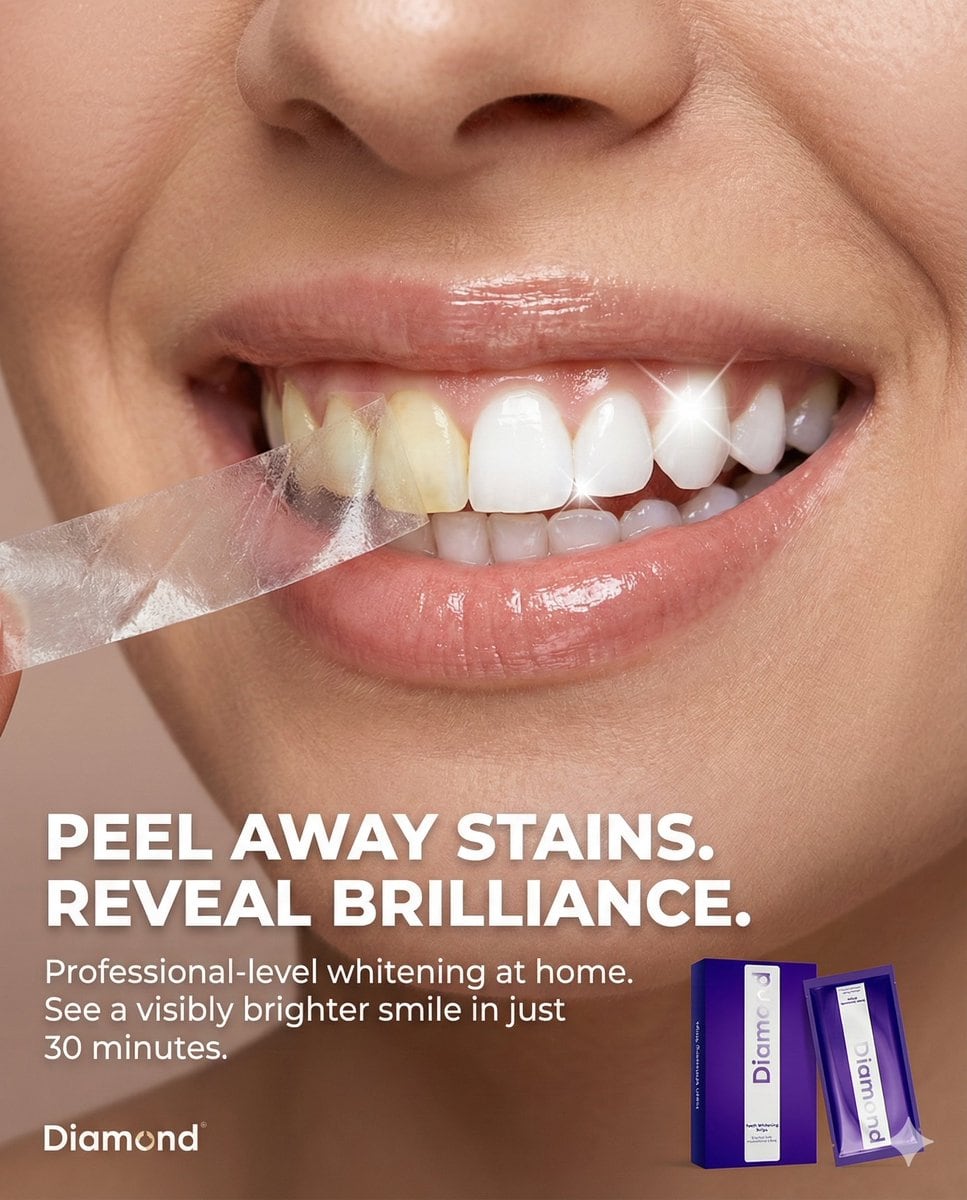
Macro Beauty Ad for Teeth Whitening Strips with Peeling Effect

A structured JSON prompt for generating a high-end, photorealistic macro beauty advertisement for teeth whitening strips. The core concept is a conceptual 'peeling' effect on the teeth, revealing a dramatically whiter smile underneath, with specific instr

Example Prompt
Use my attached image of my product and use the json profile that is provided to create the full picture. New Text for Static Ad: Headline: PEEL AWAY STAINS. REVEAL BRILLIANCE. Body: Professional-level whitening at home. See a visibly brighter smile in just 30 minutes. Tagline: Your brightest smile, unleashed. {   "meta": {     "aspect_ratio": "4:5",     "resolution": "8k",     "quality": "photorealistic_macro_beauty",     "style": "high-end beauty editorial, conceptual product advertising, clean and clinical"   },   "composition": {     "subject_position": "full_frame_macro",     "framing": "extreme close-up on the mouth and teeth of a person",     "crop": "focused tightly on the smile from nose to chin",     "visual_hook": "A precise, conceptual 'peeling' effect is applied *only* to the surface of the teeth, revealing a starkly whiter shade underneath."   },   "scene": {     "location": "professional studio",     "setting": "minimalist beauty background",     "atmosphere": "fresh, transformative, and premium",     "background": "solid, smooth neutral beige-pink, matching the original ad's aesthetic"   },   "lighting": {     "primary": "soft, flattering beauty lighting to highlight skin texture and lip gloss",     "secondary": "specular highlights on the teeth to emphasize enamel and the peeling effect",     "effect": [       "gentle shadows that give depth to the peeling layer on the teeth",       "bright, clean illumination on the revealed white teeth",       "realistic catchlights on the moist surface of the teeth and lips"     ]   },   "camera_perspective": {     "angle": "straight-on, eye-level with the mouth",     "distance": "macro close-up",     "look": "highly detailed, showing tooth texture and enamel"   },   "subject": {     "appearance": "SEE FIRST ATTACHED IMAGE for the product application.",     "interaction": "The person is smiling broadly. A thin, translucent layer is being peeled back from the front surface of the teeth, from left to right.",     "specific_action": "The peel is confined *strictly* to the teeth. The lips, gums, and surrounding skin are not affected by the peeling action. The peeled layer shows a yellower, stained tooth surface, while the area underneath is brilliantly white.",     "skin_and_lips": "Natural skin texture with visible pores, and healthy, slightly glossy lips."   },   "graphic_elements": {     "the_peel": {       "texture": "thin, transparent strip-like material, slightly crinkled as it's pulled away",       "action": "curling away from the teeth, showing the contrast in color",       "contrast": "dramatic difference between the stained 'before' layer and the bright 'after' teeth"     },     "product_placement": {       "item": "A packet or box of the whitening strips (from your attached image) is placed in the bottom right corner.",       "logo": "The brand logo is in the bottom left corner."     }   } }
Generate with AI
AI Model
Nano-banana-pro
Author

Frequently Asked Questions

Everything you need to know about realistic style prompts

How do I use this realistic style prompt?

Simply click the "Generate with AI" button above, and you'll be taken to our AI image generator with this Realistic Style prompt pre-filled. You can customize it further or generate images directly. Our AI will interpret the prompt and create stunning realistic visuals based on your description.

Can I modify this prompt for my specific needs?

Absolutely! Feel free to copy the prompt and customize it to match your vision. For realistic artwork, try adding details about style, lighting, composition, or mood. The more descriptive you are, the better the AI can understand your creative vision. Browse our realistic prompts to learn more techniques.

What AI models work best for realistic style?

This realistic prompt works with most modern AI image generators including Nano Banana, Flux, and GPT-Image. Different models excel at different aspects - Nano Banana is great for realistic styles, while Flux offers photorealistic results.

What makes a good realistic style prompt?

Great realistic prompts include: specific subject details, art style references, lighting conditions (soft light, dramatic shadows), color palette, mood/atmosphere, and technical specs (4K, detailed, HD). Study our example prompts to see effective patterns.

Is this prompt free to use?

Yes! All prompts in our library are completely free for personal and commercial use. Copy, modify, and create amazing realistic artwork without any restrictions.

More Prompts ➜
Recursive artist painting a photo of himself painting - AI Image Prompt
Recursive artist painting a photo of himself painting
Creates an amateur 1998-style photograph of a middle-aged artist copying an image from a computer screen to canvas, where the image itself is a photo of the artist painting the recursive image, ideal for mind-bending meta scenes.
by ρŁ??Mʘ
Anime character sitting on real beach photo at sunset - AI Image Prompt
Anime character sitting on real beach photo at sunset
A detailed prompt for compositing an illustrated character sitting on a real beach photo at sunset, with cinematic filters, bokeh, lens flare, strong contrast, and matched perspective.
by とらの
Illustration explaining Kurzweil’s six epochs in Japanese - AI Image Prompt
Illustration explaining Kurzweil’s six epochs in Japanese
A concise prompt that asks Nano Banana Pro to generate an explanatory image in Japanese about Ray Kurzweil’s theory of the six epochs.
by Tsubame
Vertical 4-panel gekiga-style manga YAML prompt - AI Image Prompt
Vertical 4-panel gekiga-style manga YAML prompt
A long English YAML prompt specifying layout, art style, manga elements, and panel-by-panel content for a 1:3 vertical 4-panel gekiga-style manga page featuring Knight Alex working at a convenience store.
by いにしえ@AI Creator|Will Oldgram
Red/Dark/Evil GitHub Logo with Screenshot - AI Image Prompt
Red/Dark/Evil GitHub Logo with Screenshot
A prompt requesting a modification of the GitHub logo to appear red, dark, and evil, presented within a screenshot context.
by Mehmet Ali Peker.eth ?
Image Editing: Rotate 45 Degrees - AI Image Prompt
Image Editing: Rotate 45 Degrees
A simple French prompt used to test the image editing capabilities of GPT Image 1.5, specifically instructing the model to rotate an existing image 45 degrees to the left.
by Joffrey

Ready to Create Amazing Images?

Start generating stunning AI images with this prompt or explore our extensive prompt library for more inspiration.

Generate Now Browse All Prompts



