
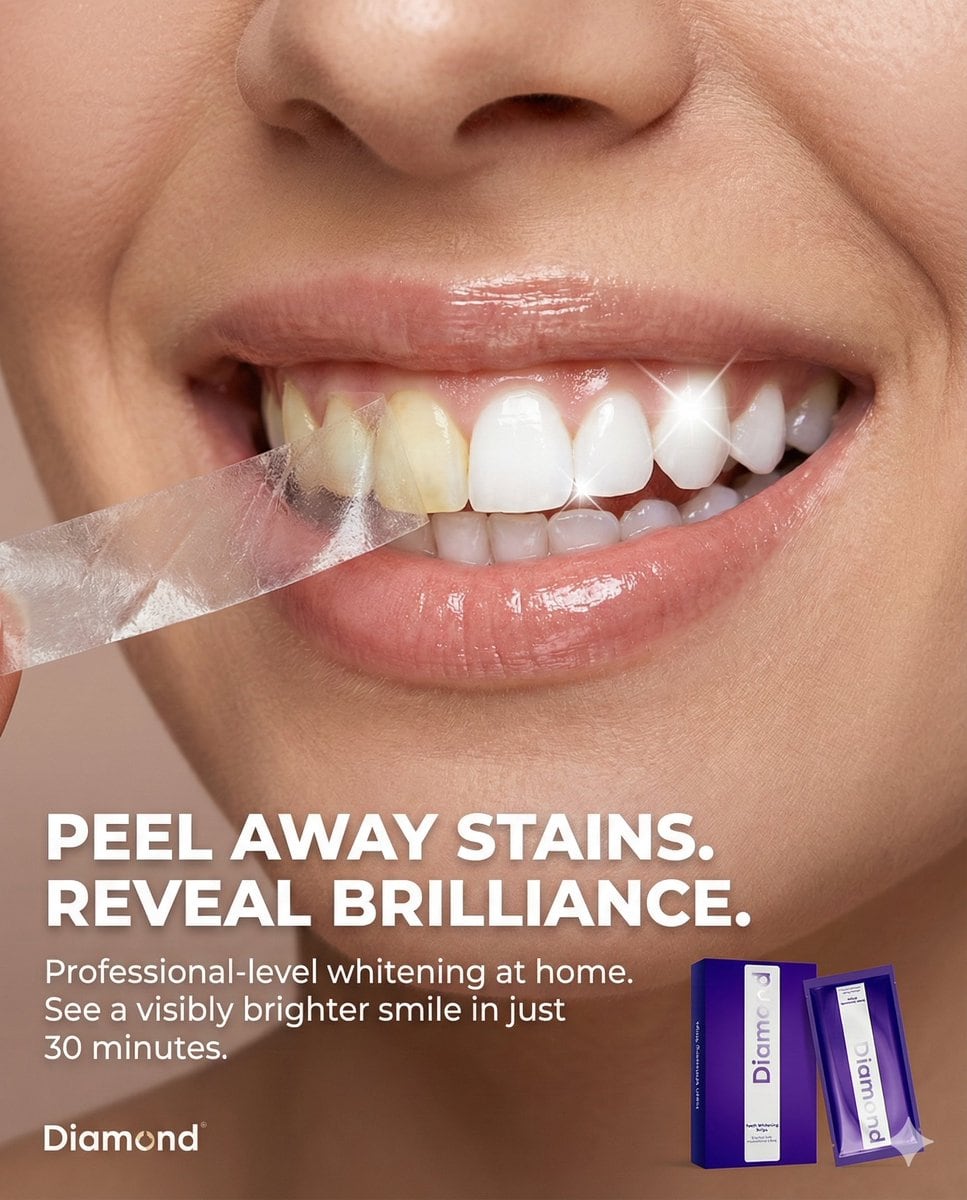
Macro Beauty Ad for Teeth Whitening Strips with Peeling Effect

A structured JSON prompt for generating a high-end, photorealistic macro beauty advertisement for teeth whitening strips. The core concept is a conceptual 'peeling' effect on the teeth, revealing a dramatically whiter smile underneath, with specific instr

Indicación de ejemplo
Use my attached image of my product and use the json profile that is provided to create the full picture. New Text for Static Ad: Headline: PEEL AWAY STAINS. REVEAL BRILLIANCE. Body: Professional-level whitening at home. See a visibly brighter smile in just 30 minutes. Tagline: Your brightest smile, unleashed. {   "meta": {     "aspect_ratio": "4:5",     "resolution": "8k",     "quality": "photorealistic_macro_beauty",     "style": "high-end beauty editorial, conceptual product advertising, clean and clinical"   },   "composition": {     "subject_position": "full_frame_macro",     "framing": "extreme close-up on the mouth and teeth of a person",     "crop": "focused tightly on the smile from nose to chin",     "visual_hook": "A precise, conceptual 'peeling' effect is applied *only* to the surface of the teeth, revealing a starkly whiter shade underneath."   },   "scene": {     "location": "professional studio",     "setting": "minimalist beauty background",     "atmosphere": "fresh, transformative, and premium",     "background": "solid, smooth neutral beige-pink, matching the original ad's aesthetic"   },   "lighting": {     "primary": "soft, flattering beauty lighting to highlight skin texture and lip gloss",     "secondary": "specular highlights on the teeth to emphasize enamel and the peeling effect",     "effect": [       "gentle shadows that give depth to the peeling layer on the teeth",       "bright, clean illumination on the revealed white teeth",       "realistic catchlights on the moist surface of the teeth and lips"     ]   },   "camera_perspective": {     "angle": "straight-on, eye-level with the mouth",     "distance": "macro close-up",     "look": "highly detailed, showing tooth texture and enamel"   },   "subject": {     "appearance": "SEE FIRST ATTACHED IMAGE for the product application.",     "interaction": "The person is smiling broadly. A thin, translucent layer is being peeled back from the front surface of the teeth, from left to right.",     "specific_action": "The peel is confined *strictly* to the teeth. The lips, gums, and surrounding skin are not affected by the peeling action. The peeled layer shows a yellower, stained tooth surface, while the area underneath is brilliantly white.",     "skin_and_lips": "Natural skin texture with visible pores, and healthy, slightly glossy lips."   },   "graphic_elements": {     "the_peel": {       "texture": "thin, transparent strip-like material, slightly crinkled as it's pulled away",       "action": "curling away from the teeth, showing the contrast in color",       "contrast": "dramatic difference between the stained 'before' layer and the bright 'after' teeth"     },     "product_placement": {       "item": "A packet or box of the whitening strips (from your attached image) is placed in the bottom right corner.",       "logo": "The brand logo is in the bottom left corner."     }   } }
Generar con IA
Modelo de IA
Nano-banana-pro
Autor

Preguntas frecuentes

Todo lo que necesitas saber sobre indicaciones de realistic style

¿Cómo uso esta indicación de realistic style?

Simplemente haz clic en el botón "Generar con IA" arriba, y serás llevado a nuestro generador de imágenes con IA con esta indicación de Realistic Style pre-llenada. Puedes personalizarla más o generar imágenes directamente. Nuestra IA interpretará la indicación y creará impresionantes visuales de realistic basados en tu descripción.

¿Puedo modificar esta indicación para mis necesidades específicas?

¡Por supuesto! Siéntete libre de copiar la indicación y personalizarla para que coincida con tu visión. Para obras de arte de realistic, intenta añadir detalles sobre estilo, iluminación, composición o ambiente. Cuanto más descriptivo seas, mejor podrá la IA entender tu visión creativa. Explora nuestras indicaciones de realistic para aprender más técnicas.

¿Qué modelos de IA funcionan mejor para realistic style?

Esta indicación de realistic funciona con la mayoría de los generadores de imágenes de IA modernos, incluyendo Nano Banana, Flux y GPT-Image. Diferentes modelos sobresalen en diferentes aspectos - Nano Banana es excelente para estilos realistic, mientras que Flux ofrece resultados fotorrealistas.

¿Qué hace una buena indicación de realistic style?

Las grandes indicaciones de realistic incluyen: detalles específicos del sujeto, referencias de estilo artístico, condiciones de iluminación (luz suave, sombras dramáticas), paleta de colores, ambiente/atmósfera y especificaciones técnicas (4K, detallado, HD). Estudia nuestras indicaciones de ejemplo para ver patrones efectivos.

¿Esta indicación es gratuita?

¡Sí! Todas las indicaciones en nuestra biblioteca son completamente gratuitas para uso personal y comercial. Copia, modifica y crea increíbles obras de arte de realistic sin restricciones.

More Prompts ➜
Stereogram of Amatitlán Lake from above - AI Image Prompt
Stereogram of Amatitlán Lake from above
A Spanish prompt to mimic an existing stereogram while depicting Lake Amatitlán from a satellite-like top view, surrounded by mountains for a strong depth effect.
by cr.txt
Storyboard-style action-following frame - AI Image Prompt
Storyboard-style action-following frame
This prompt generates a new frame that follows the sketched annotations, continuing a stampede scene toward the camera.
by Nick Matarese
MrBeast-style YouTube channel redesign - AI Image Prompt
MrBeast-style YouTube channel redesign
Creates a YouTube channel page that looks like a real MrBeast layout but with all thumbnails replaced by a themed tournament.
by Higgsfield AI ?
Chess legends hanging out in a bar - AI Image Prompt
Chess legends hanging out in a bar
A simple scene prompt asking for Bobby Fischer, Mikhail Tal, and Magnus Carlsen together in a bar, ideal for character group illustrations.
by Rakshit
Portrait edit with sunglasses, mustache, and 9:16 ratio - AI Image Prompt
Portrait edit with sunglasses, mustache, and 9:16 ratio
A prompt to edit an existing image by changing its aspect ratio to 9:16, adding sunglasses and a curled black mustache, and switching the font to square Kufi.
by AZIZ | AI ??
Text-to-Image Prompt: Curious Cat in Autumn Leaves - AI Image Prompt
Text-to-Image Prompt: Curious Cat in Autumn Leaves
A simple text-to-image prompt describing a curious cat peeking out from a pile of autumn leaves, likely used to test the general image generation capabilities of GPT Image 1.5.
by Artificial Analysis

¿Listo para crear imágenes increíbles?

Empieza a generar impresionantes imágenes con IA usando esta indicación o explora nuestra extensa biblioteca de indicaciones para más inspiración.

Generar ahora Explorar todas las indicaciones



