
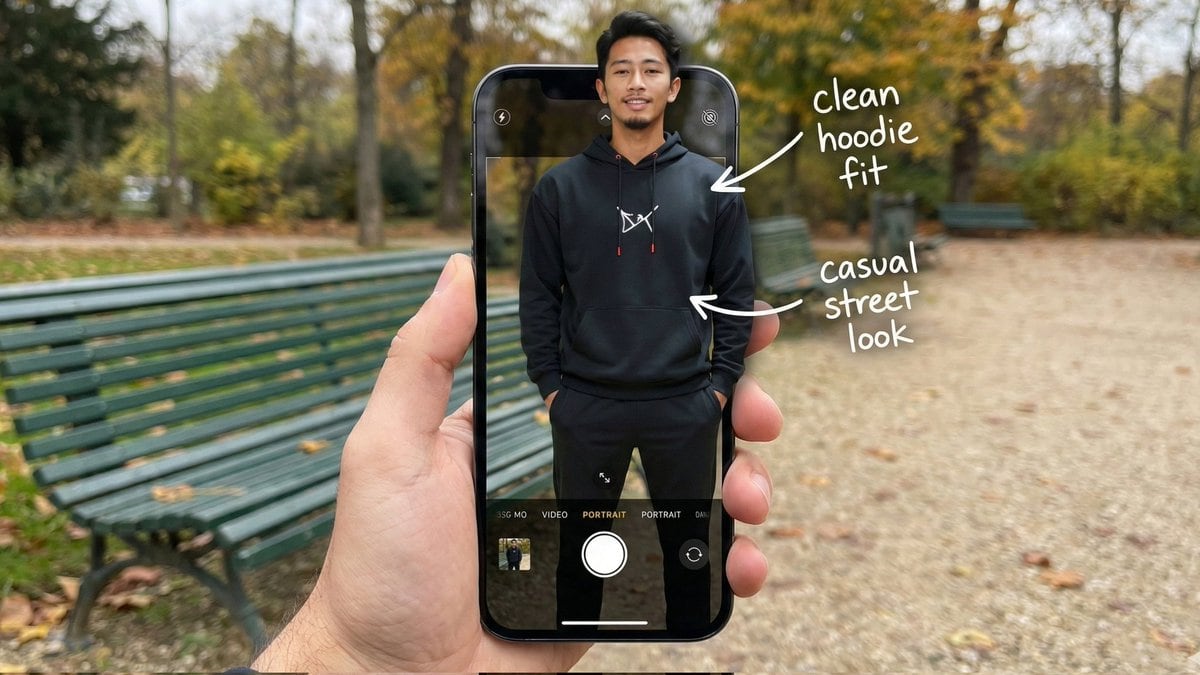
Hyper-Realistic POV Smartphone Pop-out Illusion in a Park

A complex, structured prompt designed for hyper-realistic image generation, creating a composite POV shot where the subject appears to be popping out of a smartphone screen interface in a public park setting, focusing on detailed anatomy, wardrobe, and te

Example Prompt
{ "image_metadata": { "format_version": "2.1.0", "aspect_ratio": "16:9", "shot_type": "Composite Hyper-Realistic POV", "concept": "OOTD Breakdown / Smartphone Pop-out Illusion (Outdoor Park)" }, "subject_profile": { "identity": { "gender": "Male", "ethnicity": "{argument name="ethnicity" default="Asian"}", "age_range": "20-25 years old", "identity_consistency": "preserve face and body like reference image" }, "facial_architecture": { "facial_hair": "light mustache and beard", "jawline": "defined and proportional", "expression": "relaxed confident smile", "skin_rendering": "warm tan, natural texture" }, "hair_mechanics": { "color": "black", "style": "short with volume, brushed back", "texture": "natural sheen, realistic strand breakup" }, "body_anatomy": { "frame": "lean, proportional", "posture": "standing straight, hands in hoodie pockets" } }, "wardrobe_and_styling": { "top_layer": { "item": "black hoodie", "details": "white chest logo, red string tips", "material": "matte cotton fleece" }, "bottom_layer": { "item": "black jogger pants", "fit": "clean streetwear silhouette" }, "footwear": { "item": "black sneakers", "visibility": "lower frame inside UI" } }, "device_and_interface": { "hardware": { "model": "modern high-end smartphone", "case": "matte black", "hand_interaction": "male POV holding phone in foreground" }, "software_ui": { "app": "iOS Camera Interface", "elements": [ "white shutter button", "PORTRAIT mode (active)", "focus box on subject's face" ], "screen_condition": "OLED brightness, crisp pixels" }, "augmented_overlay": { "style": "white handwritten annotations", "notes": [ { "text": "clean hoodie fit", "pointer": "upper body" }, { "text": "casual street look", "pointer": "torso" } ] } }, "environment_optics": { "location": "{argument name="location" default="public park"}", "background_elements": { "bench": "green metal park bench", "ground": "gravel path with scattered leaves", "trees": "surrounding foliage, greenery" }, "lighting_design": { "source": "natural daylight", "quality": "soft overcast, diffused shadows", "mood": "relaxed, cinematic outdoor ambiance" } }, "technical_execution": { "optics": { "lens": "35mm macro / smartphone equivalent", "depth_of_field": { "foreground": "sharp (phone + subject)", "background": "soft bokeh park depth" } }, "special_effects": { "illusion": "3D pop-out; torso out of screen, lower body inside UI", "realism": "accurate edge lighting and natural shadow blending" } }, "safety_and_exclusions": { "negative_prompt": [ }
Generate with AI
AI Model
Nano-banana-pro
Author

Frequently Asked Questions

Everything you need to know about realistic style prompts

How do I use this realistic style prompt?

Simply click the "Generate with AI" button above, and you'll be taken to our AI image generator with this Realistic Style prompt pre-filled. You can customize it further or generate images directly. Our AI will interpret the prompt and create stunning realistic visuals based on your description.

Can I modify this prompt for my specific needs?

Absolutely! Feel free to copy the prompt and customize it to match your vision. For realistic artwork, try adding details about style, lighting, composition, or mood. The more descriptive you are, the better the AI can understand your creative vision. Browse our realistic prompts to learn more techniques.

What AI models work best for realistic style?

This realistic prompt works with most modern AI image generators including Nano Banana, Flux, and GPT-Image. Different models excel at different aspects - Nano Banana is great for realistic styles, while Flux offers photorealistic results.

What makes a good realistic style prompt?

Great realistic prompts include: specific subject details, art style references, lighting conditions (soft light, dramatic shadows), color palette, mood/atmosphere, and technical specs (4K, detailed, HD). Study our example prompts to see effective patterns.

Is this prompt free to use?

Yes! All prompts in our library are completely free for personal and commercial use. Copy, modify, and create amazing realistic artwork without any restrictions.

More Prompts ➜
VTuber-style street-fashion thumbnail from a city photo - AI Image Prompt
VTuber-style street-fashion thumbnail from a city photo
A casual Japanese prompt that takes a background photo from Yurakucho and adds a VTuber-style character and bold street-font magazine text for a vertical thumbnail.
by Studio Veco|AI×VR|AI×MediaART|
Whiteboard-style simple diagram from text - AI Image Prompt
Whiteboard-style simple diagram from text
A prompt that turns a text into a clean 16:9 whiteboard-style diagram with central concept, arrows, and highlighted key points.
by かずりりぃ|ChatGPT,AI 活用×SNS発信の裏技
Origami-style step-by-step folding instructions - AI Image Prompt
Origami-style step-by-step folding instructions
Creates a 2x3 grid of step-by-step visual folding instructions from a flat sheet to a final model, each step including a person performing it, great for tutorials or manuals.
by Gadgetify
Sci-fi cinematic triptych and expansions - AI Image Prompt
Sci-fi cinematic triptych and expansions
A pair of prompts to create a cinematic sci-fi triptych in a 4:5 composition and then expand each panel into full 4:5 scenes, inspired by Roger Deakins and IMAX framing.
by Echoes of Tomorrow
Anime character sitting on real beach photo at sunset - AI Image Prompt
Anime character sitting on real beach photo at sunset
A detailed prompt for compositing an illustrated character sitting on a real beach photo at sunset, with cinematic filters, bokeh, lens flare, strong contrast, and matched perspective.
by とらの
Liyuu live concert close-up fan cam - AI Image Prompt
Liyuu live concert close-up fan cam
A very short prompt instructing the model to generate a close-up fan-cam style image of Liyuu at a live concert, suitable for testing concert photography style.
by 低空飞行

Ready to Create Amazing Images?

Start generating stunning AI images with this prompt or explore our extensive prompt library for more inspiration.

Generate Now Browse All Prompts



