
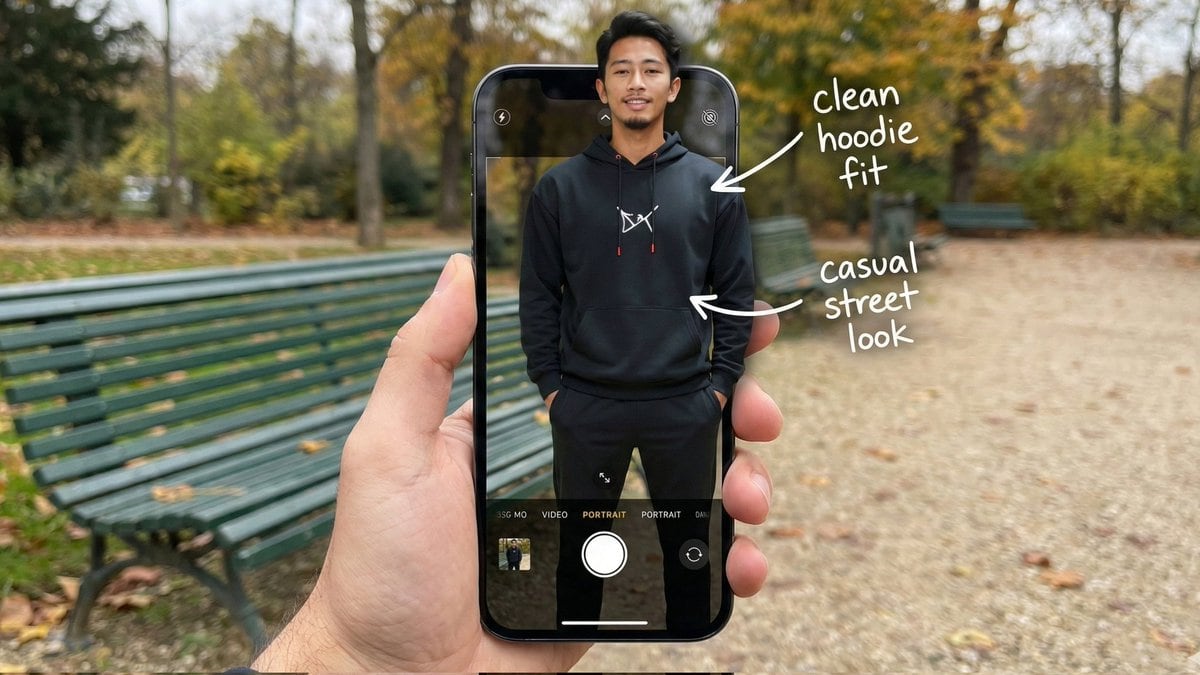
Hyper-Realistic POV Smartphone Pop-out Illusion in a Park

A complex, structured prompt designed for hyper-realistic image generation, creating a composite POV shot where the subject appears to be popping out of a smartphone screen interface in a public park setting, focusing on detailed anatomy, wardrobe, and te

Indicación de ejemplo
{ "image_metadata": { "format_version": "2.1.0", "aspect_ratio": "16:9", "shot_type": "Composite Hyper-Realistic POV", "concept": "OOTD Breakdown / Smartphone Pop-out Illusion (Outdoor Park)" }, "subject_profile": { "identity": { "gender": "Male", "ethnicity": "{argument name="ethnicity" default="Asian"}", "age_range": "20-25 years old", "identity_consistency": "preserve face and body like reference image" }, "facial_architecture": { "facial_hair": "light mustache and beard", "jawline": "defined and proportional", "expression": "relaxed confident smile", "skin_rendering": "warm tan, natural texture" }, "hair_mechanics": { "color": "black", "style": "short with volume, brushed back", "texture": "natural sheen, realistic strand breakup" }, "body_anatomy": { "frame": "lean, proportional", "posture": "standing straight, hands in hoodie pockets" } }, "wardrobe_and_styling": { "top_layer": { "item": "black hoodie", "details": "white chest logo, red string tips", "material": "matte cotton fleece" }, "bottom_layer": { "item": "black jogger pants", "fit": "clean streetwear silhouette" }, "footwear": { "item": "black sneakers", "visibility": "lower frame inside UI" } }, "device_and_interface": { "hardware": { "model": "modern high-end smartphone", "case": "matte black", "hand_interaction": "male POV holding phone in foreground" }, "software_ui": { "app": "iOS Camera Interface", "elements": [ "white shutter button", "PORTRAIT mode (active)", "focus box on subject's face" ], "screen_condition": "OLED brightness, crisp pixels" }, "augmented_overlay": { "style": "white handwritten annotations", "notes": [ { "text": "clean hoodie fit", "pointer": "upper body" }, { "text": "casual street look", "pointer": "torso" } ] } }, "environment_optics": { "location": "{argument name="location" default="public park"}", "background_elements": { "bench": "green metal park bench", "ground": "gravel path with scattered leaves", "trees": "surrounding foliage, greenery" }, "lighting_design": { "source": "natural daylight", "quality": "soft overcast, diffused shadows", "mood": "relaxed, cinematic outdoor ambiance" } }, "technical_execution": { "optics": { "lens": "35mm macro / smartphone equivalent", "depth_of_field": { "foreground": "sharp (phone + subject)", "background": "soft bokeh park depth" } }, "special_effects": { "illusion": "3D pop-out; torso out of screen, lower body inside UI", "realism": "accurate edge lighting and natural shadow blending" } }, "safety_and_exclusions": { "negative_prompt": [ }
Generar con IA
Modelo de IA
Nano-banana-pro
Autor

Preguntas frecuentes

Todo lo que necesitas saber sobre indicaciones de realistic style

¿Cómo uso esta indicación de realistic style?

Simplemente haz clic en el botón "Generar con IA" arriba, y serás llevado a nuestro generador de imágenes con IA con esta indicación de Realistic Style pre-llenada. Puedes personalizarla más o generar imágenes directamente. Nuestra IA interpretará la indicación y creará impresionantes visuales de realistic basados en tu descripción.

¿Puedo modificar esta indicación para mis necesidades específicas?

¡Por supuesto! Siéntete libre de copiar la indicación y personalizarla para que coincida con tu visión. Para obras de arte de realistic, intenta añadir detalles sobre estilo, iluminación, composición o ambiente. Cuanto más descriptivo seas, mejor podrá la IA entender tu visión creativa. Explora nuestras indicaciones de realistic para aprender más técnicas.

¿Qué modelos de IA funcionan mejor para realistic style?

Esta indicación de realistic funciona con la mayoría de los generadores de imágenes de IA modernos, incluyendo Nano Banana, Flux y GPT-Image. Diferentes modelos sobresalen en diferentes aspectos - Nano Banana es excelente para estilos realistic, mientras que Flux ofrece resultados fotorrealistas.

¿Qué hace una buena indicación de realistic style?

Las grandes indicaciones de realistic incluyen: detalles específicos del sujeto, referencias de estilo artístico, condiciones de iluminación (luz suave, sombras dramáticas), paleta de colores, ambiente/atmósfera y especificaciones técnicas (4K, detallado, HD). Estudia nuestras indicaciones de ejemplo para ver patrones efectivos.

¿Esta indicación es gratuita?

¡Sí! Todas las indicaciones en nuestra biblioteca son completamente gratuitas para uso personal y comercial. Copia, modifica y crea increíbles obras de arte de realistic sin restricciones.

More Prompts ➜
LINE sticker set from an attached character image - AI Image Prompt
LINE sticker set from an attached character image
A prompt to create a 12-piece LINE sticker set using an attached character, with varied expressions, poses, and on-theme, easy-to-use phrases.
by しろねこ
Watermelon swimming pool micro-world - AI Image Prompt
Watermelon swimming pool micro-world
A whimsical prompt for a cross-section of a giant watermelon whose flesh is a swimming pool with tiny people relaxing, evoking a fun summer mood.
by 松果先森
Editorial poolside fashion photoshoot of a man - AI Image Prompt
Editorial poolside fashion photoshoot of a man
A rich, editorial-style prompt for photographing the same man from a reference at a luxurious pool, focusing on cinematic lighting and premium magazine aesthetics.
by Johnn
Outfit transfer between two images - AI Image Prompt
Outfit transfer between two images
A reference-based editing prompt that dresses a person from one image in the clothes from another, ideal for virtual try-on or fashion swaps.
by Higgsfield AI ?
1980s classy magazine ad with Rolex and Riesling - AI Image Prompt
1980s classy magazine ad with Rolex and Riesling
A detailed prompt to draw a photorealistic 1980s-style magazine advertisement focused on a man’s hand wearing a Rolex Submariner and holding a full glass of Riesling.
by Kevin A. Bryan
Image Editing: Cloud with Face Style Transfer - AI Image Prompt
Image Editing: Cloud with Face Style Transfer
An image editing prompt requiring the model to combine elements from two reference images: the cloud from image 1 and the face of the person from image 2, while maintaining the overall style of image 1. This tests complex image manipulation and style adhe
by PSS

¿Listo para crear imágenes increíbles?

Empieza a generar impresionantes imágenes con IA usando esta indicación o explora nuestra extensa biblioteca de indicaciones para más inspiración.

Generar ahora Explorar todas las indicaciones



