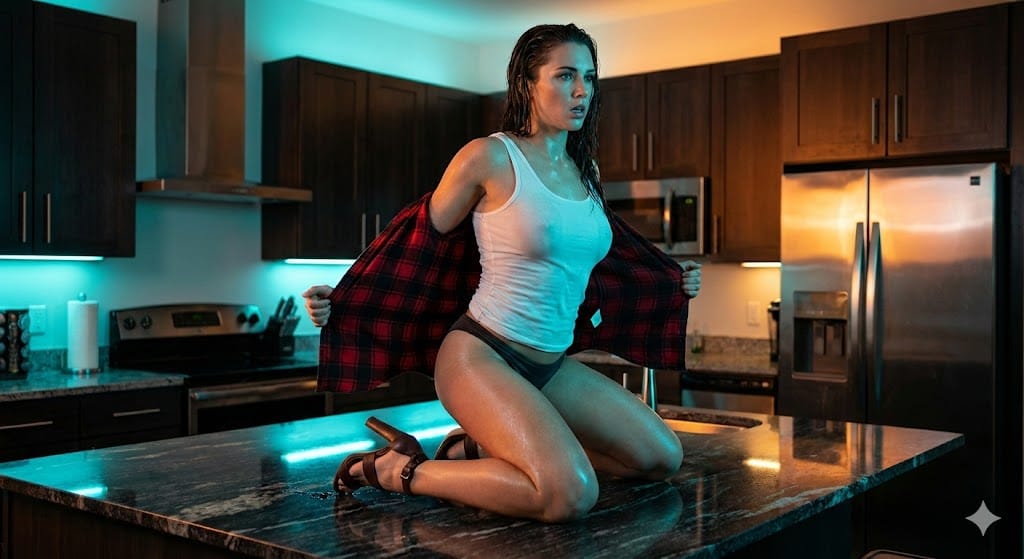
Cinematic Teal and Orange Kitchen Shot - AI Generated AI Art Style Image
Générer une image similaire

This prompt is optimized for Nano-banana-pro model

Cinematic Teal and Orange Kitchen Shot

A detailed prompt for generating a high-energy, glossy cinematic image using aggressive Teal and Orange color grading. It features a model kneeling on a reflective kitchen counter, actively removing a flannel shirt, with lighting designed to maximize dram

Exemple de prompt
{     "shot": "Cinematic Medium Shot (MS) on Elevated Subject",     "shot_details": "Dynamic, slightly low-angle framing capturing the model kneeling on a reflective kitchen counter. The scene utilizes a strong, theatrical 'Teal and Orange' lighting contrast, highlighting the wet texture of the subject's skin and clothing for a highly energetic, performance-based aesthetic.",     "subject": {       "age": "25-30",       "appearance": "Athletic, toned physique; long dark hair appears wet/slicked; intense, slightly breathless expression suitable for a music video or emotional performance.",       "pose": "Kneeling directly on a polished dark countertop, torso twisting forward. Both hands are actively pulling or adjusting a large flannel shirt off the shoulders/back. Head slightly arched back, gaze directed downward/forward."     },     "wardrobe": "Wet, semi-sheer {argument name="tank top color" default="white"} athletic tank top/undershirt; Minimalist dark navy or black bikini bottoms/boy shorts; A red and black large-scale plaid/flannel button-down shirt being actively removed; Dark brown, high-heeled sandals with delicate ankle straps.",     "environment": "Sleek, modern, industrial-chic kitchen interior. Features include dark-stained wooden upper cabinets, stainless steel appliance backs/backsplash, and a large, highly reflective black or dark grey stone kitchen island/countertop. Walls are painted a cool, muted cyan/light blue.",     "lighting": "High-contrast dual-source lighting. Primary/Fill light is a cool, intense cyan LED or strobe washing the foreground, subject's front, and side walls. Accent/Back light is warm, amber/yellow ambient light from recessed ceiling fixtures, richly illuminating the wooden cabinetry and providing strong separation from the cold foreground.",     "camera": {       "focal_length": "50mm (Standard Prime)",       "aperture": "f/4.0",       "distance": "Medium Shot",       "angle": "Slightly low angle (looking up at the elevated subject)",       "framing": "Full view of the kneeling subject from the lower thigh up, centrally positioned against the kitchen background."     },     "color_grade": "Aggressive cinematic color grading, emphasizing the separation between cold cyan shadows and warm amber midtones (Teal and Orange LUT). Overall scene is slightly underexposed to maximize dramatic effect, characteristic of high-end video production.",     "selective_color": {       "mask_target": "Highlights (wet skin, stainless steel) and Shadows (ambient fill)",       "palette_hex": [         "#00CFFF",         "#FF8C00"       ],       "rule": "Enforce the cold blue wash on reflective surfaces and ambient light, contrasting with saturated warm tones in the background wood and subject's skin. Use the picture as the reference for final aspect ratio."     },     "style": "High-energy, glossy mu" }
Générer avec l'IA

Pro Tip:

This ai art style prompt has been tested and optimized for best results. You can modify it slightly to customize the output while keeping the core structure intact.

Modèle d'IA
Nano-banana-pro
Category
AI Art Style

Questions fréquentes

Tout ce que vous devez savoir sur les prompts ai art style

Comment utiliser ce prompt ai art style ?

Cliquez simplement sur le bouton "Générer avec l'IA" ci-dessus, et vous serez redirigé vers notre générateur d'images IA avec ce prompt AI Art Style pré-rempli. Vous pouvez le personnaliser davantage ou générer des images directement. Notre IA interprétera le prompt et créera de superbes visuels ai art basés sur votre description.

Puis-je modifier ce prompt pour mes besoins spécifiques ?

Absolument ! N'hésitez pas à copier le prompt et à le personnaliser selon votre vision. Pour les œuvres d'art ai art, essayez d'ajouter des détails sur le style, l'éclairage, la composition ou l'ambiance. Plus vous êtes descriptif, mieux l'IA pourra comprendre votre vision créative. Parcourez nos prompts ai art pour apprendre plus de techniques.

Quels modèles d'IA fonctionnent le mieux pour ai art style ?

Ce prompt ai art fonctionne avec la plupart des générateurs d'images IA modernes, y compris Nano Banana, Flux et GPT-Image. Différents modèles excellent dans différents aspects - Nano Banana est excellent pour les styles ai art, tandis que Flux offre des résultats photoréalistes.

Qu'est-ce qui fait un bon prompt ai art style ?

Les excellents prompts ai art incluent : des détails spécifiques sur le sujet, des références de style artistique, des conditions d'éclairage (lumière douce, ombres dramatiques), une palette de couleurs, une ambiance/atmosphère et des spécifications techniques (4K, détaillé, HD). Étudiez nos exemples de prompts pour voir des modèles efficaces.

Ce prompt est-il gratuit ?

Oui ! Tous les prompts de notre bibliothèque sont entièrement gratuits pour un usage personnel et commercial. Copiez, modifiez et créez d'étonnantes œuvres d'art ai art sans aucune restriction.

Prêt à créer des images incroyables ?

Commencez à générer de superbes images IA avec ce prompt ou explorez notre vaste bibliothèque de prompts pour plus d'inspiration.