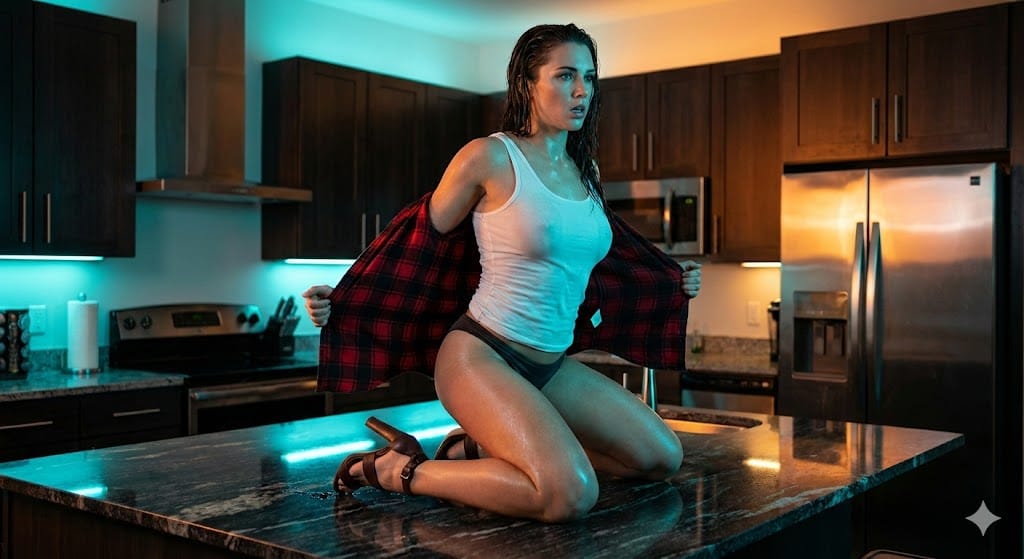
Cinematic Teal and Orange Kitchen Shot - AI Generated AI Art Style Image
Generar imagen similar

This prompt is optimized for Nano-banana-pro model

Cinematic Teal and Orange Kitchen Shot

A detailed prompt for generating a high-energy, glossy cinematic image using aggressive Teal and Orange color grading. It features a model kneeling on a reflective kitchen counter, actively removing a flannel shirt, with lighting designed to maximize dram

Indicación de ejemplo
{     "shot": "Cinematic Medium Shot (MS) on Elevated Subject",     "shot_details": "Dynamic, slightly low-angle framing capturing the model kneeling on a reflective kitchen counter. The scene utilizes a strong, theatrical 'Teal and Orange' lighting contrast, highlighting the wet texture of the subject's skin and clothing for a highly energetic, performance-based aesthetic.",     "subject": {       "age": "25-30",       "appearance": "Athletic, toned physique; long dark hair appears wet/slicked; intense, slightly breathless expression suitable for a music video or emotional performance.",       "pose": "Kneeling directly on a polished dark countertop, torso twisting forward. Both hands are actively pulling or adjusting a large flannel shirt off the shoulders/back. Head slightly arched back, gaze directed downward/forward."     },     "wardrobe": "Wet, semi-sheer {argument name="tank top color" default="white"} athletic tank top/undershirt; Minimalist dark navy or black bikini bottoms/boy shorts; A red and black large-scale plaid/flannel button-down shirt being actively removed; Dark brown, high-heeled sandals with delicate ankle straps.",     "environment": "Sleek, modern, industrial-chic kitchen interior. Features include dark-stained wooden upper cabinets, stainless steel appliance backs/backsplash, and a large, highly reflective black or dark grey stone kitchen island/countertop. Walls are painted a cool, muted cyan/light blue.",     "lighting": "High-contrast dual-source lighting. Primary/Fill light is a cool, intense cyan LED or strobe washing the foreground, subject's front, and side walls. Accent/Back light is warm, amber/yellow ambient light from recessed ceiling fixtures, richly illuminating the wooden cabinetry and providing strong separation from the cold foreground.",     "camera": {       "focal_length": "50mm (Standard Prime)",       "aperture": "f/4.0",       "distance": "Medium Shot",       "angle": "Slightly low angle (looking up at the elevated subject)",       "framing": "Full view of the kneeling subject from the lower thigh up, centrally positioned against the kitchen background."     },     "color_grade": "Aggressive cinematic color grading, emphasizing the separation between cold cyan shadows and warm amber midtones (Teal and Orange LUT). Overall scene is slightly underexposed to maximize dramatic effect, characteristic of high-end video production.",     "selective_color": {       "mask_target": "Highlights (wet skin, stainless steel) and Shadows (ambient fill)",       "palette_hex": [         "#00CFFF",         "#FF8C00"       ],       "rule": "Enforce the cold blue wash on reflective surfaces and ambient light, contrasting with saturated warm tones in the background wood and subject's skin. Use the picture as the reference for final aspect ratio."     },     "style": "High-energy, glossy mu" }
Generar con IA

Pro Tip:

This ai art style prompt has been tested and optimized for best results. You can modify it slightly to customize the output while keeping the core structure intact.

Modelo de IA
Nano-banana-pro
Category
AI Art Style

Preguntas frecuentes

Todo lo que necesitas saber sobre indicaciones de ai art style

¿Cómo uso esta indicación de ai art style?

Simplemente haz clic en el botón "Generar con IA" arriba, y serás llevado a nuestro generador de imágenes con IA con esta indicación de AI Art Style pre-llenada. Puedes personalizarla más o generar imágenes directamente. Nuestra IA interpretará la indicación y creará impresionantes visuales de ai art basados en tu descripción.

¿Puedo modificar esta indicación para mis necesidades específicas?

¡Por supuesto! Siéntete libre de copiar la indicación y personalizarla para que coincida con tu visión. Para obras de arte de ai art, intenta añadir detalles sobre estilo, iluminación, composición o ambiente. Cuanto más descriptivo seas, mejor podrá la IA entender tu visión creativa. Explora nuestras indicaciones de ai art para aprender más técnicas.

¿Qué modelos de IA funcionan mejor para ai art style?

Esta indicación de ai art funciona con la mayoría de los generadores de imágenes de IA modernos, incluyendo Nano Banana, Flux y GPT-Image. Diferentes modelos sobresalen en diferentes aspectos - Nano Banana es excelente para estilos ai art, mientras que Flux ofrece resultados fotorrealistas.

¿Qué hace una buena indicación de ai art style?

Las grandes indicaciones de ai art incluyen: detalles específicos del sujeto, referencias de estilo artístico, condiciones de iluminación (luz suave, sombras dramáticas), paleta de colores, ambiente/atmósfera y especificaciones técnicas (4K, detallado, HD). Estudia nuestras indicaciones de ejemplo para ver patrones efectivos.

¿Esta indicación es gratuita?

¡Sí! Todas las indicaciones en nuestra biblioteca son completamente gratuitas para uso personal y comercial. Copia, modifica y crea increíbles obras de arte de ai art sin restricciones.

¿Listo para crear imágenes increíbles?

Empieza a generar impresionantes imágenes con IA usando esta indicación o explora nuestra extensa biblioteca de indicaciones para más inspiración.