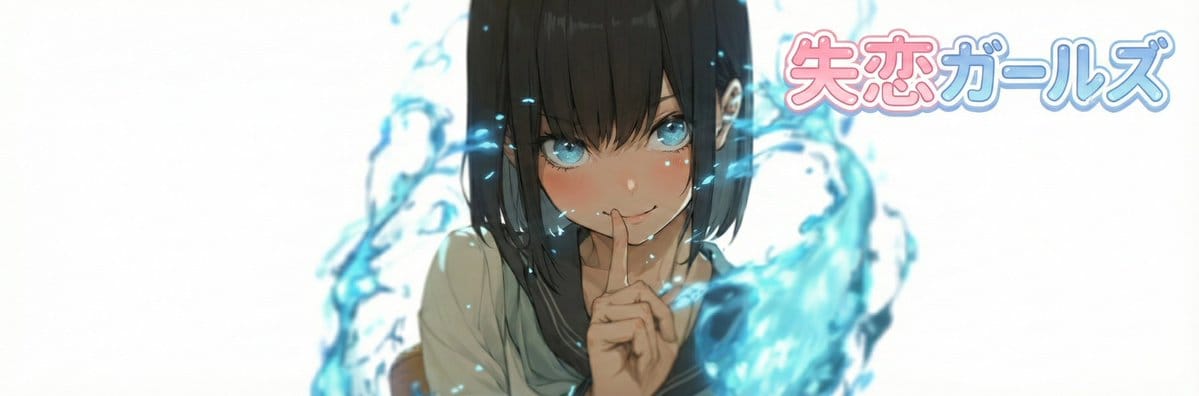
Nano Banana Pro X Header Image Generation Prompt - AI Generated AI Art Style Image
生成類似圖像

This prompt is optimized for Nano-banana-pro model

Nano Banana Pro X Header Image Generation Prompt

This is a detailed prompt designed for Nano Banana Pro to generate an X (Twitter) header image based on a reference image. It includes a custom logo design based on user-specified text and a style preset, and offers options for face zooming to control the

範例提示詞
# ===== USER CONTROLS ===== title_text: "{argument name="display string" default="<<YOUR_TEXT>>"}" title_style_preset: "{argument name="logo design preset" default="cool"}" # cool, cute, cool_cute, luxury, pop, cyber, minimal, retro, kawaii face_zoom: "{argument name="zoom on/off" default="off"}" # off, on subject: > Create a 3:1 wide banner using the provided reference image content. The primary face must be centered inside an invisible safe zone (not drawn), and a title logo (derived from title_text + title_style_preset) must be placed inside the same safe zone. composition: > Aspect ratio 3:1. Invisible safe zone (DO NOT draw it): - Left margin: 15% of width - Right margin: 15% of width - Top margin: 16% of height - Bottom margin: 16% of height Keep the entire face AND the entire title logo fully inside this safe zone. Background may extend to the edges. action: > Place the reference image content with maximum fidelity. Auto-crop/scale/reposition to fit a 3:1 banner with no stretching. Detect the primary face (if multiple faces, pick the largest/most prominent). Center the primary face within the safe zone both horizontally and vertically. Never crop off the face/eyes; keep the full face comfortably inside the safe zone (not near edges). Face zoom behavior: - If face_zoom is OFF: keep the original framing as much as possible while still centering the face in the safe zone. - If face_zoom is ON: zoom/crop to a bust-up portrait centered on the face (head and shoulders visible; include upper chest; do not crop the top of the head or chin; keep facial features prominent). Create negative space inside the safe zone for the title logo by adjusting crop/reposition/out
AI生成

Pro Tip:

This ai art style prompt has been tested and optimized for best results. You can modify it slightly to customize the output while keeping the core structure intact.

AI模型
Nano-banana-pro
作者
Category
AI Art Style

常見問題

關於ai art style提示詞,你想知道的一切

如何使用這個ai art style提示詞?

只需點擊上面的「AI生成」按鈕,即可跳轉到我們的AI圖像生成器,並且這個AI Art Style提示詞已自動填好。你可以進一步自訂或直接生成圖像。我們的AI會解讀提示詞,並根據你的描述創建出令人驚嘆的ai art視覺效果。

我可以根據特定需求修改這個提示詞嗎?

當然可以!隨意複製並定製這個提示詞,以實現你的創作構想。對於ai art藝術作品,嘗試添加風格、光線、構圖或情緒等細節。你的描述越具體,AI就越能理解你的創意。瀏覽我們的ai art提示詞合集,學習更多技巧。

哪些AI模型最適合生成ai art style圖像?

這個ai art提示詞適用於大多數現代AI圖像生成器,包括Nano Banana、Flux和GPT-Image。不同的模型各有專長——Nano Banana擅長ai art風格,而Flux則能生成逼真的照片級效果。

怎樣才算是一個好的ai art style提示詞?

優秀的ai art提示詞通常包含:具體的主題細節、藝術風格參考、光線條件(如柔光、戲劇性陰影)、色彩搭配、情緒/氛圍以及技術規格(如4K、細節豐富、高清)。研究我們的範例提示詞,可以學到有效的模式。

這個提示詞可以免費使用嗎?

是的!我們庫中的所有提示詞,無論是個人還是商業用途,都完全免費。你可以隨意複製、修改,並創作出色的ai art藝術作品,沒有限制。

準備好創作驚豔圖像了嗎?

立即使用這個提示詞開始生成令人讚嘆的AI圖像,或者瀏覽我們豐富的提示詞庫,獲取更多靈感。