
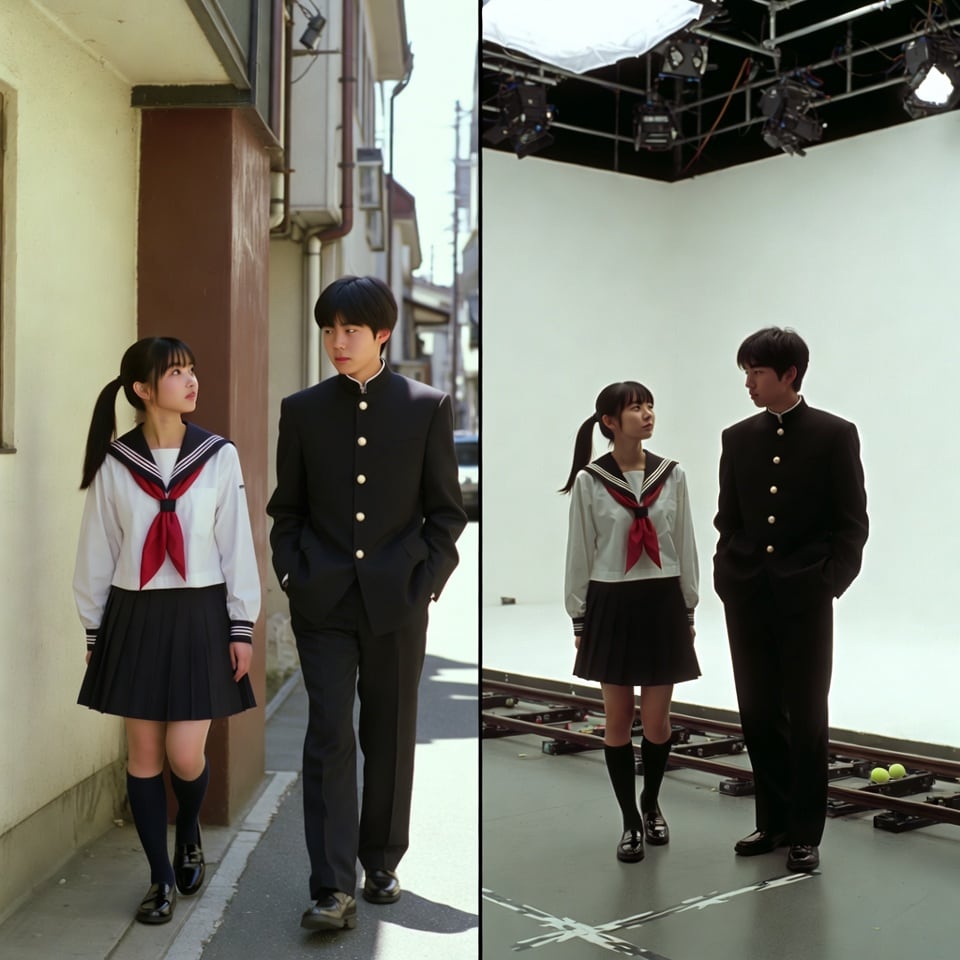
VFX Comparison Image Prompt (Before/After) for Nano Banana Pro

A complex, structured prompt for Nano Banana Pro or Seedream 4.5 to generate a split-screen VFX comparison image. The left side shows the photorealistic 'finished shot' based on a theme, and the right side shows the 'green screen shooting' setup with the

Example Prompt
A VFX comparison image based on a scene described by the theme or specific content (Example: {argument name="theme" default="A woman flying over the sea"}), featuring the person in the attached image. VFX comparison composition with a split screen accurately aligned by a central vertical line. **IMPORTANT: The number of characters, gender, and appearance must exactly match the provided input image. Do not add or remove characters.** **Left Half (Finished Shot):** A photorealistic movie scene perfectly depicting the theme "**[Enter Theme]**". * **Character:** The person from the input image is performing actions (pose and expression) suitable for the theme "**[Enter Theme]**". * **Background:** A detailed and realistic environment (outdoor or indoor) suitable for the theme, with cinematic lighting and atmosphere. **Right Half (Green Screen Shooting):** Standing in a studio with a giant blue/green screen (chroma key) in the **exact same composition and pose** as the person in the left half. Visible white cyclorama wall, complex lighting rigs overhead, cables, black marks (tape) indicating standing positions, dolly tracks for camera rails, harsh studio lighting that is not blocked, faint shadows of the film crew visible at the edges. The background is a completely flat, solid green screen for compositing. Look and feel of VFX before-and-after from early 2000s Japanese cinema, texture of extremely degraded, low-quality analog video, noise, and color fading.
Generate with AI
AI Model
Nano-banana-pro

Frequently Asked Questions

Everything you need to know about realistic style prompts

How do I use this realistic style prompt?

Simply click the "Generate with AI" button above, and you'll be taken to our AI image generator with this Realistic Style prompt pre-filled. You can customize it further or generate images directly. Our AI will interpret the prompt and create stunning realistic visuals based on your description.

Can I modify this prompt for my specific needs?

Absolutely! Feel free to copy the prompt and customize it to match your vision. For realistic artwork, try adding details about style, lighting, composition, or mood. The more descriptive you are, the better the AI can understand your creative vision. Browse our realistic prompts to learn more techniques.

What AI models work best for realistic style?

This realistic prompt works with most modern AI image generators including Nano Banana, Flux, and GPT-Image. Different models excel at different aspects - Nano Banana is great for realistic styles, while Flux offers photorealistic results.

What makes a good realistic style prompt?

Great realistic prompts include: specific subject details, art style references, lighting conditions (soft light, dramatic shadows), color palette, mood/atmosphere, and technical specs (4K, detailed, HD). Study our example prompts to see effective patterns.

Is this prompt free to use?

Yes! All prompts in our library are completely free for personal and commercial use. Copy, modify, and create amazing realistic artwork without any restrictions.

More Prompts ➜
Diffusion model process diagram with cat and noise images - AI Image Prompt
Diffusion model process diagram with cat and noise images
An English prompt asking for an explanatory diagram of the diffusion model image generation process using a cat image and noise images, including the forward diffusion learning process and the noise prediction model.
by 松井健太郎 睡眠・精神医学 (Kentaro Matsui)
Convert illustration to retro Game Boy Advance-style pixel art - AI Image Prompt
Convert illustration to retro Game Boy Advance-style pixel art
A Japanese instruction telling Nano Banana Pro to convert an illustration into pixel art in the style of the Game Boy Advance era.
by 株式会社ヴェシカ??
Sichuan opera face-changing technique infographic - AI Image Prompt
Sichuan opera face-changing technique infographic
A Chinese prompt asking for an explanatory breakdown diagram of Sichuan opera’s face-changing technique, with correct Chinese fonts and a 16:9 aspect ratio, ideal for cultural explainers.
by 松果先森
Close-up 1:1 image of hot okonomiyaki - AI Image Prompt
Close-up 1:1 image of hot okonomiyaki
A concise Japanese prompt for generating a square close-up shot of freshly cooked okonomiyaki on a griddle.
by Google Japan
Realistic Historical iPhone Photo Generation - AI Image Prompt
Realistic Historical iPhone Photo Generation
A unique prompt that combines modern photography style (iPhone photo) with highly specific historical and geographical coordinates (7°15′32″S 112°44′12″E) and a precise date (September 19, 1945), aiming to generate a crowd perspective image of a historica
by DΞV
Image Editing: Car and Background Transformation - AI Image Prompt
Image Editing: Car and Background Transformation
A simple editing prompt used to test the model's precise editing capabilities by instructing it to change the car in an existing image to a Tesla and replace the trees in the background with tall skyscrapers.
by Artificial Analysis

Ready to Create Amazing Images?

Start generating stunning AI images with this prompt or explore our extensive prompt library for more inspiration.

Generate Now Browse All Prompts



