
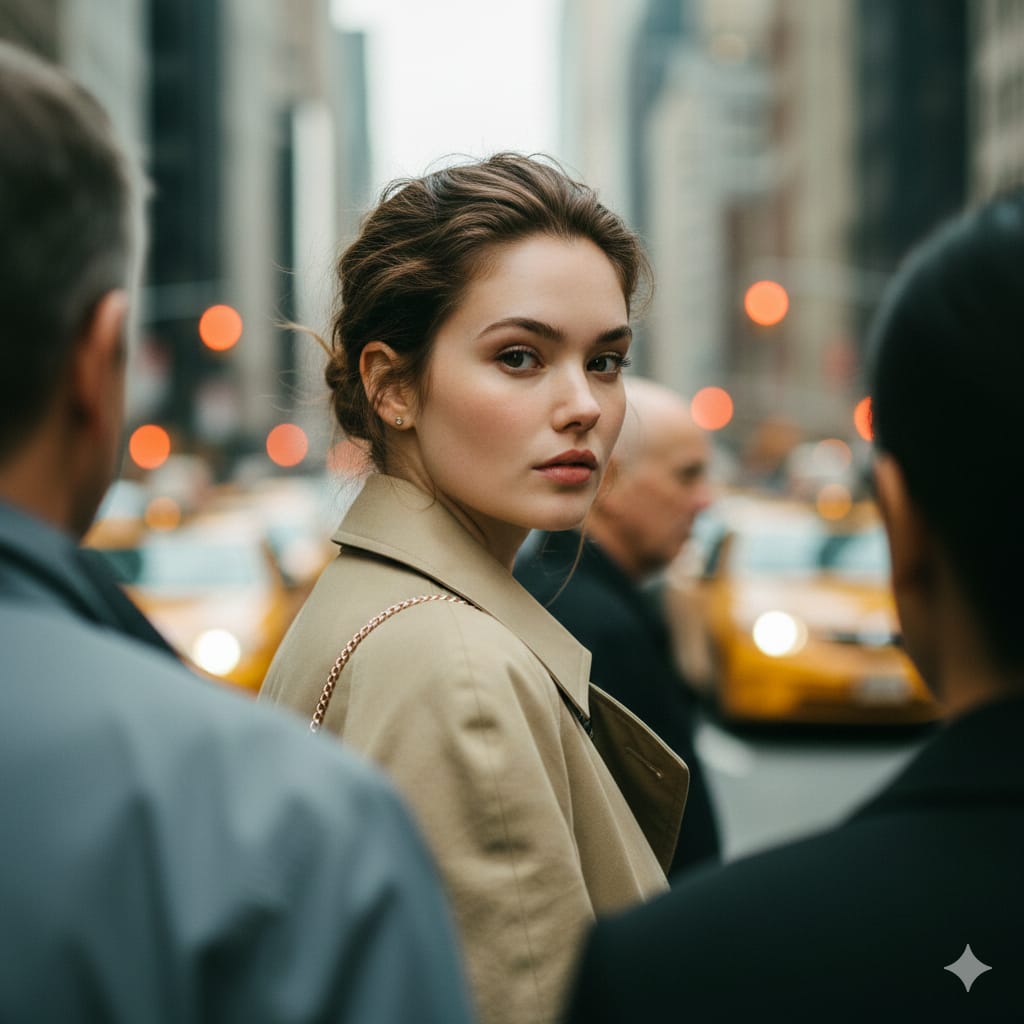
Photorealistic Candid Street Portrait with Extreme Shallow DOF

A highly detailed prompt for generating a photorealistic, candid street-fashion portrait. The core intent is to achieve extreme shallow depth of field, keeping a single subject tack-sharp in the mid-ground while rendering a moving crowd and the city backg

Example Prompt
Core Intent: Create a photorealistic candid street-fashion portrait with extreme shallow depth of field where a single woman is sharply in focus in the mid-ground, surrounded by a moving crowd rendered as soft blur/bokeh. Preserve the exact framing, subject placement, color grade, and atmosphere. 1) Composition & Framing (LOCK) •Aspect: 4:5 vertical. •Camera height: chest-to-eye level (slightly above the subject’s shoulder line). •Framing: mid-ground subject centered slightly left-of-center, from upper chest to top of head clearly visible; shoulders included; background heavily blurred. •Foreground: two large blurred human shapes frame the subject: •Left foreground: blurred middle-aged man occupying left third, grey/blue jacket, face out of focus. •Right foreground: blurred person occupying right-lower quadrant (dark hair), also out of focus. •Mid-right: blurred older bald man head/shoulder visible behind subject’s right shoulder. •Background: dense city street with yellow taxi/cab shapes and warm orange bokeh lights; tall urban forms dissolve into creamy blur. 2) Subject (Primary) •Person: young adult woman, fair/light skin, subtle freckles, natural editorial beauty. •Hair: medium brown, messy low updo/bun with loose wisps; slightly damp/urban texture; flyaways framing face. •Expression: calm, slightly serious/curious; lips relaxed; eyes looking directly toward camera with a soft, neutral intensity. •Pose: body facing right (3/4 profile), head turned back over left shoulder to look at camera. 3) Wardrobe & Accessories (Exact Feel) •Outerwear: {argument name="outerwear color" default="beige/tan"} trench coat (matte cotton), collar open, classic lapels, slightly rumpled city-wear texture. •Bag: small shoulder bag with thin gold chain strap on her right shoulder; strap catches a bit of light; bag itself mostly hidden. •Jewelry: small earring visible (subtle, warm tone). 4) Environment (Street Mood) •Busy metropolitan sidewalk/street scene, crowd density high. •Background palette: teal/green-grey city haze + yellow cab + warm orange bokeh lights. •No readable signage, no sharp background details—everything behind subject remains creamy blur. 5) Lighting (LOCK) •Natural daylight, overcast-to-soft sun (diffused), no harsh shadows. •Subject face evenly lit with gentle highlights on cheekbones and nose; cinematic soft contrast. 6) Camera & Optics (CRITICAL) •Look: telephoto candid portrait with strong compression. •Lens: 85mm–135mm range, wide open (f/1.4–f/2.0). •Focus: tack-sharp on subject’s eyes and eyelashes; foreground and background strongly out of focus. •Depth: creamy bokeh, smooth falloff, mild cat-eye bokeh at edges. •Shutter/feel: background crowd appears naturally blurred from DOF; slight motion blur suggested in foreground figures. 7) Color Science / Grade (LOCK) •Cinematic teal/green wash in shadows and background. •Warm highlights (skin tones natural, slightly warm). •Yellow taxi pops softly; orange bokeh lights glow. •Fine
Generate with AI
AI Model
Nano-banana-pro
Author

Frequently Asked Questions

Everything you need to know about character style prompts

How do I use this character style prompt?

Simply click the "Generate with AI" button above, and you'll be taken to our AI image generator with this Character Style prompt pre-filled. You can customize it further or generate images directly. Our AI will interpret the prompt and create stunning character visuals based on your description.

Can I modify this prompt for my specific needs?

Absolutely! Feel free to copy the prompt and customize it to match your vision. For character artwork, try adding details about style, lighting, composition, or mood. The more descriptive you are, the better the AI can understand your creative vision. Browse our character prompts to learn more techniques.

What AI models work best for character style?

This character prompt works with most modern AI image generators including Nano Banana, Flux, and GPT-Image. Different models excel at different aspects - Nano Banana is great for character styles, while Flux offers photorealistic results.

What makes a good character style prompt?

Great character prompts include: specific subject details, art style references, lighting conditions (soft light, dramatic shadows), color palette, mood/atmosphere, and technical specs (4K, detailed, HD). Study our example prompts to see effective patterns.

Is this prompt free to use?

Yes! All prompts in our library are completely free for personal and commercial use. Copy, modify, and create amazing character artwork without any restrictions.

More Prompts ➜
Six-panel life comic - AI Image Prompt
Six-panel life comic
A prompt idea for generating a six-panel comic summarizing events from your life last week, ideal for personal storytelling visuals.
by Pietro Schirano
Concert poster for Google Banana Band - AI Image Prompt
Concert poster for Google Banana Band
A Chinese prompt for designing a poster announcing a Google Banana Band concert on a specific date at a major venue, good for testing typography and layout in Traditional Chinese.
by fox hsiao
Nano Banana Pro brand hero image (variant tweet) - AI Image Prompt
Nano Banana Pro brand hero image (variant tweet)
Another tweet repeating the same Nano Banana Pro header image prompt, aiming for consistency with Google’s brand design.
by 松果先森
Hyper-Realistic Buddhist Monk Meditation Scene - AI Image Prompt
Hyper-Realistic Buddhist Monk Meditation Scene
A prompt for generating a hyper-realistic, full-shot image of an elderly Buddhist monk meditating on a rugged mountain peak. It specifies detailed textures for robes and rocks, dramatic sunrise lighting, and a cinematic atmosphere with snow-capped mountai
by Murphy
Polarized Selfie of Elon Musk and Sam Altman - AI Image Prompt
Polarized Selfie of Elon Musk and Sam Altman
A prompt for generating a polarized selfie photo featuring Elon Musk and Sam Altman drinking Coca-Cola while wearing Christmas caps.
by Drashya Kuruwa
Image Editing: Rotate 45 Degrees - AI Image Prompt
Image Editing: Rotate 45 Degrees
A simple French prompt used to test the image editing capabilities of GPT Image 1.5, specifically instructing the model to rotate an existing image 45 degrees to the left.
by Joffrey

Ready to Create Amazing Images?

Start generating stunning AI images with this prompt or explore our extensive prompt library for more inspiration.

Generate Now Browse All Prompts



