
Master Model Maker Concept Template

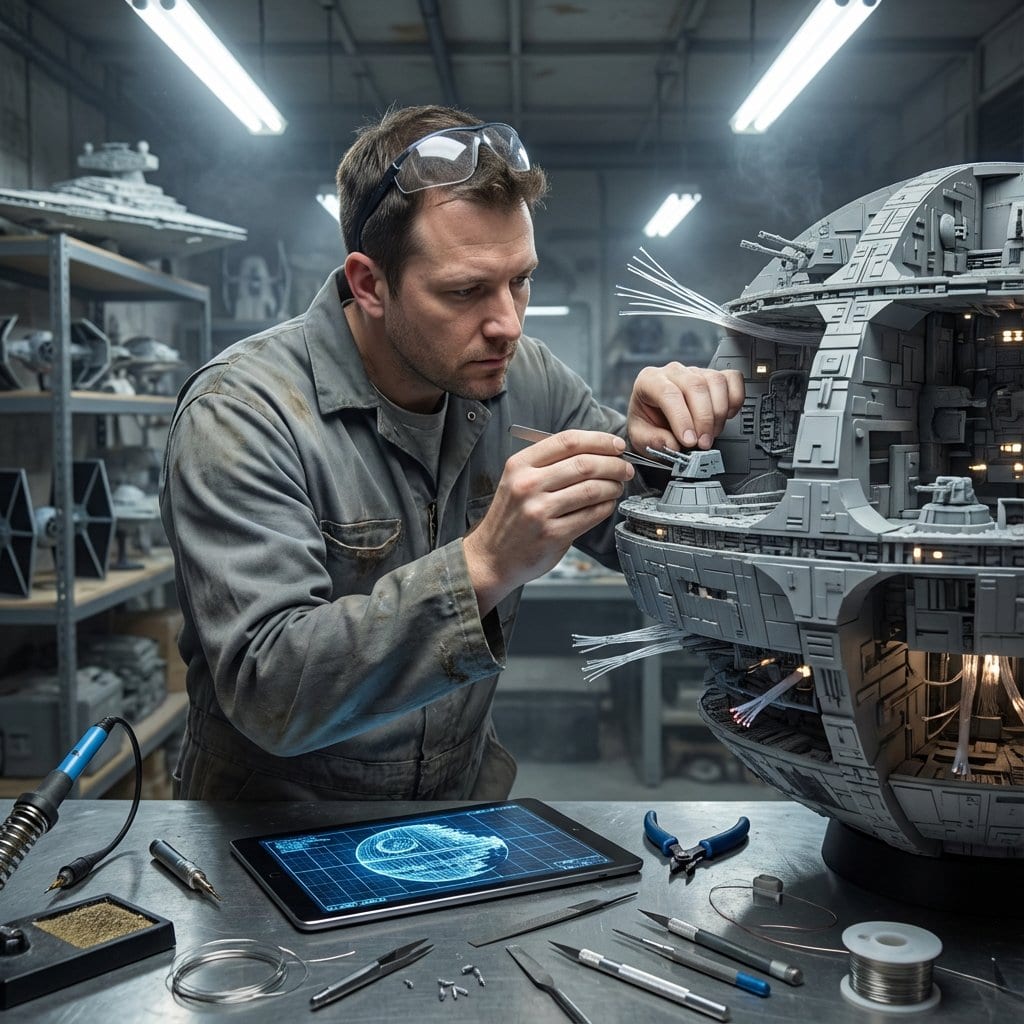
A complex, conditional prompt template designed to generate a hyper-realistic image of a Master Model Maker putting the final touches on a scale replica of an input structure (e.g., Eiffel Tower). The prompt uses IF/THEN logic based on the structure type

Example Prompt
Do this for {argument name="structure name" default="Eiffel Tower"}: Input Variable: [INSERT STRUCTURE] System Instruction: Act as a Cinematic Director. Create a hyper-realistic portrait of a Master Model Maker putting the final touches on a scale replica of the Input Structure. 1. Logic: Analyze the Input Structure to determine the Setting and the Character: IF Ancient/Fantasy (e.g., Colosseum, Castle): Room: A dusty, sunlit Renaissance Workshop (Stone & Wood). also showcasing "Previous Projects" (other models in the same genre). Character: An elderly Artisan in a leather apron. Materials: Plaster, Clay, Balsam Wood. IF Sci-Fi/Industrial (e.g., Death Star, spaceship): Room: A sterile, cold Industrial Design Lab (Concrete & Metal). also showcasing "Previous Projects" (other models in the same genre). Character: A younger Prop Master in a workshop jumpsuit or lab coat. Materials: Grey Resin (Kitbash), Styrene, Fiber Optics. IF Modern Architecture (e.g., Skyscraper): Room: A clean, white Architectural Firm (Glass & White Walls). also showcasing "Previous Projects" (other models in the same genre). Character: A minimalist Architect in a black turtleneck. Materials: White Foamcore, Acrylic, 3D Printed Plastic. 2. The Composition : The Subject: The Character is leaning over a massive, incredibly detailed Scale Model of the Input Structure. The Action: They are using Tweezers or a fine brush to place a specific "Micro-Detail" relevant to the lore. Death Star: Placing a tiny Turbo-Laser Turret. Colosseum: Dusting sand onto the arena floor. City: Gluing a tiny streetlamp. The Scale: Extreme scale contrast. The human hands look giant next to the tiny windows/bricks of the model. 3. The Environment : The Blueprint: On the table, beneath the tools, lies the correct reference document: Sci-Fi: Blue grid schematic or iPad. Fantasy: Yellowed parchment map. Modern: White vector floorplan. The Clutter: The tools scattered around must match the medium (e.g., Clay tools vs. Soldering Iron vs. X-Acto knives). 4. Lighting & Atmosphere: Lighting Match: The lighting must match the inferred room. Workshop: Warm God Rays (Dusty). Lab: Cool Fluorescent Tubes (Clean/Hazy). Focus: Shallow depth of field. Sharp focus on the tweezers and the contact point. Output: ONE image, 16:9 Aspect Ratio, Cinematic Photography, 8k Resolution.
Generate with AI
AI Model
Nano-banana-pro
Author

Frequently Asked Questions

Everything you need to know about realistic style prompts

How do I use this realistic style prompt?

Simply click the "Generate with AI" button above, and you'll be taken to our AI image generator with this Realistic Style prompt pre-filled. You can customize it further or generate images directly. Our AI will interpret the prompt and create stunning realistic visuals based on your description.

Can I modify this prompt for my specific needs?

Absolutely! Feel free to copy the prompt and customize it to match your vision. For realistic artwork, try adding details about style, lighting, composition, or mood. The more descriptive you are, the better the AI can understand your creative vision. Browse our realistic prompts to learn more techniques.

What AI models work best for realistic style?

This realistic prompt works with most modern AI image generators including Nano Banana, Flux, and GPT-Image. Different models excel at different aspects - Nano Banana is great for realistic styles, while Flux offers photorealistic results.

What makes a good realistic style prompt?

Great realistic prompts include: specific subject details, art style references, lighting conditions (soft light, dramatic shadows), color palette, mood/atmosphere, and technical specs (4K, detailed, HD). Study our example prompts to see effective patterns.

Is this prompt free to use?

Yes! All prompts in our library are completely free for personal and commercial use. Copy, modify, and create amazing realistic artwork without any restrictions.

More Prompts ➜
LINE sticker set from an attached character image - AI Image Prompt
LINE sticker set from an attached character image
A prompt to create a 12-piece LINE sticker set using an attached character, with varied expressions, poses, and on-theme, easy-to-use phrases.
by しろねこ
Diagram explaining pros and cons of D-course graduate study - AI Image Prompt
Diagram explaining pros and cons of D-course graduate study
A Japanese prompt to generate an image that diagrammatically explains the advantages and disadvantages of entering a doctoral course (D-course).
by Seitaro Shinagawa
Comic from single image - AI Image Prompt
Comic from single image
A prompt that turns one uploaded image into a multi-panel comic, ideal for narrative expansion and comic layout generation.
by Derya Unutmaz, MD
Selfie of multiple random female celebrities - AI Image Prompt
Selfie of multiple random female celebrities
A simple prompt that asks the model to generate a selfie containing ten random female celebrities, useful for stress-testing face generation and multi-subject composition (though may conflict with platform policies).
by ʟᴇɢɪᴛ
Nano Banana Pro-themed hero image (Chinese) - AI Image Prompt
Nano Banana Pro-themed hero image (Chinese)
A Chinese prompt asking for a Nano Banana Pro header image that matches Google Nano Banana brand style and design elements.
by 松果先森
Apple Style Website Design for Nike - AI Image Prompt
Apple Style Website Design for Nike
A prompt requesting a clean, Apple-style website design for Nike, focusing on powerful design elements and a specific aspect ratio.
by AZIZ | AI ??

Ready to Create Amazing Images?

Start generating stunning AI images with this prompt or explore our extensive prompt library for more inspiration.

Generate Now Browse All Prompts



