
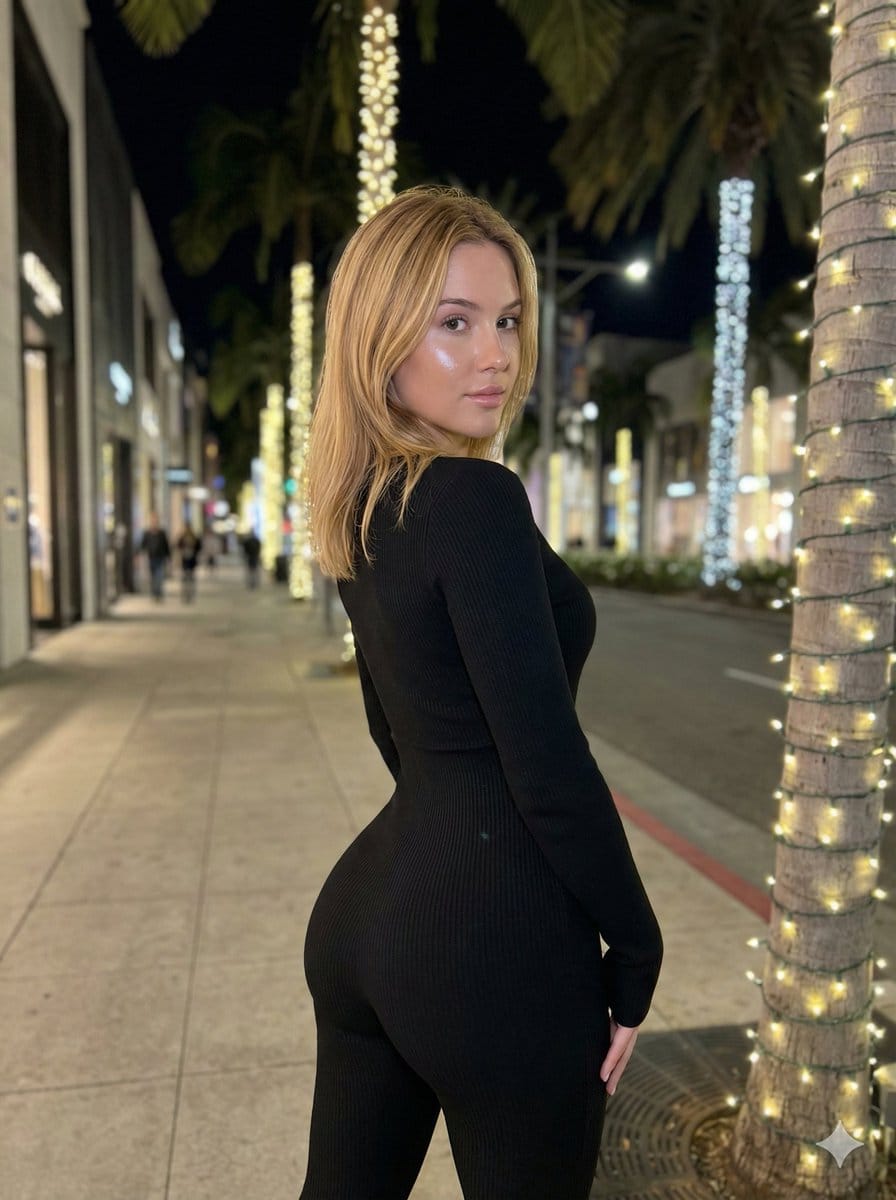
Hyper-Realistic Rear-Oblique Pose Replication Prompt

An extremely detailed, structured image generation prompt focused on replicating a specific, anatomically complex pose (extreme lordosis/anterior pelvic tilt) of a young woman in a black ribbed jumpsuit. It specifies morphology, apparel, precise pose geom

Example Prompt
{   "meta": {     "task": "exact_visual_replication",     "version": "v3_ultra_pose_lock",     "aspect_ratio": "3:4",     "strictness_level": "absolute_fidelity"   },   "subject_morphology": {     "demographics": "Young female",     "hair": {       "color": "Warm blonde",       "style": "Shoulder-length lob, straight with slight texture",       "behavior": "Falling naturally, slight gravity pull on ends, illuminated by artificial light"     },     "skin": {       "tone": "Fair/Pale",       "texture": "Natural smoothness with slight flash washout on face",       "lighting_reaction": "Reflective sheen on cheekbones and nose"     }   },   "apparel_and_textiles": {     "garment": "Full-body tight jumpsuit / unitard",     "color": "Deep black",     "material": "Ribbed knit fabric",     "fit": "Hyper-compressive, skin-tight, confirming exactly to anatomical curves",     "texture_visibility": "Vertical ribbing visible where light catches curvature (buttocks, waist, arm)"   },   "pose_geometry_and_physics": {     "overall_orientation": "Standing, rear-oblique angle (facing away from camera, twisted back)",     "spine_curvature": {       "lumbar": "Extreme lordosis (deep lower back arch)",       "thoracic": "Rotational twist to subject's left",       "cervical": "Head rotated approx 80 degrees left to look over shoulder"     },     "pelvic_state": {       "tilt": "Aggressive anterior pelvic tilt",       "rotation": "Square to the rear-diagonal axis",       "visual_dominance": "Gluteal region visually magnified by perspective and tilt"     },     "limb_placement": {       "left_arm": "Hanging straight down side, slight elbow flexion, hand relaxed near thigh",       "right_arm": "Obscured by torso rotation, shoulder drop visible",       "legs": "Standing straight, weight slightly biased to right leg, knees soft-locked"     },     "weight_distribution": "Gravity-centered on heels, posture actively held against gravity to maintain curve"   },   "camera_and_framing": {     "angle": "Eye-level relative to subject's torso",     "focal_length": "Medium-wide (smartphone camera aesthetic)",     "composition": {       "framing": "Subject centered horizontally, cropped at mid-thigh/knee",       "foreground": "Palm tree trunk with lights on immediate right edge",       "depth": "Deep perspective of street receding to left"     }   },   "lighting_and_atmosphere": {     "environment": "Urban luxury street at night (sidewalk)",     "primary_source": "Mixed artificial street lighting",     "key_light": "Frontal flash or bright signage illuminating face and hair (cool/neutral temp)",     "ambient_light": "Warm yellow glow from string lights wrapped around palm trees",     "shadows": "Soft drop shadows on ground, deep occlusion shadows in clothing folds",     "bokeh": "Distant street lights and storefronts slightly out of focus"   },   "environmental_details": {     "location": "Upscale shopping district sidewalk"   } }
Generate with AI
AI Model
Nano-banana-pro
Author

Frequently Asked Questions

Everything you need to know about realistic style prompts

How do I use this realistic style prompt?

Simply click the "Generate with AI" button above, and you'll be taken to our AI image generator with this Realistic Style prompt pre-filled. You can customize it further or generate images directly. Our AI will interpret the prompt and create stunning realistic visuals based on your description.

Can I modify this prompt for my specific needs?

Absolutely! Feel free to copy the prompt and customize it to match your vision. For realistic artwork, try adding details about style, lighting, composition, or mood. The more descriptive you are, the better the AI can understand your creative vision. Browse our realistic prompts to learn more techniques.

What AI models work best for realistic style?

This realistic prompt works with most modern AI image generators including Nano Banana, Flux, and GPT-Image. Different models excel at different aspects - Nano Banana is great for realistic styles, while Flux offers photorealistic results.

What makes a good realistic style prompt?

Great realistic prompts include: specific subject details, art style references, lighting conditions (soft light, dramatic shadows), color palette, mood/atmosphere, and technical specs (4K, detailed, HD). Study our example prompts to see effective patterns.

Is this prompt free to use?

Yes! All prompts in our library are completely free for personal and commercial use. Copy, modify, and create amazing realistic artwork without any restrictions.

More Prompts ➜
Opposite camera view of anime girl by the river - AI Image Prompt
Opposite camera view of anime girl by the river
A prompt for changing the camera angle to view an existing character from behind while maintaining pose and scene consistency.
by B.M. Cifer
Ultra-realistic photo from retro game interface - AI Image Prompt
Ultra-realistic photo from retro game interface
An English prompt instructing Nano Banana Pro to turn a retro game interface into an ultra-realistic 1990s-style family photo, removing UI and retelling the scene as if it happened in real life.
by Stas Kulesh
Holiday photos across a lifetime - AI Image Prompt
Holiday photos across a lifetime
Generates a series of holiday-style photos showing the same person aging up to 80 years old.
by Min Choi
Nano Banana Pro brand hero image (variant tweet) - AI Image Prompt
Nano Banana Pro brand hero image (variant tweet)
Another tweet repeating the same Nano Banana Pro header image prompt, aiming for consistency with Google’s brand design.
by 松果先森
Cyberpunk woman in neon frame - AI Image Prompt
Cyberpunk woman in neon frame
A structured JSON prompt of a lone woman in a foggy cyberpunk city street, silhouetted in a glowing red rectangular frame with teal and red lighting.
by K
Image Editing: Car and Background Transformation - AI Image Prompt
Image Editing: Car and Background Transformation
A simple editing prompt used to test the model's precise editing capabilities by instructing it to change the car in an existing image to a Tesla and replace the trees in the background with tall skyscrapers.
by Artificial Analysis

Ready to Create Amazing Images?

Start generating stunning AI images with this prompt or explore our extensive prompt library for more inspiration.

Generate Now Browse All Prompts



