
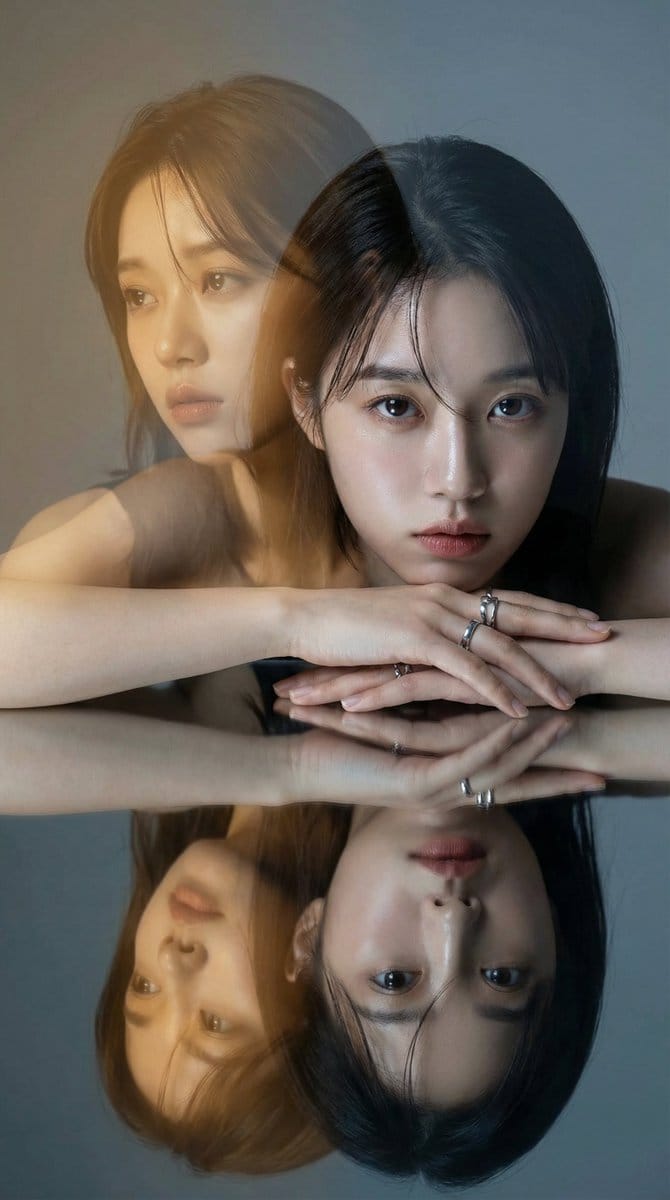
High-Fashion Double Exposure Portrait with Reflection

A complex, multi-step prompt for creating a high-fashion editorial double exposure portrait. It layers a sharp, cool-toned primary image (direct gaze) with a translucent, warm golden-amber secondary image (melancholic gaze) to create narrative contrast, a

Example Prompt
{ "version": "1.1", "description": "Create a high-fashion editorial double exposure portrait. The image should feature two distinct expressions creating a narrative contrast, bathed in a specific warm golden light flare against a cool background, with a mirrored reflection below.", "variables": { "PRIMARY_EXPRESSION": { "type": "string", "value": "Intense, direct, unyielding gaze into the camera", "description": "The grounded, sharp expression of the subject in the immediate foreground." }, "SECONDARY_EXPRESSION": { "type": "string", "value": "A distant, melancholic look towards the left, as if lost in a fading memory or dream", "description": "The narrative-driven, emotive expression for the translucent, overlaid image that suggests inner thought or past versus present." } }, "steps": [ { "name": "NARRATIVE_DOUBLE_EXPOSURE", "goal": "Layer two images to create an emotional story, using a specific color palette for contrast.", "instructions": "Use the subject from the input image to create a cinematic double exposure.\n\n1. **Primary Layer (The Present):** A sharp, high-definition portrait. The subject has the {argument name="primary expression" default="Intense, direct, unyielding gaze into the camera"}. The lighting is neutral to cool studio light, highlighting skin texture and silver accessories cleanly.\n2. **Secondary Layer (The Inner World/Memory):** A translucent overlay, slightly offset. The subject has the {argument name="secondary expression" default="A distant, melancholic look towards the left, as if lost in a fading memory or dream"}. This layer must be heavily influenced by a **Warm Golden-Amber Editorial Light Leak** (like the golden hour filter in image_1). This warm tone should wash over the face and hair, creating a dreamlike, almost sepia-toned contrast against the cooler primary layer." }, { "name": "MIRRORED_COMPOSITION", "goal": "Replicate the specific posing and reflective surface from the reference.", "instructions": "The subject is posed leaning forward with hands crossed over a highly polished, dark reflective surface. The primary layer (cool tones, direct gaze) must be perfectly mirrored below, adding symmetry and grounding the ethereal double exposure above." }, { "name": "EDITORIAL_ATMOSPHERE", "goal": "Finalize the lighting and mood to match a high-end magazine aesthetic.", "instructions": "The background should be a smooth, muted cool grey/blue gradient studio wall, providing a clean backdrop that makes the warm golden flare pop. The overall feel should be moody, cinematic, and luxurious, capturing a frozen moment of introspection." } ], "final_goal": "Produce a single, high-fashion photographic still using double exposure. It must feature the subject with a sharp, direct gaze contrasted with a translucent, story-filled golden-amber memory overlay, all reflected in a polished surface beneath." }
Generate with AI
AI Model
Nano-banana-pro
Author

Frequently Asked Questions

Everything you need to know about character style prompts

How do I use this character style prompt?

Simply click the "Generate with AI" button above, and you'll be taken to our AI image generator with this Character Style prompt pre-filled. You can customize it further or generate images directly. Our AI will interpret the prompt and create stunning character visuals based on your description.

Can I modify this prompt for my specific needs?

Absolutely! Feel free to copy the prompt and customize it to match your vision. For character artwork, try adding details about style, lighting, composition, or mood. The more descriptive you are, the better the AI can understand your creative vision. Browse our character prompts to learn more techniques.

What AI models work best for character style?

This character prompt works with most modern AI image generators including Nano Banana, Flux, and GPT-Image. Different models excel at different aspects - Nano Banana is great for character styles, while Flux offers photorealistic results.

What makes a good character style prompt?

Great character prompts include: specific subject details, art style references, lighting conditions (soft light, dramatic shadows), color palette, mood/atmosphere, and technical specs (4K, detailed, HD). Study our example prompts to see effective patterns.

Is this prompt free to use?

Yes! All prompts in our library are completely free for personal and commercial use. Copy, modify, and create amazing character artwork without any restrictions.

More Prompts ➜
Hyper faithful image remaster - AI Image Prompt
Hyper faithful image remaster
A short instruction prompt to remaster a blurry image with maximum fidelity to the original.
by Follow4vibess
Magazine-style photo containing given article text - AI Image Prompt
Magazine-style photo containing given article text
A prompt to embed a given block of text into a stylish magazine-article photograph with rich layout, images, quotes and bold formatting.
by AI焦点
Japanese infographic in Kasumigaura PowerPoint style - AI Image Prompt
Japanese infographic in Kasumigaura PowerPoint style
Prompt to generate an image containing all information written in Japanese, styled like a Kasumigaura PowerPoint slide.
by FabyΔ
1980s US import TV anime style - AI Image Prompt
1980s US import TV anime style
A minimal prompt specifying 80s US-imported TV anime style, suited for retro animated show imagery.
by Hagbard Celine
Fortnite Screenshot of Trump Skin Selector Menu - AI Image Prompt
Fortnite Screenshot of Trump Skin Selector Menu
A straightforward prompt requesting an image that looks like a Fortnite screenshot, specifically showing the skin selector menu with Donald Trump selected as a playable skin.
by DaWe
Image Editing: Car and Background Transformation - AI Image Prompt
Image Editing: Car and Background Transformation
A simple editing prompt used to test the model's precise editing capabilities by instructing it to change the car in an existing image to a Tesla and replace the trees in the background with tall skyscrapers.
by Artificial Analysis

Ready to Create Amazing Images?

Start generating stunning AI images with this prompt or explore our extensive prompt library for more inspiration.

Generate Now Browse All Prompts



