
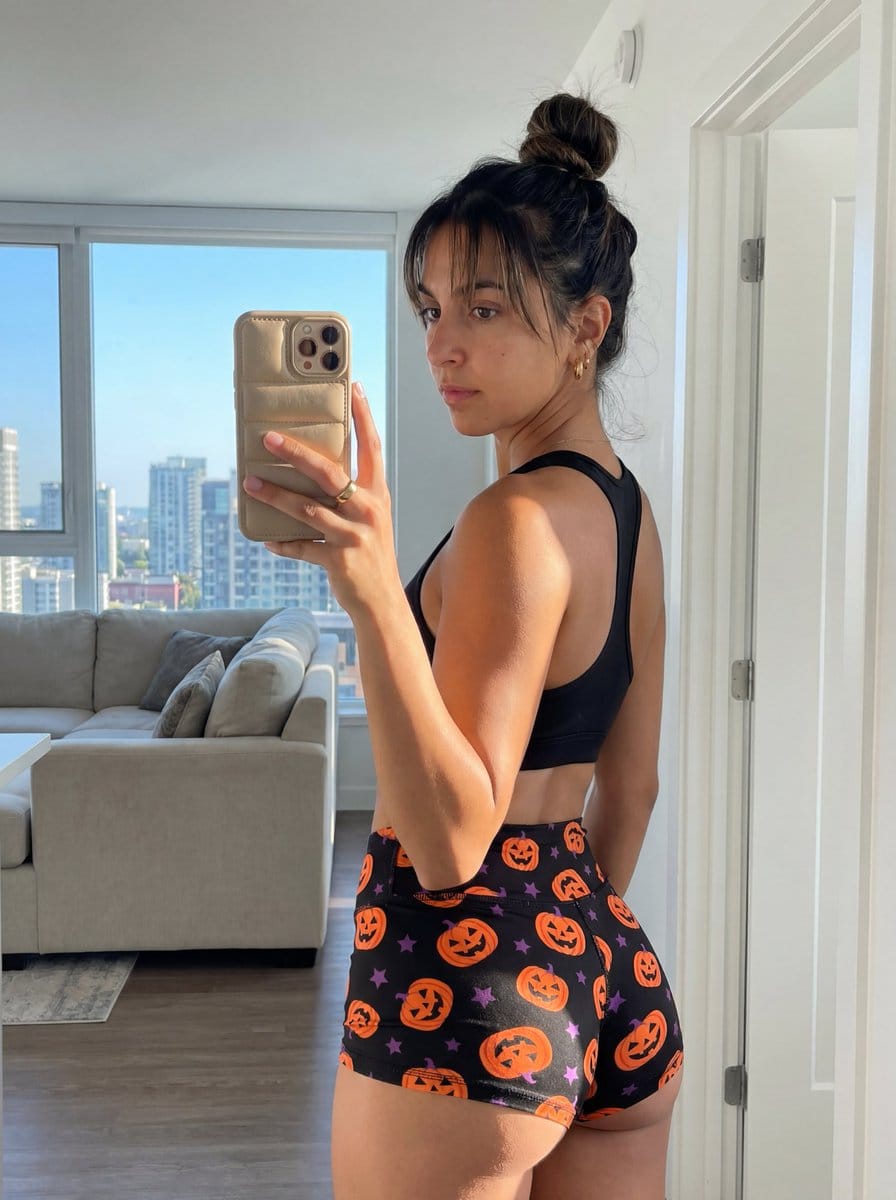
Halloween Gym Mirror Selfie Prompt

A highly detailed JSON prompt for Gemini Nano Banana Pro to generate an ultra-photorealistic mirror selfie, capturing a curvy woman in a Halloween-themed sports bra and shorts, emphasizing a raw smartphone photography aesthetic and realistic lighting from

Example Prompt
{ "subject": { "description": "Young woman with a fit, curvy physique taking a mirror selfie", "hair": "Dark brown hair styled in a messy, high bun with loose strands and wispy bangs framing the face", "clothing": "Black racerback sports bra, tight black booty shorts with a Halloween pattern featuring orange jack-o'-lantern pumpkins and small purple stars", "physique": "Athletic and voluptuous build, prominent glutes, slim waist, visible back musculature, tan skin tone", "accessories": "Gold ring on right hand, small earrings", "phone": "Gold or champagne-colored iPhone with a textured, puffy 'puffer' style case held in the right hand" }, "pose": { "stance": "Standing with back towards the mirror, torso twisted slightly to the left", "head_orientation": "Head turned over the left shoulder, looking directly into the mirror/camera", "limbs": "Right arm raised holding the phone, left arm down by side, legs standing straight with weight slightly shifted", "focus": "Emphasis on the posterior view and profile curve" }, "environment": { "setting": "Modern apartment interior seen through a mirror reflection", "details": "Large floor-to-ceiling window on the left revealing a city skyline and blue sky, white door frame on the right, glimpse of a living area in the background with a couch and ceiling light", "surface": "Clean mirror surface reflecting the subject and room" }, "camera": { "shot_type": "Mirror selfie, medium shot capturing from knees to top of head", "perspective": "Reflection view, camera positioned at shoulder height", "focal_length": "26mm equivalent (smartphone main camera)", "depth_of_field": "Deep depth of field, background slightly softer but visible" }, "lighting": { "source": "Strong natural daylight entering from the large window on the left, mixed with soft indoor ambient lighting", "characteristics": "Directional side lighting creating highlights on the left arm, hair, and profile, casting soft shadows on the right side of the back and legs", "quality": "Realistic, high-contrast daylight balance" }, "mood_and_expression": { "emotion": "Confident, sultry, casual", "facial_expression": "Neutral to slight pout, focused gaze on the phone screen/mirror reflection", "atmosphere": "Casual lifestyle, influencer aesthetic, morning or afternoon vibe" }, "style_and_realism": { "aesthetic": "Raw smartphone photography, unpolished social media snapshot", "rendering": "Photorealistic, 8k resolution, texture-rich", "details": "Visible skin texture, natural fabric folds in clothing, realistic light falloff" }, "colors_and_tone": { "palette": "Natural skin tones (tan), deep blacks (clothing), bright oranges (pumpkins), cool whites and blues (background/window)", "contrast": "Medium-high contrast due to window light", "saturation": "Natural to slightly vibrant" }, "quality_and_technical_details": { "resolution": "Best quality, ultra-detailed", "sharpness": "Sharp focus on the subject, no motion blur", "noise": "Subtl
Generate with AI
AI Model
Nano-banana-pro
Author

Frequently Asked Questions

Everything you need to know about realistic style prompts

How do I use this realistic style prompt?

Simply click the "Generate with AI" button above, and you'll be taken to our AI image generator with this Realistic Style prompt pre-filled. You can customize it further or generate images directly. Our AI will interpret the prompt and create stunning realistic visuals based on your description.

Can I modify this prompt for my specific needs?

Absolutely! Feel free to copy the prompt and customize it to match your vision. For realistic artwork, try adding details about style, lighting, composition, or mood. The more descriptive you are, the better the AI can understand your creative vision. Browse our realistic prompts to learn more techniques.

What AI models work best for realistic style?

This realistic prompt works with most modern AI image generators including Nano Banana, Flux, and GPT-Image. Different models excel at different aspects - Nano Banana is great for realistic styles, while Flux offers photorealistic results.

What makes a good realistic style prompt?

Great realistic prompts include: specific subject details, art style references, lighting conditions (soft light, dramatic shadows), color palette, mood/atmosphere, and technical specs (4K, detailed, HD). Study our example prompts to see effective patterns.

Is this prompt free to use?

Yes! All prompts in our library are completely free for personal and commercial use. Copy, modify, and create amazing realistic artwork without any restrictions.

More Prompts ➜
Essay-style manga about a family trip to Universal Studios - AI Image Prompt
Essay-style manga about a family trip to Universal Studios
A prompt that turns a personal anecdote into an essay-style manga where a family plans a trip to Universal Studios and is surprised by the ticket pricing for their child.
by みちぽ|Xの先生
4-panel manga about Gemini generating Japanese text images - AI Image Prompt
4-panel manga about Gemini generating Japanese text images
A prompt to create a 4-panel manga using an attached character who learns via smartphone that Gemini can generate images containing Japanese text and tries it out.
by Google Japan
Elon Musk bank statement mockup - AI Image Prompt
Elon Musk bank statement mockup
A Chinese prompt to generate a realistic-looking Elon Musk bank account statement with full detailed information, useful for testing document realism (not for fraud).
by -Zho-
Four-panel satirical manga about generative AI - AI Image Prompt
Four-panel satirical manga about generative AI
A Japanese prompt that instructs the model to create a four-panel comic image satirizing generative AI itself.
by 石川陽太 Yota Ishikawa
Image-to-Image Transformation Test - AI Image Prompt
Image-to-Image Transformation Test
A prompt used to test GPT Image 1.5's capabilities in portrait retention, instruction following, and feature migration, likely involving an uploaded image for transformation.
by -Zho-
3x3 Grid Scene Generation with Numbering - AI Image Prompt
3x3 Grid Scene Generation with Numbering
A prompt designed to test the model's ability to generate a 3x3 grid of images, all depicting the same scene but from 9 different angles, and crucially, requiring the model to place the cell number in the bottom left corner of each scene.
by AZIZ | AI ??

Ready to Create Amazing Images?

Start generating stunning AI images with this prompt or explore our extensive prompt library for more inspiration.

Generate Now Browse All Prompts



