
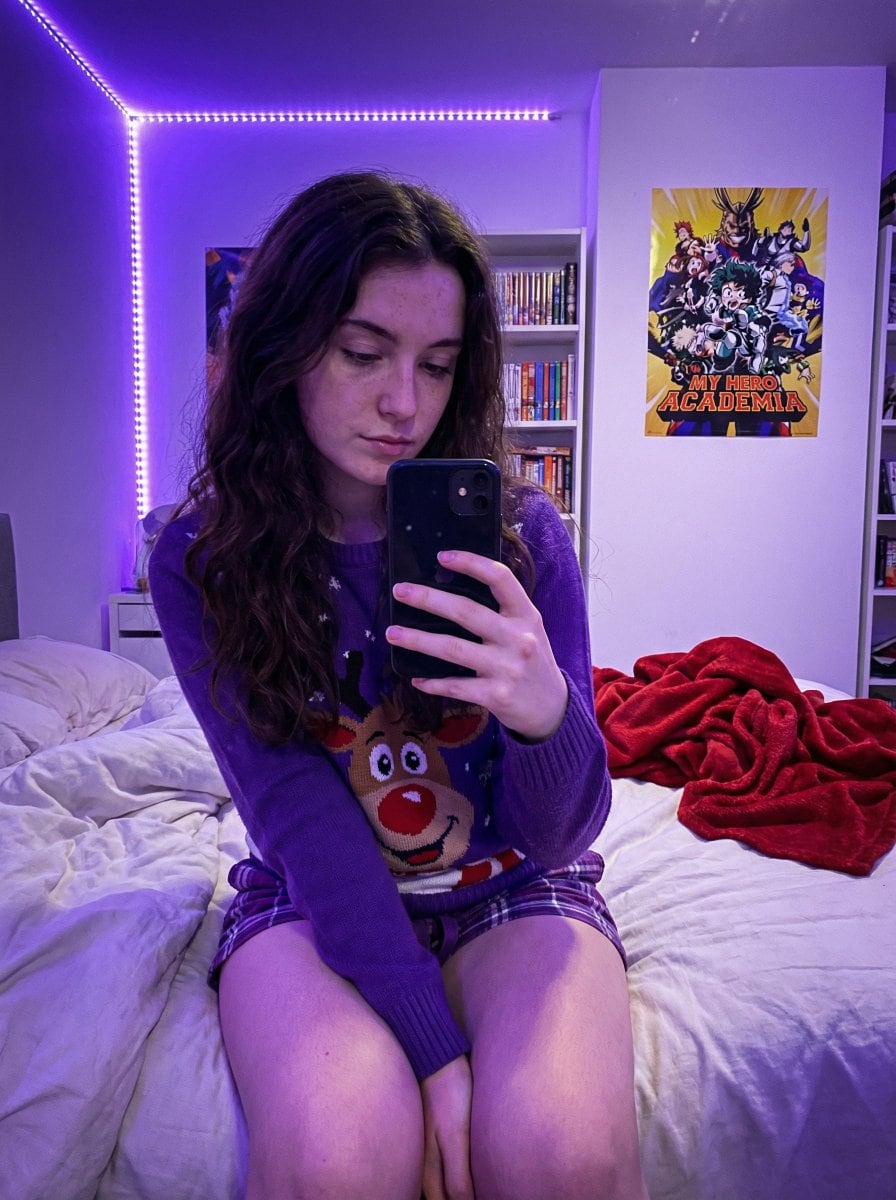
Gen Z Bedroom Selfie Prompt (Purple LED Light)

A highly detailed JSON prompt for generating an ultra-photorealistic image simulating a casual smartphone selfie taken in a Gen Z bedroom. It specifies a subject wearing a holiday sweater and pajama shorts, sitting on an unmade bed, with the scene dominat

Example Prompt
{ "prompt_structure": { "subject_details": { "demographics": "Young female, fair skin tone, natural appearance with distinct freckles across nose and cheeks", "facial_features": "Soft facial structure, neutral to soft expression, gaze directed down at phone", "hair": "Long, dark brown, loose wavy texture, center part, draping over shoulders", "clothing": { "top": "Purple crewneck holiday sweater featuring a large cartoon reindeer face", "bottom": "Purple plaid pajama shorts (only small section visible at upper thigh)" }, "pose": "Sitting upright on a bed, body angled slightly to viewer's left. Both legs are bent sharply at the knees and drawn up tightly against the torso. The shins are prominent, and feet are tucked near the buttocks. Right hand holds a smartphone with a black case up in front of the body to take a selfie." }, "environment_context": { "setting": "Gen Z bedroom / dorm room context", "background_elements": [ "White floating shelves packed with diverse colorful books", "Anime posters on white walls (My Hero Academia clearly visible)", "LED strip lights running vertically along the wall corner", "Messy unmade bed with white textured duvet or blanket", "Crumpled red fleece throw blanket in background on bed" ] }, "lighting_atmosphere": { "primary_source": "Dominant Purple/Violet LED ambient lighting originating from corner strip", "quality": "Dim, soft, moody, atmospheric, strong colored purple cast on skin, clothing, and surroundings", "shadows": "Soft, diffused shadows created by the ambient colored light" }, "camera_technical": { "style": "Casual Smartphone Selfie, Candid shot", "simulation": "Smartphone Main Sensor Simulation", "angle": "Slightly low angle, looking slightly up at the subject", "focal_length": "Approx 24-28mm wide angle (phone lens equivalent)", "aperture": "f/1.7 wide open", "iso": "High ISO (approx 800-1600) resulting in visible fine digital noise/grain", "focus": "Sharp focus on subject's face and knees, slight depth of field blur on background bookshelf" }, "quality_modifiers": { "engine": "Nano Banana Pro", "details": "Ultra Photorealistic, 8k resolution, raw photo style, realistic skin texture with highly visible pores and freckles underneath purple light, tangible fabric texture details on sweater and blanket, a" } } }
Generate with AI
AI Model
Nano-banana-pro

Frequently Asked Questions

Everything you need to know about realistic style prompts

How do I use this realistic style prompt?

Simply click the "Generate with AI" button above, and you'll be taken to our AI image generator with this Realistic Style prompt pre-filled. You can customize it further or generate images directly. Our AI will interpret the prompt and create stunning realistic visuals based on your description.

Can I modify this prompt for my specific needs?

Absolutely! Feel free to copy the prompt and customize it to match your vision. For realistic artwork, try adding details about style, lighting, composition, or mood. The more descriptive you are, the better the AI can understand your creative vision. Browse our realistic prompts to learn more techniques.

What AI models work best for realistic style?

This realistic prompt works with most modern AI image generators including Nano Banana, Flux, and GPT-Image. Different models excel at different aspects - Nano Banana is great for realistic styles, while Flux offers photorealistic results.

What makes a good realistic style prompt?

Great realistic prompts include: specific subject details, art style references, lighting conditions (soft light, dramatic shadows), color palette, mood/atmosphere, and technical specs (4K, detailed, HD). Study our example prompts to see effective patterns.

Is this prompt free to use?

Yes! All prompts in our library are completely free for personal and commercial use. Copy, modify, and create amazing realistic artwork without any restrictions.

More Prompts ➜
Annotated decoding of a cryptic Santa notice - AI Image Prompt
Annotated decoding of a cryptic Santa notice
A Korean prompt asking the model to interpret a cryptic notice that a Korean person can understand and overlay annotations and keywords directly onto the original image.
by lucas
Ink painting style Abé-chan with a sword - AI Image Prompt
Ink painting style Abé-chan with a sword
A brief prompt to draw a character named Abe-chan in a sumi-e (ink painting) style, holding a sword from the side view.
by ウィズダフネ初老”ジフレド”
UI redesign and optimization commands - AI Image Prompt
UI redesign and optimization commands
A set of natural-language prompts for redesigning and optimizing existing UI screens, focusing on audience, conversion, and usability goals.
by Stitch by Google
Einstein teaching at MIT with Hindi joke text - AI Image Prompt
Einstein teaching at MIT with Hindi joke text
A detailed prompt for a realistic classroom scene of Einstein at an MIT chalkboard, with a playful Devanagari sentence written clearly on the board.
by neural nets.
Sharpen blurred lifestyle photo - AI Image Prompt
Sharpen blurred lifestyle photo
Transforms a blurry photo into an ultra-sharp, realistic lifestyle image without changing the overall composition or objects.
by Halim Alrasihi
Modern anime-film style, only modify left girl - AI Image Prompt
Modern anime-film style, only modify left girl
A concise prompt to transform only the left girl in an image into a modern anime movie art style, keeping the rest of the image unchanged.
by 低空飞行

Ready to Create Amazing Images?

Start generating stunning AI images with this prompt or explore our extensive prompt library for more inspiration.

Generate Now Browse All Prompts



