
Christmas Flash Photo in Times Square with Motion Blur - AI Generated Realistic Style Image
Generate Similar Image

This prompt is optimized for Nano-banana-pro model

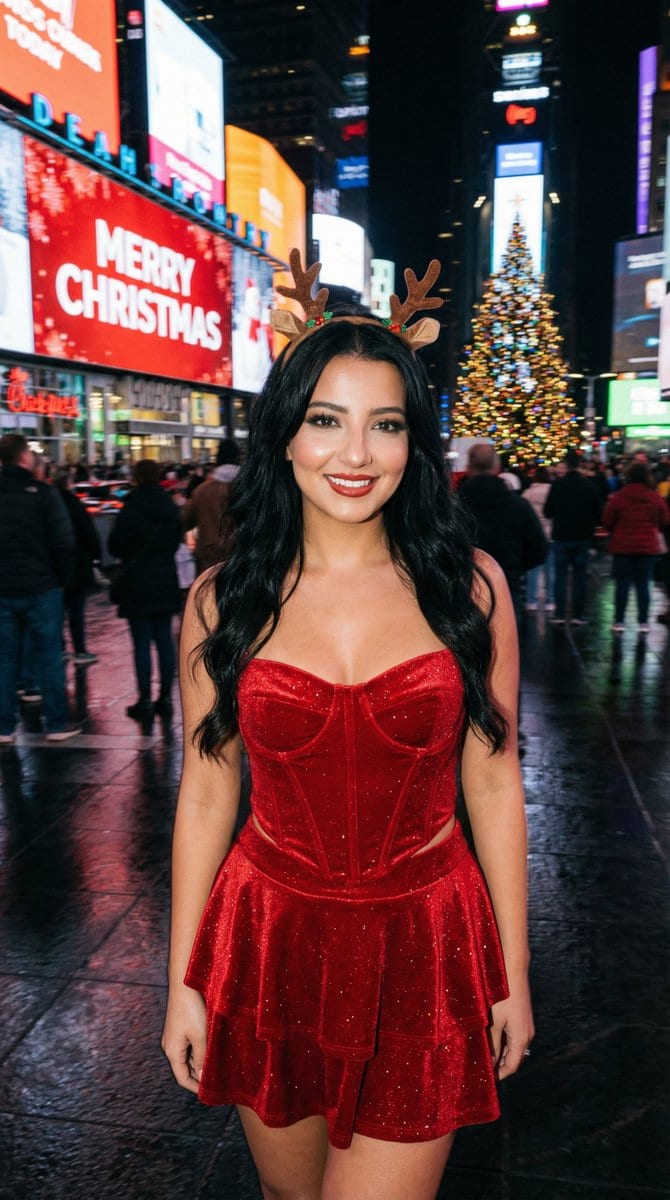
Christmas Flash Photo in Times Square with Motion Blur

A highly structured prompt for generating a photorealistic, candid flash photograph taken at night in Times Square during Christmas. It specifies the subject's appearance (black wavy hair, red velvet outfit, soft smoky glam makeup) and uses heavy cinemati

Example Prompt
{ "aspect_ratio": "3:4", "style_and_setting": "A candid on-camera flash photograph taken at night in New York City's Times Square during the Christmas season. Real smartphone/compact-camera flash vibe, high realism, natural grain, authentic nightlife atmosphere.", "subject_appearance": "The central subject is a young woman with long wavy BLACK hair (glossy, healthy volume). She wears a sparkling red velvet corset top with a pointed hem, a matching tiered mini skirt, and a small stylish reindeer antler headband.", "pose_and_expression": "She holds a natural, fun pose with a warm, closed-mouth smile, looking directly into the camera. Confident, attractive, model-like presence while staying photoreal (no uncanny beauty filter).", "makeup": { "style": "SOFT SMOKY GLAM (NOT heavy)", "eyes": "soft charcoal-brown smoky eyeshadow with a gentle gradient, lightly blended (not blown out too far), subtle shimmer optional", "liner": "thin-to-medium black eyeliner with a small refined wing, tightlined upper lash line", "lashes": "defined lashes with mascara (optional light wispy falsies, not dramatic)", "brows": "natural-clean shaping, softly defined", "skin": "flash-friendly glow with real texture (no plastic smoothing), subtle highlight on cheekbones", "lips": "warm red lips (satin to soft gloss), clean edges but not overdrawn" }, "background_elements": "The background features giant LED screens and holiday signage. One prominent screen displays bright 'MERRY CHRISTMAS' text against a red background. Other surrounding screens display Christmas themes heavily weighted with red, blue, and green colors. A large, brilliantly illuminated Christmas tree with ornaments is visible in the scene.", "lighting_and_atmosphere": "The overall atmosphere is darker with heavy cinematic motion blur in the background, turning LED screens, traffic, and crowds into streaking lines of color. The on-camera flash freezes the subject perfectly: face and outfit tack-sharp, clean flash catchlights in the eyes, soft flash highlights on skin. Wet pavement reflects the blurred streaks of light. Colors remains harmonious and believable.", "camera_notes": { "capture_style": "handheld candid flash photo", "focus": "subject perfectly sharp; background strongly motion-blurred", "grain": "natural low-light grain", "no_ai_look": "avoid overly clean studio look" }, "strict_rules": [ "Photoreal flash realism", "Hair must be BLACK and wavy", "Makeup must be SOFT smoky glam (NOT heavy)", "Subject sharp; background heavy motion blur", "No watermark, no extra text overlay beyond the existing Times Square screen content" ], "negative_prompt": [ "watermark", "logo", "extra overlay text on the image", "cartoon", "anime", "cgi look", "plastic skin", "over-smoothed face", "beautify filter", "identity drift", "blond"
Generate with AI

Pro Tip:

This realistic style prompt has been tested and optimized for best results. You can modify it slightly to customize the output while keeping the core structure intact.

AI Model
Nano-banana-pro
Author
Category
Realistic Style

Frequently Asked Questions

Everything you need to know about realistic style prompts

How do I use this realistic style prompt?

Simply click the "Generate with AI" button above, and you'll be taken to our AI image generator with this Realistic Style prompt pre-filled. You can customize it further or generate images directly. Our AI will interpret the prompt and create stunning realistic visuals based on your description.

Can I modify this prompt for my specific needs?

Absolutely! Feel free to copy the prompt and customize it to match your vision. For realistic artwork, try adding details about style, lighting, composition, or mood. The more descriptive you are, the better the AI can understand your creative vision. Browse our realistic prompts to learn more techniques.

What AI models work best for realistic style?

This realistic prompt works with most modern AI image generators including Nano Banana, Flux, and GPT-Image. Different models excel at different aspects - Nano Banana is great for realistic styles, while Flux offers photorealistic results.

What makes a good realistic style prompt?

Great realistic prompts include: specific subject details, art style references, lighting conditions (soft light, dramatic shadows), color palette, mood/atmosphere, and technical specs (4K, detailed, HD). Study our example prompts to see effective patterns.

Is this prompt free to use?

Yes! All prompts in our library are completely free for personal and commercial use. Copy, modify, and create amazing realistic artwork without any restrictions.

Ready to Create Amazing Images?

Start generating stunning AI images with this prompt or explore our extensive prompt library for more inspiration.



