
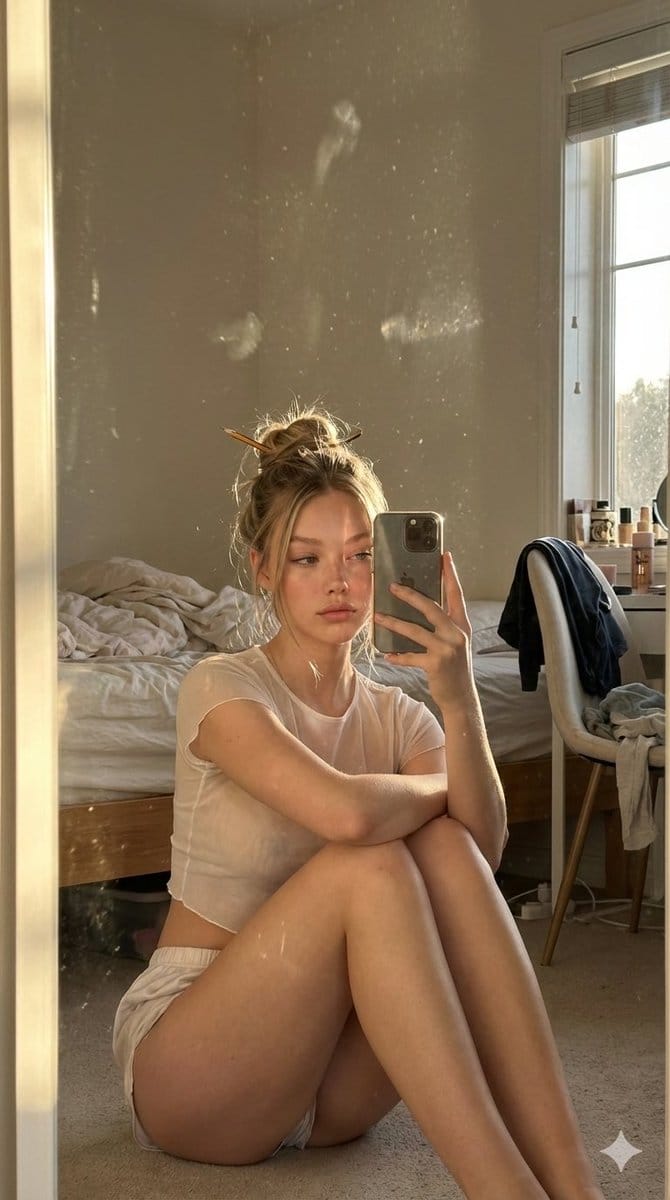
Candid Golden Hour iPhone Mirror Selfie in a Messy Bedroom

A detailed prompt for generating an ultra-photorealistic, intimate, and unposed mirror selfie taken by a Scandinavian woman in a slightly messy bedroom during golden hour. It focuses on realistic smartphone camera effects, subtle mirror smudges, and natur

Example Prompt
{   "scene": {     "description": "Ultra-photorealistic amateur iPhone mirror selfie taken during golden hour in a normal, slightly messy bedroom. The atmosphere feels intimate, spontaneous, and unposed.",     "environment": {       "location": "ordinary bedroom",       "elements": [         "tall vertical elegant mirror leaning against the wall",         "subtle hand smudges and faint fingerprints on the mirror surface, barely visible and only noticeable where sunlight hits",         "unmade bed with wrinkled sheets",         "chair with clothes casually draped over it",         "small nightstand with everyday personal items",         "soft clutter that feels lived-in and natural"       ],       "lighting": "warm golden hour sunlight entering from the side, casting soft highlights, long shadows, and gentle reflections on the mirror"     },     "photography": {       "camera_style": "amateur iPhone mirror selfie",       "angle": "slightly above seated eye level, captured through mirror reflection",       "shot_type": "intimate candid mirror selfie",       "aspect_ratio": "9:16 vertical",       "lens_feel": "natural smartphone lens with subtle perspective distortion",       "texture": "ultra-photorealistic skin texture, natural grain, soft highlights, faint fingerprints and light smudges visible on the mirror, no beauty filter"     }   },   "subject": {     "apperance": "Beatiful scandinavian woman in her early 20's"     },     "pose": {       "overall": "sitting on the floor directly in front of the mirror with knees pulled toward the chest",       "torso": "upper torso turned slightly more toward the mirror, creating a frontal reflection rather than a side profile",       "head": "head positioned close to the knees, naturally aligned with the torso",       "hands": "one hand holding the phone casually in front of the face, the other resting loosely near the legs",     },     "expression": {       "eyes": "eyes looking directly at the phone screen",       "face": "soft, tired eyes with a calm end-of-day expression",       "vibe": "quiet intimacy, spontaneous and unposed"     },     "hair": {       "style": "messy casual updo loosely held with a pencil",       "details": "a few stray strands falling naturally around the face",       "feel": "effortless, imperfect, realistic"     },     "clothing": {       "top": "sheer lightweight crop top with subtle transparency and soft fabric",       "bottom": "ultra-short fitted sleep shorts, thin stretchy fabric, minimal seams"     },     "body": {       "silhouette": "natural curvy proportions with a fuller bust",       "posture": "relaxed, slightly hunched forward in a comfortable seated position"     },       },   "style_constraints": {     "realism": "ultra-photorealistic",     "mood": "intimate, quiet, candid",     "avoid": [       "posed modeling look",       "studio lighting",       "glamour photography",       "overly polis"     ] }
Generate with AI
AI Model
Nano-banana-pro
Author

Frequently Asked Questions

Everything you need to know about realistic style prompts

How do I use this realistic style prompt?

Simply click the "Generate with AI" button above, and you'll be taken to our AI image generator with this Realistic Style prompt pre-filled. You can customize it further or generate images directly. Our AI will interpret the prompt and create stunning realistic visuals based on your description.

Can I modify this prompt for my specific needs?

Absolutely! Feel free to copy the prompt and customize it to match your vision. For realistic artwork, try adding details about style, lighting, composition, or mood. The more descriptive you are, the better the AI can understand your creative vision. Browse our realistic prompts to learn more techniques.

What AI models work best for realistic style?

This realistic prompt works with most modern AI image generators including Nano Banana, Flux, and GPT-Image. Different models excel at different aspects - Nano Banana is great for realistic styles, while Flux offers photorealistic results.

What makes a good realistic style prompt?

Great realistic prompts include: specific subject details, art style references, lighting conditions (soft light, dramatic shadows), color palette, mood/atmosphere, and technical specs (4K, detailed, HD). Study our example prompts to see effective patterns.

Is this prompt free to use?

Yes! All prompts in our library are completely free for personal and commercial use. Copy, modify, and create amazing realistic artwork without any restrictions.

More Prompts ➜
Infographic about a CEO struggling with hiring - AI Image Prompt
Infographic about a CEO struggling with hiring
A Japanese prompt for creating an infographic visualizing the situation of a company president who is having trouble with recruitment.
by 濱崎賢太郎|AI×採用で人手不足ゼロに
Cutaway infographic of a 5th generation stealth fighter jet - AI Image Prompt
Cutaway infographic of a 5th generation stealth fighter jet
A high-detail prompt for generating a 3D cutaway technical infographic of a modern 5th-gen stealth fighter, showing internal systems in DK encyclopedia style.
by block0
50 artifacts from different eras and cultures - AI Image Prompt
50 artifacts from different eras and cultures
A casual Japanese prompt that asks the model to place 50 completely different artifacts from various eras and cultures into a single image.
by くまがあゆむ
Bilingual diagram from a research paper - AI Image Prompt
Bilingual diagram from a research paper
A prompt that instructs the model to read a linked paper carefully and then draw a professional bilingual diagram summarizing it, useful for academic visualizations.
by -Zho-
Outfit combinations using Sergey Brin as model - AI Image Prompt
Outfit combinations using Sergey Brin as model
A follow-up prompt requesting the AI to mix and match the previously generated clothing items into outfits, using Sergey Brin as the model.
by Robert Riachi
Chibi-Style Character Transformation - AI Image Prompt
Chibi-Style Character Transformation
A prompt for transforming subjects (people, objects, animals, or scenes) into adorable chibi-style characters. It specifies features like oversized heads, tiny bodies, large sparkling eyes, soft rounded features, pastel shading, and preserving recognizabl
by ChatGPT

Ready to Create Amazing Images?

Start generating stunning AI images with this prompt or explore our extensive prompt library for more inspiration.

Generate Now Browse All Prompts



